
Introduction
The BioLite Dash 450 is a high-performance, rechargeable headlamp designed for runners, offering a no-bounce, no-slip fit and powerful illumination. Its lightweight design and advanced features ensure comfort and visibility during any activity.

Image: The BioLite Dash 450 headlamp in Midnight Grey, worn by a runner, showcasing its low-profile design and bright front light.
Key Features
- 450 Lumens Brightness: Powerful beam with a 90-meter range for focused illumination.
- 3D SlimFit Construction: No-bounce, no-slip design for a comfortable, weightless feel.
- Rear Red Light & Reflective Band: Enhanced 360-degree visibility for safety in low-light conditions.
- USB-C Rechargeable: Convenient charging with a 2-hour charge time.
- Long Runtime: Up to 60 hours on low, 3 hours on high, plus a 1-hour reserve mode.
- IPX4 Water Resistance: Designed to withstand splashes and rain.
Setup
1. Initial Charge
Before first use, fully charge your BioLite Dash 450 headlamp. Locate the USB-C charging port on the rear light unit. Connect the provided USB-C cable to the headlamp and a power source (e.g., wall adapter, computer USB port). The battery indicator lights will show charging progress.

Image: Close-up of the rear unit of the BioLite Dash 450 headlamp, showing the USB-C charging port and battery indicator lights.
2. Adjusting the Fit
The headlamp features an adjustable strap for a secure and comfortable fit. Adjust the elastic band using the buckles on either side of the rear unit until it feels snug but not too tight on your head. The 3D SlimFit construction is designed to minimize bounce during activity.

Image: A person wearing the BioLite Dash 450 headlamp, demonstrating its comfortable and lightweight design on the forehead.
Operating Instructions
1. Powering On/Off and Mode Selection (Front Light)
Press the main power button on the top of the front light unit to cycle through the various front light modes: White Spot, White Flood, Spot & Flood, Red Flood, and White Strobe. Hold the button for a few seconds to turn the light off from any mode.
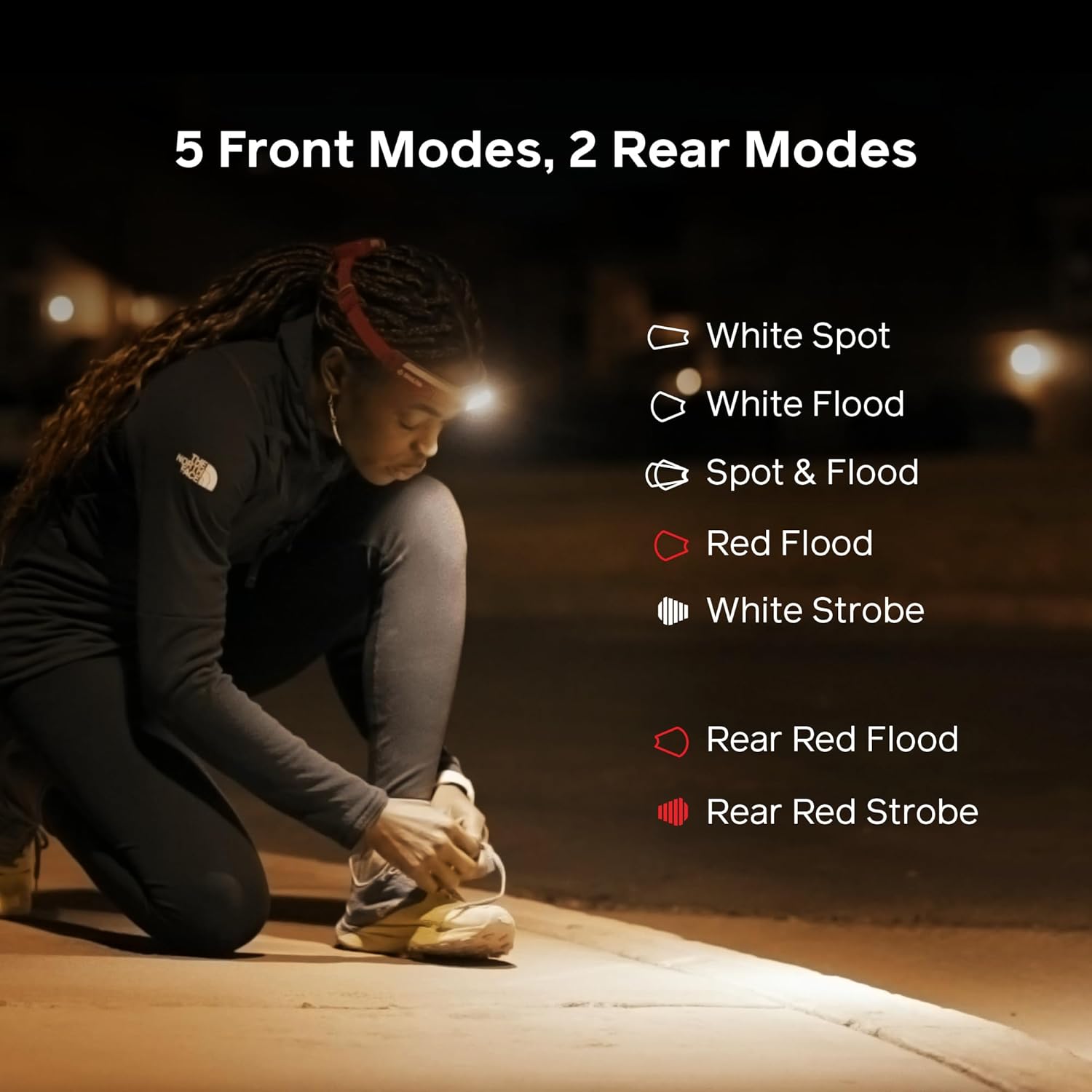
Image: Diagram illustrating the five front light modes available on the BioLite Dash 450 headlamp: White Spot, White Flood, Spot & Flood, Red Flood, and White Strobe.
2. Rear Red Light Operation
The rear red light provides additional visibility. Press the button on the rear unit to activate it. Cycle through Rear Red Flood and Rear Red Strobe modes. This feature is crucial for being seen by others from behind, especially during night runs or low-light conditions.
Image: A runner wearing the BioLite Dash 450 headlamp from behind, clearly showing the illuminated rear red light for enhanced visibility.
3. Adjusting Beam Angle
The front light unit can be tilted to adjust the beam angle, allowing you to direct light precisely where needed. Gently push the front light up or down to select your desired angle. This is useful for adapting to different terrains or activities.

Image: A close-up of the BioLite Dash 450 headlamp's front unit, demonstrating the ability to easily tilt the light for adjustable beam angling.
Maintenance
- Cleaning: Wipe the headlamp with a damp cloth to remove dirt and sweat. Do not use harsh chemicals or abrasive cleaners.
- Storage: Store the headlamp in a cool, dry place when not in use. Avoid prolonged exposure to direct sunlight or extreme temperatures.
- Battery Care: For optimal battery life, charge the headlamp regularly, even if not used frequently. Avoid fully depleting the battery for extended periods.
Troubleshooting
- Light Not Turning On: Ensure the battery is charged. Press and hold the power button for a few seconds to confirm activation.
- Dim Light Output: The battery may be low. Recharge the headlamp.
- Inconsistent Operation: Check for any debris or moisture around the buttons or charging port. Ensure the USB-C port cover is securely closed.
Specifications
| Feature | Detail |
|---|---|
| Brightness | 450 Lumens (White) |
| Beam Distance | 90 meters |
| Power Source | Rechargeable Lithium Ion Battery |
| Charging Time | 2 hours (via USB-C) |
| Runtime (Low) | Up to 60 hours |
| Runtime (High) | Up to 3 hours + 1-hour reserve |
| Water Resistance | IPX4 Rated |
| Weight | 78 grams (0.17 lbs) |
| Material | ABS, Polycarbonate |
| Model Number | HPA0411 |
Warranty and Support
The BioLite Dash 450 Headlamp is backed by a 3-year warranty. For detailed warranty information, product support, or service inquiries, please visit the official BioLite website or contact their customer service.
Official BioLite Store: BioLite Store on Amazon
Product Video
Video: An official product video from BioLite introducing the Dash 450 headlamp, highlighting its features and benefits for runners.