
VTech 80-580600
VTech Spidey and His Amazing Friends Spidey to The Rescue Driver
Instruction Manual
Product Overview
Meet the Spidey team from the hit MARVEL show Spidey and his Amazing Friends, and see what this 2-in-1 driver can do! Turn the hand grips and easily transform the vehicle between Spidey’s Web-Crawler and Spin’s Techno-Racer. Practice driving each vehicle while exploring the rules of the road. Learn about Spidey and his friends Spin, Ghost-Spider, Ms. Marvel and Hulk by pressing the WEB-Ster or character buttons. Team up with Spidey to play seven thrilling games and follow instructions to complete missions—like rescuing a puppy or stopping super-villains such as Doc Ock, Green Goblin, and Rhino. What a ride! Intended for ages 3+ years. Requires 2 AA batteries. Batteries included for demo purposes only. New batteries recommended for regular use.
- Web out and hop in this 2-in-1 driver that switches between Spidey’s Web-Crawler and Spin’s Techno-Racer.
- Turn the steering wheel and explore driving directions, turn signals and traffic lights.
- Hear super facts about Spidey, Spin, Ghost-Spider, Ms. Marvel, and Hulk with voices, phrases, and cool sound effects from the show.
- Complete simple missions or go up against super-villains like Doc Ock, Green Goblin and Rhino in seven action-packed games.
- Intended for ages 3+ years; requires 2 AA batteries; batteries included for demo purposes only; new batteries recommended for regular use.
- This pretend-play driver toy is great for preschoolers to explore problem-solving and cause-and-effect; makes an exciting unisex gift for holidays, birthdays or just because.
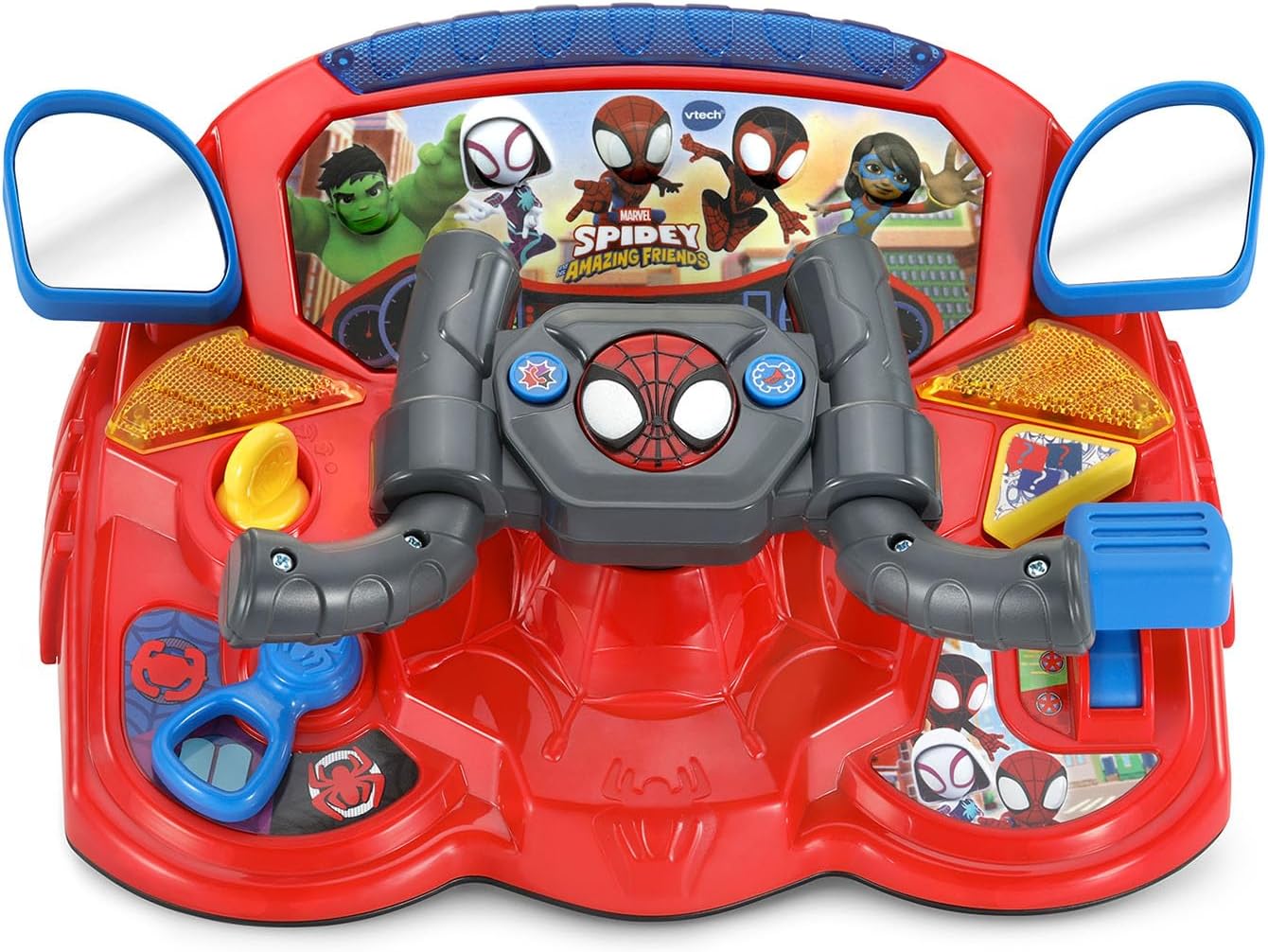
Figure 1: Spidey to The Rescue Driver in Web-Crawler mode.
Setup
Battery Installation
The Spidey to The Rescue Driver requires 2 AA batteries. Batteries are included for demonstration purposes only. For regular use, new alkaline batteries are recommended.
- Locate the battery compartment on the underside of the unit.
- Using a screwdriver, loosen the screw on the battery compartment cover.
- Remove the cover.
- Insert 2 new AA (LR6) batteries, ensuring correct polarity (+ and -).
- Replace the battery compartment cover and tighten the screw securely.
Important Battery Information:
- Non-rechargeable batteries are not to be recharged.
- Rechargeable batteries are to be removed from the toy before being charged.
- Rechargeable batteries are only to be charged under adult supervision.
- Do not mix old and new batteries.
- Do not mix different types of batteries (e.g., alkaline, standard carbon-zinc, or rechargeable nickel-cadmium).
- Only batteries of the same or equivalent type as recommended are to be used.
- Batteries are to be inserted with the correct polarity.
- Exhausted batteries are to be removed from the toy.
- The supply terminals are not to be short-circuited.

Figure 2: Back of the product packaging indicating battery requirements.
Operating Instructions
Power On/Off
Locate the On/Off switch, usually on the side or back of the unit. Slide the switch to the "On" position to activate the toy. To conserve battery life, slide the switch to "Off" when not in use. The toy also features an automatic shut-off function after a period of inactivity.
2-in-1 Transformation
The Spidey to The Rescue Driver can transform between two modes: Spidey's Web-Crawler and Spin's Techno-Racer. To transform, simply turn the hand grips on the steering wheel. The toy will announce the current mode.

Figure 3: Spidey's Web-Crawler mode.

Figure 4: Spin's Techno-Racer mode.
Controls and Features
- Steering Wheel: Turn the steering wheel to simulate driving and interact with games.
- WEB-Ster Button: Press this button to hear facts about Spidey and his friends.
- Character Buttons: Press buttons featuring Spidey, Spin, Ghost-Spider, Ms. Marvel, and Hulk to hear their voices and phrases.
- Speed Control: Adjust the speed for racing and braking sounds.
- Help Button: Press for hints or assistance during missions.
- Control Buttons: Use these buttons to honk the horn or call a Spidey team member.
- Turn Signals & Traffic Lights: Interact with these features to learn about road rules.
Play Modes and Games
The driver offers seven action-packed games and various play modes. Use the mode selector to choose between different activities. Follow the instructions provided by the toy to complete missions, rescue characters, and stop super-villains like Doc Ock, Green Goblin, and Rhino.

Figure 5: Child engaging with the Spidey Driver.

Figure 6: Child using the Spidey Driver at a table.
Maintenance
Cleaning Instructions
To keep your Spidey to The Rescue Driver in optimal condition:
- Wipe the toy with a slightly damp cloth.
- Do not use harsh chemicals or abrasive cleaners.
- Do not immerse the toy in water.
Storage
Store the toy in a cool, dry place away from direct sunlight and heat sources when not in use for extended periods. Remove batteries if the toy will not be used for a long time to prevent leakage.
Troubleshooting
| Problem | Solution |
|---|---|
| Toy does not turn on or respond. |
|
| Sound is distorted or too low. |
|
| Toy is not transforming correctly. |
|
Specifications
| Feature | Detail |
|---|---|
| Model Number | 80-580600 |
| Brand | VTech |
| Material Type | Plastic |
| Product Dimensions | 29.69 x 12.09 x 0.25 cm; 839.15 g |
| Item Weight | 1.85 Pounds |
| Batteries Required | 2 AA batteries (included for demo) |
| Recommended Age | 36 months - 6 years |
| Release Date | July 1 2025 |
Warranty and Support
VTech products are designed to provide years of educational fun. For detailed warranty information or technical support, please visit the official VTech website or contact their customer service department.
You can find more information and support at the VTech Store on Amazon.
Related documents80-580600


Ask a question about this manual
Ask about setup, troubleshooting, compatibility, parts, safety, or missing instructions. Manuals+ will review the question and use this page’s manual context to help answer it.