
Introduction
This manual provides detailed instructions for the installation, operation, and maintenance of your NESA NS-705NHB 2-DIN Multimedia System. This system features a 7-inch 1024x600 LCD touchscreen, Bluetooth 4.0, Android PhoneLink, DVD/CD/USB playback, GPS, and advanced audio controls. Please read this manual thoroughly before using the product to ensure proper operation and to prevent damage.
Safety Information
- Professional Installation Recommended: Due to the complexity of car audio and video systems, professional installation is highly recommended to avoid damage to the unit or your vehicle.
- Driving Safety: Do not operate the system's advanced features or watch videos while driving. Always prioritize road safety.
- Power Supply: Connect the unit only to a 12V DC power supply with a negative ground.
- Wiring: Ensure all wiring is correctly connected according to the wiring diagram to prevent short circuits or malfunctions.
- Temperature: Avoid exposing the unit to extreme temperatures or direct sunlight for prolonged periods.
Setup
Unpacking and Contents
Carefully unpack the unit and check that all accessories are present. The package should include:
- NESA NS-705NHB Car Monitor 2-Din DVD Player
- Wiring Harnesses
- GPS Antenna
- Mounting Brackets
- Remote Control
- Owner's Manual
- Registration Card

Figure 1: Included accessories for the NESA NS-705NHB unit.
Installation Guidelines
Before beginning installation, disconnect the vehicle's negative battery terminal to prevent electrical shorts. Ensure the mounting location is suitable for a 2-DIN unit. Refer to your vehicle's specific dashboard removal instructions if necessary.
Wiring Connections
Connect the wiring harness to the corresponding ports on the rear of the unit and to your vehicle's electrical system. Pay close attention to power, ground, speaker, and accessory wires. The unit includes RCA inputs/outputs for external devices and a dedicated input for a backup camera.

Figure 2: Rear panel connections of the NESA NS-705NHB.
Operating the Unit
Front Panel Controls and Display
The NS-705NHB features a 7-inch anti-glare resistive touchscreen and 7-color RGB LED illuminated keys for intuitive control. The display offers adjustable backlight settings for optimal visibility.
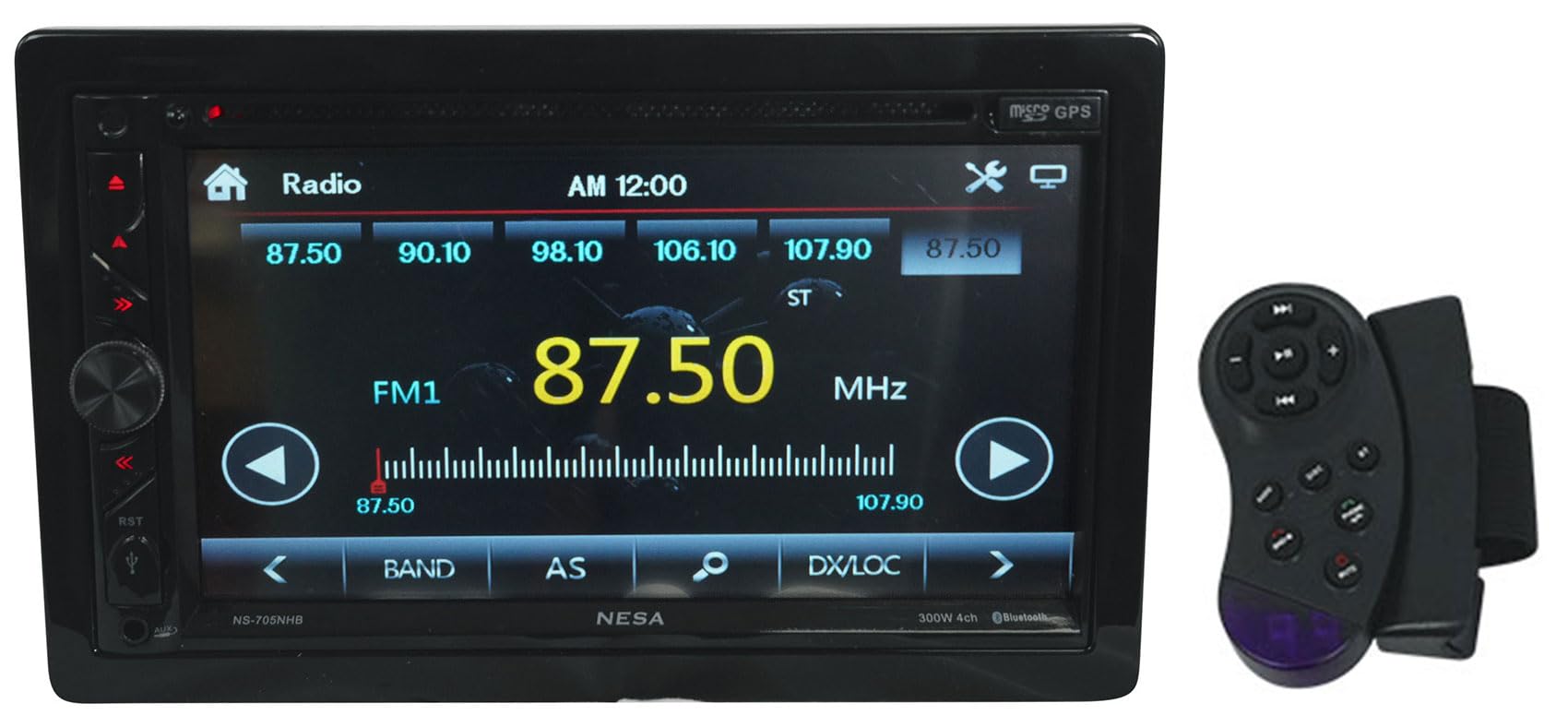
Figure 3: Front view of the NESA NS-705NHB unit.
Main Menu Overview
Upon powering on, the main menu provides access to various functions such as Radio, Disc, Phone Link, USB, GPS, and Bluetooth. Navigate through these options using the touchscreen.

Figure 4: Main menu interface of the NESA NS-705NHB.
Bluetooth 4.0 Connectivity
To pair your mobile device, access the Bluetooth menu. Search for available devices on your phone and select "NS-705NHB". Once paired, you can make hands-free calls and stream audio (A2DP) wirelessly.
Android PhoneLink Integration
Connect your Android device via USB to enable PhoneLink. This feature allows you to mirror and control your Android device's screen directly on the NS-705NHB's display, accessing apps and media.
Media Playback
- DVD/CD: Insert a disc into the slot. The unit supports DVD and CD playback.
- USB: Connect a USB drive (up to 64GB) to the USB port. The system supports 1080p MP4/WMV video and MP3/WMA audio playback with ID3 tag and album art display.
GPS Navigation
The integrated GPS functionality allows for navigation. Access the GPS menu to view maps and plan routes. Ensure the GPS antenna is properly installed for optimal signal reception.

Figure 5: GPS navigation interface on the NESA NS-705NHB.
Audio Settings
Utilize the built-in 10-band equalizer with preset EQs to customize your sound profile. The unit also features 6-channel preamp RCA outputs for connecting external amplifiers and a 300W Class A/B amplifier.
Camera and Steering Wheel Control Integration
The system supports integration with backup cameras for enhanced safety. It is also compatible with steering wheel remote controls, allowing you to manage basic functions without taking your hands off the wheel.
Maintenance
Cleaning the Unit
Use a soft, dry cloth to clean the display and exterior of the unit. For stubborn smudges on the screen, a slightly damp cloth with a mild, non-abrasive cleaner can be used, then wipe dry immediately. Avoid using harsh chemicals or abrasive materials.
Software Updates
Periodically check the manufacturer's website for any available software or firmware updates for your model. Follow the provided instructions carefully for any update procedures.
Troubleshooting
| Problem | Possible Cause | Solution |
|---|---|---|
| No power | Incorrect wiring; Blown fuse | Check power and ground connections; Replace fuse if necessary. |
| No sound | Speaker wires disconnected; Volume too low; Mute activated | Verify speaker connections; Adjust volume; Deactivate mute function. |
| Bluetooth not connecting | Device not in pairing mode; Unit not discoverable | Ensure both devices are in pairing mode; Restart Bluetooth on both devices. |
| GPS signal lost | GPS antenna obstructed or disconnected | Ensure clear line of sight for antenna; Check antenna connection. |
| Touchscreen unresponsive | System error; Screen calibration needed | Restart the unit; Refer to system settings for screen calibration. |
If problems persist after attempting these solutions, please contact customer support.
Specifications
| Feature | Detail |
|---|---|
| Model Number | NS-705NHB |
| Display Size | 7 Inches |
| Display Resolution | 1024x600 LCD |
| Display Type | Anti-glare Resistive Touchscreen |
| Connectivity Technology | Bluetooth 4.0, RCA, USB |
| Media Support | DVD, CD, USB (up to 64GB) |
| Video Playback | 1080p MP4/WMV |
| Audio Playback | MP3/WMA with ID3 tag and album art |
| Equalizer | 10-band with preset EQs |
| Preamp Outputs | 6-channel RCA |
| Amplifier | 300W Class A/B |
| Item Weight | 5 pounds |
| Product Dimensions | 9.5 x 9.5 x 7 inches |
Warranty Information
The NESA NS-705NHB unit comes with a 1-year manufacturer's warranty. This warranty covers defects in materials and workmanship under normal use. Please retain your proof of purchase for warranty claims. The warranty does not cover damage caused by improper installation, accident, misuse, abuse, negligence, or unauthorized modification.
Customer Support
For technical assistance, troubleshooting beyond this manual, or warranty inquiries, please contact NESA customer support. Refer to the contact information provided with your product packaging or visit the official NESA website for the most up-to-date support details.