
Introduction
This manual provides essential information for the safe and efficient operation, installation, and maintenance of your SANSUI Arctic Pro JSE183SI24B1 1.4 Ton 3 Star Inverter Split AC. Please read this manual thoroughly before using the appliance and retain it for future reference. The Sansui 1.4 Ton Split AC is designed to offer efficient cooling for spaces up to 140 sq. ft., utilizing inverter technology for energy-efficient performance and a 5-in-1 Convertible Mode for customized cooling.
Safety Information
Always adhere to the following safety precautions to prevent injury or damage to the unit.
- Professional Installation: Installation, relocation, and maintenance of the air conditioner must be performed by a qualified service technician. Improper installation can lead to electric shock, fire, or water leakage.
- Power Supply: Ensure the power supply voltage matches the rating label on the unit. Do not use extension cords or multi-outlet adapters.
- Grounding: The appliance must be properly grounded to prevent electric shock.
- Ventilation: Do not block the air inlet or outlet of the indoor or outdoor unit.
- Cleaning: Disconnect power before cleaning the unit. Use a soft, dry cloth for cleaning. Do not use water or chemical cleaners directly on the unit.
- Children and Pets: Keep children and pets away from the unit during operation and maintenance.
- Refrigerant: The unit contains R32 refrigerant. Do not attempt to repair or tamper with the refrigerant circuit.
Product Overview
The SANSUI Arctic Pro Inverter Split AC is designed for optimal cooling and energy efficiency. Below are its key features and a visual representation of the unit.
Key Features
- Capacity: 1.4 Ton, suitable for rooms up to 170 sqft.
- Energy Rating: 3 Star BEE Rating for energy efficiency.
- Condenser: 100% Copper Condenser for better cooling and durability.
- Filter: PM 2.5 Filter for improved air quality.
- Convertible Modes: 5-in-1 Convertible functionality to adjust cooling capacity.
- Refrigerant: Uses R32 refrigerant, which is environmentally friendly.
- Special Features: Self Diagnosis, Stabilizer-free operation.
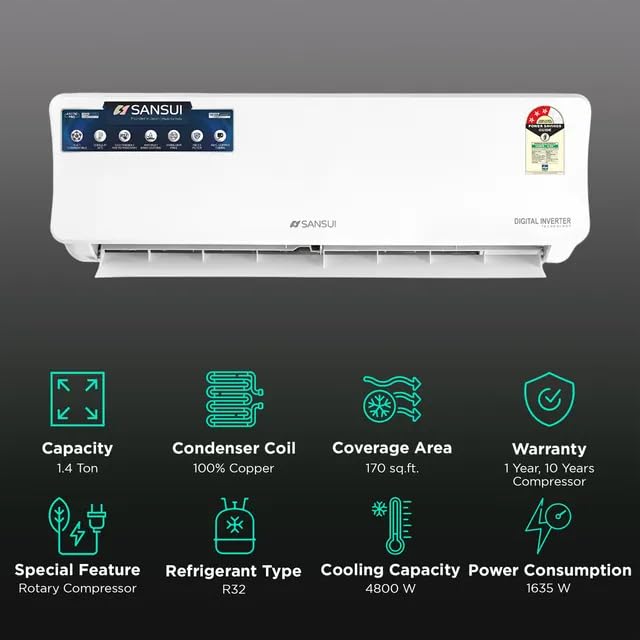
Figure 1: SANSUI Arctic Pro Indoor Unit with Key Features Overview. This image highlights the unit's capacity (1.4 Ton), 100% Copper Condenser, coverage area (170 sq.ft.), warranty (1 Year, 10 Years Compressor), special feature (Rotary Compressor), Refrigerant Type (R32), Cooling Capacity (4800 W), and Power Consumption (1635 W).
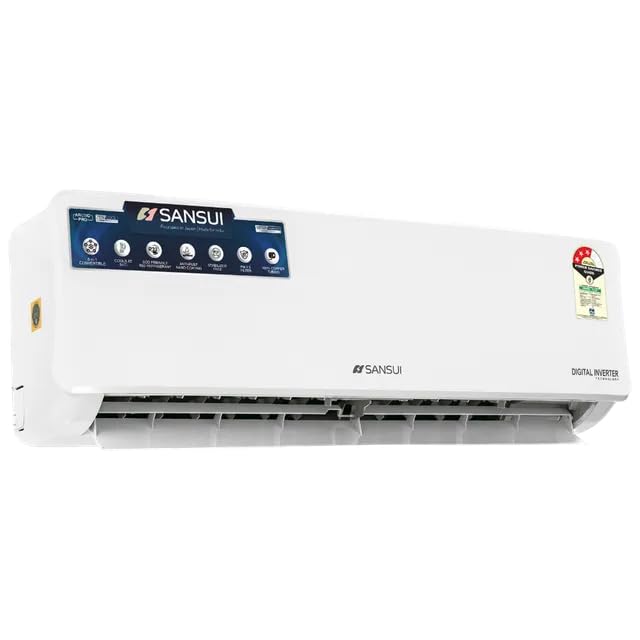
Figure 2: SANSUI Arctic Pro Indoor Unit Front View. A clear front view of the SANSUI Arctic Pro indoor unit, showing its sleek design and control panel area.
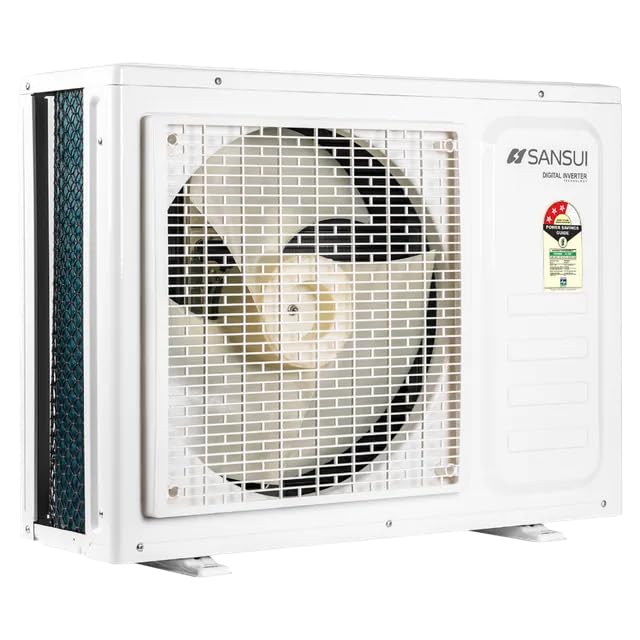
Figure 3: SANSUI Arctic Pro Outdoor Unit Front View. A clear front view of the SANSUI Arctic Pro outdoor unit, featuring the fan grille and overall compact design.
Setup and Installation
The SANSUI Arctic Pro is a split-system air conditioner requiring professional installation. The following information provides general guidance.
Unpacking
Carefully unpack the indoor and outdoor units, remote control, and accessories. Inspect all components for any signs of damage. If any damage is found, contact your dealer immediately.
Installation Considerations
- Location: Choose a location for the indoor unit that allows for even air distribution and is away from direct sunlight or heat sources. The outdoor unit should be placed in a well-ventilated area, away from obstacles.
- Drainage: Ensure proper drainage for condensate water from the indoor unit.
- Electrical Connection: The electrical wiring must comply with local regulations and be performed by a certified electrician.
- Dimensions: Consider the dimensions for proper placement and service access.
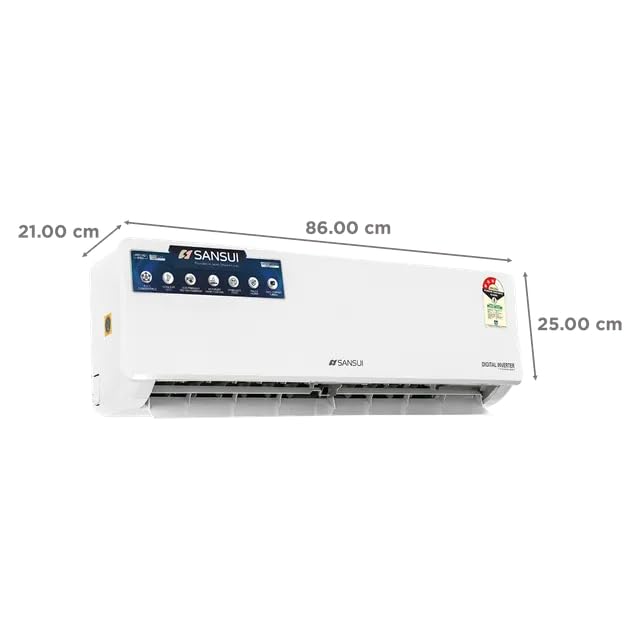
Figure 4: SANSUI Arctic Pro Indoor Unit Dimensions. This image illustrates the dimensions of the indoor unit: 21 cm (depth), 86 cm (width), and 25 cm (height).
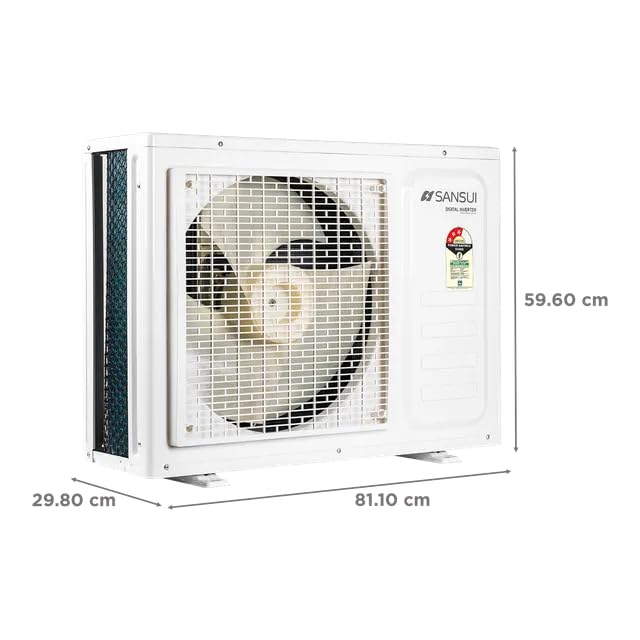
Figure 5: SANSUI Arctic Pro Outdoor Unit Dimensions. This image illustrates the dimensions of the outdoor unit: 29.80 cm (depth), 81.10 cm (width), and 59.60 cm (height).
Initial Power-Up
After professional installation, ensure all connections are secure. Turn on the main power supply to the AC unit. The unit will typically perform a self-diagnosis upon first power-up.
Operating Instructions
Your SANSUI Arctic Pro AC is controlled via a wireless remote control. Familiarize yourself with the remote's functions for optimal use.
Remote Control Overview
The remote control allows you to power the unit on/off, select operating modes, adjust temperature, set fan speed, and activate special functions. Point the remote control directly at the indoor unit's receiver window.
Operating Modes
The unit features 5-in-1 Convertible Modes, allowing flexibility in cooling capacity. Common modes include:
- Cool Mode: Provides cooling by lowering the room temperature to the set level.
- Fan Mode: Circulates air without cooling or heating.
- Dry Mode: Reduces humidity in the room.
- Auto Mode: The unit automatically selects the appropriate operating mode based on the room temperature.
- 5-in-1 Convertible Mode: This feature allows you to adjust the cooling capacity of the AC to suit your needs, potentially saving energy during milder conditions or providing maximum cooling when required. Refer to the remote control's specific button for activating and cycling through these modes.
Temperature Adjustment
Use the temperature up/down buttons on the remote to set your desired room temperature. The typical operating range is between 16°C and 30°C.
Timer Function
The timer function allows you to set the unit to turn on or off automatically after a specified period. Consult your remote control's specific instructions for setting the timer.
Maintenance
Regular maintenance ensures optimal performance and longevity of your air conditioner.
Filter Cleaning
The PM 2.5 filter and other air filters should be cleaned regularly, typically every two weeks or more frequently depending on usage and air quality. To clean:
- Turn off the AC and disconnect the power supply.
- Open the front panel of the indoor unit.
- Remove the air filters.
- Clean the filters with a vacuum cleaner or wash them with lukewarm water and a mild detergent. Rinse thoroughly.
- Allow filters to dry completely in a shaded area before reinstalling.
- Close the front panel and reconnect power.
Outdoor Unit Cleaning
Periodically check the outdoor unit for debris, leaves, or dirt that may obstruct airflow. Carefully remove any obstructions. Do not spray water directly onto the electrical components.
Seasonal Maintenance
Before the cooling season, ensure the unit is clean and free of obstructions. At the end of the cooling season, operate the unit in fan-only mode for a few hours to dry the internal components, then disconnect power.
Troubleshooting
If you encounter issues with your AC, refer to the table below for common problems and solutions. If the problem persists, contact a qualified service technician.
| Problem | Possible Cause | Solution |
|---|---|---|
| AC does not turn on | No power supply; Remote control batteries low; Circuit breaker tripped. | Check power connection; Replace batteries; Reset circuit breaker. |
| Insufficient cooling | Dirty air filters; Blocked outdoor unit; Room too large; Doors/windows open; Temperature setting too high. | Clean filters; Clear obstructions; Ensure proper room size; Close openings; Lower temperature setting. |
| Unusual noise | Loose parts; Obstruction in fan; Unit not level. | Contact service technician; Check for obstructions; Ensure unit is level. |
| Water leakage from indoor unit | Clogged drain pipe; Improper installation. | Clear drain pipe; Contact service technician for inspection. |
| Remote control not working | Batteries dead or incorrectly inserted; Obstruction between remote and unit. | Replace batteries; Ensure clear line of sight. |
Specifications
Detailed technical specifications for the SANSUI Arctic Pro JSE183SI24B1 1.4 Ton 3 Star Inverter Split AC.
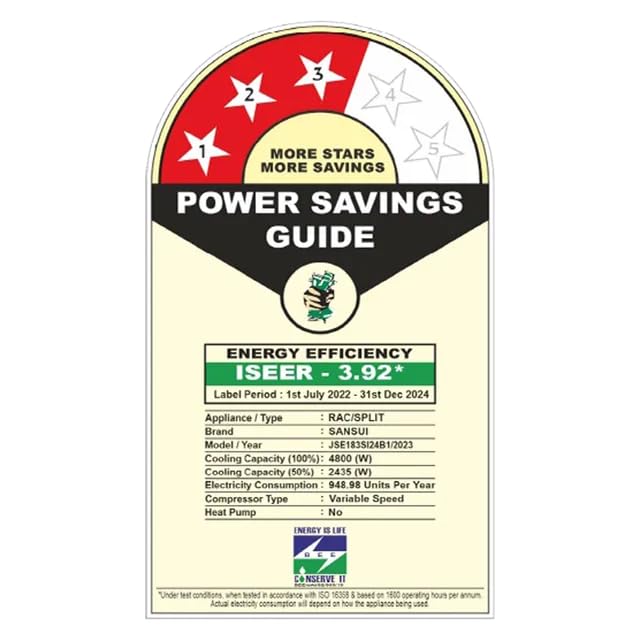
Figure 6: SANSUI Arctic Pro Energy Efficiency Label. This image displays the BEE 3-star energy rating label, showing ISEER (3.92*), cooling capacity (100%: 4800W, 50%: 2435W), electricity consumption (948.98 Units per year), and other energy-related details for the period 1st July 2022 - 31st Dec 2024.
| Feature | Specification |
|---|---|
| Brand | SANSUI |
| Model Name | JSE183SI24B1 |
| Capacity | 1.4 Tons |
| BEE Star Rating | 3 Star |
| Cooling Power | 4800 Kilowatts (Rated) |
| Annual Energy Consumption | 1635 Watts (Power Consumption) |
| Refrigerant Type | R32 |
| Condenser Type | Copper |
| Compressor Type | Rotary Scroll (Inverter) |
| Special Feature | PM 2.5 Filter, 5 in 1 Convertible, Self Diagnosis |
| Noise Level (Indoor Unit) | 51 Decibels |
| Indoor Unit Dimensions (D x W x H) | 21D x 86W x 25H Centimeters |
| Outdoor Unit Dimensions (D x W x H) | 29.8D x 81.1W x 59.6H Centimeters (Approximate, based on image) |
| Item Weight | 32.5 Kilograms |
| Voltage | 230 Volts |
| Control Method | Remote Control |
| Included Components | 1 x Air Conditioner, 1 x Warranty Card |
Warranty and Support
Your SANSUI Arctic Pro Air Conditioner comes with comprehensive warranty coverage and dedicated customer support.
Warranty Details
- Comprehensive Warranty: 1 Year on the entire unit.
- Compressor Warranty: 10 Years on the compressor.
Please retain your purchase receipt and warranty card for any warranty claims. The warranty covers manufacturing defects under normal use conditions.
Customer Support
For technical assistance, service requests, or warranty claims, please contact SANSUI customer support:
- Email: sansuicare@jainaindia.com
- Refer to your warranty card for additional contact numbers or service center details.


