
Introduction
This manual provides comprehensive instructions for the PARTPHONER Cordless Rechargeable Touch Table Lamp, Model PALP471AB1. This modern black iron lamp features a 5000mAh rechargeable battery, 3-level dimmable touch control, and is designed for versatile indoor and outdoor use. Please read this manual thoroughly before assembly and operation to ensure proper use and longevity of your product.
Product Overview
Components
The PARTPHONER Cordless Rechargeable Touch Table Lamp includes the following components:
- Lamp Stand (Base and Stem)
- Lampshade
- Lampshade Fixing Rings (2 pieces)
- A15 LED Bulb
- 50cm Type-C Charging Cable

Image: All components of the PARTPHONER Cordless Table Lamp, including the lamp stand, lampshade, fixing rings, LED bulb, and Type-C charging cable.
Key Features
- Modern Black Iron Design: Sleek and durable, suitable for various decor styles.
- Rechargeable & Long-Lasting Battery: Equipped with a 5000mAh battery, providing up to 40 hours of runtime at low brightness (10%) or 10 hours at full power.
- 3-Way Dimmable Touch Control: Easily adjust brightness with a tap for 3 preset levels, or long-press for smooth adjustment from 10% to 100%.
- Portability: Cordless and lightweight design allows for easy relocation.
- Versatile Use: Ideal for bedrooms, living rooms, dining tables, patios, and camping.
Setup Instructions
Follow these steps to assemble your PARTPHONER Cordless Table Lamp:
- Prepare the Lampshade: Unroll the lampshade material. Attach the two lampshade rings to the top and bottom edges of the lampshade material using the integrated clips. Secure the vertical seam with the provided Velcro.
- Attach Lampshade to Stand: Place the assembled lampshade onto the lamp stand. Secure it by screwing the lampshade fixing rings onto the lamp holder.
- Install the LED Bulb: Carefully screw the A15 LED bulb into the lamp holder.
- Initial Charge: Before first use, fully charge the lamp using the provided Type-C charging cable. Connect the cable to the lamp's charging port and a suitable USB power adapter (not included). The indicator light will show charging status.
Video: This video demonstrates the step-by-step assembly process for the PARTPHONER Cordless Table Lamp, including attaching the lampshade and installing the bulb.

Image: Step-by-step assembly of the lampshade, showing how to attach the metal rings to the fabric shade.

Image: Installation of the A15 LED bulb into the lamp holder after the lampshade is secured.
Operating Instructions
Power On/Off and Brightness Adjustment
The lamp features a touch-sensitive control located on its base.
- To Turn On/Off: Lightly tap the touch control button on the lamp base.
- To Adjust Brightness (Preset Levels): Tap the touch control button repeatedly to cycle through the three preset brightness levels (low, medium, high).
- To Adjust Brightness (Stepless Dimming): Press and hold the touch control button to smoothly adjust the brightness from 10% to 100%. Release the button when the desired brightness is reached.
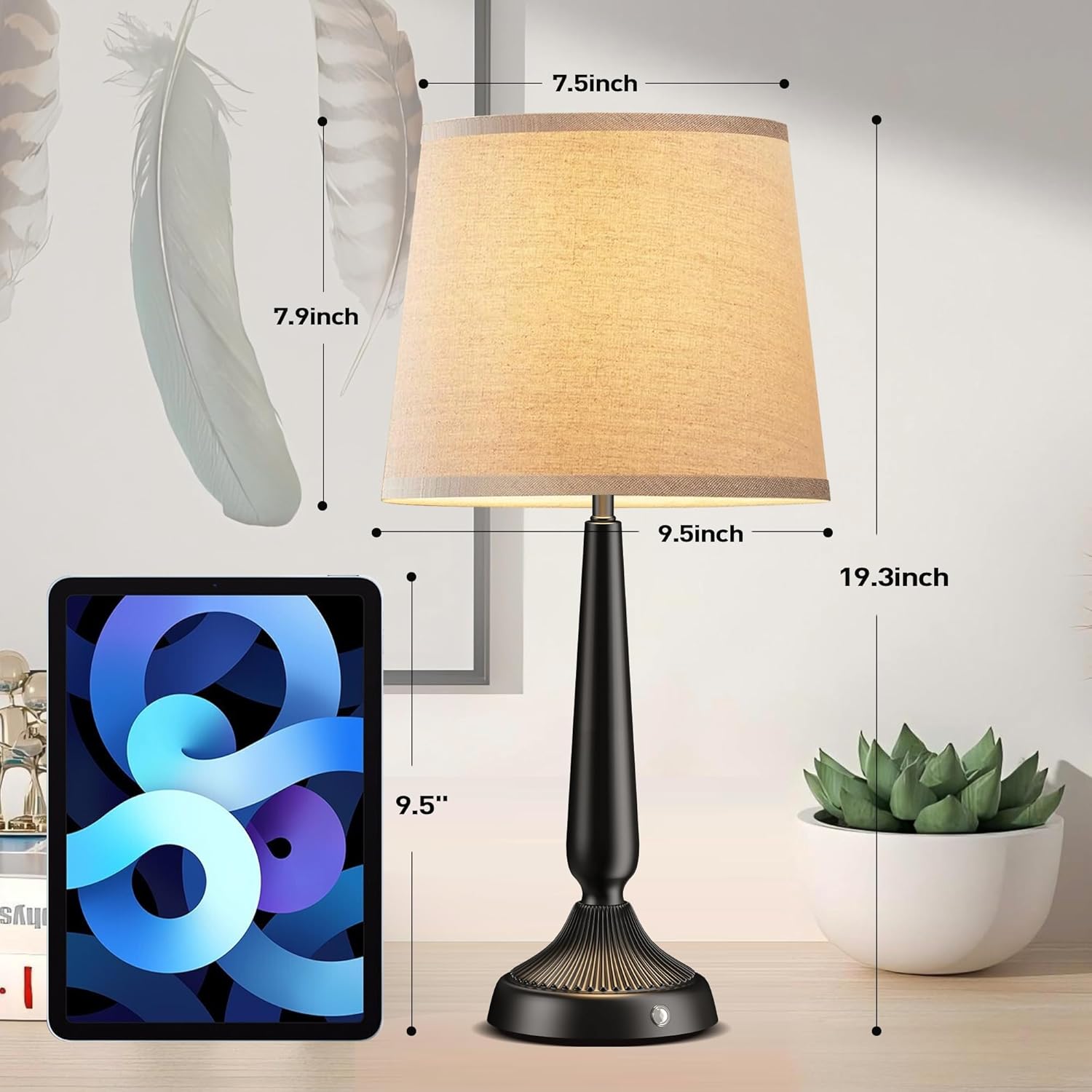
Image: Demonstration of the touch control feature, illustrating how to tap for preset brightness levels and long-press for stepless dimming.
Charging the Lamp
Use the provided 50cm Type-C charging cable to recharge the lamp's internal 5000mAh battery. Connect the Type-C end to the lamp's charging port and the USB-A end to a compatible USB power source (e.g., wall adapter, computer USB port). A full charge provides extended use, up to 40 hours at the lowest setting.
Video: This video highlights the features and operation of the PARTPHONER Rechargeable Battery Powered Table Lamp, including its touch control and portability.
Maintenance
- Cleaning: Wipe the lamp base and shade with a soft, dry cloth. Do not use abrasive cleaners or solvents.
- Battery Care: To prolong battery life, avoid fully discharging the lamp frequently. Recharge when the light becomes dim. If storing for an extended period, charge the battery to approximately 50% every 3-6 months.
- Bulb Replacement: The lamp uses an A15 LED bulb. Ensure the lamp is off and unplugged before attempting to replace the bulb. Use only compatible A15 LED bulbs.
Troubleshooting
| Problem | Possible Cause | Solution |
|---|---|---|
| Lamp does not turn on. | Battery is depleted. Bulb is loose or faulty. | Charge the lamp fully. Check if the bulb is screwed in tightly. Replace the bulb if necessary. |
| Brightness adjustment is not working. | Touch control malfunction. | Ensure your finger is making full contact with the touch sensor. If the issue persists, contact customer support. |
| Short battery life. | Operating at high brightness continuously. Battery degradation over time. | Reduce brightness settings for longer runtime. Ensure the lamp is fully charged before use. Battery life naturally decreases over many charge cycles. |
Specifications
| Attribute | Detail |
|---|---|
| Brand | PARTPHONER |
| Model Number | PALP471AB1 |
| Product Dimensions | 9.45"D x 9.45"W x 19"H |
| Item Weight | 2.09 pounds (0.95 Kilograms) |
| Material | Iron |
| Finish Type | Polished |
| Power Source | Battery Powered |
| Battery Capacity | 5000mAh |
| Battery Life | Up to 40 hours (at 10% brightness) |
| Light Source Type | LED (A15 Bulb) |
| Switch Type | Touch |
| Special Feature | Cordless, Dimmable |
| Indoor/Outdoor Usage | Indoor, Outdoor |
Warranty and Support
For warranty information or technical support, please refer to the product packaging or contact PARTPHONER customer service directly. Keep your purchase receipt for any warranty claims.