
YARDCARE M800Plus
YARDCARE M800Plus Robotic Lawnmower User Manual
Model: M800Plus
1. Introduction
Thank you for choosing the YARDCARE M800Plus Robotic Lawnmower. This advanced wire-free perimeter robot is designed to provide effortless and precise lawn maintenance for areas up to 800 m². Equipped with dual GPS positioning and AI Vision technology, it intelligently navigates your lawn, avoids obstacles, and ensures a perfectly manicured finish. This manual provides essential information for setup, operation, maintenance, and troubleshooting to help you get the most out of your new robotic lawnmower.

Figure 1.1: YARDCARE M800Plus Robotic Lawnmower and its companion app.
2. Safety Information
Always prioritize safety when operating and maintaining the robotic lawnmower. Failure to follow safety instructions can result in injury or damage to the product.
- Read the Manual: Fully read and understand this user manual before operating the device.
- Children and Pets: Keep children and pets away from the robotic lawnmower when it is operating. The device is equipped with tilt sensors, collision detection, and an emergency stop button that immediately halt the machine if lifted or impacted, protecting your family and pets.
- Blades: The robotic lawnmower has sharp blades. Exercise extreme caution when handling or cleaning the blades. Always turn off the device and disconnect it from the power source before performing any maintenance.
- Obstacles: Clear the lawn of any loose objects such as toys, stones, or wires before operation to prevent damage to the mower or property. The AI obstacle avoidance system detects over 150 common obstacles, but pre-clearing is always recommended.
- Noise Level: The robotic lawnmower operates at a low noise level, below 60 dB, ensuring quiet operation.
- Weather Conditions: The robot is equipped with a rain sensor and will automatically return to its charging station in case of rain. Avoid manual operation during heavy rain or extreme weather conditions.
- Unauthorized Modifications: Do not attempt to modify or repair the robotic lawnmower yourself. Refer all servicing to qualified personnel.
3. Package Contents
Ensure all items are present and in good condition upon unpacking. If any items are missing or damaged, contact customer support.

- Robotic Lawnmower (x1)
- Hex Key (x1)
- Charging Station Fixing Screws (x6)
- Instruction Manual (x1)
- Charging Station (x1)
- Blades (x3)
- M4*10 Blade Screws (x3)
4. Setup and Installation
The YARDCARE M800Plus is designed for a wire-free setup, making installation quick and easy.
4.1 Wire-Free Operation
Unlike traditional robotic lawnmowers, the M800Plus does not require a perimeter wire or RTK system. It uses advanced GPS and AI Vision for navigation.

Figure 4.1: The M800Plus offers a wire-free and effortless setup.
4.2 Charging Station Placement
Place the charging station on a flat, level surface with clear access for the robotic lawnmower. Ensure it is connected to a power outlet. The robot will automatically return to this station for recharging when its battery is low or when rain is detected.
4.3 Initial Lawn Preparation
For optimal performance, ensure your lawn has clear boundaries. The M800Plus is designed for lawns with well-defined edges. If the grass height exceeds 6.5 cm, it is recommended to perform an initial manual cut before the first robotic mowing session, as tall grass may be interpreted as an obstacle by the AI vision system.

Figure 4.2: The M800Plus performs best on lawns with clear boundaries and manageable grass height.
5. Operating Instructions
The YARDCARE M800Plus utilizes advanced technology for efficient and autonomous lawn mowing.
5.1 Dual GPS & AI Vision Navigation
The robotic lawnmower uses a powerful GPS system combined with AI visual navigation to map your lawn and ensure precise cutting. It automatically detects grass-free areas and edge contours, facilitating easy startup without boundary wires.

Figure 5.1: Integrated GPS system for precise navigation.
5.2 Intelligent Obstacle Avoidance
Equipped with a 135° wide-angle camera and an advanced AI recognition algorithm, the robot detects over 150 common obstacles in real-time, such as toys, pots, and small animals. It avoids collisions and maintains a safe distance during continuous mowing.
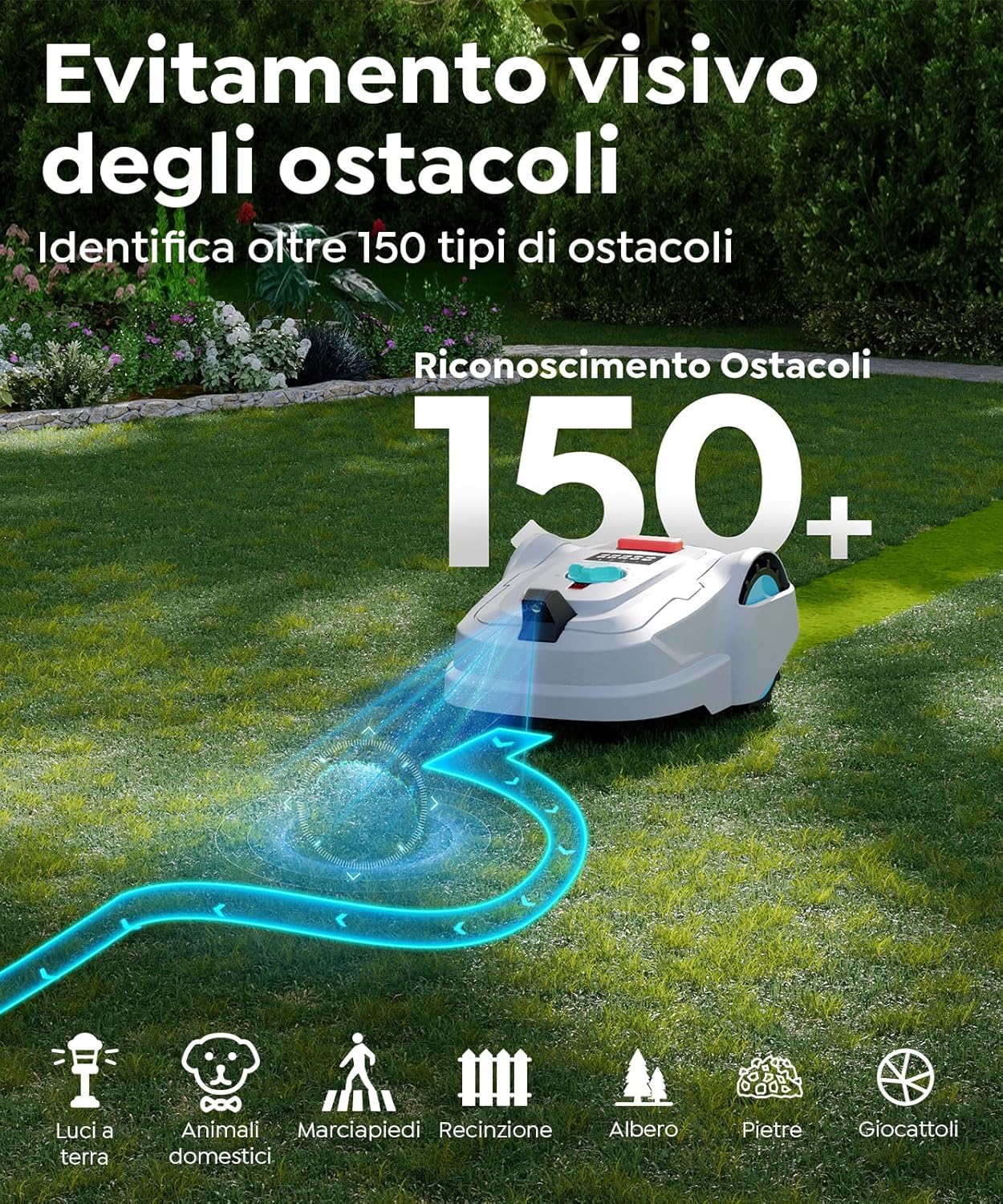
Figure 5.2: Visual obstacle avoidance for enhanced safety.
5.3 Mowing Patterns and Coverage
The M800Plus alternates between ordered and random mowing patterns to ensure complete lawn coverage. It can cover surfaces up to 800 m² on a single charge, operating for 80-100 minutes continuously.

Figure 5.3: Efficient mowing patterns for complete lawn care.
5.4 Spot Spiral Mowing
For areas with denser grass, the spot spiral mowing mode allows the robot to focus on specific sections, gradually increasing its cutting radius to ensure a cleaner and more uniform finish.

Figure 5.4: Spot spiral mowing for dense grass areas.
5.5 Adjustable Cutting Height
The robotic lawnmower features a manually adjustable cutting height from 2 to 6 cm, allowing you to customize the lawn's appearance to your preference.

Figure 5.5: Manual cutting height adjustment for precision.
5.6 Automatic Recharging and Rain Sensor
The M800Plus automatically returns to its charging station when the battery is low or when its integrated rain sensor detects precipitation, ensuring continuous operation and protection from adverse weather.

Figure 5.6: Automatic return to charging station.
6. Smart App Control
Manage your YARDCARE M800Plus conveniently through the dedicated YARDCARE app, available for both Android and iOS devices.

Figure 6.1: Personalized mowing time and scheduling via the app.
- Scheduling: Program mowing sessions to fit your schedule.
- Mowing Modes: Choose from three work modes: ordered, random, or spiral.
- Notifications: Receive real-time notifications on the device's status.
- OTA Updates: Update the system anytime via Over-The-Air (OTA) updates for improved performance and new features.
- Multi-language Interface: The app features a multi-language interface for intuitive and easy use.
7. Maintenance
Regular maintenance ensures the longevity and optimal performance of your YARDCARE M800Plus.
7.1 Cleaning
After each mowing session, it is recommended to gently rinse the underside of the robotic lawnmower to remove grass clippings and debris. Avoid using high-pressure water directly on the device.

Figure 7.1: Easy cleaning and slope climbing capability.
7.2 Blade Replacement
Inspect the blades regularly for wear and tear. Replace dull or damaged blades using the provided hex key and blade screws. Always ensure the device is powered off and disconnected before replacing blades.
8. Troubleshooting
This section provides solutions to common issues you might encounter.
| Problem | Possible Cause | Solution |
|---|---|---|
| Robot not mowing or stopping unexpectedly. | Low battery; Obstacle detected; Rain detected; Blades jammed. | Check battery level and ensure it returns to charging station. Clear any obstacles. Check for rain. Inspect and clean blades. |
| Uneven mowing. | Incorrect cutting height setting; Dull blades; Poorly defined lawn edges. | Adjust cutting height. Replace blades if dull. Ensure lawn boundaries are clear. |
| Robot not returning to charging station. | Charging station obstructed; GPS signal interference; Battery too low to navigate. | Ensure clear path to charging station. Check GPS signal strength via app. Manually place robot on charger if battery is critically low. |
| App connectivity issues. | Bluetooth/Wi-Fi off; App outdated; Robot out of range. | Ensure Bluetooth/Wi-Fi is enabled on your device. Update the YARDCARE app. Move closer to the robot. |
For issues not listed here or if troubleshooting steps do not resolve the problem, please contact YARDCARE customer support.
9. Specifications
- Model Number: M800Plus
- Brand: YARDCARE
- Product Dimensions: 63 x 52 x 32 cm
- Item Weight: 13 kg
- Power Source: Battery Powered
- Battery: 1 x 12V battery (included)
- Maximum Mowing Area: 800 m²
- Adjustable Cutting Height: 2 - 6 cm
- Cutting Width: 18 cm
- Operating Time per Charge: 80-100 minutes
- Noise Level: Below 60 dB(A)
- Slope Climbing Capacity: 36.4% (20°)
10. Warranty and Support
Your YARDCARE M800Plus Robotic Lawnmower comes with a manufacturer's warranty. Please refer to the warranty card included in your product packaging for specific terms and conditions, including warranty duration and coverage details.
For technical support, service, or warranty claims, please contact YARDCARE customer service through the contact information provided in your product documentation or visit the official YARDCARE website. You can also visit the YARDCARE Store on Amazon for more information.
Related documentsM800Plus


Ask a question about this manual
Ask about setup, troubleshooting, compatibility, parts, safety, or missing instructions. Manuals+ will review the question and use this page’s manual context to help answer it.