
Important Safety Information
Read all instructions before operating the Hikiddo 6V Electric Kids Bumper Car. Failure to follow these safety guidelines may result in serious injury.
- Adult Supervision Required: Always supervise children during operation.
- Age and Weight Limits: Suitable for children aged 3-5 years. Maximum weight capacity is 66 lbs.
- Safety Harness: Ensure the five-point safety harness is securely fastened before each use.
- Operating Environment: Use on flat, dry surfaces. Avoid slopes, stairs, public roads, and wet areas.
- Avoid Obstacles: Clear the play area of any potential hazards.
- Charging: Only use the provided charger. Do not overcharge.
- Emergency Stop: Familiarize yourself with the parental remote control's emergency stop button.
Package Contents
Verify that all components are present before beginning assembly:
- Bumper Car Main Body
- Drive Wheels (2)
- Caster Wheels (2)
- Drive Motors (2)
- Joystick Handles (2)
- Seat with 5-Point Harness
- Backrest/Headrest Assembly
- Parental Remote Control
- Charger
- Assembly Hardware (screws, washers, nuts)
- Instruction Manual
Setup and Assembly
Follow these steps to assemble your Hikiddo 6V Electric Kids Bumper Car:
- Unboxing: Carefully remove all components from the packaging.
- Install Drive Wheels and Motors: Attach the drive motors and wheels to the underside of the bumper car body. Ensure all connections are secure.
- Install Caster Wheels: Secure the two caster wheels to the designated spots on the underside of the car.
- Connect Battery: Locate the battery compartment, typically under the seat. Connect the battery terminals as instructed.
- Attach Seat and Backrest: Secure the seat and backrest assembly to the main body using the provided screws.
- Install Joysticks: Insert the joystick handles into their respective slots and secure them.
- Initial Charge: Before first use, charge the bumper car for 8-12 hours to ensure optimal battery life.
For a visual guide, please refer to the official installation video:
Video: Installation Guide for Hikiddo Bumper Car. This video demonstrates the step-by-step assembly process of the bumper car, including attaching wheels, connecting wiring, and securing the seat.
Operating Instructions
Familiarize yourself with the controls and features for a safe and enjoyable experience.
Powering On and Off
To turn on the bumper car, locate the power switch, usually near the seat. Press it to the 'On' position. To turn off, press the switch to 'Off'.
Driving the Bumper Car
- Manual Control: Use the two joysticks to control movement. Push both forward to move forward, pull both back to move backward. Push one forward and pull the other back to perform 360-degree spins.
- Speed Settings: The car features three adjustable speeds: 1.11 mph, 1.33 mph, and 1.55 mph. Select the appropriate speed based on the child's age and skill level.
Parental Remote Control
The parental remote control allows an adult to override manual controls for safety and guidance. It includes an emergency stop button for immediate halting of the vehicle.
Video: Parental Control Demonstration. This video illustrates how the parental remote control can be used to guide the bumper car and ensure child safety.
Entertainment Features
The bumper car includes built-in music, Bluetooth connectivity, USB, and MP3 ports for audio playback. Upgraded colorful flashing lights synchronize with the music, enhancing the ride experience.
Video: Activating Lights and Music. This video shows how to activate the bumper car's light function and play music through its integrated system.
Maintenance
- Cleaning: Wipe the car with a damp cloth. Do not use harsh chemicals or abrasive cleaners.
- Battery Care: Recharge the battery after each use. If storing for an extended period, charge the battery fully every 30 days to prolong its lifespan.
- Storage: Store the bumper car in a dry, cool place away from direct sunlight and moisture.
- Regular Inspection: Periodically check all screws, connections, and the safety harness for wear or damage.
Troubleshooting
| Problem | Possible Cause | Solution |
|---|---|---|
| Car does not turn on. | Battery not connected or discharged. | Check battery connections. Charge the battery for 8-12 hours. |
| Car does not move. | Joysticks not engaged correctly or remote control active. | Ensure joysticks are pushed/pulled fully. Check if parental remote is overriding controls. |
| Lights not flashing with music. | Light synchronization feature not activated. | Short press the music switch to activate light synchronization. |
| Remote control not working. | Remote batteries low or not paired. | Replace remote batteries. Refer to remote pairing instructions in the full manual. |
Specifications
- Product Dimensions: 18.11 x 23.22 x 29.13 inches
- Item Weight: 19.4 pounds
- Manufacturer Recommended Age: 3 - 5 years
- Battery: 6V High-Capacity
- Motors: 2 x 30W
- Speed Settings: 1.11 mph, 1.33 mph, 1.55 mph
- Features: 5-Point Harness, Parental Remote Control, Built-in Music, Bluetooth, USB, MP3, Colorful Flashing Lights
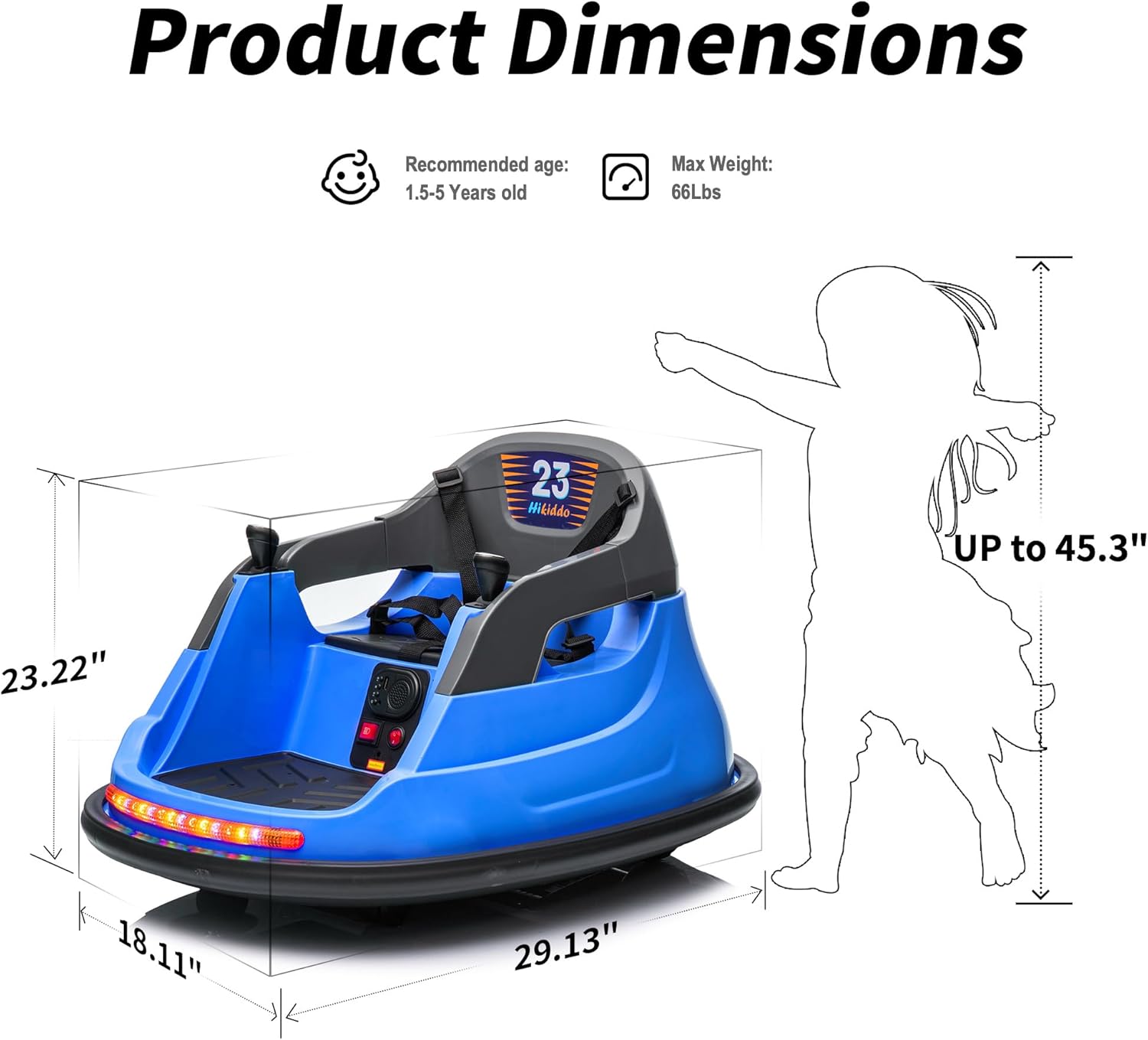
Image: Product Dimensions. This diagram illustrates the physical measurements of the bumper car, including length, width, and height, along with recommended age and maximum weight capacity.
Warranty and Support
For warranty information, please refer to the documentation included with your product or contact Hikiddo customer support directly. Keep your purchase receipt as proof of purchase.
If you encounter any issues or have questions not covered in this manual, please reach out to Hikiddo customer service for assistance.