
Introduction
Thank you for choosing the ZUWSUJS Electric Spin Scrubber. This manual provides essential information for the safe and effective use, maintenance, and care of your new cleaning device. Please read these instructions thoroughly before first use and retain them for future reference.
Product Overview
The ZUWSUJS Electric Spin Scrubber is a versatile, cordless cleaning tool designed to simplify various household cleaning tasks. It features an adjustable long handle, multiple brush heads, and a powerful motor with adjustable speeds, making it suitable for bathrooms, kitchens, tiles, bathtubs, and more.
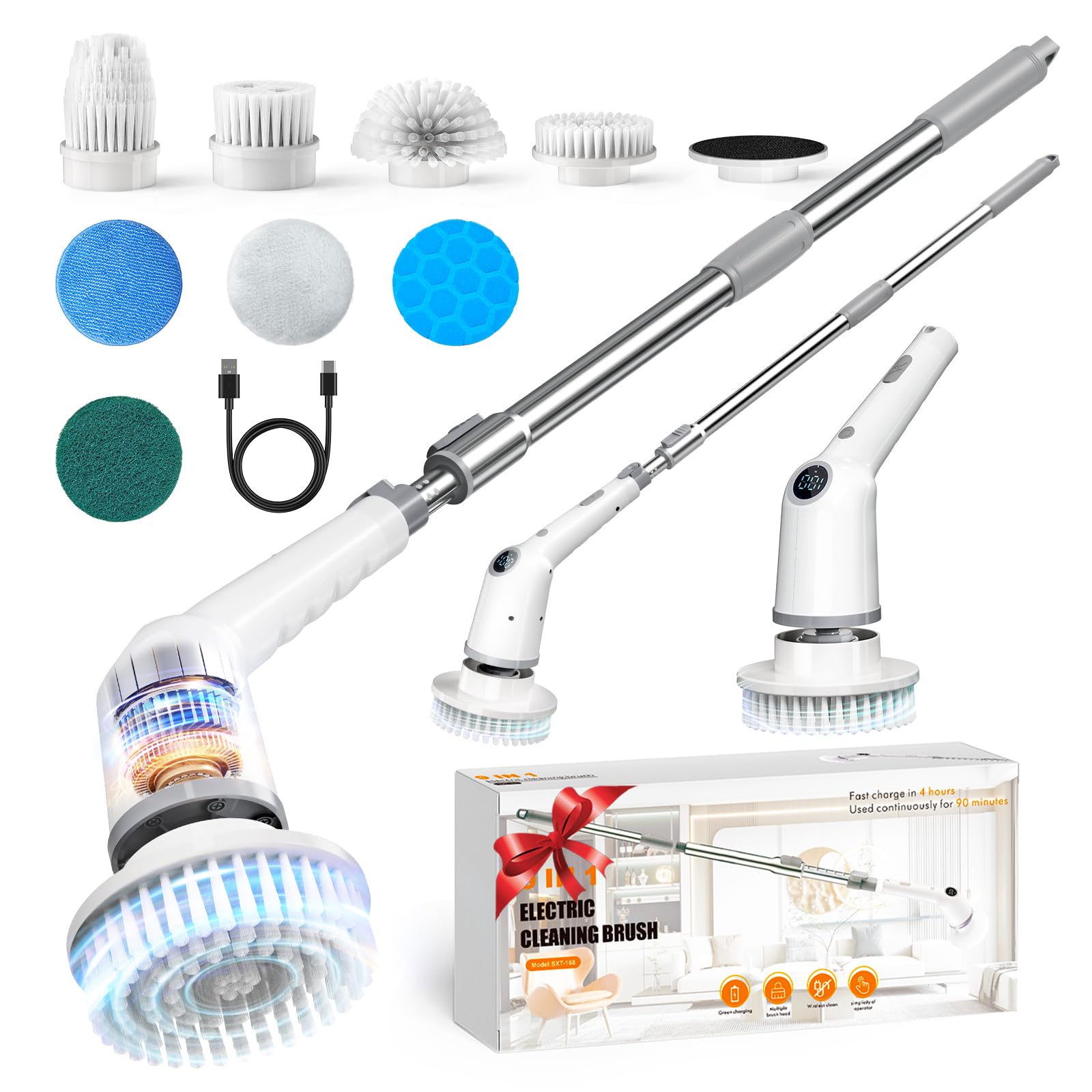
Figure 1: Main unit of the ZUWSUJS Electric Spin Scrubber.
Package Contents
Ensure all items are present before proceeding with setup:
- Electric Spin Scrubber Main Unit
- Extension Rod (Adjustable Handle)
- Charging Cable
- 8 Replaceable Brush Heads:
- Round brush (for curved surfaces like bathtubs and toilets)
- Flat brush (for tile floors and grouts)
- Corner brush (for corner gaps)
- Sponge brush (for windows)
- Scouring pad
- Chenille brush
- Cloth brush
- Wide range brush

Figure 2: The eight types of replaceable brush heads for various cleaning tasks.
Setup
1. Charging the Device
- Locate the charging port on the main unit. Ensure the waterproof protective cover is properly installed after charging.
- Connect the charging cable to the device and a suitable power source.
- A full charge takes approximately 90 minutes and provides up to 3.5 hours of working time. The digital display will show the battery level.

Figure 3: The scrubber's digital display indicates battery level and charging status.
2. Assembling the Handle
- To use the scrubber with the long handle, connect the extension rod to the main unit. Align the connectors and push until it clicks into place.
- The handle is adjustable from 9.8 to 47.2 inches. To extend or retract, press the release button on the handle and adjust to your desired length.

Figure 4: The detachable and extendable handle allows for flexible cleaning options.
3. Attaching Brush Heads
- Select the appropriate brush head for your cleaning task.
- Align the brush head with the rotating base of the main unit and push firmly until it locks securely.
- To remove, gently pull the brush head away from the base.
Video 1: Detailed instructions on assembling the scrubber and attaching brush heads.
Operating Instructions
1. Power On/Off and Speed Adjustment
- To power on the scrubber, press and hold the power button located on the handle.
- The digital display will illuminate, showing the current battery level and speed setting.
- Press the power button briefly to cycle through the 3 adjustable speeds:
- Low (340 RPM): For gentle cleaning.
- Medium (380 RPM): For daily cleaning.
- High (405 RPM): For deep cleaning and stubborn grime.
- To power off, press and hold the power button again.

Figure 5: The digital display allows for easy selection of three cleaning speeds.
2. Using the Scrubber
- Apply your preferred cleaning solution to the surface or directly to the brush head.
- Start with a lower speed and gradually increase if needed for tougher stains.
- Move the scrubber across the surface with light pressure. The rotating brush will do the work.
- Utilize the extendable handle for hard-to-reach areas like high walls, ceilings, or low floors, reducing the need for bending or kneeling.
Video 2: Demonstration of the scrubber's features and usage in various cleaning scenarios.
Maintenance
1. Cleaning the Brush Heads
- After each use, remove the brush head from the main unit.
- Rinse the brush head thoroughly under running water to remove any dirt or cleaning solution residue.
- Allow brush heads to air dry completely before storing.
2. Cleaning the Main Unit
- The main unit is IPX7 waterproof, meaning it can withstand immersion in water up to 1 meter for 30 minutes. This allows for direct washing.
- Wipe the main unit with a damp cloth to clean any external grime.
- Ensure the charging port's waterproof protective cover is securely closed when cleaning the unit or using it in wet environments.

Figure 6: The IPX7 waterproof rating ensures safe use and easy cleaning of the device.
3. Storage
- Store the scrubber and its accessories in a cool, dry place away from direct sunlight.
- The detachable handle allows the unit to be stored compactly.
Troubleshooting
- Device not turning on: Ensure the battery is fully charged. Check the charging cable and adapter for damage.
- Brush head not spinning: Verify that the brush head is securely attached to the main unit. Check for any obstructions.
- Reduced performance: The battery may be low. Recharge the device. Ensure the correct brush head is being used for the task.
Specifications
| Model Number | SXT-168 |
| Brand | ZUWSUJS |
| Motor Power | 25W |
| Adjustable Speeds | 3 (340 RPM / 380 RPM / 405 RPM) |
| Noise Level | Under 50 dB |
| Battery Life | Up to 90 minutes (continuous cleaning) |
| Waterproof Rating | IPX7 |
| Handle Length | 9.8 - 47.2 inches (adjustable) |
| Materials | Plastic, Stainless Steel |
| Item Weight | 2.5 Pounds |
| Product Dimensions | 17.3"L x 7.8"W x 3.15"H |
Warranty & Support
For any product-related inquiries, technical support, or warranty claims, please contact ZUWSUJS customer service through the retailer where the product was purchased. Please have your model number (SXT-168) and purchase details ready.