
VITCOCO C2
VITCOCO Visual Water Dental Flosser User Manual
Model: C2
1. Product Overview
The VITCOCO Visual Water Dental Flosser is an advanced oral hygiene device designed for effective and precise cleaning of teeth and gums. It integrates a high-definition camera for real-time visual guidance, allowing users to target specific areas with enhanced accuracy. This device features multiple cleaning modes, adjustable water pressure levels, and a large water tank for comprehensive oral care.

Image: VITCOCO Visual Water Dental Flosser, showing the device, included nozzles, and the accompanying mobile application interface.
Components
- Main Unit (Water Flosser Body)
- Detachable Water Tank (350ML capacity)
- Visual Nozzle (with integrated HD camera)
- Standard Nozzles (2x)
- Large Elbow Nozzles (2x)
- USB-C Charging Cable

Image: Exploded view of the water flosser showing the removable water tank and the various nozzle types included.
2. Key Features
- HD Camera Integration: Equipped with 6 LED lights and a 1080P high-definition camera, providing real-time visual feedback for precise cleaning.
- Customizable Cleaning Modes: Features 2 modes (Floss and Massage) and 12 adjustable water pressure levels (gears 2-12) to suit individual oral care needs. Includes a memory function to retain your preferred settings.
- Large Water Tank: A 350ML detachable water tank minimizes the need for frequent refills during use.
- IPX7 Waterproof Rating: Ensures durability and safe use, even in wet environments like showers.
- Long Battery Life: Built-in 2000mAh lithium battery provides approximately 120 minutes of use on a full charge, with convenient USB-C charging.
- 360° Rotatable Nozzle: Allows for easy access to all areas of the mouth.
- High Compatibility: The accompanying mobile application is compatible with both Android and iOS devices.
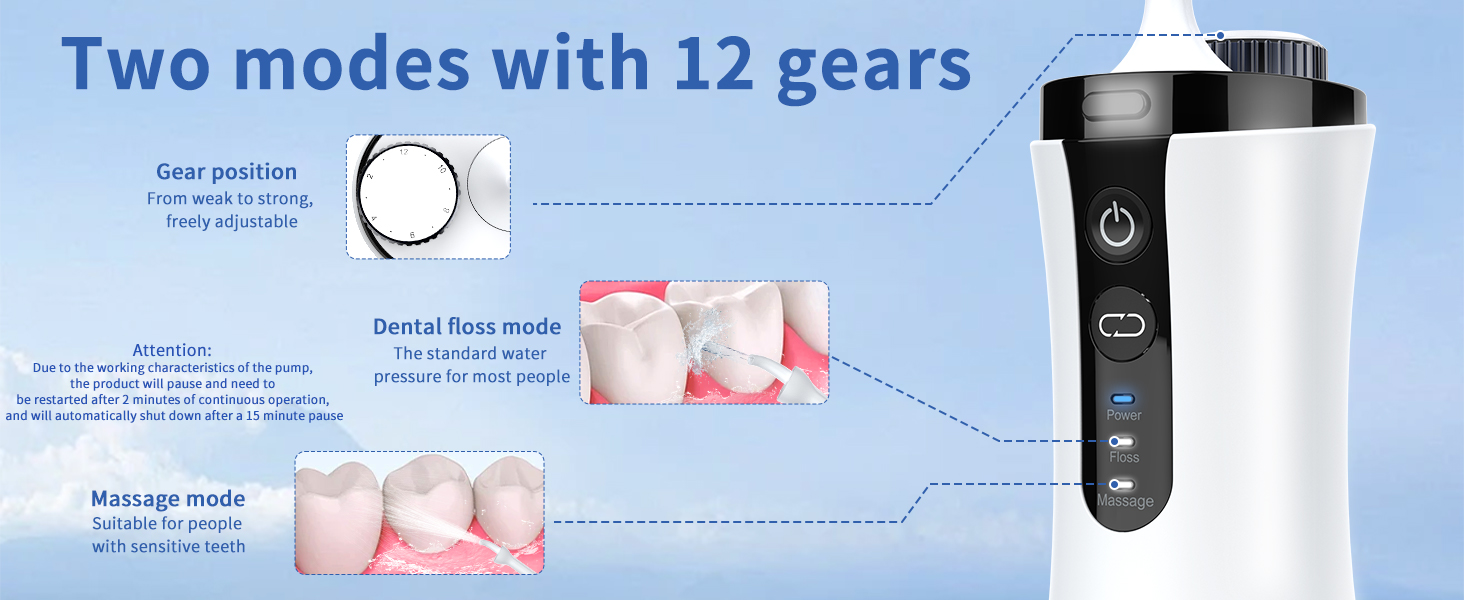
Image: Visual representation of the 1080HD camera and app features, including 6 LED lights, 360° angle, split screen, photography, camera, and mirror functions.

Image: Diagram detailing the two operational modes (Floss and Massage) and the 12 adjustable gear settings for water pressure.
3. Setup
- Charge the Device: Before first use, fully charge the water flosser using the provided USB-C cable. The charging port is typically located at the bottom or side of the unit. A full charge takes approximately [insert typical charging time if known, otherwise omit].
- Attach a Nozzle: Select the desired nozzle (Visual, Standard, or Large Elbow). Insert the nozzle firmly into the opening at the top of the main unit until it clicks into place. Ensure it is securely attached to prevent leakage.
- Fill the Water Tank: Detach the water tank from the main unit by twisting or pulling it down (refer to product diagram for specific method). Fill the tank with lukewarm water. Do not use hot water. Reattach the water tank securely to the main unit.

Image: Visual instructions for adding water to the tank and inserting a nozzle into the device.
4. Operating Instructions
- Power On: Long press the power button to turn on the device.
- Select Mode: Press the "Mode" button to cycle between Floss mode and Massage mode.
- Floss Mode: Standard water pressure for most users.
- Massage Mode: Gentle pulsating pressure, suitable for sensitive teeth and gum massage.
- Adjust Water Pressure (Gears): Rotate the gear adjustment dial to select your desired water pressure level from 2 to 12. Start with a lower setting and gradually increase as you become comfortable.
- Position the Nozzle: Lean over a sink and place the nozzle tip into your mouth, aiming it at a 90-degree angle to your gums. Close your lips slightly to prevent splashing while allowing water to flow into the sink.
- Begin Flossing: Press the power button again to start the water flow. Guide the nozzle along your gumline, pausing briefly between teeth.
- Power Off: Long press the power button to turn off the device after use.
Note: Due to the working characteristics of the pump, the product will pause and need to be restarted after 2 minutes of continuous operation. It will automatically shut down after a 15-minute pause for safety and battery conservation.

Image: Illustration of the water flosser in use, highlighting the power, mode, and gear adjustment controls.
5. App Connection & Visual Flossing
To utilize the visual flossing feature, connect your device to the dedicated mobile application.
- Download the App: Search for "SUNUO" in your device's App Store (iOS) or Google Play Store (Android), or scan the QR code below to download the application.
- Power On Device: Long press the power button on the water flosser to turn it on.
- Connect to Wi-Fi: On your smartphone, go to Wi-Fi settings and connect to the Wi-Fi network named "SUNUO-XXXX" (where XXXX is a unique identifier for your device).
- Open the App: Launch the SUNUO app. It should automatically detect and connect to your water flosser.
- Begin Visual Flossing: Once connected, the app will display a real-time view from the flosser's camera, allowing you to see and target areas for cleaning.


Image: Detailed steps for connecting the water flosser to your smartphone via the SUNUO app and Wi-Fi.
6. Maintenance
Cleaning the Device
- After each use, empty any remaining water from the tank.
- Rinse the water tank thoroughly with clean water.
- Wipe the exterior of the main unit with a soft, damp cloth. Do not submerge the main unit in water, despite its IPX7 rating, to prolong its lifespan.
- For deep cleaning, you can occasionally add a small amount of white vinegar to the water tank and run it through the device to prevent mineral buildup. Follow with a full tank of clean water to rinse.
Cleaning Nozzles
- Remove the nozzle from the device.
- Rinse the nozzle under running water.
- For thorough cleaning, you can soak nozzles in a solution of 2 parts water to 1 part white vinegar for 5-10 minutes, then rinse thoroughly.
Storage
Store the water flosser in a cool, dry place away from direct sunlight. Ensure the water tank is empty and dry before storing for extended periods.
7. Troubleshooting
| Problem | Possible Cause | Solution |
|---|---|---|
| Device does not power on. | Low battery; Device malfunction. | Charge the device fully. If still unresponsive, contact customer support. |
| Weak water pressure. | Low battery; Incorrect gear setting; Nozzle clogged; Air in pump. | Charge the device. Increase the gear setting. Clean the nozzle. Ensure water tank is full and properly attached. |
| Water leakage. | Nozzle not properly inserted; Water tank not securely attached. | Ensure the nozzle is firmly clicked into place. Reattach the water tank securely. |
| App cannot connect to device Wi-Fi. | Device Wi-Fi not active; Incorrect Wi-Fi selected; App permissions. | Ensure device is powered on and the visual nozzle is attached. Select the correct "SUNUO-XXXX" Wi-Fi network. Check app permissions on your phone. Restart both device and phone. |
| Camera image is blurry or dark. | Camera lens dirty; Insufficient lighting. | Gently clean the camera lens on the visual nozzle with a soft cloth. Ensure adequate lighting in your environment. |
8. Specifications
| Feature | Detail |
|---|---|
| Model Number | C2 |
| Product Dimensions | 3.21 x 2.72 x 9.17 inches |
| Weight | 1.06 Pounds |
| Battery | 2000mAh Lithium Battery (1 A battery included) |
| Water Tank Capacity | 350ML |
| Water Pressure Range | 40-130 PSI |
| Pulse Frequency | 1500 pulses/minute |
| Waterproof Rating | IPX7 |
| Camera Resolution | 1080P HD |
| Power Source | Battery Powered (USB-C Charging) |
| Product Benefits | Gum Health |
9. Warranty and Support
VITCOCO products are manufactured to high-quality standards. For any questions, concerns, or warranty claims, please contact VITCOCO customer support. Please refer to your purchase documentation for specific warranty terms and conditions.
For further assistance, you may visit the official VITCOCO store on Amazon: VITCOCO Store
Ask a question about this manual
Ask about setup, troubleshooting, compatibility, parts, safety, or missing instructions. Manuals+ will review the question and use this page’s manual context to help answer it.