
1. Introduction
This manual provides detailed instructions for setting up, operating, and maintaining your KALINCO Smart Watch, Model IDW25. Please read this manual thoroughly before using the device to ensure proper function and safety.
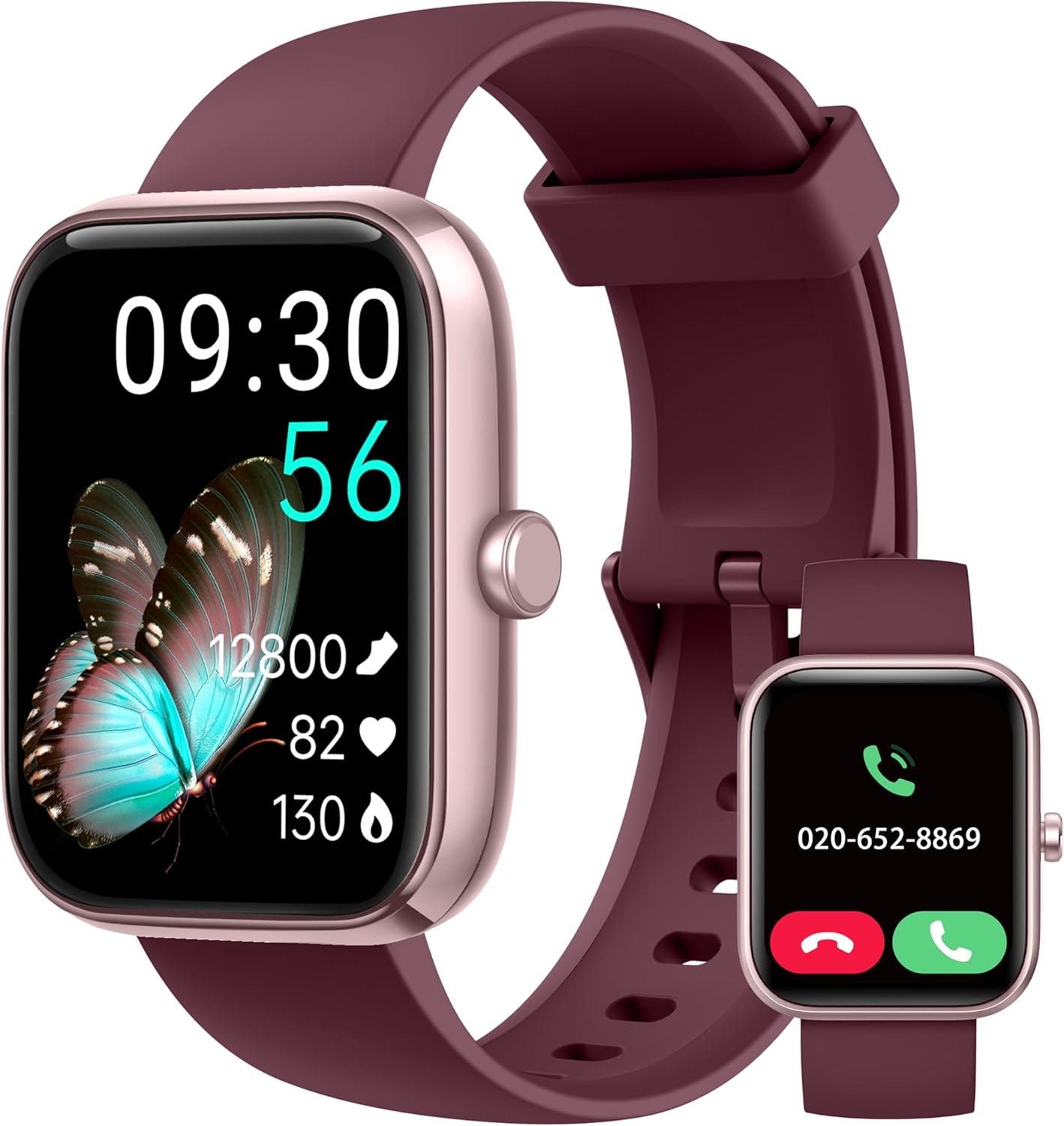
Image: The KALINCO Smart Watch IDW25, featuring a rectangular display and a plum purple silicone strap. The main screen shows time, date, steps, heart rate, and blood oxygen. A smaller inset image shows the watch displaying an incoming call.
2. Package Contents
Ensure all items are present in the package:
- KALINCO Smart Watch (Model IDW25)
- Charging Cable
- User Manual (this document)

Image: A visual representation of the KALINCO Smart Watch package contents, including the watch, charging cable, and user manual. Dimensions of the watch and strap are also shown.
3. Setup Guide
3.1 Charging the Device
Before first use, fully charge your KALINCO Smart Watch. The watch has a battery life of approximately 7 days with normal use, 20 days in power-saving mode, and 30 days in standby mode. A full charge takes about 2 hours.
- Connect the magnetic charging cable to the charging contacts on the back of the watch.
- Plug the USB end of the cable into a standard USB power adapter (not included) or a computer's USB port.
- The watch display will indicate charging status.

Image: An illustration detailing the battery performance of the KALINCO Smart Watch, showing 2 hours charging time, 7 days normal use, 20 days power-saving mode, and 30 days standby time.
3.2 App Installation and Pairing
The KALINCO Smart Watch requires the "VeryFit" app for full functionality. The watch is compatible with Android 6.0+ and iOS 9.0+ smartphones. It is not compatible with tablets or computers.
- Download the "VeryFit" app from the App Store (for iOS) or Google Play Store (for Android).
- Open the VeryFit app and follow the on-screen instructions to create an account or log in.
- Enable Bluetooth on your smartphone.
- In the VeryFit app, navigate to the device pairing section and search for your KALINCO Smart Watch.
- Select your watch from the list of discovered devices to initiate pairing. Confirm the pairing request on both your watch and smartphone.
Note: The watch strap buckle contains nickel, which may cause allergic reactions in sensitive individuals.
4. Operating Instructions
4.1 Basic Navigation
- Touchscreen: Swipe left, right, up, or down to navigate through menus and features. Tap to select.
- Side Button: Press to wake the screen, return to the home screen, or access the app list. Press and hold to activate Alexa.
- Raise to Wake: Enable this feature in the VeryFit app to automatically turn on the screen when you raise your wrist.
4.2 Call and Message Functions
Once connected to your smartphone via the VeryFit app, you can manage calls and receive notifications directly on your watch.
- Answering/Making Calls: You can answer incoming calls or make calls directly from the watch when it is connected to your phone.
- Message Notifications: Receive alerts for messages from apps like WhatsApp, SNS, etc. A red dot on the watch face indicates unread notifications.
- Important Note: The watch cannot be used to reply to text messages.
- Settings: Adjust sound volume, vibration intensity, or enable silent mode via the watch settings or VeryFit app.
- Do Not Disturb (DND) Mode: Easily set up DND mode for periods when you wish to avoid interruptions.

Image: A display showing the KALINCO Smart Watch's interface for making and answering calls, including a dial pad, call history, and frequent contacts. The VeryFit app interface for call settings is also visible.

Image: Screenshots of the KALINCO Smart Watch displaying various smart reminders, including SNS notifications (WhatsApp, Facebook), washing hand reminders, walking reminders, and drinking water reminders.
4.3 Alexa Voice Assistant
Your KALINCO Smart Watch features built-in Alexa, allowing you to perform various tasks using voice commands.
- Activation: Press and hold the power button or tap the Alexa icon on the watch screen to wake Alexa.
- Commands: Speak into your watch to ask questions, set alarms, check the weather, control Alexa-compatible smart devices, and more.

Image: A user interacting with the KALINCO Smart Watch's Alexa voice assistant, demonstrating commands like "Alexa, turn off the light," "Alexa, will it rain today?", and "Alexa, set a 10 minute timer."
4.4 Health Monitoring
The watch provides comprehensive health tracking features.
- Heart Rate Monitoring: Continuously monitors your heart rate 24/7 and provides instant alerts for irregular readings.
- Blood Oxygen (SpO2) Monitoring: Measures your blood oxygen levels.
- Stress Monitoring: Tracks your stress levels throughout the day.
- Simultaneous Measurement: Utilize the upgraded detection technology to measure heart rate, blood oxygen, and stress simultaneously with a single tap.
- Sleep Tracking: Monitors your sleep patterns and breathing quality in real-time, providing insights into your sleep health.
- Health Reminders: Set reminders to drink water, wash hands, and move around to promote healthy habits.
- Menstrual Cycle Tracking: A dedicated feature for women to track and manage their menstrual cycles.

Image: Visuals of the KALINCO Smart Watch displaying heart rate, blood oxygen, stress levels, and sleep duration, highlighting its daily health care capabilities.

Image: A diagram illustrating the one-step health tracking feature, showing how heart rate, blood oxygen, and stress can be measured simultaneously with a single click on the watch.

Image: A screenshot of the VeryFit app displaying detailed sleep analysis, including awake time, REM sleep, light sleep, and deep sleep durations, along with a sleep score.

Image: A visual showing the menstrual cycle tracking feature within the VeryFit app, allowing users to track menstruation, prediction, and ovulation dates.
4.5 Fitness Tracking and Sports Modes
The watch supports over 100 sports modes, with the ability to select up to 20 to display on the watch.
- Sport Selection: Choose from over 100 sports options in the VeryFit app and sync your preferred 20 to the watch.
- Automatic Recognition: The watch can intelligently recognize common exercises like running and walking.
- Data Display: View real-time data such as time duration, calories burned, distance, average/max pace, and aerobic training effect directly on the watch. More detailed analysis is available in the VeryFit app.
- Connected GPS: Utilize your phone's GPS through the VeryFit app to track outdoor activity routes.
- Breathing Training: Use guided breathing exercises to aid relaxation and recovery after workouts.

Image: A visual demonstrating the KALINCO Smart Watch's extensive sports modes and advanced analysis, showing various exercise metrics like duration, calories, distance, steps, heart rate, and recovery time.

Image: A user viewing their exercise data and a map of their route, illustrating the connected GPS feature for outdoor activities.

Image: The KALINCO Smart Watch displaying the breathing training interface, showing a timer and a visual guide for inhalation and exhalation.
4.6 Other Features
- Watch Faces: Customize your watch face from various options in the VeryFit app or create your own.
- Find My Phone: Locate your paired smartphone using the watch.
- Weather Push: Receive weather forecasts directly on your watch.
- Unit Setting & Time Format: Adjust measurement units and time display format.
- Alarm Clock, Stopwatch, Timer: Standard timekeeping functions.
- Flashlight: Use the watch screen as a temporary light source.
- Screen Brightness & Screen-on Time: Adjust display settings for optimal viewing and battery life.

Image: A selection of customizable watch faces available for the KALINCO Smart Watch, including options to personalize time displays and colors.

Image: Screenshots showing various watch settings and utilities, including wake gesture, brightness adjustment, vibration adjustment, and flashlight function.

Image: Displays of the KALINCO Smart Watch showing weather forecast, music control, camera remote control, and the 'Find Phone' feature.

Image: Screenshots of the KALINCO Smart Watch demonstrating its alarm, stopwatch, timer, and Do Not Disturb (DND) mode functionalities.
5. Maintenance
5.1 Cleaning Your Watch
Regularly clean your watch and strap to ensure hygiene and proper function.
- Wipe the watch screen and body with a soft, damp cloth.
- For the silicone strap, use mild soap and water, then rinse thoroughly and dry.
- Avoid using harsh chemicals or abrasive materials.
5.2 Water Resistance
The KALINCO Smart Watch has an IP68 waterproof rating, making it suitable for water sports like swimming. It also features a draining function to expel water from the speaker.
Important: The watch is not suitable for hot showers, saunas, or deep-sea diving, as extreme temperatures or high-pressure water can compromise the seal.

Image: The KALINCO Smart Watch submerged in water, illustrating its IP68 waterproof rating and showing the "Draining water..." function on the screen.
6. Troubleshooting
- Watch not turning on: Ensure the watch is fully charged. Connect it to the charger for at least 10 minutes.
- Cannot pair with phone:
- Ensure Bluetooth is enabled on your phone.
- Make sure the VeryFit app is installed and open.
- Check if the watch is within Bluetooth range of your phone.
- Restart both your phone and the watch.
- Ensure your phone's operating system meets the compatibility requirements (Android 6.0+ or iOS 9.0+).
- Inaccurate health data:
- Ensure the watch is worn snugly on your wrist, but not too tight.
- Clean the sensor on the back of the watch.
- Avoid excessive movement during measurements.
- Notifications not appearing:
- Check notification settings in the VeryFit app and on your phone.
- Ensure the watch is connected to your phone via Bluetooth.
- Disable DND mode on the watch if it is active.
- Alexa not responding:
- Ensure the watch is connected to your phone and has an active internet connection.
- Check Alexa settings in the VeryFit app.
- Speak clearly and directly into the watch.
For further assistance, refer to the FAQ section within the VeryFit app.
7. Specifications
| Feature | Detail |
|---|---|
| Brand | KALINCO |
| Model Number | IDW25 |
| Screen Size | 1.83 Inches |
| Screen Resolution | 240*284 |
| Item Weight | 2.89 ounces (approx. 82g) |
| Battery Type | Lithium Ion (1 included) |
| Charging Time | Approx. 2 hours |
| Battery Life (Normal Use) | Up to 7 days |
| Battery Life (Power Saving) | Up to 20 days |
| Battery Life (Standby) | Up to 30 days |
| Water Resistance | IP68 |
| Connectivity | Bluetooth |
| Special Feature | Voice Assistant (Alexa Built-in) |
| Compatible Phone Models | Android 6.0+ and iOS 9.0+ smartphones |
| Color | Plum Purple |
8. Warranty and Support
KALINCO offers a three-year warranty for this product. For warranty claims or technical support, please refer to the following resources:
- VeryFit App: The app contains an E-manual, FAQ section, and Wellness Management tools.
- Manufacturer Website: Visit the official KALINCO website for additional support and contact information.


