
Introduction
This manual provides detailed instructions for the installation, operation, maintenance, and troubleshooting of your SIXWIN 4+64G Android 15 Car Radio. Please read this manual thoroughly before using the product to ensure proper functionality and safety.
Setup and Installation
Package Contents
Verify that all items listed below are included in your package:
- 1 x Car Player + 1 x Canbus
- 1 x Power Cable + 1 x RCA Cable
- 1 x Rear View Camera Input Cable + 2 x USB Cable
- 1 x GPS Antenna + 1 x Surveillance Camera
- 1 x Mounting Accessories + 1 x User Manual

Image: Overview of the SIXWIN car radio's dimensions and the complete packing list, including cables, antennas, and accessories.
Vehicle Compatibility
This car radio is designed for Renault Clio 3rd generation models manufactured between 2005 and 2014.
Installation Overview
The installation process involves removing the original car radio, connecting the new unit's wiring harness, and securing the new display. Professional installation is recommended.

Image: Comparison of the car dashboard before and after installing the SIXWIN car radio, showing the integrated display.

Image: Detailed view of the SIXWIN car radio installed in a Renault Clio III dashboard, showcasing the display and interface.
Operating Instructions
System Overview
The unit runs on Android 15 with a 4-core processor, 4GB RAM, and 64GB ROM, providing a responsive and stable user experience on its 1024x600 high-resolution 9-inch IPS touchscreen with 2.5D glass and anti-blue light features.

Image: Visual representation of the 4-core processor, 4GB RAM, 64GB ROM, and the IPS 2.5D touchscreen display.
Wireless CarPlay
Connect your iPhone wirelessly to access mobile applications directly on the car radio's screen. This allows for hands-free calls, messaging, music playback, and navigation using voice commands or touch controls.

Image: Screenshot of the Wireless Apple CarPlay interface displayed on the car radio, showing various app icons.
Wireless Android Auto
Connect your Android smartphone wirelessly to access mobile applications directly on the car radio's screen. This allows for hands-free calls, messaging, music playback, and navigation using voice commands or touch controls.

Image: Screenshot of the Wireless Android Auto interface displayed on the car radio, showing navigation and media controls.
Mirror Link Functionality
Connect your smartphone via Wi-Fi (for iOS) or Wi-Fi/USB (for Android) to mirror your phone's screen onto the car radio display. This allows you to view and interact with your smartphone's applications, music, and videos on the larger screen.

Image: Illustration of the Mirror Link feature, showing a smartphone screen duplicated on the car radio display for both iOS and Android devices.
GPS Navigation and WiFi Connectivity
The unit supports online and offline maps for precise navigation, including voice guidance and real-time traffic information. Connect to the internet via a WiFi hotspot to browse websites, stream content, and download applications.

Image: Display of GPS navigation interface with map routes and icons for various online applications accessible via WiFi.
Bluetooth 5.0
Pair your mobile phone or other devices via Bluetooth 5.0 for hands-free calling, wireless music streaming, and file transfer. The system supports automatic phone book loading.

Image: Interface showing Bluetooth connection for hands-free calls and music playback.
FM/RDS Radio
Access various radio stations with clear sound quality. The unit features an integrated RDS receiver and supports 18 preset stations across FM (3*6 channels) for music, news, and real-time traffic information.

Image: Display of the FM/RDS radio interface, showing station presets and radio information.
32-Band Equalizer
Customize your audio experience with the 32-band equalizer. Select from various sound styles such as Jazz, Classical, Rock, and Pop, and adjust sound effects for an immersive listening experience.

Image: Screenshot of the 32-band equalizer interface, showing frequency adjustments and sound field controls.
Steering Wheel Controls
Maintain full control of your car radio without taking your hands off the steering wheel. Easily adjust radio and music settings for safe operation.

Image: Diagram illustrating how to configure steering wheel controls with the car radio interface.
Rear View Camera
The included HD rearview camera automatically activates when reversing, providing a clear, wide-angle view for safe parking and maneuvering. The camera is designed to be waterproof for reliable performance in all weather conditions.
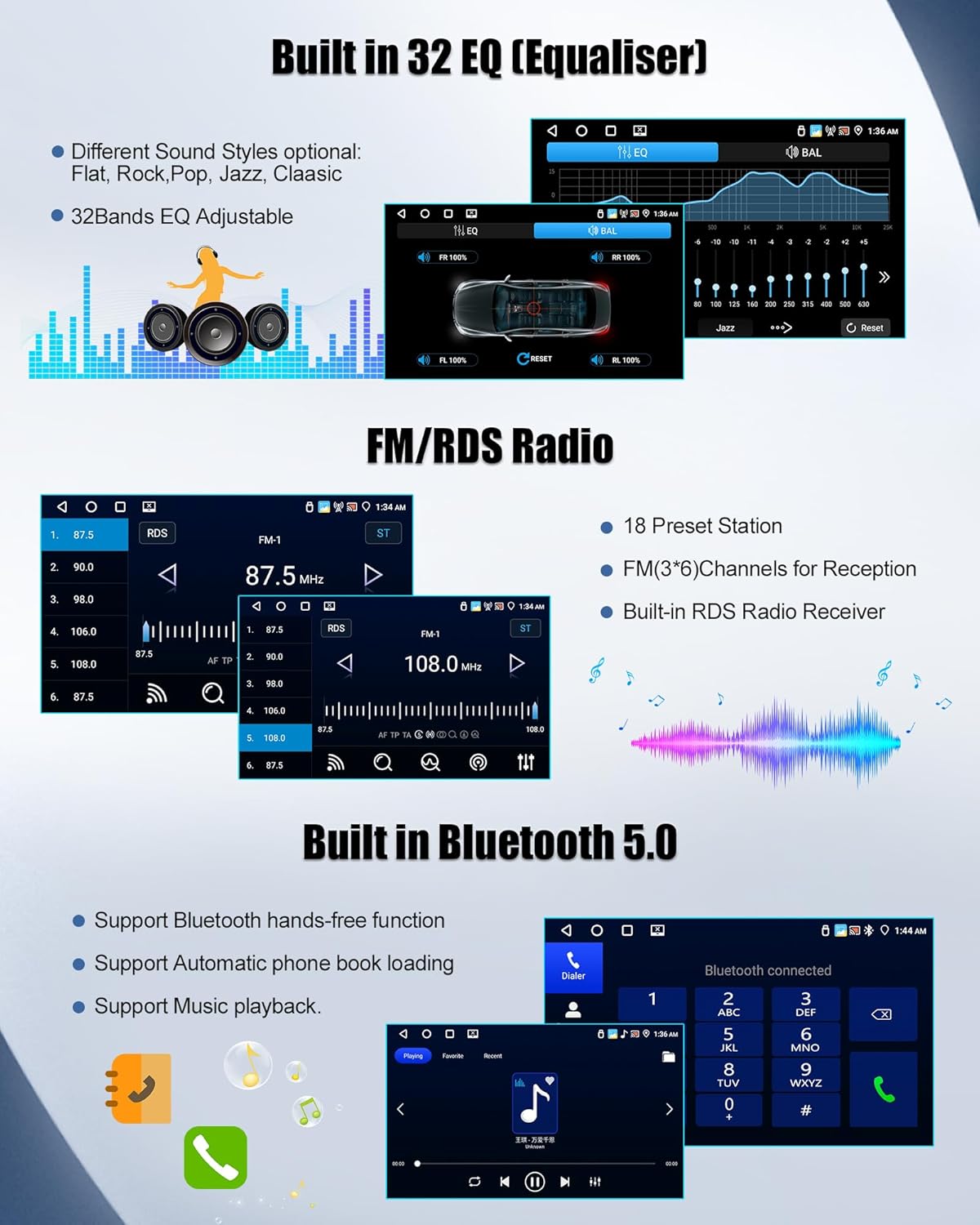
Image: Illustration of the rearview camera and its display on the car radio screen, showing parking guidelines.
Additional Features
- Split-screen mode: Run two applications simultaneously on the screen.
- Customizable User Interfaces: Personalize the look and feel of your display.
- Dual USB Ports: Connect multiple USB devices.
- AUX Input: Connect external audio sources.
- Audio/Video Output: Connect to external displays or audio systems.
Optional functions (requires additional accessories): Dashcam, Intelligent Voice Assistant, Online Radio, World Weather, DAB+ Receiver.
Maintenance
Cleaning the Unit
Gently wipe the screen and unit exterior with a soft, dry cloth. Avoid using abrasive cleaners or solvents, as they may damage the surface.
Software Updates
Periodically check for available software updates to ensure optimal performance and access to the latest features. Updates can typically be performed via the system settings when connected to Wi-Fi.
Troubleshooting
Steering Wheel Control Issues
If your car's steering wheel buttons are not functioning after installation, follow these steps to restore normal operation:
- Ensure your original car's small screen remains properly connected. Do not remove the original small screen from your vehicle.
- Connect the small yellow connector (labeled 'A' from the car) to the corresponding port (labeled 'B' on the power harness).
- Select the correct protocol:
- Navigate to: [Settings] -> [Factory Settings] (Password: 8888) -> [Protocol Settings]
- Select the corresponding protocol in this order:
- Manufacturer: Hiworld
- Car Series: Renault-Dacia
- Car Model: Clio3

Image: Visual guide for resolving steering wheel control issues, showing cable connections and protocol settings.
General Issues
- No Power: Check all power connections and fuses. Ensure the ignition is on.
- No Sound: Verify speaker connections, volume settings, and audio source selection.
- GPS Signal Loss: Ensure the GPS antenna is properly installed and has a clear view of the sky.
- Touchscreen Unresponsive: Try restarting the unit. If the issue persists, contact support.
Specifications
| Feature | Detail |
|---|---|
| Brand | SIXWIN |
| Screen Size | 9 Inches |
| Operating System | Android 15 |
| RAM + ROM | 4GB RAM + 64GB ROM |
| Connectivity Technology | Bluetooth 5.0, USB, Wi-Fi |
| Special Features | 32EQ, Wireless Carplay / Wireless Android Auto / Mirror Link |
| Compatible Devices | Smartphone |
| Connector Type | RCA, CVBS/AHD, USB |
| Max Output Power | 4x45W |
| Voltage | 12V DC |
| Audio Output Mode | Stereo |
| Surround Sound Channel Configuration | 5.1 |
| Video Encoding | MKV, AVI, MP4, etc. |
Warranty and Support
Warranty Information
This product comes with a 2-year manufacturer's warranty. Additionally, a 30-day return policy is available. Please retain your proof of purchase for warranty claims.
Customer Support
For any questions regarding our products, before or after sale, we provide 24-hour customer service. You can reach our support team via email:

Image: A customer service representative wearing a headset, symbolizing available support.

