
DJCLUB DJ-B100S
DJCLUB 100W LED Moving Head Light Instruction Manual
Model: DJ-B100S
1. Introduction
This manual provides detailed instructions for the safe operation, installation, and maintenance of your DJCLUB 100W LED Moving Head Light. Please read this manual thoroughly before using the product to ensure proper function and to prevent damage or injury.

Image: Front view of the DJCLUB 100W LED Moving Head Light, showcasing its compact design and lens.
2. Safety Information
Always observe the following safety precautions to reduce the risk of electric shock, fire, or personal injury.
- Electrical Safety: Ensure the power supply voltage matches the product's requirements (110V AC). Always disconnect power before cleaning or servicing.
- Ventilation: Do not block ventilation openings. Ensure adequate airflow around the unit to prevent overheating.
- Mounting: Securely mount the fixture using appropriate hardware. Ensure the mounting surface can support the weight of the fixture.
- Temperature: Avoid operating the light in excessively hot or cold environments. The operating temperature range is specified in the specifications section.
- Eye Safety: Do not stare directly into the light source. The LED beam is very bright and can cause eye damage.
- Water and Moisture: Keep the unit away from water, moisture, and high humidity environments.
- Servicing: Refer all servicing to qualified service personnel. Do not attempt to repair the unit yourself.
3. What's in the Box
Upon opening the package, please verify that all listed components are present and undamaged:
- 100W Moving head light
- Power cable
- DMX Cable
- Omega Bracket
- Manual (this document)
4. Setup and Installation
The DJCLUB 100W LED Moving Head Light is designed for easy installation. Follow these steps for proper setup:
- Unpacking: Carefully remove the light fixture and all accessories from the packaging. Inspect for any signs of damage during transit.
- Mounting:
- Determine the desired mounting location (e.g., truss, ceiling, wall).
- Attach the provided Omega Bracket to the bottom of the fixture using the designated screw holes.
- Securely fasten the Omega Bracket to your mounting structure using appropriate clamps or screws (not included). Ensure the fixture is stable and cannot vibrate loose.

Image: Rear view of the moving head light showing DMX input/output, power input, and on/off switch, emphasizing easy installation.
- Power Connection: Connect the provided power cable to the "POWER INPUT" on the rear of the fixture and then to a suitable 110V AC power outlet.
- DMX Connection (Optional): If using DMX control, connect a DMX cable from your DMX controller's output to the "DMX512 INPUT" on the fixture. For multiple fixtures, daisy-chain them by connecting the "DMX512 OUTPUT" of the first fixture to the "DMX512 INPUT" of the next.
5. Operating Instructions
The DJCLUB 100W LED Moving Head Light offers multiple operating modes:
5.1 Control Panel Overview
The control panel on the base of the unit features a digital display and several buttons (MENU, UP, DOWN, ENTER) for navigating settings and modes.
Image: Close-up of the control panel on the base of the moving head light, showing the display and navigation buttons.
5.2 Operating Modes
- DMX512 Mode:
This mode allows for professional control using a DMX controller. The fixture uses 12 DMX channels. Refer to the DMX Channel Chart for specific functions of each channel.
- Master/Slave Mode:
Connect multiple fixtures via DMX cables. Set one fixture as "Master" and others as "Slave." The slave units will mimic the master's movements and effects.
- Auto Run Mode:
The fixture will cycle through pre-programmed light shows automatically. Use the control panel to select different auto programs.
- Sound Mode:
The light will react to sound and music detected by its built-in microphone. Adjust sensitivity via the control panel.
5.3 Key Features and Effects
- 100W White LED Source: Provides powerful and bright illumination.
- Color Wheel: Features 11 colors plus open, allowing for a wide range of atmospheric effects.
- Gobo Wheel: Equipped with 14 gobos plus open with shake function, enabling projection of various patterns.

Image: Diagram illustrating various gobo patterns and the effect of the 8-face roto prism.
- 8-Face Roto Prism: Creates multiple beams from a single light source, adding dynamic visual complexity.
- Beam Angle: A narrow 2° beam angle ensures sharp, focused light.
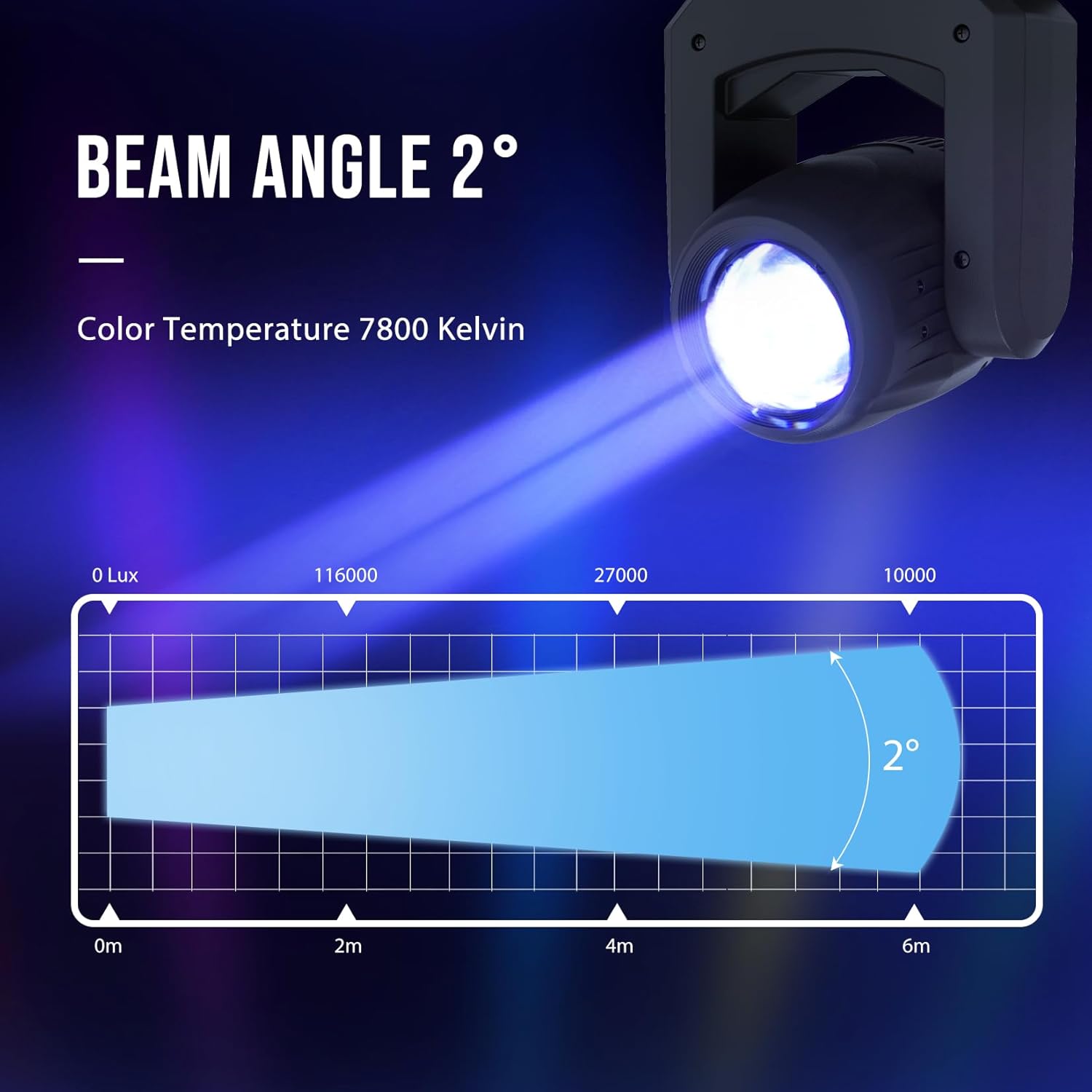
Image: Graphic illustrating the tight 2-degree beam angle and its intensity over distance.
- Pan/Tilt Movement: The lamp head can rotate 540° horizontally (Pan) and 200° vertically (Tilt), allowing for extensive coverage and dynamic movement.

Image: Diagrams showing the 200-degree tilt and 540-degree pan rotation capabilities of the light head.
- Strobe: Adjustable strobe speed for pulsating light effects.
- Dimmer: Smooth electronic dimming from 0-100%.
6. Maintenance
Regular maintenance ensures the longevity and optimal performance of your DJCLUB Moving Head Light.
- Cleaning:
- Disconnect power before cleaning.
- Use a soft, lint-free cloth to wipe down the exterior.
- For lenses and optical components, use a specialized lens cleaner and cloth to avoid scratches.
- Inspection: Periodically check all cables, connections, and mounting hardware for wear or damage. Replace any worn parts immediately.
- Storage: When not in use for extended periods, store the fixture in a dry, dust-free environment, preferably in its original packaging or a padded case.
7. Troubleshooting
If you encounter issues with your light, refer to the following common problems and solutions:
| Problem | Possible Cause | Solution |
|---|---|---|
| Light does not power on. | No power, faulty cable, blown fuse. | Check power connection, test cable, replace fuse (F3A/250V). |
| No DMX control. | Incorrect DMX address, faulty DMX cable, controller issue. | Verify DMX address, check DMX cable connections, test with another controller. |
| Light is unresponsive or erratic. | Interference, overheating, internal fault. | Ensure proper ventilation, restart the unit, contact support if problem persists. |
| Motor noise is excessive. | Normal operation, loose component. | Some motor noise is normal. If unusually loud, check for loose parts or contact support. |
8. Technical Specifications
Detailed specifications for the DJCLUB 100W LED Moving Head Light:
| Feature | Detail |
|---|---|
| Light Source | 100W White LED |
| Beam Angle | 2° |
| Color Temperature | 7800 Kelvin |
| Brightness | 1760Lux@10m |
| Voltage | 110 Volts (AC) |
| Wattage | 100 Watts (Max Compatible), 150 Watts (Light Source) |
| DMX Channels | 12CH |
| Color Wheel | 11 Colors + Open |
| Gobo Wheel | 14 Gobos + Open with Shake |
| Prism | 8-Face Roto Prism |
| Pan Movement | 540° |
| Tilt Movement | 200° |
| Material | ABS, Aluminum, Glass, Iron, Plastic |
| Product Dimensions | 8.66"L x 5.9"W x 9.85"H |
| Item Weight | 8.93 Pounds |
| Model Number | DJ-B100S |
| Certifications | CE, RoHS |

Image: Detailed diagram showing the dimensions (height, width, depth) of the moving head light.
9. Warranty and Support
DJCLUB DMX stage lighting products, including this moving head light, come with a comprehensive warranty and dedicated customer support:
- Money Back Guarantee: A 30-day money back guarantee from the date of purchase.
- Warranty Period: A 90-day warranty from the date of purchase covering manufacturing defects.
- Customer Support: If you encounter any problems or have questions, please feel free to contact us via our after-sales email. We are committed to helping you solve any issues.
For further assistance, please visit the official DJCLUB store: DJCLUB Store on Amazon
Ask a question about this manual
Ask about setup, troubleshooting, compatibility, parts, safety, or missing instructions. Manuals+ will review the question and use this page’s manual context to help answer it.