Introduction
Thank you for choosing the Sisism H2 Hybrid Active Noise Cancelling Headphones. This manual provides detailed instructions for the proper use, setup, and maintenance of your headphones. Please read this manual thoroughly before using the product to ensure optimal performance and longevity.

Image: The Sisism H2 Hybrid Active Noise Cancelling Headphones, black with silver accents, showcasing the over-ear design and earcups.
Package Contents
Ensure all items are present in the package:
- Sisism Hybrid Active Noise Cancelling Headphones (H2)
- Type-C Charging Cable
- Owner's Manual
Product Overview
Familiarize yourself with the various components and controls of your Sisism H2 headphones.

Image: A diagram illustrating the functional components of the Sisism H2 headphones, including volume controls, MFB (Multi-Function Button), audio interface, charging port, ANC button, microphone, and digital display.
- Volume Controls (+/-): Adjust audio volume.
- MFB (Multi-Function Button): Power on/off, play/pause, answer/end calls.
- Audio Interface: For wired connection (e.g., 3.5mm audio cable, not included).
- Charging Port: USB Type-C port for charging.
- ANC Button: Activates/deactivates Active Noise Cancellation and Transparency Mode.
- Microphone: For voice calls and voice assistant.
- Digital Display: Shows battery level and connection status.


Image: Left: Sisism H2 headphones folded, demonstrating their portable design. Right: A close-up of the adjustable headband with numerical markings for precise fit.
Setup
1. Charging the Headphones
Before first use, fully charge your headphones. Connect the supplied Type-C charging cable to the charging port on the headphones and the other end to a USB power source (e.g., wall adapter, computer USB port). The digital display will indicate charging status and battery level. A full charge typically takes approximately 2-3 hours.
2. Powering On/Off
- Power On: Press and hold the MFB button for approximately 3 seconds until the indicator light illuminates and you hear a power-on prompt.
- Power Off: Press and hold the MFB button for approximately 3 seconds until the indicator light turns off and you hear a power-off prompt.
3. Bluetooth Pairing
- Ensure the headphones are powered off.
- Press and hold the MFB button for approximately 5 seconds until the indicator light flashes blue and red alternately, indicating pairing mode.
- On your device (smartphone, tablet, laptop), enable Bluetooth and search for available devices.
- Select "Sisism H2" from the list of found devices.
- Once connected, the indicator light will flash blue slowly, and you will hear a connection confirmation.
- If pairing fails, turn off the headphones and repeat the steps.
The headphones will automatically attempt to reconnect to the last paired device when powered on.
Operating Instructions
Basic Controls
- Play/Pause: Short press the MFB button.
- Next Track: Long press the Volume + button.
- Previous Track: Long press the Volume - button.
- Volume Up: Short press the Volume + button.
- Volume Down: Short press the Volume - button.
- Answer/End Call: Short press the MFB button during an incoming call.
- Reject Call: Long press the MFB button during an incoming call.
- Activate Voice Assistant: Double-press the MFB button.
Active Noise Cancellation (ANC) and Transparency Mode
The Sisism H2 headphones feature Hybrid Active Noise Cancellation to reduce ambient noise and a Transparency Mode to allow you to hear your surroundings.
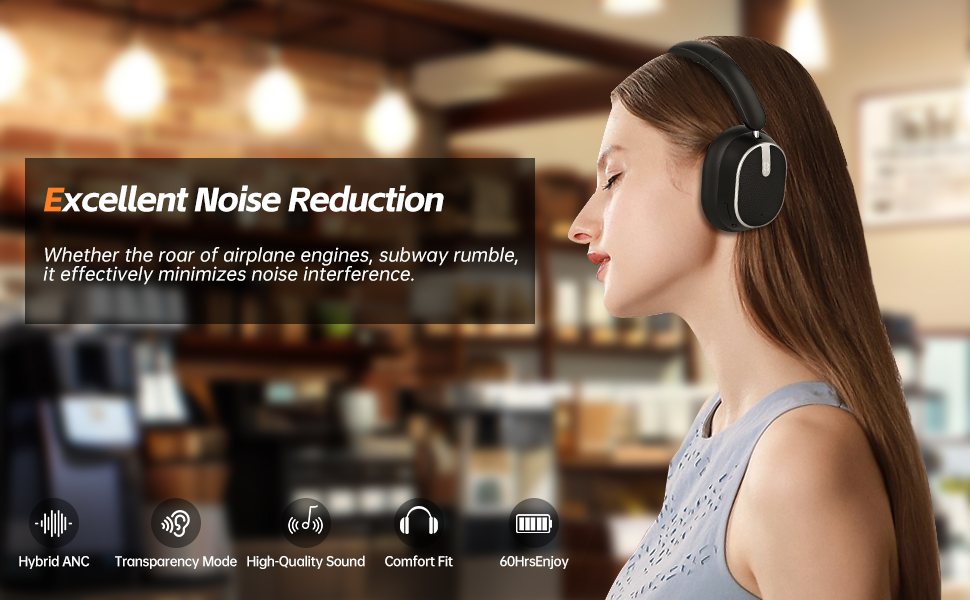
Image: A woman wearing the Sisism H2 headphones in a cafe setting, illustrating the noise reduction capability. The text highlights "Excellent Noise Reduction" for minimizing interference from airplane engines or subway rumble.
- Activate ANC: Short press the ANC button. You will hear an audible prompt confirming ANC is on. This mode is designed to minimize external noise, such as engine hum or general background chatter, allowing for a more focused listening experience.
- Activate Transparency Mode: Short press the ANC button again. You will hear an audible prompt confirming Transparency Mode is on. This mode allows ambient sounds to pass through, enabling you to stay aware of your surroundings without removing the headphones.
- Deactivate ANC/Transparency Mode: Short press the ANC button a third time to turn off both modes.

Image: A woman wearing Sisism H2 headphones outdoors, demonstrating the Transparency Mode feature. The text emphasizes staying connected with surroundings while exploring.
Battery Life
The Sisism H2 headphones offer extended battery performance:
- Up to 60 hours of playtime with ANC off.
- Up to 40 hours of playtime with ANC on.

Image: Sisism H2 headphones displayed with icons indicating battery endurance: 40 hours with ANC on, 60 hours with ANC off, and capacity for 900 songs.
Maintenance
- Cleaning: Use a soft, dry cloth to clean the headphones. Do not use abrasive cleaners or solvents.
- Storage: When not in use, store the headphones in a cool, dry place, away from direct sunlight and extreme temperatures. The foldable design allows for compact storage.
- Water Exposure: These headphones are not waterproof. Avoid exposure to water or excessive moisture.
- Battery Care: To preserve battery life, charge the headphones at least once every three months if not used regularly.
Troubleshooting
| Problem | Possible Cause | Solution |
|---|---|---|
| Headphones do not power on. | Low battery. | Charge the headphones fully using the provided Type-C cable. |
| Cannot pair with device. | Headphones not in pairing mode; Bluetooth off on device; too far from device. | Ensure headphones are in pairing mode (flashing blue/red). Turn on Bluetooth on your device. Move headphones closer to the device (within 10 meters). Clear previous Bluetooth connections on your device and try again. |
| No sound or low volume. | Volume too low on headphones or device; headphones not connected properly. | Adjust volume on both headphones and connected device. Reconnect Bluetooth. |
| ANC not working effectively. | ANC not activated; specific types of noise. | Ensure ANC is activated by pressing the ANC button. ANC is most effective against low-frequency, constant noises. |
| Microphone not working. | Microphone blocked; device settings. | Ensure the microphone port is clear. Check microphone input settings on your connected device. |
Specifications
| Feature | Detail |
|---|---|
| Model Number | H2 |
| Connectivity Technology | Bluetooth |
| Noise Control | Hybrid Noise Cancellation |
| Form Factor | On Ear |
| Ear Placement | On Ear |
| Material | Plastic |
| Item Weight | 14.4 ounces (0.41 Kilograms) |
| Product Dimensions | 2 x 1 x 3 inches |
| Batteries | 2 A batteries required (included) |
| Compatible Devices | Smartphone, MP3 Player, Laptop |
| Specific Uses | Business, Fitness, Travel |
Warranty and Support
For warranty information and customer support, please refer to the contact details provided on the product packaging or the official Sisism website. Keep your purchase receipt for warranty claims.


