
1. Product Overview
The KBSYNT Front 4K Dash Cam is designed to seamlessly integrate into your Honda Accord (Gen11) models from 2023 to 2026, including LX, EX, Sport-L, EX-L, and Touring trims. This OEM-style dash cam provides high-resolution 4K video recording, ensuring clear capture of road events. It features essential functions such as loop recording, G-sensor for collision detection, and Wi-Fi connectivity for app control.

Image: KBSYNT Front 4K Dash Cam seamlessly integrated into a Honda Accord, maintaining an OEM-style appearance.
2. Package Contents
Verify that all items are present in your package:
- Front 4K Dash Cam (Main Unit)
- Instruction Manual
- Crowbar (Pry Tool)
- Screwdriver
- 64GB TF Card
- Card Reader
- Y-Type Conversion Cable

Image: All components included in the KBSYNT Front 4K Dash Cam package.
3. Installation Guide
Follow these steps for a seamless installation of your KBSYNT Front 4K Dash Cam. The OEM-style design ensures no exposed cables and an unobstructed view.
- Remove the Original Front Cover: Use the provided crowbar to carefully pry off the rain-fall sensor cover located near the rearview mirror.
- Remove the Original Rear Cover: Use the crowbar to gently remove the original rear cover.
- Remove Room Lamp Screws: Open the glasses case compartment and use the screwdriver to remove the screws securing the room lamp assembly.
- Remove the Room Lamp: Carefully remove the room lamp assembly from the ceiling.
- Unplug the 8-pin Plug: Locate and unplug the 8-pin connector from the room lamp assembly.
- Connect the Y-Type Cable: Connect the provided Y-type conversion cable to the unplugged 8-pin connector.
- Thread Dash Cam Wire: Thread the dash cam's power wire through the opening and connect it to the Y-type cable.
- Install the Dash Cam: Securely install the KBSYNT dash cam unit into the housing.
- Install the Room Lamp: Push the room lamp assembly back into place, ensuring all connections are secure.
- Install Screws and Finish: Reinstall the screws in the glasses case compartment and close it.

Image: Visual guide for the installation process in a Honda Accord.
Video: General overview of the Dash Cam for Honda, demonstrating features and potentially installation aspects.
4. Operating Instructions
4.1 Basic Controls
- Power Button: Press to start/stop recording. Press and hold for 10 seconds to turn off the dash cam. Press again to turn it on.
- Photo Button: Press to take a picture. Press and hold for 10 seconds to reset the dash cam to factory settings (this will format the SD card).
- Indicator Light: Displays the current status of the dash cam.
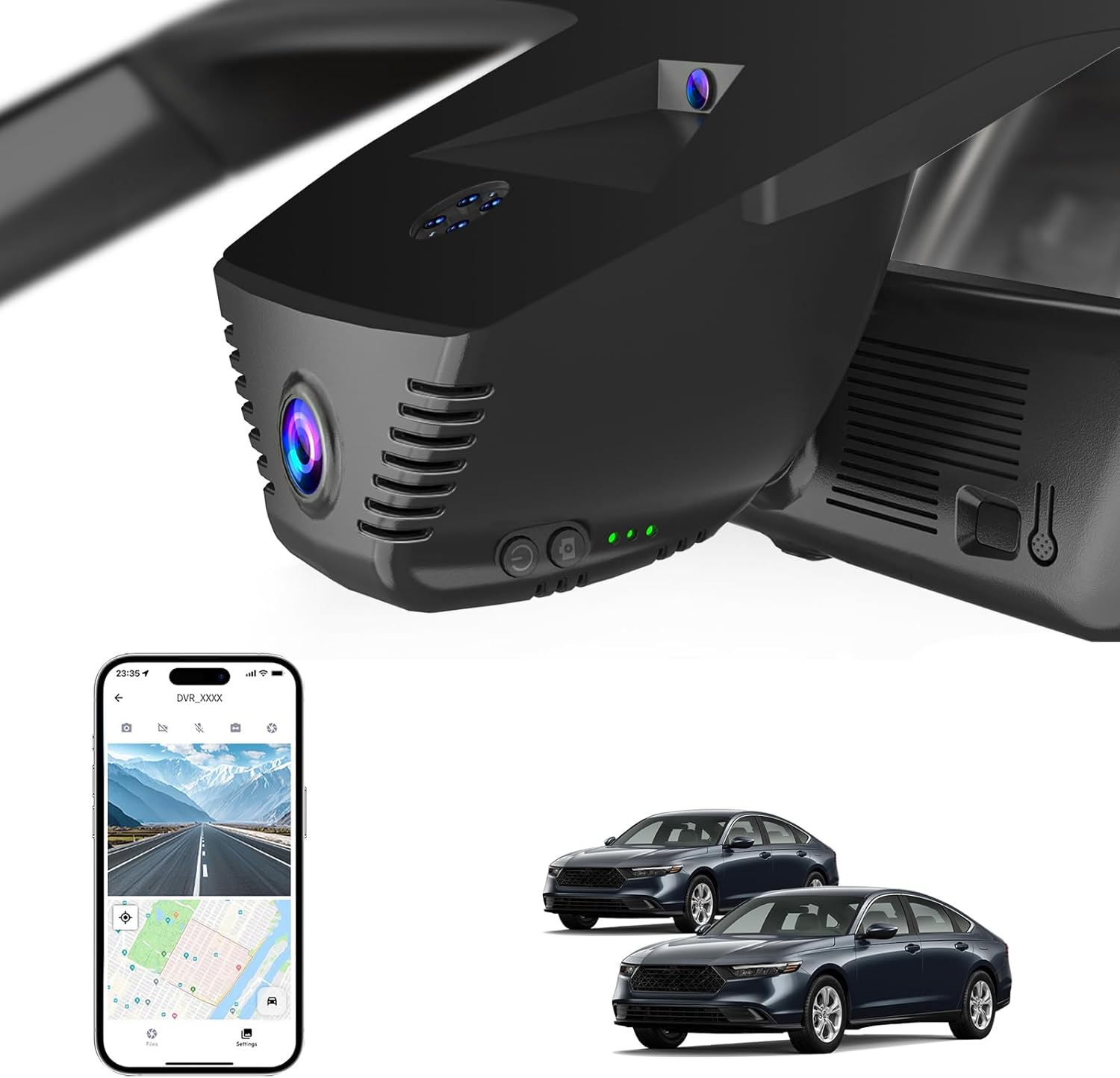
Image: Close-up of the dash cam's power, photo, and indicator light buttons.
Video: Introduction to the functions of the dash cam's buttons.
4.2 Recording Modes
- Loop Recording: When the TF card is full, the dash cam automatically overwrites the oldest footage with new recordings. Locked video files are protected from being overwritten.
- G-Sensor: In the event of a sudden collision or impact, the built-in G-sensor detects the event and automatically locks the current video file to prevent it from being overwritten.

Image: Automatic Loop Recording feature, showing older files being overwritten.

Image: G-Sensor functionality, locking video upon impact.
4.3 Parking Monitor
The 24-hour parking monitor provides continuous protection for your vehicle. Note: This function requires an additional hardwire kit (search B0F26LDFZW) for continuous power supply.

Image: 24-Hour Parking Monitor feature, requiring a hardwire kit.
4.4 GPS Functionality
The built-in GPS functionality enables precise recording of your driving route and speed directly into your video footage, providing vital evidence in case of an accident. When viewing videos on the app, you can track vehicle information such as location, speed, and time.

Image: App interface displaying GPS tracking with route and speed data.
5. App Usage (Fuvymyt App)
The Fuvymyt app offers fast connection speeds and low latency for live viewing and comfortable user experience. All app functions are free. The initial password for the app is 12345678.
- Connect to Wi-Fi: On your smartphone, connect to the dash cam's Wi-Fi network (named DVR_xxxx). The dash cam's Wi-Fi is for video transmission only and does not provide internet access.
- Open Fuvymyt App: Launch the Fuvymyt app on your smartphone.
- Live View & Recording: Access the live view, start/stop recording, and capture photos directly from the app.
- Access Footage: View footage saved on the SD card or downloaded to your phone.
- Settings: Adjust dash cam settings via the app.

Image: Fuvymyt App interface for managing dash cam footage and settings.
Video: Detailed guide on using the Fuvymyt App for dash cam control and footage management.
6. Maintenance
To ensure optimal performance of your dash cam:
- SD Card Management: The dash cam supports TF cards up to 256GB. Regularly check the SD card for proper functioning. Loop recording will manage storage by overwriting older files, but occasional manual review is recommended.
- Formatting: Resetting the dash cam to factory settings (by pressing and holding the photo button for 10 seconds) will format the SD card, erasing all data. Back up important footage before performing a factory reset.
7. Troubleshooting
- App Connection Issues: If the app cannot show live view, preview, or download videos, try turning off cellular data or Bluetooth on your smartphone. Ensure you are connected to the dash cam's Wi-Fi network.
- Dash Cam Not Recording: Check if the SD card is properly inserted and not full. Ensure loop recording is enabled.
- Poor Video Quality: Ensure the lens is clean and free from obstructions. Check app settings for video resolution.
8. Specifications
| Feature | Description |
|---|---|
| Brand | KBSYNT |
| Model Name | Front 4K Dash Cam |
| Vehicle Service Type | Honda Accord 2023 2024 2025 2026 Hybrid LX Sport EX Touring EX-L (Gen11) |
| Connectivity Technology | Wi-Fi |
| Special Feature | App Control |
| Video Capture Resolution | 2160p |
| Included Components | Installation Tool, 64GB TF Card, Card Reader, Y-Type Conversion Cable |
| Mounting Type | Windshield Mount |
| Field Of View | 160 Degrees |
| Frame Rate | 30 fps |
| Optical Sensor Technology | CMOS |
| Are Batteries Included | Yes |
9. Warranty & Support
9.1 Warranty Information
This product comes with a 2-Year Manufacturer Warranty.
9.2 Customer Support
If you encounter any issues or have questions, please contact KBSYNT customer support. We aim to respond within 12 hours.
- Contact via Amazon: Reach out through the Amazon messaging system.
- 24H Support: Assistance is available 24 hours.
- Email Support: For non-urgent inquiries.
- Phone Support: For immediate assistance.