
1. Introduction
This manual provides essential information for the safe and efficient operation of your WILPREP Commercial Convection Oven. This 38-inch full-size electric convection oven features 10 kW power, 7 cu ft capacity, and is designed for commercial kitchen and bakery environments, operating on 240V 1 Phase power. Please read this manual thoroughly before installation, operation, or maintenance.

Figure 1: Front view of the WILPREP Commercial Convection Oven.
2. Important Safety Instructions
Always follow basic safety precautions when using electrical appliances to reduce the risk of fire, electric shock, and injury to persons.
- Electrical Safety: Ensure the oven is connected to a properly grounded 240V 1-phase electrical supply with appropriate circuit protection. Do not use extension cords.
- Hot Surfaces: The oven exterior and interior surfaces become extremely hot during operation. Use heat-resistant gloves and exercise caution.
- Ventilation: Ensure adequate ventilation around the oven to prevent overheating and maintain proper air circulation.
- Cleaning: Disconnect power before cleaning. Allow the oven to cool completely. Use non-abrasive cleaners suitable for stainless steel and enamel.
- Supervision: Do not leave the oven unattended during operation. Close supervision is necessary when any appliance is used by or near children.
- Installation: Installation must be performed by qualified personnel in accordance with all local codes and regulations.

Figure 2: Oven dimensions and ETL/Intertek safety certifications, indicating compliance with safety standards.
3. Package Contents
Upon unpacking, verify that all components are present and undamaged. If any items are missing or damaged, contact your supplier immediately.
- WILPREP Commercial Convection Oven (1 unit)
- Oven Racks (5 units)
- Instruction Manual (this document)
4. Setup and Installation
4.1 Unpacking
Carefully remove the oven from its packaging. Inspect for any shipping damage. Retain packaging materials for future transport if needed.
4.2 Placement
Place the oven on a stable, level, non-combustible surface capable of supporting its weight. Ensure adequate clearance from walls and other equipment for proper ventilation and access. The oven dimensions are approximately 38"D x 38"W x 38"H.
4.3 Electrical Connection
This oven requires a dedicated 240V, 1-phase electrical supply with a 10 kW power rating. Connection must be performed by a licensed electrician in compliance with all national and local electrical codes. Ensure the power supply is properly grounded.
4.4 Rack Installation
Insert the 5 oven racks into the desired positions within the 11 available rack brackets. The multiple rack configurations allow for flexible placement based on the items being cooked.

Figure 3: The convection oven properly installed in a commercial kitchen environment.
5. Operating Instructions
5.1 Control Panel Overview
The control panel features knobs for temperature and timer settings, along with switches for fan speed, fan mode, light, and power.

Figure 4: Detailed view of the oven's control panel, showing knobs and switches.
5.2 Preheating the Oven
- Ensure the oven is properly connected to power.
- Turn the POWER switch to ON.
- Set the desired temperature using the TEMP knob (range 150°F to 500°F).
- Allow the oven to preheat until the HEAT indicator light turns off, signaling the set temperature has been reached.
5.3 Convection Fan Settings
The oven features a built-in convection fan with dual modes and two speeds for efficient and even heat distribution.
- Fan Modes:
- COOK Mode: Standard operation for baking and roasting.
- COOL Mode: Used to rapidly cool the oven interior or for specific cooking processes.
- Fan Speeds:
- HIGH: For faster cooking and more intense air circulation.
- LOW: For delicate items or when less aggressive air circulation is desired.
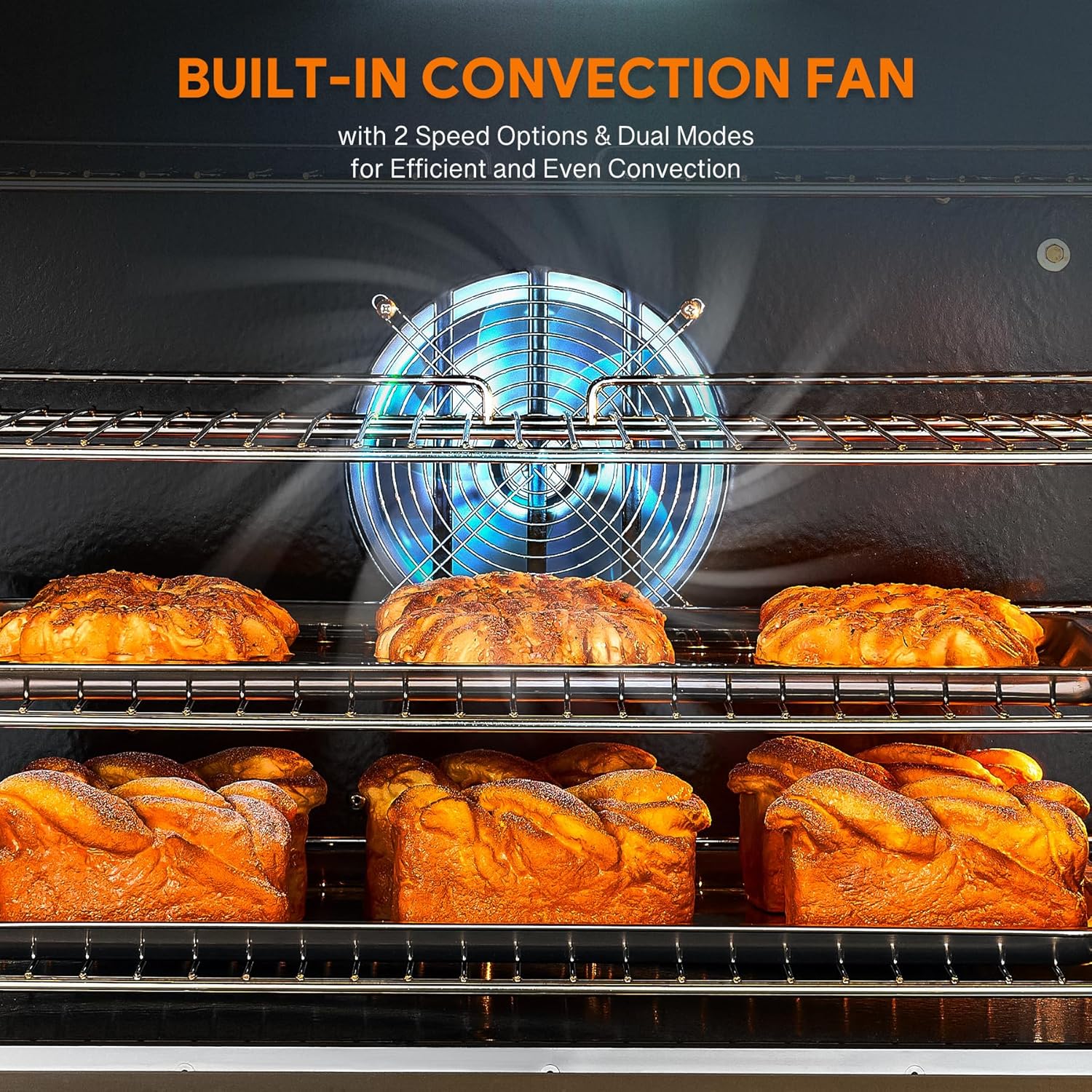
Figure 5: The powerful convection fan ensures even heat distribution across all racks.
5.4 Using the Timer
The 60-minute timer provides a reminder without cutting off power, allowing for continuous operation if needed. Set the timer by rotating the TIMER knob to the desired duration. An audible alert will sound when the time expires.
5.5 Loading the Oven
With a 7 cu. ft. capacity and 5 adjustable racks, the oven can accommodate a variety of food items. Utilize the 11 rack brackets to customize the interior layout. Avoid overcrowding to ensure optimal air circulation and even cooking.

Figure 6: The spacious interior and adjustable racks provide versatility for different food types.
5.6 Monitoring Cooking Progress
The built-in LED lights and double-layer glass doors allow for clear monitoring of your dishes without opening the doors and releasing hot air, which helps maintain consistent oven temperature.
6. Cleaning and Maintenance
Regular cleaning and maintenance will ensure the longevity and optimal performance of your oven.
6.1 Daily Cleaning
- Interior: After each use, allow the oven to cool. The enamel interior provides a non-porous surface for easy cleaning. Wipe down with a damp cloth and mild detergent. For stubborn stains, use a non-abrasive oven cleaner suitable for enamel surfaces.
- Exterior: The stainless steel exterior offers maximum durability and corrosion resistance. Wipe with a damp cloth and a stainless steel cleaner to maintain its finish.
- Racks: Remove oven racks and wash them with warm, soapy water.
6.2 Periodic Maintenance
- Inspect door seals for wear and tear. Replace if damaged to maintain heat efficiency.
- Check electrical connections periodically for tightness and signs of wear. This should be done by a qualified technician.
- Ensure the convection fan is free from obstructions.

Figure 7: Key construction features facilitating durability and ease of cleaning.
7. Troubleshooting
Before contacting customer support, refer to the following table for common issues and their solutions.
| Problem | Possible Cause | Solution |
|---|---|---|
| Oven does not heat up. | No power supply; circuit breaker tripped; power switch off. | Check power connection; reset circuit breaker; ensure power switch is ON. |
| Uneven cooking. | Fan not operating correctly; oven overloaded; improper rack placement. | Check fan settings (speed/mode); reduce load; adjust rack positions for better airflow. |
| Temperature inaccurate. | Thermostat issue; door seal leakage. | Verify with an external oven thermometer; inspect door seals for damage. Contact service if issues persist. |
| Fan is noisy. | Obstruction in fan; worn bearings. | Disconnect power and inspect fan for debris. If noise persists, contact service. |
8. Product Specifications
| Feature | Detail |
|---|---|
| Brand | Wilprep |
| Model | 1 Phase SIngle Deck |
| Power Source | Electric |
| Electrical Requirements | 240V, 1 Phase, 10 kW |
| Capacity | 7 cu. ft. |
| Temperature Range | 150°F - 500°F (65°C - 260°C) |
| Number of Shelves | 5 (adjustable with 11 rack brackets) |
| Control Type | Knob |
| Product Dimensions (D x W x H) | 38" x 38" x 38" |
| Special Features | Automatic Thermostat, Adjustable Convection Fan (2 modes, 2 speeds), Multiple Rack Configurations, Durable and Easy-to-Clean Construction (Stainless Steel Exterior, Enamel Interior), Built-in LED Lights, Double-Layer Glass Doors. |
| Included Components | Oven Racks |
9. Warranty and Customer Support
For warranty information or technical assistance, please contact Wilprep customer support. Keep your purchase receipt and product model information handy when contacting support.
Manufacturer: WILPREP
Refer to the official Wilprep website or your purchase documentation for specific warranty terms and contact details.
