
Introduction
Thank you for choosing the TOPUTURE TP4 4-in-1 Foldable Walking Pad Treadmill. This manual provides essential information for the safe and effective use of your new fitness equipment. Please read this manual thoroughly before operation and retain it for future reference. The TOPUTURE TP4 is designed for home and office use, offering versatile exercise modes including walking, climbing, and running, with a compact, foldable design for easy storage.
Safety Information
Important Safety Precautions:
- Always consult with a physician before starting any new exercise program.
- Ensure the treadmill is placed on a flat, stable surface.
- Keep children and pets away from the treadmill during operation.
- Wear appropriate athletic footwear and clothing.
- Do not operate the treadmill if it is damaged or malfunctioning.
- Unplug the treadmill from the power outlet when not in use or before cleaning/maintenance.
- Do not exceed the maximum user weight capacity of 300 lbs (136 kg).
- Use the safety key/clip at all times during operation.
Components and Parts
The TOPUTURE TP4 treadmill comes with the following main components:
- Treadmill Unit (main body with running belt, motor, and base display)
- Handlebar Assembly (with upper LED display and control panel)
- Remote Control
- Power Cord
- Tool Kit (for minor adjustments and maintenance)
- User Manual (this document)
- Lubricating Oil
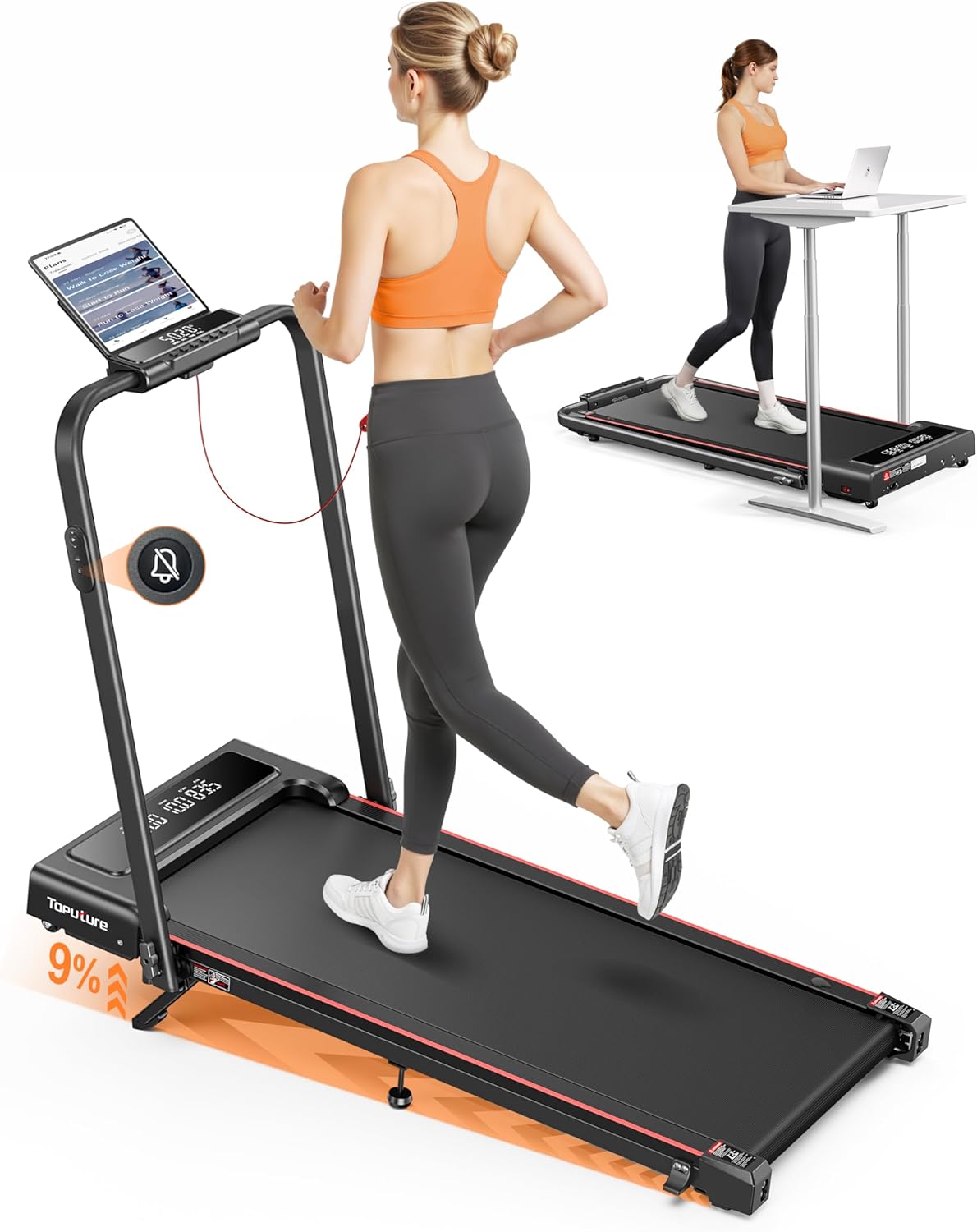
Image: The TOPUTURE TP4 treadmill in its upright running configuration with a user, and in its folded, under-desk walking pad configuration with another user at a standing desk. This illustrates the 4-in-1 functionality.
Setup
The TOPUTURE TP4 treadmill is designed for installation-free setup. It is ready to use right out of the box with minimal preparation.
- Unpack: Carefully remove the treadmill from its packaging.
- Positioning: Place the treadmill on a flat, stable surface with adequate clearance around it (at least 2 feet from walls or furniture).
- Unfold (if applicable): If the handlebar is folded down for storage, gently lift it into the upright position until it locks securely. Ensure all locking mechanisms are engaged.
- Connect Power: Plug the power cord into the treadmill's power input and then into a grounded electrical outlet.
- Safety Key: Attach the safety key clip to your clothing before starting any exercise.

Image: Demonstrates the treadmill's versatility, showing it used as an under-desk walking pad (0.6-5 MPH) and as a traditional treadmill with the handle upright (5-7.6 MPH).
Operating Instructions
The TOPUTURE TP4 offers multiple modes and features for a comprehensive workout.
Power On/Off
- To power on, ensure the safety key is in place and press the power button on the control panel or remote.
- To power off, press the power button again or remove the safety key.
Control Panel and Remote Control
The treadmill features a dual LED display, showing real-time data such as time, speed, distance, and calories burned. The remote control provides convenient access to functions.

Image: Detailed view of the treadmill's control panel with dual LED screens, displaying metrics like speed, distance, time, and calories. The remote control is also shown, highlighting its silent button design.
- Start/Stop: Press to begin or end your workout.
- Speed Adjustment: Use '+' and '-' buttons to increase or decrease speed. Speed range is 0.6-7.6 MPH.
- Mode (M Mode): Set workout goals based on time, calories, or distance.
- Silent Remote Control: The remote features noiseless buttons for quiet operation.
Powerful and Quiet Motor
The treadmill is equipped with a 2.5 HP motor designed for stable performance and quiet operation, with noise levels below 45dB. It supports a maximum user weight of 300 lbs.

Image: An exploded view showing the powerful 2.5HP motor and internal components of the treadmill, emphasizing its low noise output (less than 45dB) and robust 300 lbs weight capacity.
Incline Adjustment
The treadmill offers a 9% manual incline adjustment to simulate uphill running and enhance calorie burning.

Image: Illustrates the 9% manual incline feature, demonstrating how it can boost fat burning compared to a flat surface. A user is shown exercising on the inclined treadmill.
To adjust the incline:
- Ensure the treadmill is powered off and unplugged.
- Locate the incline adjustment mechanism at the rear of the treadmill.
- Unfold the footpad, insert the pin into the desired incline level, and adjust the middle footpad for stability.
- Refer to the included tool kit for any necessary tools for adjustment.
Smart App Connectivity
Connect your treadmill to the dedicated smart app via Bluetooth for enhanced features:

Image: Shows the treadmill's smart app connectivity feature, allowing users to sync exercise data, access personalized training plans, and track progress through a mobile application.
- Sync exercise data in real-time.
- Access personalized training plans.
- Track your progress and set new challenges.
Maintenance
Regular maintenance ensures the longevity and optimal performance of your treadmill.
Cleaning
- Wipe down the treadmill surfaces with a damp cloth after each use.
- Avoid using abrasive cleaners or solvents.
- Keep the area around the treadmill clean and free of dust.
Lubrication
The running belt requires periodic lubrication to reduce friction and extend its lifespan. The treadmill features convenient lubrication holes.

Image: Illustrates the multi-layer shock absorption system designed to protect knees and floors, highlighting the toughness, multi-layer damping, and springback features of the running belt.
- Apply lubricating oil every 3-6 months, depending on usage frequency.
- Lift the edge of the running belt and apply a small amount of silicone lubricant to the center of the deck.
- Run the treadmill at a low speed for a few minutes to distribute the lubricant.
Belt Adjustment
If the running belt becomes misaligned or too loose/tight, it may need adjustment using the provided tool kit.
- Refer to the specific instructions in the tool kit for detailed belt adjustment procedures.
- Typically involves turning adjustment bolts at the rear of the treadmill.
Troubleshooting
This section addresses common issues you might encounter with your TOPUTURE TP4 treadmill.
| Problem | Possible Cause | Solution |
|---|---|---|
| Treadmill does not power on. | Power cord not connected, safety key not in place, power outlet issue. | Ensure power cord is securely plugged in. Check safety key. Test outlet with another device. |
| Running belt slips or hesitates. | Belt too loose, insufficient lubrication. | Adjust belt tension (refer to maintenance section). Apply silicone lubricant. |
| Unusual noise during operation. | Loose parts, motor issue, belt friction. | Check for loose screws and tighten. Lubricate belt. If noise persists, contact customer support. |
| Remote control not responding. | Low battery, interference. | Replace remote control battery. Ensure no obstructions between remote and treadmill. |
| App connection issues. | Bluetooth off, app not updated, treadmill not discoverable. | Ensure Bluetooth is enabled on your device. Restart app and treadmill. Check app store for updates. |
Specifications
| Feature | Detail |
|---|---|
| Model Number | TP4 |
| Product Dimensions (Unfolded) | 127 cm (L) x 58.4 cm (W) x 106.7 cm (H) |
| Folding Size | 127 cm (L) x 58.4 cm (W) x 11.4 cm (H) |
| Item Weight | 21.1 kg (46.5 lbs) |
| Motor Horsepower | 2.5 HP (Peak) |
| Speed Range | 0.6 - 7.6 MPH |
| Maximum Incline | 9% (Manual Adjustment) |
| Weight Capacity | 300 lbs (136 kg) |
| Running Belt | 5-layer anti-slip belt with 8 silicone shock absorbers and 2 soft rubber pads |
| Display Metrics | Time, Speed, Distance, Calories Burned |
| Connectivity | Bluetooth (for Smart App) |
| Special Features | Foldable, Compact Design, Lightweight, Silent Remote Control, Dual Display, Installation-Free |
Warranty and Support
TOPUTURE provides a warranty for this product. For specific warranty terms and conditions, please refer to the warranty card included in your product packaging or contact TOPUTURE customer service directly.
Customer Support:
If you have any questions, require technical assistance, or need to claim warranty service, please contact TOPUTURE customer support. Contact information can typically be found on the product packaging, the official TOPUTURE website, or the warranty card.
When contacting support, please have your model number (TP4) and purchase date ready.
