
1. Product Overview
The SPYPOINT Flex-Dark Twin Starter Pack includes two advanced cellular trail cameras designed for discreet wildlife monitoring and hunting. These cameras capture high-resolution 40MP photos and 1080p videos with sound, transmitting them directly to your mobile device via the SPYPOINT app. Featuring no-glow night vision, cross-carrier cellular coverage, and a durable, weather-resistant build, the Flex-Dark ensures reliable performance in various outdoor conditions.

Image: The SPYPOINT Flex-Dark Twin Starter Pack, showcasing two cameras, two 32GB SD cards, and two mounting straps, alongside a smartphone displaying the SPYPOINT app interface.
2. Key Features
- No-Glow Night Vision: Stay invisible with no-glow LEDs that emit no visible light, ensuring discretion in total darkness. Switch between no glow and low glow settings remotely for ultimate control in any hunting or wildlife monitoring situation without spooking game.
- Crystal-Clear 40MP Photos & 1080p Videos + Sound: Capture every detail with high-resolution images and HD video, sent to your cell phone via the free SPYPOINT app. Fine-tune your FLEX-DARK cellular trail cam using advanced features like Multi-shot, Time-Lapse+, customizable scheduling, and in-app maps. Quick, hassle-free setup with on-camera buttons and mobile activation. No Wi-Fi needed.
- Free Photo Transmission Plan Included: Get 100 photos/month at no cost, no commitment. Upgrade anytime for more photos.
- Heavy-Duty & Weather-Resistant Build: Built for rugged outdoor use, the FLEX-DARK trail camera features a reinforced ghost grey casing for superior concealment and durability. The semi-flexible antenna with secure brass fittings resists damage and stays in place, while the upgraded latch is designed for easy opening, even in cold weather.
- Cross-Carrier Cellular Coverage: No need to choose a carrier. The FLEX-DARK game camera auto-connects to the best available signal, ensuring reliable photo and video transmission wherever your hunt takes you.

Image: A close-up of the SPYPOINT Flex-Dark camera, highlighting its no-glow feature to avoid disturbing wildlife.

Image: A smartphone screen showing a high-resolution 40MP photo of deer, captured by the Flex-Dark camera.

Image: A smartphone screen showing a 1080p video of deer, captured by the Flex-Dark camera, indicating video with sound capability.
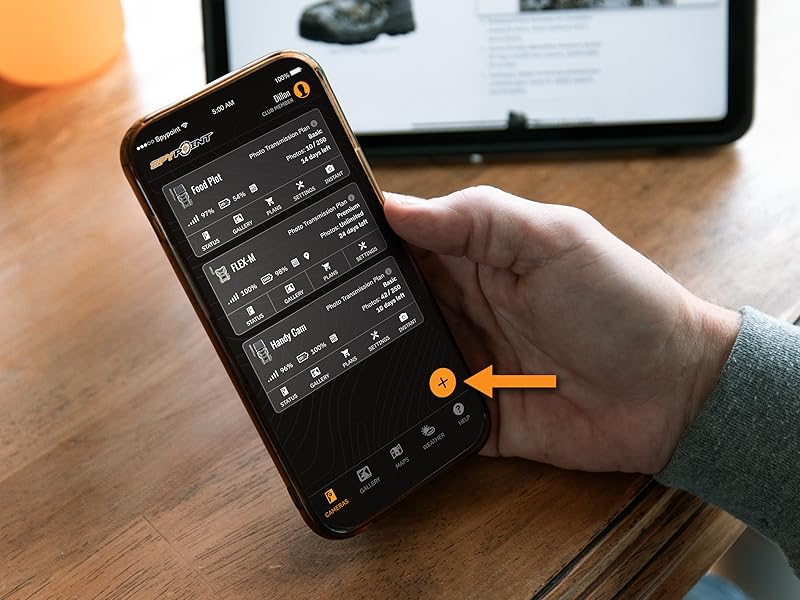
Image: A detailed view of the SPYPOINT Flex-Dark camera, emphasizing its robust and weather-resistant design.

Image: The SPYPOINT Flex-Dark camera illustrating its ability to connect to the best available cellular network for reliable data transmission.
3. Getting Started: Initial Setup
Follow these steps to set up your SPYPOINT Flex-Dark camera for the first time:
- Download the SPYPOINT App: Search for 'SPYPOINT' in your device's app store and install the official application.
- Activate Your Camera: Open the SPYPOINT app and follow the on-screen instructions to add a new device. You will be prompted to scan the QR code located inside the camera's battery compartment.
- Install Components:
- Screw in the antenna firmly.
- Insert the provided microSD card into the designated slot.
- Insert the required batteries (not included, but compatible with LIT-22 rechargeable battery pack or 8 AA batteries).
- Power On and Format SD Card: Turn on the camera using the ON/OFF switch. Once powered on, format the microSD card directly from the camera's settings or via the SPYPOINT app to ensure proper function.
- Perform a Test: Press the 'TEST' button on the camera to check cellular signal strength and confirm connectivity. The status lights will indicate the signal level.

Image: A smartphone scanning the QR code located within the SPYPOINT Flex-Dark camera for device identification and activation.

Image: Visual guide for initial camera setup, showing where to screw in the antenna, insert the microSD card, and locate the power switch.

Image: A close-up of the camera's control panel, indicating the 'FORMAT' button for the microSD card and the 'TEST' button for signal strength.
4. Operation
The SPYPOINT Flex-Dark camera is primarily operated and managed through the SPYPOINT mobile application.
Using the SPYPOINT App:
- Camera Management: The app allows you to view and manage all your connected SPYPOINT cameras. You can check battery levels, signal strength, and storage capacity.
- Photo and Video Retrieval: Captured photos and videos are automatically transmitted to your app, allowing you to view them remotely.
- Settings Configuration: Adjust camera settings such as photo resolution, video length, detection delay, operating schedule, and flash mode (no-glow/low-glow) directly from the app.
- Mapping and Location: Utilize the in-app maps to pinpoint camera locations and plan your scouting routes.

Image: A hand holding a smartphone displaying the SPYPOINT app, showing a list of connected cameras and their status.
5. Maintenance
Proper maintenance ensures the longevity and optimal performance of your SPYPOINT Flex-Dark camera.
- Battery Management: Regularly check battery levels via the app. Replace AA batteries when low, or recharge the LIT-22 battery pack if using. Ensure battery contacts are clean and free of corrosion.
- Cleaning: Use a soft, dry cloth to clean the camera lens and infrared sensors. Avoid abrasive materials or harsh chemicals. Keep the camera housing free of dirt, dust, and debris.
- SD Card Care: Periodically format your microSD card to prevent data corruption and ensure optimal recording performance. Consider replacing the SD card if you experience frequent errors or slow performance.
- Environmental Protection: While weather-resistant, avoid submerging the camera in water. Ensure the latch is securely closed to protect internal components from moisture and dust.

Image: Two SPYPOINT LIT-22 rechargeable lithium battery packs, which are compatible power sources for the Flex-Dark camera.

Image: A SPYPOINT branded 32GB microSD memory card, essential for camera operation.
6. Troubleshooting
If you encounter issues with your SPYPOINT Flex-Dark camera, consider the following common solutions:
- No Photos/Videos Transmitting:
- Check cellular signal strength in the app or by pressing the 'TEST' button on the camera. Relocate the camera if the signal is weak.
- Ensure your photo transmission plan is active and not exceeded.
- Verify that the camera's operating schedule in the app is correctly set.
- Check battery levels.
- Blurry Images/Videos:
- Clean the camera lens and IR sensors with a soft cloth.
- Ensure the camera is securely mounted and not subject to movement from wind or animals.
- Check the focus setting if available, or ensure the camera is within optimal detection range.
- Camera Not Powering On:
- Verify that fresh batteries are installed correctly, or that the LIT-22 battery pack is charged.
- Check battery contacts for corrosion.
- App Connectivity Issues:
- Ensure your smartphone has a stable internet connection.
- Update the SPYPOINT app to the latest version.
- Restart both the camera and your smartphone.
For further assistance, refer to the SPYPOINT support resources available through their official website or within the SPYPOINT app.
7. Technical Specifications
| Specification | Detail |
|---|---|
| Connectivity Protocol | Cellular |
| Controller Type | Push Button |
| Mounting Type | Tree Mount |
| Video Capture Resolution | 1080p |
| Color | Starter Pack- SD (Ghost Grey) |
| Number of Items | 2 (in Twin Starter Pack) |
| Batteries Required? | No (compatible with 8 AA or LIT-22 rechargeable) |
| Video Capture Format | MPEG-4 |
| Unit Count | 2.0 Count |
| UPC | 887157000455 |
| Package Dimensions | 12.24 x 8.82 x 3.35 inches |
| Item Weight | 2.09 pounds |
| ASIN | B0DXDVHM7B |
| Date First Available | May 12, 2025 |
| Manufacturer | SPYPOINT |
| Recommended Uses For Product | Game & Trail |
| Brand | SPYPOINT |
| Connectivity Technology | Wireless |
| Compatible Devices | Smartphone |
| Power Source | Battery Powered |
8. Warranty and Support
The SPYPOINT Flex-Dark Twin Starter Pack comes with a 2-year warranty, ensuring peace of mind regarding product defects and performance issues. For warranty claims or technical support, please visit the official SPYPOINT website or contact their customer service directly. The SPYPOINT app also provides access to support resources and FAQs.
Remember to register your product to activate your warranty and receive important updates.


