
ZHOUCE NF-859MG
NF-859MG Network Cable Tester User Manual
Model: NF-859MG | Brand: ZHOUCE
1. Introduction
The ZHOUCE NF-859MG is a versatile and advanced network cable tester designed for comprehensive network diagnostics. It supports various cable types including POE, CAT5, CAT7, and CAT3, and integrates multiple testing functions such as VFL, POE test, anti-interference RJ11/RJ45 testing, phone line testing, continuity testing, port blinking, and sensitivity adjustments. This device is an essential tool for both professional network installations and DIY enthusiasts, providing accurate and efficient troubleshooting capabilities.

Figure 1: NF-859MG Network Cable Tester with its components.
2. Product Features
- Multifunctional Compatibility: Supports POE, CAT5, CAT7, CAT3, RJ11, RJ45 (CAT5e/CAT6/CAT6a) cables.
- Integrated Testing: Combines VFL (Visual Fault Locator), POE test, network cable test, continuity test, and port blinking.
- Advanced Features: Includes anti-interference capabilities, sensitivity adjustments, and a new receiver design.
- Visual Fault Locator (VFL): Features a 10mW red pen function with 650nm wavelength for fiber optic cable testing, offering fast flash, slow flash, and high accuracy modes.
- POE Testing: Quickly identifies Power Over Ethernet status and voltage presence.
- Continuity Test: Ensures proper functioning of network cables.
- Port Blinking: Helps identify connected ports on network devices.
- Non-Contact Voltage (NCV) Test: Detects voltage presence in cables, including POE lines and 120V sources.
- RJ45 QC Function: Provides a 1-second test for RJ45 crimp status.
- User-Friendly Design: Compact size, lightweight, and easy-to-read indicator lights.
3. Package Contents
The NF-859MG Network Cable Tester package includes the following items:
- NF-859MG Transmitter Unit
- NF-859MG Receiver Unit
- USB Charging Cable
- RJ11 Cable
- RJ45 Cable
- Alligator Clip Cable
- User Manual (this document)
Figure 2: The NF-859MG Network Cable Tester and included accessories.
4. Setup
Before using the NF-859MG, ensure both the Transmitter and Receiver units are adequately charged. Use the provided USB charging cable to charge the devices via their Type-C charging ports.
4.1 Component Identification
Familiarize yourself with the main components and ports of the Transmitter and Receiver units:

Figure 3: Labeled diagram of the NF-859MG Transmitter and Receiver units.
- Transmitter Unit: Power indicator, Line sequence indicator, Type-C charging port.
- Receiver Unit: Probing Rod, Power Indicator, Wire Detection Signal Strength Indicator, Wire Detection Sensitivity Adjustment Knob, Power switch, Wire Detection Key, Alignment Test Key, Local Alignment Test R Port, NCV button, Red Light Key, Crimping Test Port, Local Alignment Test M Port, M Wiring Sequence Indicator, R Wiring Sequence Indicator, Remote Alignment Test A Port, Bottom Cover.
5. Operating Instructions
5.1 POE Testing
The NF-859MG can test for Power Over Ethernet (POE) presence and status. Connect the Transmitter unit to the POE-enabled port. The device will indicate if POE voltage is present.

Figure 4: Performing a POE test with the NF-859MG Transmitter.
The device features a 60V anti-burn design, allowing direct connection to a switch for wire-to-wire testing without risk of damage. The Transmitter and Receiver can individually test POE switch power supply wire core connections.

Figure 5: POE cable core connection testing methods (1-2 or 3-6 illuminated, 4-5 or 7-8 illuminated, 8-pole POE powered).
5.2 Continuity Test
To perform a continuity test, connect one end of the network cable to the Transmitter and the other end to the Receiver. The indicator lights on both units will illuminate in sequence, verifying the proper connection and continuity of each wire pair.
5.3 Visual Fault Locator (VFL)
The VFL function is used to test fiber optic cables. Connect the fiber optic cable to the VFL port on the Receiver unit. The red light emitted (10mW, 650nm) will help locate breaks or faults in the fiber. The VFL supports fast flash, slow flash, and continuous light modes.

Figure 6: Using the 10KM Red Light Pen (VFL) function for fiber optic testing. Note: SC, FC, ST connectors/fiber optic cables are not included.
5.4 Port Blinking
The port blinking function helps identify the connected port on a network switch or router. When activated, the indicator light on the connected port will blink, making it easy to trace cables in a crowded network environment.
5.5 RJ45 QC Function
This function allows for a quick quality check of RJ45 crimp connections. Connect the crimped RJ45 cable to the designated port on the Receiver. The device performs a 1-second test to verify the crimp status, indicating if any core is not pressed in properly.

Figure 7: RJ45 QC Function in action, detecting a faulty crimp connection.
5.6 NCV (Non-Contact Voltage) Measurement
The NCV function allows for non-contact detection of AC voltage. Hold the probing rod of the Receiver near a live wire or a POE cable to detect voltage presence without direct contact. This is useful for safety and quick identification of powered lines.

Figure 8: NCV (Non-Contact Voltage) measurement and LED lighting feature.
The Receiver also features a built-in LED flashlight, controlled by a 3-position switch, useful for working in dark environments.
5.7 Anti-interference Wire Finding
The NF-859MG is designed with anti-interference technology for accurate wire finding, checking, and matching. When using the wire finding mode, the Transmitter transmits digital signals, and the Receiver filters interference signals, providing more precise line tracing, especially in environments with power lines.

Figure 9: Anti-interference wire finding in action.
5.8 Receiver Pairing Method
The Receiver and Transmitter units can be paired for remote testing. The line-seeking mode allows direct operation without switching between units. Both units can measure network cables independently or in conjunction.
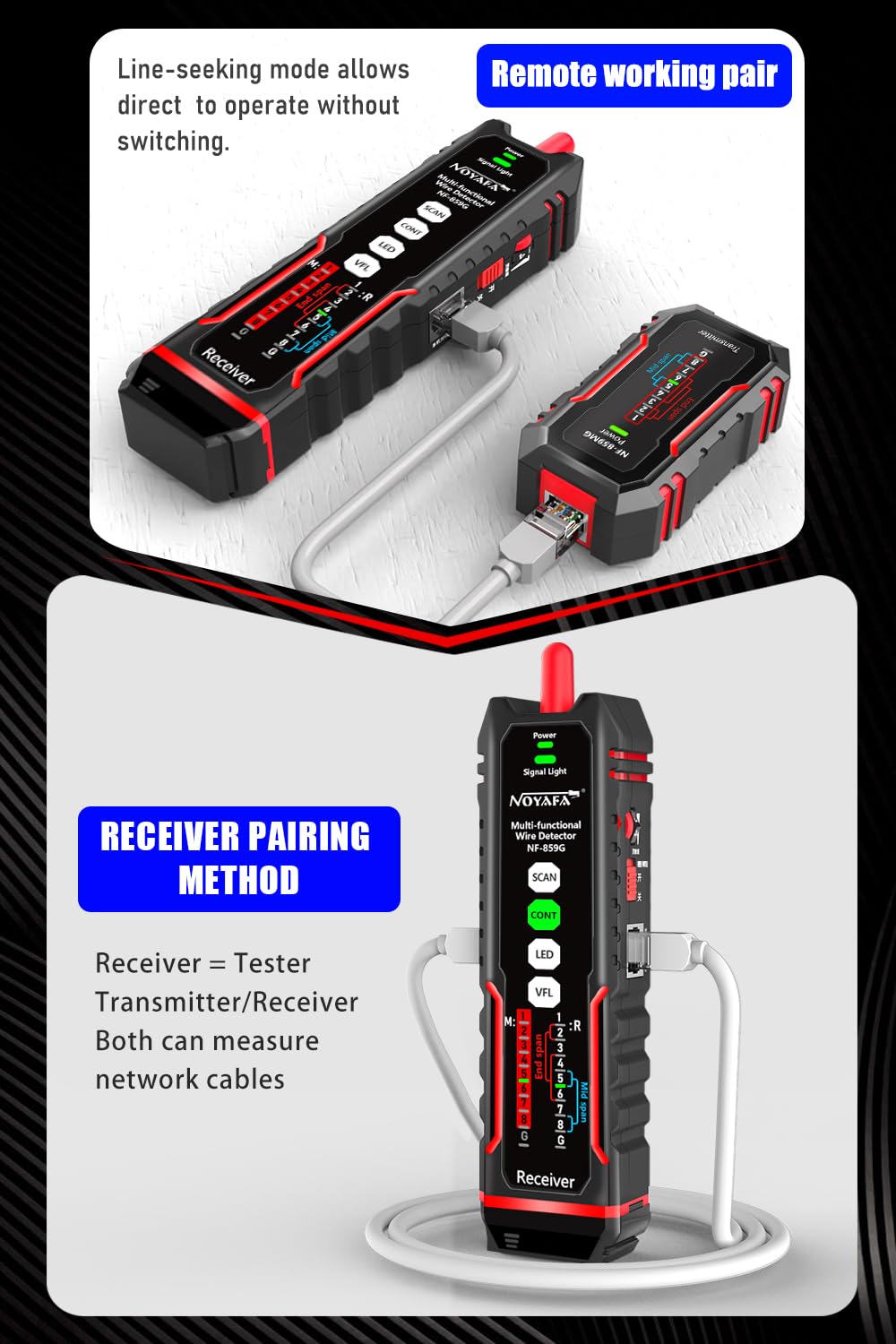
Figure 10: Receiver pairing and cable measurement setup.
6. Maintenance
- Cleaning: Use a soft, dry cloth to clean the device. Do not use abrasive cleaners or solvents.
- Storage: Store the device in a cool, dry place away from direct sunlight and extreme temperatures.
- Charging: Ensure the device is charged regularly, especially if not used for extended periods, to maintain battery health.
- Handling: Handle the device with care to avoid drops or impacts that could damage internal components.
7. Troubleshooting
| Problem | Possible Cause | Solution |
|---|---|---|
| Device does not power on. | Low battery or no charge. | Charge the device using the provided USB cable. |
| Cable test results are inconsistent or incorrect. | Poor cable connection, damaged cable, or dirty ports. | Ensure cables are securely connected. Inspect cables for damage. Clean ports if necessary. |
| VFL red light is dim or not visible. | Low battery or dirty VFL port/fiber end. | Charge the device. Clean the VFL port and fiber optic cable end. |
| NCV function not detecting voltage. | Not close enough to the live wire, or no voltage present. | Ensure the probing rod is very close to the wire. Verify voltage presence with another method if possible. |
8. Specifications
| Feature | Detail |
|---|---|
| Model Number | NF-859MG |
| Brand | ZHOUCE |
| Dimensions | 10.2 x 5.71 x 2.05 inches (Package) |
| Item Weight | 0.68 Pounds (approx. 10.88 ounces) |
| Color | Black |
| Power Source | Rechargeable (via Type-C) |
| VFL Emission Energy | 10mW |
| VFL Wavelength | 650nm |
| POE Anti-burn Voltage | 60V |
| Supported Cable Types | POE, CAT5, CAT7, CAT3, RJ11, RJ45 (CAT5e/CAT6/CAT6a) |
9. Warranty and Support
For warranty information and technical support, please refer to the contact details provided by ZHOUCE at the point of purchase or visit the official ZHOUCE website. Keep your purchase receipt as proof of purchase for warranty claims.
The manufacturer, ZHOUCE, has been a professional and reliable test technician, developer, manufacturer, and seller of measurement and inspection products and solutions since 1999. They offer a range of wire-finding instruments, thermal cameras, multimeters, and underground wire testers.
Ask a question about this manual
Ask about setup, troubleshooting, compatibility, parts, safety, or missing instructions. Manuals+ will review the question and use this page’s manual context to help answer it.