
ANRAN US-Q04-3MP-2Pack
ANRAN Solar Security Cameras Wireless Outdoor Instruction Manual
Model: US-Q04-3MP-2Pack
Introduction
Thank you for choosing the ANRAN Solar Security Camera. This manual provides comprehensive instructions for setting up, operating, and maintaining your wireless outdoor security cameras. Designed for optimal home surveillance, these cameras feature 2K resolution, 360° PTZ control, AI human detection, and solar-powered operation for continuous security.

Image: Two ANRAN Solar Security Cameras, highlighting their compact design and integrated solar panels.
What's in the Box
Please verify that all components are present before beginning installation:
- 2 x Wireless Solar Camera
- 2 x 1.6W Solar Panel (fixed to camera)
- 2 x USB Cable
- 2 x Screw Pack
- 1 x User Manual
- 2 x Mounting Hole Template
- 1 x Surveillance Sign

Image: A visual representation of all items included in the product package, ensuring users can confirm they have everything needed for setup.
Setup
1. Installation
The ANRAN Solar Security Camera is designed for simple installation. Choose a location with ample sunlight exposure for the solar panel and a strong Wi-Fi signal. Use the provided mounting bracket and screws to securely attach the camera to a wall or suitable surface.

Image: A person installing the ANRAN camera on an exterior wall, demonstrating the ease of setup without separate solar panel installation.
2. App Download and Connection
Download the ANRAN app from your smartphone's app store (available on Google Play and the App Store). Follow the voice guidance within the app to connect your camera to your 2.4G WiFi network. Ensure your camera is fully charged via the USB cable before initial setup for a smooth experience.
Video: An official ANRAN video demonstrating the features and setup process of the Q04 Solar Security Camera, including app connectivity and key functionalities.
Operating Instructions
1. 360° PTZ Control
Utilize the ANRAN app to remotely control the camera's Pan-Tilt-Zoom (PTZ) functions. The 360° pan and 90° tilt capabilities allow you to monitor every corner of your property, eliminating blind spots.

Image: Illustrates the camera's 360° pan and 90° tilt functionality, providing comprehensive surveillance coverage.
2. Night Vision Modes
The camera offers three night vision modes for clear visibility in low-light conditions:
- Smart Mode: Automatically switches between infrared and color night vision based on detected motion.
- Color Mode: Provides full-color night vision using built-in spotlights.
- Infrared Mode: Standard black and white infrared vision for discreet monitoring.
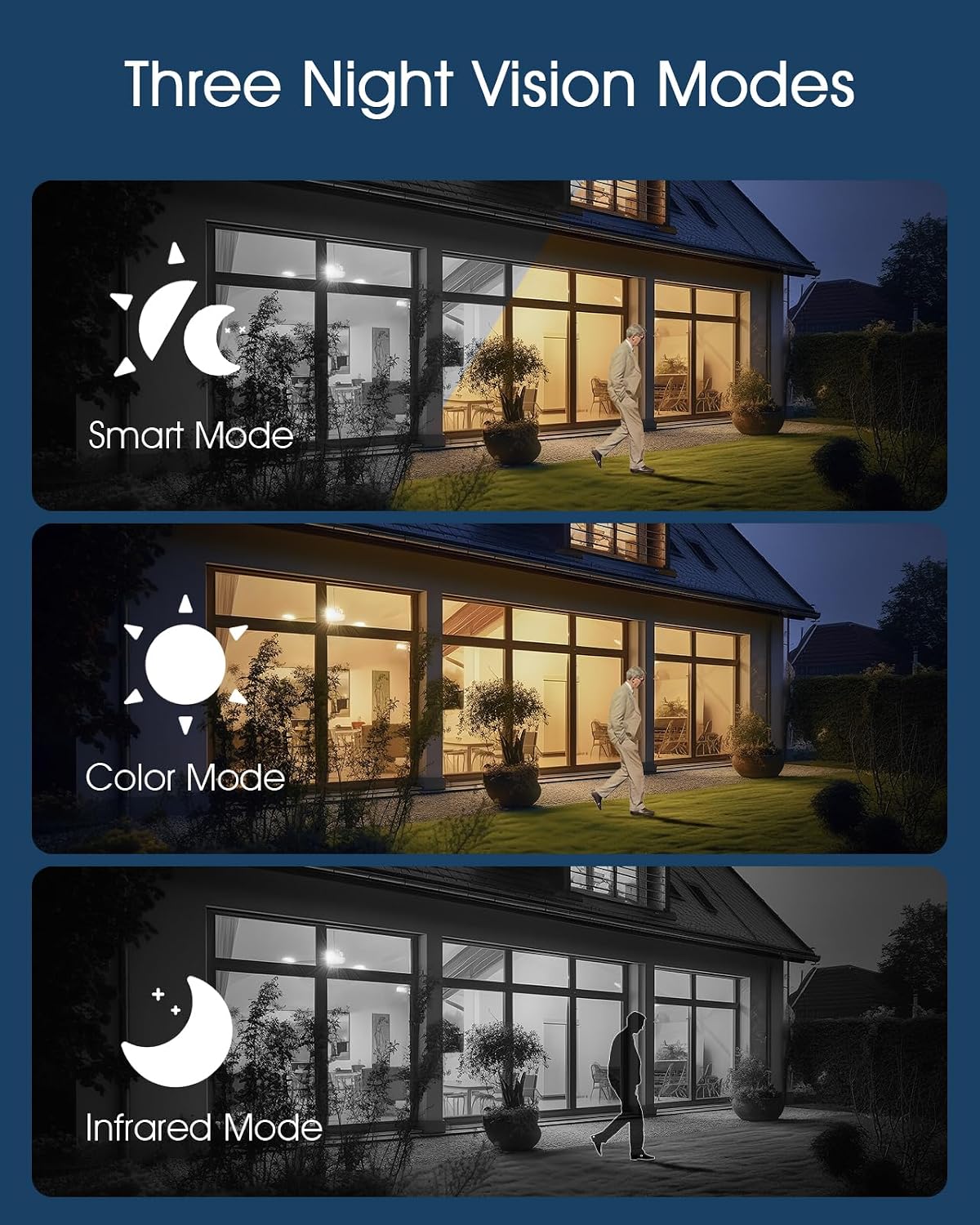
Image: Demonstrates the three night vision modes (Smart, Color, Infrared) for enhanced visibility in various lighting conditions.
3. AI Human Detection & Real-Time Alerts
The camera's intelligent motion detection focuses and tracks human movement, reducing false alarms. Receive immediate mobile notifications when a threat is detected. Alarm options include siren, spotlights, and app notifications.

Image: Visual representation of the AI Human Detection feature, highlighting a detected person within the camera's view.
4. Two-Way Audio Communication
Engage in real-time two-way conversations through the camera using the ANRAN app. This feature allows you to communicate with visitors or deter intruders from anywhere.

Image: A user interacting with the camera via the app, demonstrating the two-way audio communication feature.
5. Storage Options
Your ANRAN camera supports two storage modes:
- Lifetime Free Cloud Storage: Records 6-second clips with 7-day loop coverage permanently.
- SD Card Storage: Supports up to 128GB MicroSD card (not included) for continuous recording.

Image: Illustrates the dual storage options: local MicroSD card (up to 128GB) and 7-day free cloud storage.
Maintenance
1. Cleaning
Regularly wipe the solar panel and camera lens with a soft, damp cloth to ensure optimal performance. Avoid using harsh chemicals or abrasive materials that could damage the surfaces.
2. Solar Panel Exposure
Ensure the fixed solar panel receives adequate direct sunlight daily for continuous power. Trim any overhanging branches or clear debris that might obstruct sunlight.

Image: The camera is shown enduring rain, emphasizing its IP66 waterproof and dustproof rating for outdoor use.
Troubleshooting
| Problem | Possible Cause / Solution |
|---|---|
| Camera not connecting to Wi-Fi | Ensure 2.4G Wi-Fi is enabled. Check Wi-Fi signal strength at installation location. Restart camera and router. |
| Battery not charging | Verify solar panel is receiving direct sunlight. Clean the solar panel. Charge via USB cable if sunlight is insufficient. |
| False motion alerts | Adjust detection sensitivity in the app. Utilize customizable detection zones to exclude irrelevant areas. |
| Poor night vision quality | Ensure camera lens is clean. Check for obstructions blocking infrared LEDs. Adjust night vision mode settings. |
For further assistance, please refer to the support information in the Warranty and Support section.
Specifications
| Feature | Detail |
|---|---|
| Indoor/Outdoor Usage | Outdoor |
| Compatible Devices | Smartphone |
| Power Source | Solar Powered |
| Connectivity Protocol | Wi-Fi (2.4G) |
| Controller Type | Google Assistant, Amazon Alexa |
| Mounting Type | Wall Mount |
| Video Capture Resolution | 3MP, 2K |
| Number of Items | 2 |
| Wireless Communication Technology | Wi-Fi |
| Form Factor | Dome |
| Viewing Angle | 360 Degrees (PTZ) |
| Night Vision Range | 50 Feet |
| Frame Rate | 25 frames per second |
| Material | Acrylonitrile Butadiene Styrene (ABS) |
| Water Resistance Level | Waterproof (IP66) |
| Flash Memory Supported Size Maximum | 128 GB (SD) |
| Battery Power | 5000 Milliamp Hours |
| Special Feature | HD Resolution, 2-Way Audio, Night Vision, Weather Proof, PTZ Technology |
Warranty and Support
ANRAN offers a 2-year warranty for these cameras. If you encounter any problems or require technical assistance, please contact our professional technical team and after-sales team. We are available to assist you within 24 hours on weekdays.
For multi-channel service including email, phone, and live chat, please refer to the contact information provided in the included User Manual.
Ask a question about this manual
Ask about setup, troubleshooting, compatibility, parts, safety, or missing instructions. Manuals+ will review the question and use this page’s manual context to help answer it.