
Introduction
This manual provides detailed instructions for the setup, operation, and maintenance of your MARVO KG933G Saber 61 Mechanical Gaming Keyboard. Please read this manual thoroughly before using the product to ensure optimal performance and longevity.
Package Contents
- MARVO KG933G Saber 61 Mechanical Gaming Keyboard
- Detachable USB Type-C Cable
- User Manual (this document)
Product Overview
The MARVO KG933G Saber 61 is a compact 60% mechanical gaming keyboard designed for performance and portability. It features durable mechanical switches, dynamic RGB backlighting, and full anti-ghosting capabilities.
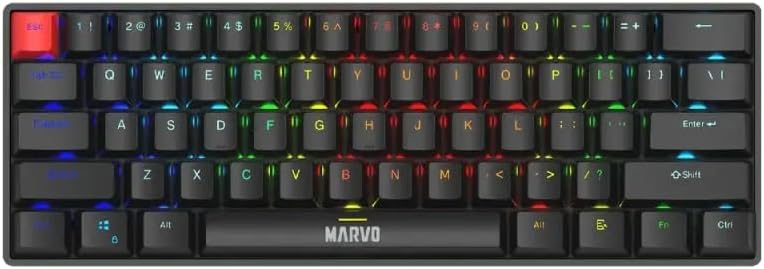
Image 1: Top-down view of the MARVO KG933G keyboard, showcasing its compact 60% layout and rainbow backlighting.
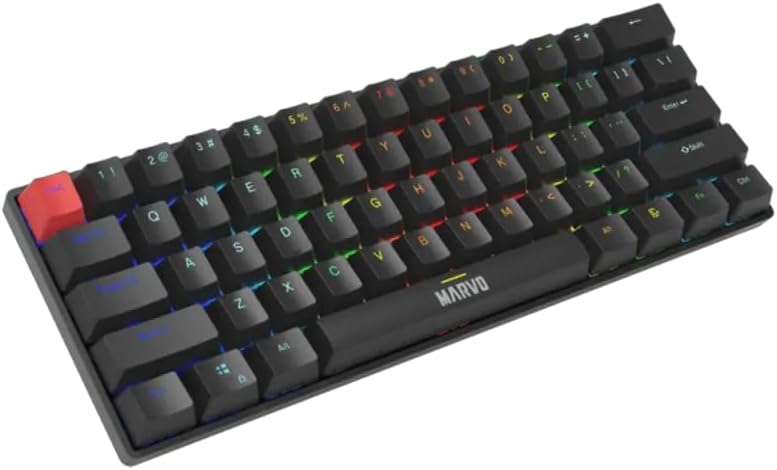
Image 2: Angled view of the MARVO KG933G keyboard, highlighting the keycap profile and illuminated keys.
Setup
- Connect the Cable: Insert the USB Type-C end of the detachable cable into the port on the back of the keyboard.
- Connect to Computer: Plug the standard USB-A end of the cable into an available USB port on your computer.
- Driver Installation: The keyboard is plug-and-play. Your operating system (Windows 8+ or Mac OS X 10.10+) will automatically detect and install the necessary drivers.
- Ready for Use: Once drivers are installed, the keyboard is ready for immediate use.
Operating Instructions
Basic Key Functions
The KG933G features a 60% layout, meaning some functions are accessed via the FN (Function) key in combination with other keys.
Multimedia Keys (FN Combinations)
Access multimedia controls by holding down the FN key and pressing the corresponding key:
- FN + A: Previous Track
- FN + S: Play/Pause
- FN + D: Next Track
- FN + F: Mute
- FN + G: Volume Down
- FN + H: Volume Up
- FN + J: Web Browser
- FN + K: My Computer
- FN + L: Email
- FN + ;: Calculator
Backlight Control (FN Combinations)
The keyboard features dynamic RGB backlighting with 12 lighting modes. Control the backlighting using the following combinations:
- FN + \|: Change Lighting Mode (Cycle through 12 modes)
- FN + [{: Decrease Brightness
- FN + ]}: Increase Brightness
- FN + ;: Decrease Lighting Speed
- FN + ': Increase Lighting Speed

Image 3: The MARVO KG933G keyboard showcasing its vibrant RGB lighting effects in a typical desk setup.
Anti-Ghosting
The MARVO KG933G features full N-key rollover (anti-ghosting) which ensures that every keypress registers accurately, even when multiple keys are pressed simultaneously. This feature is automatically enabled and requires no configuration.
Programmable Features
The keyboard supports macro programming and customizable keys. For advanced configuration and macro setup, please refer to the official MARVO software (if available for this model) or third-party remapping tools. Specific instructions for software usage are typically provided with the software itself.
Maintenance
Cleaning the Keyboard
- Disconnect the keyboard from your computer before cleaning.
- Use a soft, lint-free cloth slightly dampened with water or a mild cleaning solution to wipe the keycaps and chassis.
- For dust and debris between keys, use compressed air.
- Avoid using harsh chemicals, abrasive cleaners, or excessive moisture.
Keycap Removal (Optional)
If you need to clean under the keycaps or replace them, use a keycap puller. Gently pull the keycap straight up. When reattaching, align the keycap with the switch stem and press down firmly until it clicks into place.

Image 4: Illustration of using a keycap puller to safely remove a keycap from the MARVO KG933G keyboard.
Troubleshooting
- Keyboard not responding:
- Ensure the USB cable is securely connected to both the keyboard and the computer.
- Try connecting the keyboard to a different USB port on your computer.
- Test the keyboard on another computer to rule out a computer-specific issue.
- Restart your computer.
- Backlighting not working or incorrect:
- Ensure the keyboard is properly connected.
- Use the FN + \| combination to cycle through lighting modes.
- Use FN + [{ and FN + ]} to adjust brightness.
- Keys not registering or double-typing:
- Clean the affected key(s) using compressed air to remove any debris.
- If the issue persists, it may indicate a switch malfunction. Contact customer support.
Specifications
| Keyboard Type | Mechanical switch |
| Switch Type | Red Switch (50-million keystroke lifespan) |
| Keyboard Size | 60% Compact Design |
| Backlighting | Rainbow Backlight with 12 Lighting Modes |
| Anti-Ghosting | Full keys anti-ghosting (N-key rollover) |
| Connectivity | Wired (Detachable USB Type-C Cable, 1.5m PVC cable) |
| Multimedia Keys | Yes, Through Function Key (FN) |
| Compatible OS | Mac OS X 10.10+, Windows 8+ |
| Durable Design | Double injection keycaps |
Warranty and Support
The MARVO KG933G Saber 61 Mechanical Gaming Keyboard comes with a manufacturer's warranty of 6 months from the date of purchase.
For technical support, warranty claims, or further assistance, please contact your retailer or visit the official MARVO website for contact information.
Spare part information is not available or provided at this time.


