
Introduction
This user manual provides instructions for the New Remotes BN59-01388H Smart TV Remote Control. This remote is designed for seamless compatibility with 2023 and 2024 Samsung Smart TVs, offering a direct replacement experience without the need for complex programming.
Please read this manual thoroughly to understand the features and proper operation of your new remote control.
Setup
1. Battery Installation
The BN59-01388H remote control requires two AAA batteries (not included). Follow these steps to install them:
- Locate the battery compartment cover on the back of the remote control.
- Gently slide the battery cover downwards to open the compartment.
- Insert two AAA batteries, ensuring the positive (+) and negative (-) terminals align correctly with the markings inside the compartment.
- Slide the battery cover back into place until it clicks securely.
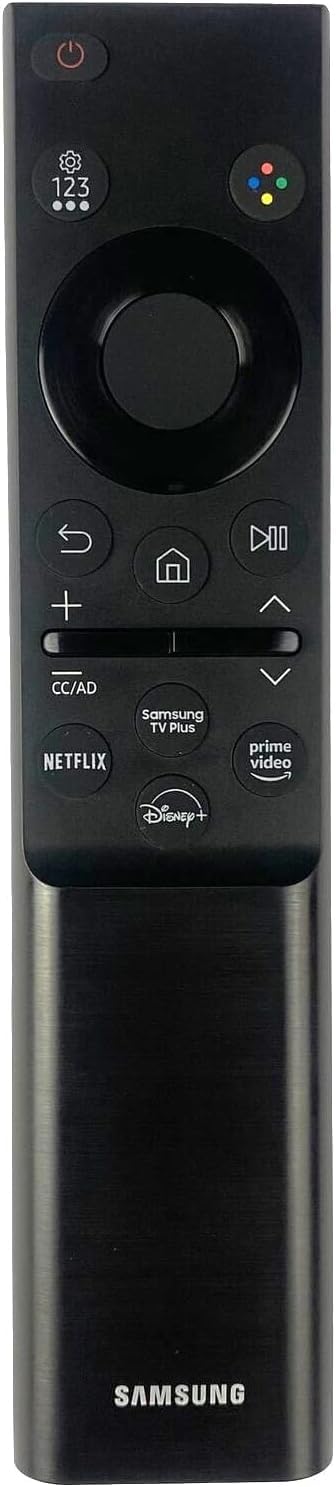
Image: The BN59-01388H remote control with its battery compartment open, showing two AAA batteries inserted. The back cover slides down to reveal the battery slots.
2. Initial Use
This remote control is designed for immediate use with compatible 2023 and 2024 Samsung Smart TVs. No programming or pairing is required. Simply insert the batteries, and the remote should function directly with your television.
Operating the Remote Control
The BN59-01388H remote control features a user-friendly layout with dedicated buttons for essential functions and popular streaming services.
Button Functions:
- Power Button (⏻): Turns the TV on or off.
- Navigation Pad (Circular): Use the directional arrows (Up, Down, Left, Right) to navigate menus and select items. The center button acts as an "Enter" or "OK" button.
- Back Button (↩): Returns to the previous screen or menu.
- Home Button (⌂): Accesses the Smart Hub or home screen of your Samsung TV.
- Play/Pause Button (⏸): Controls media playback (play, pause).
- Volume Buttons (+/-): Adjusts the TV volume. Pressing the volume button can also mute/unmute the sound.
- Channel Buttons (Up/Down Arrows): Changes TV channels.
- CC/AD Button: Toggles Closed Captions or Audio Description.
- Dedicated App Buttons: Direct access to popular streaming services such as Netflix, Samsung TV Plus, Prime Video, and Disney+.
Point the remote control directly at your Samsung TV for optimal performance. Ensure there are no obstructions between the remote and the TV's infrared receiver.
Maintenance
Cleaning:
To clean your remote control, use a soft, dry cloth. For stubborn dirt, slightly dampen the cloth with water or a mild, non-abrasive cleaner. Avoid using harsh chemicals or abrasive materials, as these can damage the remote's surface or internal components.
Battery Replacement:
Replace the batteries when the remote control becomes unresponsive or its range decreases significantly. Always replace both batteries at the same time with new AAA batteries. Do not mix old and new batteries, or different types of batteries, as this can lead to leakage or malfunction.
Troubleshooting
| Problem | Solution |
|---|---|
| Remote is not responding. |
|
| Buttons are not working. |
|
| Remote range is reduced. |
|
Specifications
- Model Number: BN59-01388H
- Brand: New Remotes
- Compatible Devices: 2023 and 2024 Samsung Smart Televisions
- Connectivity Technology: Infrared (IR)
- Special Feature: No Programming Required
- Power Source: 2 x AAA Batteries (not included)
- Dimensions: Approximately 6.38 x 1.85 x 0.55 inches (16.2 x 4.7 x 1.4 cm)
- Item Weight: Approximately 1.44 ounces (40.8 grams)
Warranty and Support
For any questions, troubleshooting assistance, or warranty inquiries regarding your New Remotes BN59-01388H Smart TV Remote Control, please contact the seller or manufacturer directly. Refer to your purchase documentation for specific warranty terms and contact information.


