
HBEZON 24x30 Left Hinge
HBEZON Medicine Cabinet with LED Lights and Mirror
Model: 24x30 Left Hinge
User Instruction Manual
1. Introduction
This manual provides detailed instructions for the installation, operation, and maintenance of your HBEZON Medicine Cabinet with LED Lights and Mirror. Please read this manual thoroughly before installation and use to ensure proper function and safety. This cabinet is designed to enhance your bathroom with smart features and efficient storage.
2. Important Safety Information
WARNING: Always follow the manufacturer's instructions for installation and use. Do not attempt to install the cabinet if you are not comfortable doing so. If the cabinet is to be hardwired, it should be done by a licensed electrician. Keep electrical outlets and USB ports dry and away from water. Do not overload the outlets or use damaged cords.
- Ensure all electrical connections are made by a qualified professional if hardwiring.
- Do not expose the electrical components to excessive moisture or water.
- Always disconnect power before performing any maintenance or cleaning.
- This product contains glass components; handle with care to prevent breakage and injury.
3. Package Contents
Verify that all components are present before beginning installation:
- Medicine cabinet with mirror
- Mounting Hardware
- Adjustable Shelves (3 included)
4. Product Features
The HBEZON Medicine Cabinet is equipped with advanced features for convenience and functionality:
- 3 Color Lighting Modes & Adjustable Brightness: High-brightness 6000 Lumens LED light strip with warm, natural, and cold white modes. Brightness is fully adjustable from 0% to 100%.
- Memory Function: Remembers your last light setting for added convenience.
- Anti-fog Function: Built-in defogger keeps your reflection clear in steamy environments.
- Electrical Outlet & USB Port: Built-in outlets and USB ports for easy device charging.
- Soft-Close DTC Hinges: Rustproof hinges with silent buffering technology for smooth and quiet door closure.
- Space-Saving Design: Adjustable shelves maximize storage space, keeping items organized and dust-free.
- Durable Construction: Aluminum frame designed to withstand bathroom humidity.

Figure 1: Overview of key features and functionalities.
5. Installation Guide
5.1 Mounting Options
This medicine cabinet supports both surface wall-mounted and recessed installation:
- Surface Mount: The cabinet is mounted directly onto the wall surface.
- Recessed Mount: With detachable glass panels, the cabinet can be recessed into a wall cutout for a flush, integrated look.

Figure 2: Recessed Mount vs. Wall Mount Installation.
5.2 Dimensions
Ensure your installation area accommodates the cabinet's dimensions:
- Product Dimensions: 5"D x 24"W x 30"H
- For recessed installation, a cutout of approximately 23"W x 29"H x 4"D is required.
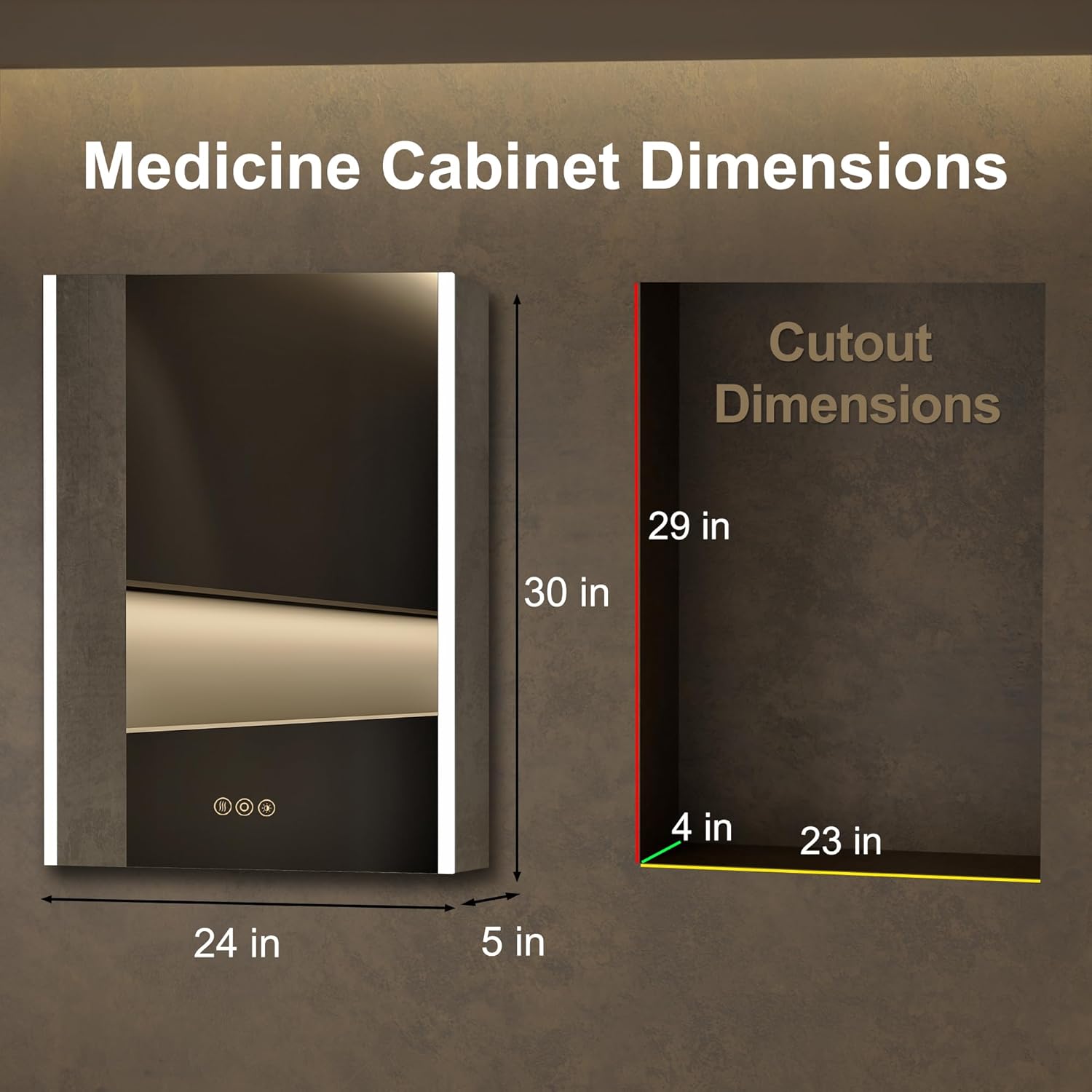
Figure 3: Medicine Cabinet and Cutout Dimensions.
5.3 Electrical Connection
The cabinet is designed for hardwired installation. It is strongly recommended that a licensed electrician perform the electrical wiring to ensure safety and compliance with local codes.
6. Operating Instructions
6.1 Smart Touch Controls
The mirror features smart touch buttons for controlling lighting and defogging functions:
- Power On/Off: Short press the power icon to turn the mirror lights on or off.
- Adjust Brightness: Long press the brightness icon to dim or brighten the lights (0% to 100%). The memory function will recall your last brightness setting.
- Change Color Temperature: Short press the color temperature icon to cycle through warm (3000K), natural (4000K), and cold white (6000K) lighting modes.
- Anti-Fog Function: Press the defogger icon to activate or deactivate the anti-fog feature. This keeps the mirror clear in humid conditions.

Figure 4: Adjusting Light Color Temperature.

Figure 5: Brightness Dimmer and Memory Function.

Figure 6: Anti-Fog Function in operation.
6.2 Internal Features
- Electrical Outlets and USB Ports: Located inside the cabinet, these allow for convenient charging of electric razors, toothbrushes, or other devices. Ensure the door is open when using these ports.
- Adjustable Shelves: The glass shelves can be repositioned to accommodate items of various heights, optimizing your storage space.

Figure 7: Internal Features: Outlets, USB, Hinges, and Light Strip.

Figure 8: Spacious Interior Storage with Adjustable Shelves.
Video 1: Demonstration of the medicine cabinet's features, including lighting, anti-fog, and storage.
7. Maintenance
To ensure the longevity and optimal performance of your medicine cabinet, follow these maintenance guidelines:
- Cleaning the Mirror: Use a soft, lint-free cloth and a non-abrasive glass cleaner. Spray the cleaner onto the cloth, not directly onto the mirror, to prevent liquid from seeping into the electrical components.
- Cleaning the Cabinet Interior: Wipe down interior surfaces and shelves with a damp cloth and mild soap. Dry thoroughly.
- Electrical Components: Keep the electrical outlets and USB ports clean and dry. Do not use water or liquid cleaners near these components.
- Hinges: Periodically check the soft-close hinges for smooth operation. No lubrication is typically required.
8. Troubleshooting
If you encounter any issues with your medicine cabinet, refer to the following common problems and solutions:
| Problem | Possible Cause | Solution |
|---|---|---|
| Lights not turning on | No power supply; loose wiring; faulty LED driver. | Check circuit breaker. Ensure all wiring connections are secure (consult electrician if unsure). Contact customer support if issue persists. |
| Anti-fog not working | Anti-fog function not activated; power issue. | Ensure the anti-fog touch button is pressed. Check power supply to the unit. |
| Touch controls unresponsive | Mirror surface is wet or dirty; temporary electronic glitch. | Clean and dry the mirror surface. Disconnect power for 5 minutes and then reconnect to reset. |
| Outlets/USB not providing power | Power switch for outlets is off; circuit overload. | Ensure the internal power switch for the outlets is in the ON position. Do not overload the outlets. |
If you are unable to resolve an issue using these steps, please contact HBEZON customer support for further assistance.
9. Specifications
| Attribute | Detail |
|---|---|
| Brand | HBEZON |
| Model | 24x30 Left Hinge |
| Color | Silver |
| Product Dimensions | 5"D x 24"W x 30"H |
| Mounting Type | Wall Mount or Recessed Mount |
| Number of Doors | 1 |
| Number of Shelves | 3 |
| Frame Material | Aluminum |
| Item Weight | 51.9 pounds |
| Special Features | Smart Touch Control, Lighting Memory Function, Dimmable, 3 Color Lighting Modes, Defogger, Space-saving, Soft-close Hinges, Electrical Outlet & USB Port, Adjustable Shelves |
10. Warranty and Support
For information regarding product warranty, returns, or technical support, please refer to the warranty card included with your purchase or visit the official HBEZON website. Customer support is available to assist with any questions or concerns you may have.
Related documents24x30 Left Hinge


Ask a question about this manual
Ask about setup, troubleshooting, compatibility, parts, safety, or missing instructions. Manuals+ will review the question and use this page’s manual context to help answer it.