
1. Introduction
This manual provides detailed instructions for the installation, setup, and operation of your Vonnision 12MP POE IP Fisheye Camera. This camera is designed for both indoor and outdoor surveillance, offering a 6K Ultra HD panoramic view with advanced features for comprehensive security monitoring.
2. What's in the Box
- 1PCS 12MP Panoramic Fisheye IP Camera
- Mounting hardware (screws, drywall anchors)
- Waterproof lid
- Mounting template
- Ethernet cable (1m)
- Quick Start Guide
- Surveillance Sticker

Image: Vonnision 12MP POE IP Fisheye Camera and its standard accessories.
3. Product Overview and Features
The Vonnision 12MP POE IP Fisheye Camera offers a wide range of features designed for robust surveillance:
- 1.5mm Fisheye Lens & 6K Ultra HD: Provides a super wide 180° viewing angle with 12-megapixel resolution, eliminating blind spots.
- Power over Ethernet (PoE): Simplifies installation by combining power and data transmission over a single Ethernet cable.
- Fisheye Dewarping: Delivers clear and undistorted images from the panoramic view.
- Advanced Sensor Technology: Equipped with Sigmastar Mstar359 SoC and 1/2.3'' IMX577 Starvis Starlight Sensing Sensor for superior image quality.
- Wide Dynamic Range (WDR) & 3D Noise Reduction (3D NR): Ensures clear images in challenging lighting conditions.
- Motion & Human Body Detection: Intelligent detection capabilities to minimize false alarms.
- 1-Way Talk: Built-in microphone for audio monitoring.
- Durable Design: Metal housing with IP66 waterproof rating, suitable for harsh weather conditions. Includes built-in surge and lightning protection.
- Excellent Night Vision: 3pcs Matrix IR LEDs provide up to 49 feet of clear night vision.
- Broad Compatibility: Supports H.265/H.264 dual compression and is compatible with various 6K PoE NVRs, QNAP, NAS, FTP, Blue Iris, Ispy, and plug-and-play with Hikvision, LTS, EZVIZ, Dahua, Lorex, Uniview, TVT, and Raysharp NVRs (with DHCP enabled).

Image: Overview of Vonnision 12MP POE IP Fisheye Camera features.
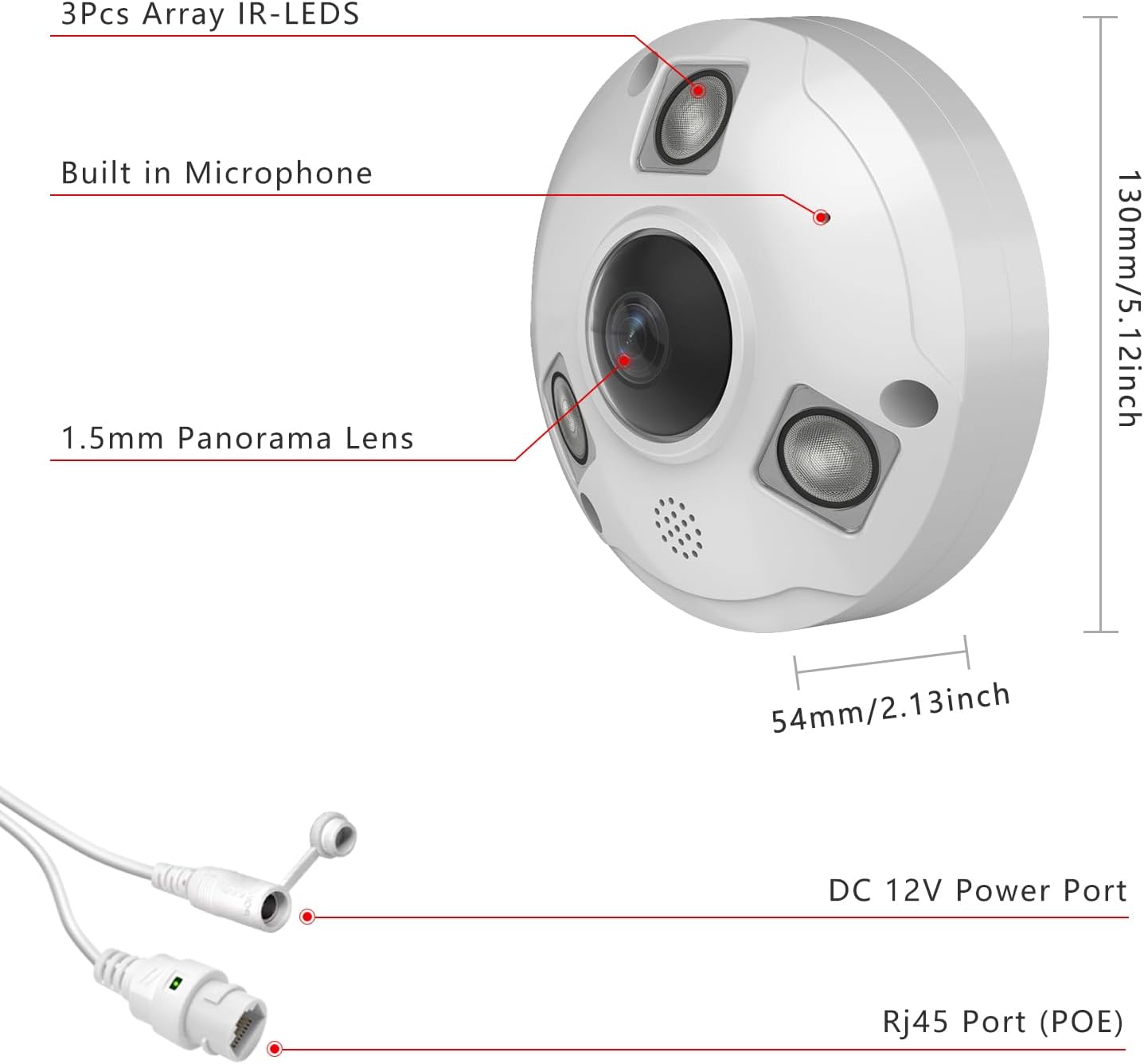
Image: Physical dimensions and connection ports.

Image: Micro SD Card slot for local storage.

Image: One-way audio feature.

Image: IP66 Weatherproof Rating.
4. Installation
Follow these steps to properly install your Vonnision 12MP POE IP Fisheye Camera:
- Prepare the Mounting Surface: Use the provided mounting template to mark and drill holes on your desired ceiling or wall location. Insert the drywall anchors if necessary.
- Remove Dome Cover: Use a hex key to unscrew and remove the dome cover from the camera base. Keep the protective film on the lens until installation is complete.
- Secure the Base: Pass the Ethernet cable through the cable notch on the mount base. Secure the camera base to the mounting surface using the provided screws.
- Adjust Viewing Angle: Adjust the camera's lens to achieve the optimal viewing angle. The camera supports 360° horizontal and 57° vertical manual adjustments.
- Attach Dome Cover: Securely reattach the dome cover to the camera base using the screws.

Image: Connecting the POE Camera to an NVR.
Video: Unboxing and Installation Guide (Reolink Duo 2V PoE). This video provides a general overview of the installation process, which is similar for many dome-style PoE cameras.
5. Setup and Configuration
After physical installation, configure your camera for optimal performance:
- Network Connection: Connect the camera to your PoE switch, PoE injector, PoE router, or PoE NVR using an Ethernet cable. Ensure DHCP is enabled on your network for plug-and-play compatibility with supported NVRs.
- Access via Web Browser: The camera is compatible with multiple web browsers including IE, Microsoft Edge, Firefox, Google Chrome, and Safari. Access the camera's interface by entering its IP address in your browser.
- NVR/Software Integration: The camera supports H.265/H.264 dual compression and is compatible with various 6K H.265/H.264 PoE NVRs. It also integrates with QNAP, NAS, FTP, Blue Iris, and Ispy. SDK can be provided for professional customers.
Video: Reolink 6MP 360 Degree Panoramic Indoor Fisheye Camera. This video showcases the panoramic capabilities and app interface, relevant for understanding the Vonnision camera's operation.
Video: No more Blind Spots... 180 degree HIGH QUALITY! Duo 3 POE. This video illustrates the wide coverage and PoE benefits applicable to your Vonnision camera.
6. Operating Instructions
Maximize your camera's potential with these operating tips:
- Live View: Access the live feed through your NVR, web browser, or compatible mobile application to monitor your premises in real-time.
- Playback: Review recorded footage stored on your NVR or Micro SD card. Utilize motion detection and human body detection features to quickly find relevant events.
- Night Vision: The camera automatically switches to infrared night vision in low-light conditions, providing clear black and white images up to 49 feet.
- Audio Monitoring: Use the built-in microphone for one-way audio monitoring.
- Fisheye Dewarping: Utilize software features to dewarp the fisheye view into a more conventional, undistorted image for easier analysis.

Image: Day and Night Vision with Fisheye Dewarping.

Image: Panoramic View and Dewarping.

Image: IP66 Waterproofing and Night Vision.
7. Maintenance
Regular maintenance ensures the longevity and optimal performance of your camera:
- Cleaning: Gently clean the camera lens and housing with a soft, damp cloth. Avoid abrasive cleaners that could scratch the lens.
- Firmware Updates: Periodically check the Vonnision website for firmware updates to ensure your camera has the latest features and security enhancements.
- Cable Inspection: Regularly inspect the Ethernet cable and connections for any signs of wear or damage, especially in outdoor installations.
- Environmental Checks: Ensure the camera's mounting remains secure and free from obstructions.
8. Troubleshooting
If you encounter issues with your camera, refer to these common troubleshooting steps:
- No Image/Video:
- Check power supply and Ethernet cable connection.
- Verify network settings and IP address.
- Ensure your NVR or viewing software is correctly configured.
- Poor Image Quality:
- Clean the camera lens.
- Check for obstructions in the camera's field of view.
- Adjust camera position to avoid direct light sources or extreme weather exposure.
- Motion Detection Issues:
- Adjust motion detection sensitivity settings.
- Ensure detection zones are correctly configured.
- Update camera firmware.
- NVR Compatibility:
- Ensure DHCP is enabled on your NVR for plug-and-play functionality.
- For third-party NVRs, verify ONVIF protocol support.
9. Specifications
| Feature | Detail |
|---|---|
| Model Name | 12mp fisheye camera |
| Indoor/Outdoor Usage | Indoor, Outdoor |
| Maximum Webcam Image Resolution | 12 MP |
| Video Capture Resolution | 6k |
| Connectivity Technology | Wired (Ethernet, PoE) |
| Special Feature | 360° Wide Viewing Angle, Fisheye Dewarping, 1-Way Audio, Motion Detection, Human Body Detection, IP66 Waterproof, WDR, Night Vision (49ft) |
| Power Source | Corded Electric (PoE) |
| Compatible Devices | Network Video Recorder (NVR), QNAP, NAS, FTP, Blue Iris, Ispy, Hikvision, LTS, EZVIZ, Dahua, Lorex, Uniview, TVT, Raysharp NVRs |
| Item Dimensions L x W x H | 5.12 x 5.12 x 2.13 inches |
| Item Weight | 1.21 Pounds |
| UPC | 768795327862 |
10. Warranty and Support
For warranty information and technical support, please refer to the official Vonnision website or contact their customer service directly. Keep your purchase receipt for warranty claims.