
Introduction
The Baseus 45W 20000mAh Power Bank is a portable charging solution designed for a wide range of electronic devices. It features 45W bidirectional fast charging, supporting protocols such as PD3.0/PPS 45W, QC4+/QC3.0/QC2.0, and USB-A SCP/AFC. With a 20000mAh capacity, it can provide multiple charges for smartphones, tablets, and even some laptops. The power bank includes two integrated USB-C cables for convenience, along with additional USB-C and USB-A ports, allowing simultaneous charging of up to four devices. Advanced safety features protect against overcharge, deep discharge, short circuits, and overheating.

This image shows the Baseus 45W 20000mAh Power Bank, highlighting its compact design, integrated USB-C cables, and digital display for battery percentage.
Setup
- Initial Charging: Before first use, fully charge the power bank. It typically takes 3.5 to 4 hours to fully recharge with a 30W charger.
- Battery Calibration: For accurate battery percentage readings, perform a full discharge and recharge cycle after unpacking. This calibrates the internal sensor.
- Understanding the Display: The digital LED display shows the exact remaining battery percentage.
Operating Instructions
Charging Devices
The power bank offers multiple options for charging your devices:
- Integrated USB-C Cables: Utilize the two built-in USB-C cables for direct connection to compatible devices. One cable supports 30W input and 45W output, while the other provides 45W output.
- USB-C Port: Use an external USB-C cable with the dedicated USB-C port for up to 30W input and 45W output.
- USB-A Port: Use an external USB-A cable with the USB-A port for up to 33W output.
You can charge up to four devices simultaneously using a combination of the integrated cables and ports.
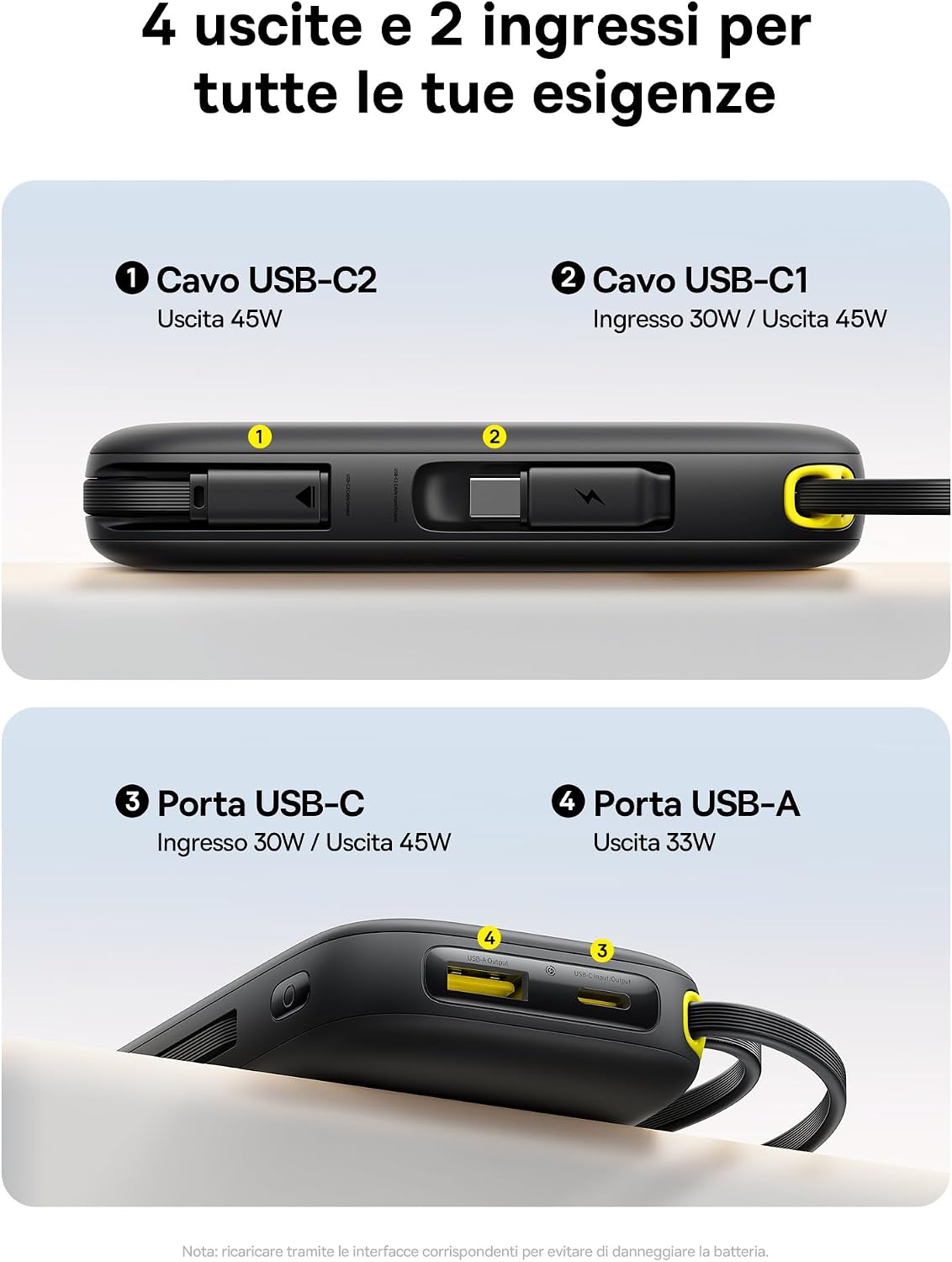
This diagram illustrates the power bank's versatile connectivity, featuring two integrated USB-C cables (one for 30W input/45W output, one for 45W output), an additional USB-C port (30W input/45W output), and a USB-A port (33W output), allowing for multiple device charging.
Recharging the Power Bank
To recharge the power bank, connect a power adapter to the USB-C input port or the integrated USB-C cable that supports input. The power bank supports up to 30W input for faster recharging.
Low-Current Mode
For charging low-power devices such as earbuds or smartwatches, double-click the power button to activate the energy-saving (low-current) mode. This mode ensures stable and safe charging for sensitive electronics.

The power bank is shown charging a smartphone, demonstrating its 45W super-fast charging feature. The display indicates rapid charge progress for devices like iPhone 16 and Huawei Mate 60 Pro.
Maintenance
- General Care: Keep the power bank dry and away from extreme temperatures. Avoid dropping or subjecting it to strong impacts.
- Cleaning: Use a soft, dry cloth to clean the exterior of the power bank. Do not use liquid cleaners or solvents.
- Cable Durability: The integrated USB-C cables are designed for durability, tested to withstand over 10,000 bends. However, avoid excessive force or sharp angles when using them.

The image details the integrated USB-C cable, which also serves as a convenient lanyard for easy carrying. It emphasizes the cable's 24.5 cm length for flexible use and its durability, tested to withstand over 10,000 bends.
Troubleshooting
- Power Bank Stops Charging at 30%: If the power bank stops delivering power while the display still shows around 30% charge, this may occur during 45W fast charging. Try using the low-current mode or a slower charging method for consistent power delivery. Recalibrating the battery (full discharge then full recharge) may also help.
- Overheating During Fast Charge: When utilizing the full 45W fast charging capability, the power bank may generate noticeable heat. This is normal for high-power delivery but can slightly reduce efficiency. Ensure adequate ventilation.
- Device Not Charging:
- Ensure the power bank has sufficient charge.
- Check that all cables are securely connected to both the power bank and the device.
- Verify that your device is compatible with the power bank's output ports and charging protocols.
- Try a different cable or port.
Specifications
| Brand | Baseus |
| Model Name | PPQD3-2040 |
| Model Number | PPKPC-0520S |
| Battery Capacity | 20000mAh |
| Max Battery Power | 45W |
| Color | Black |
| Special Features | Integrated cable, Fast charging, LED indicators |
| Voltage | 5 Volts |
| Input Ports | USB Type-C (integrated cable), USB Type-C port |
| Output Ports | USB Type-C (integrated cable), USB Type-C port, USB Type-A port |
| Number of Ports | 4 (2 integrated USB-C, 1 USB-C port, 1 USB-A port) |
| Power Source | Corded Electric |
| Portable | Yes |
| Compatible Devices | iPhone 17/16/15 series, iPad, MacBook Air/Pro, Samsung Galaxy, Google Pixel, Huawei, Xiaomi, AirPods, Steam Deck, Switch, etc. |
| Battery Type | Lithium Polymer |
| Item Weight | 361 Grams |
| Item Dimensions (L x W x H) | 12.1 x 7.2 x 3.1 cm |
| UPC | 850071093599 |
| Country of Origin | China |
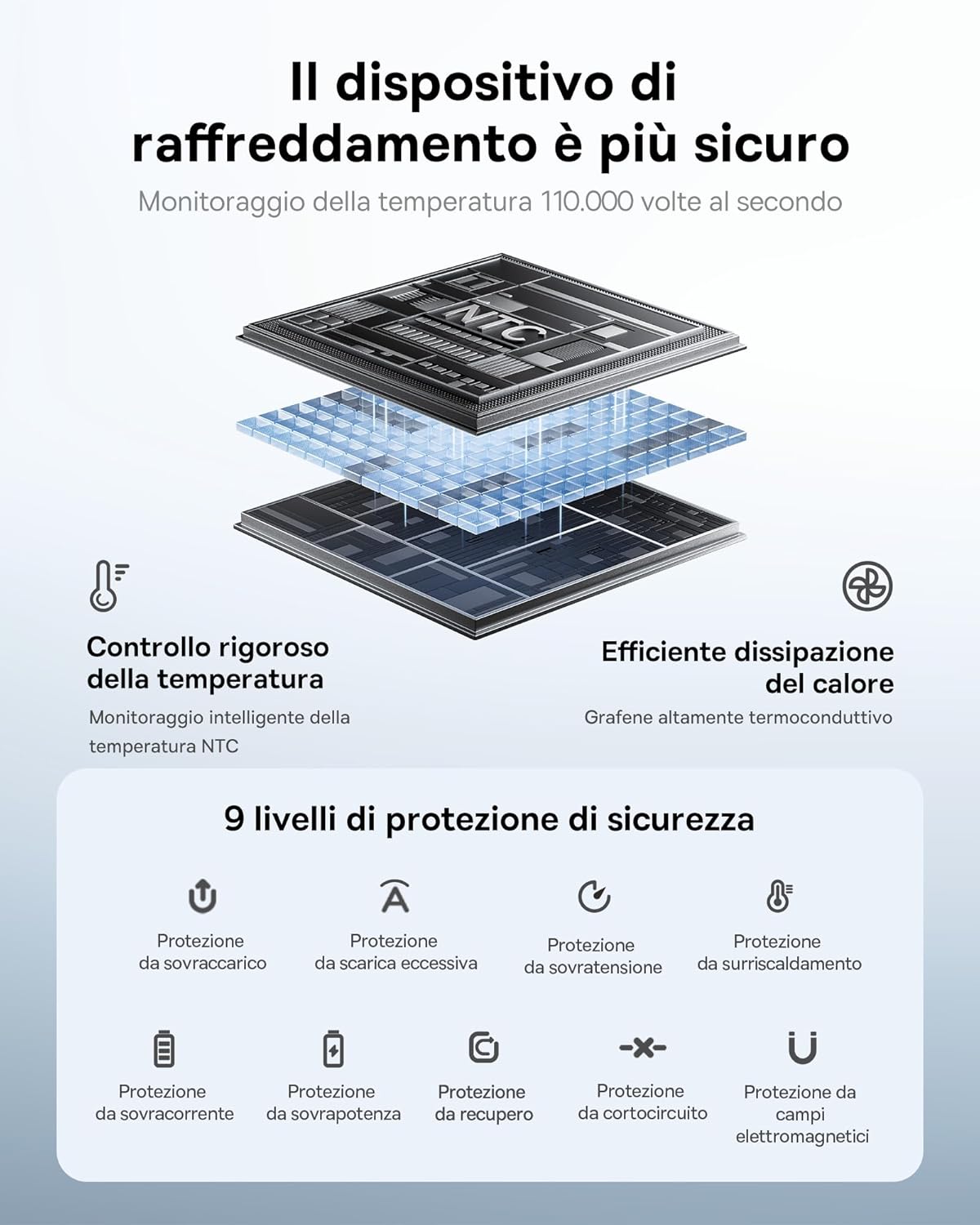
An infographic explaining the power bank's advanced cooling system, which monitors temperature 110,000 times per second, and its nine levels of safety protection, including safeguards against overcharge, over-discharge, over-voltage, overheating, over-current, overpower, recovery, short circuit, and electromagnetic fields.
Warranty
The Baseus 45W 20000mAh Power Bank comes with a 24-month warranty from the date of purchase. This warranty covers manufacturing defects and ensures reliable operation under normal use. While some specifications may mention a 'Lifetime' warranty type, the explicit 24-month period applies to your purchase experience.
Please retain your proof of purchase for warranty claims.
Support
For any questions, technical assistance, or warranty claims regarding your Baseus 45W 20000mAh Power Bank, please contact Baseus customer support. Contact information can typically be found on the official Baseus website or through the retailer where the product was purchased.


