
1. Introduction
Thank you for purchasing the Devoko 120x120cm L-Shaped Gaming Desk. This manual provides detailed instructions for assembly, operation, and maintenance to ensure safe and efficient use of your new desk. Please read this manual thoroughly before assembly and retain it for future reference.
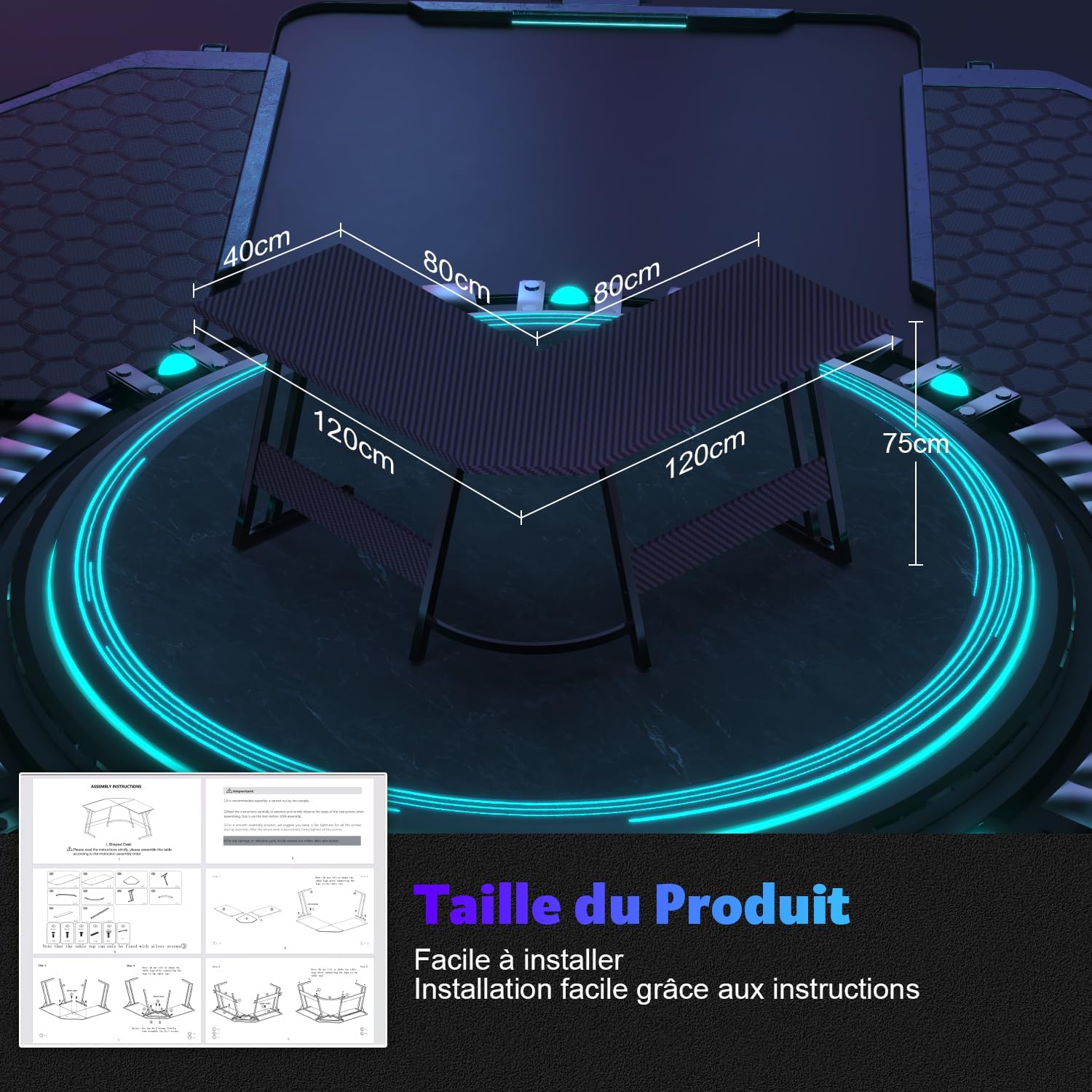
Image 1: Devoko L-Shaped Gaming Desk in a typical setup.
2. Safety Information
Observe the following safety precautions to prevent injury or damage to the product:
- Always assemble the desk on a soft, clean surface to prevent scratches.
- Ensure all screws and fasteners are securely tightened before use. Periodically check and re-tighten as necessary.
- Do not overload the desk or monitor stand. Refer to specifications for weight limits.
- Keep small parts and packaging materials away from children to prevent choking hazards.
- Use the desk on a level surface to ensure stability.
- Avoid placing hot items directly on the desk surface without protection.
3. Package Contents
Please verify that all components are present before beginning assembly. If any parts are missing or damaged, contact customer support.
Note: The exact number and type of fasteners may vary slightly. Refer to the included assembly diagram for precise details.
- Desk Panels (L-shaped sections)
- Monitor Stand Panel
- Z-shaped Leg Frames
- Support Beams/Brackets
- Adjustable Foot Pads
- Assembly Hardware (screws, nuts, Allen key, wrench)
- Instruction Manual

Image 2: Product dimensions and typical assembly instruction layout.
4. Assembly Instructions
Follow these steps carefully for proper assembly. It is recommended to have two people for assembly.
- Unpack and Identify Parts: Lay out all components on a clean, soft surface. Compare them with the parts list and diagrams in your included manual.
- Assemble Leg Frames: Attach the Z-shaped leg frames to the main support beams using the provided screws. Ensure all connections are firm but do not fully tighten yet.
- Attach Desk Panels: Carefully place the L-shaped desk panels onto the assembled leg frames. Align the screw holes and secure the panels with screws.
- Install Monitor Stand: Position the monitor stand on the designated area of the desk. Secure it using the appropriate fasteners.
- Final Tightening: Once all parts are in place and aligned, gradually tighten all screws and bolts. Do not overtighten.
- Adjust Foot Pads: Adjust the foot pads at the bottom of the legs to ensure the desk is level and stable on your floor.
Assembly Demonstration Videos (General L-Shaped Desk Assembly)
Video 1: General assembly steps for an L-shaped gaming desk. This video is for demonstration purposes and may not feature the exact Devoko model.
Video 2: Another general assembly guide for a corner desk, illustrating common construction methods. This video is for demonstration purposes and may not feature the exact Devoko model.

Image 3: Detail of the Z-shaped leg frame, contributing to desk stability.
5. Operating Instructions
The Devoko L-shaped gaming desk is designed for versatility and ergonomic comfort.
L-Shaped Design and Space Utilization
The L-shaped configuration allows for optimal use of corner spaces, providing an expansive surface for multiple monitors, gaming peripherals, or office equipment. This design helps create a dedicated and organized workspace or gaming zone without occupying excessive room.
Monitor Stand Usage
The removable monitor stand is designed to elevate your screen to an ergonomic viewing height, which can help reduce neck and back strain during prolonged use. It also provides additional storage space underneath for small items or documents.

Image 4: Benefits of using the ergonomic monitor stand for improved posture.
Versatile Applications
This desk is suitable for various environments, including gaming setups, home offices, or study areas. Its robust construction ensures durability for diverse uses.
Feature Demonstration Videos (General Desk Features)
Video 3: Demonstration of monitor stand usage and ergonomic benefits. This video is for demonstration purposes and may not feature the exact Devoko model.
Video 4: Illustrates under-desk storage and organization. This video is for demonstration purposes and may not feature the exact Devoko model.
6. Maintenance
Regular maintenance will prolong the life and appearance of your desk.
- Cleaning: Wipe the desk surface with a soft, damp cloth. Avoid harsh chemicals or abrasive cleaners that could damage the finish.
- Hardware Check: Periodically inspect all screws and bolts to ensure they remain tight. Re-tighten if necessary to maintain stability.
- Avoid Direct Sunlight: Prolonged exposure to direct sunlight may cause fading or damage to the desk surface.
- Liquid Spills: Clean up liquid spills immediately to prevent staining or damage to the wood material.
7. Troubleshooting
If you encounter any issues with your Devoko L-Shaped Gaming Desk, refer to the following common problems and solutions:
| Problem | Possible Cause | Solution |
|---|---|---|
| Desk is wobbly or unstable. | Loose fasteners; uneven floor. | Check and tighten all screws and bolts. Adjust the foot pads to level the desk. |
| Parts do not align during assembly. | Incorrect orientation of parts; screws overtightened prematurely. | Review the assembly instructions and diagrams. Loosen all screws, realign parts, then gradually tighten. |
| Monitor stand feels loose. | Fasteners not fully tightened. | Ensure all screws securing the monitor stand are tightened. |
If the problem persists after attempting these solutions, please contact Devoko customer support for further assistance.
8. Specifications
- Brand: Devoko
- Model: 120x120cm L-Shaped Gaming Desk
- Color: Carbon Black
- Dimensions (L x W x H): Approximately 120 cm x 120 cm x 75 cm (47.2 x 47.2 x 29.5 inches)
- Material: Engineered Wood (Top), Wood (Base)
- Finish Type: Lacquered
- Special Feature: Removable Monitor Stand for adjustable height
- Desk Design: Computer Desk, L-shaped
9. Warranty & Support
Devoko products are manufactured to high-quality standards. For specific warranty information, please refer to the documentation included with your purchase or visit the official Devoko website. If you require assistance, have questions, or need to report missing/damaged parts, please contact Devoko customer support through your retailer or the brand's official contact channels.
