
Introduction
Thank you for choosing the Fansbe Direct A29 Digital Alarm Clock. This manual provides comprehensive instructions for setting up, operating, and maintaining your new alarm clock. Please read this manual carefully to ensure proper use and to fully utilize all features of your device.
Package Contents
Please check the package for the following items:
- Fansbe Direct A29 Digital Alarm Clock
- USB Type-C Charging Cable
- User Manual
Note: 2 AAA batteries for backup memory function are not included and must be purchased separately.
Setup
1. Power Connection
Connect the provided USB Type-C cable to the Type-C charging port on the alarm clock and plug the other end into a compatible USB power adapter (not included). The alarm clock will power on automatically.
2. Backup Battery Installation
For uninterrupted timekeeping and alarm settings during power outages, install 2 AAA batteries (not included) into the battery compartment located at the bottom of the unit. Ensure correct polarity.
3. App Connection (FANSBE APP)
The Fansbe Direct A29 alarm clock can be controlled via the FANSBE mobile application for enhanced functionality.
- Ensure the alarm clock is powered on.
- Enable Bluetooth on your smartphone. Manual pairing in your phone's Bluetooth settings is not required.
- Download and open the "FANSBE" app from your device's app store.
- In the app, tap "+Add" and select the image corresponding to your alarm clock.
- Tap "Start" to initiate the connection. The alarm clock will automatically connect to the app.
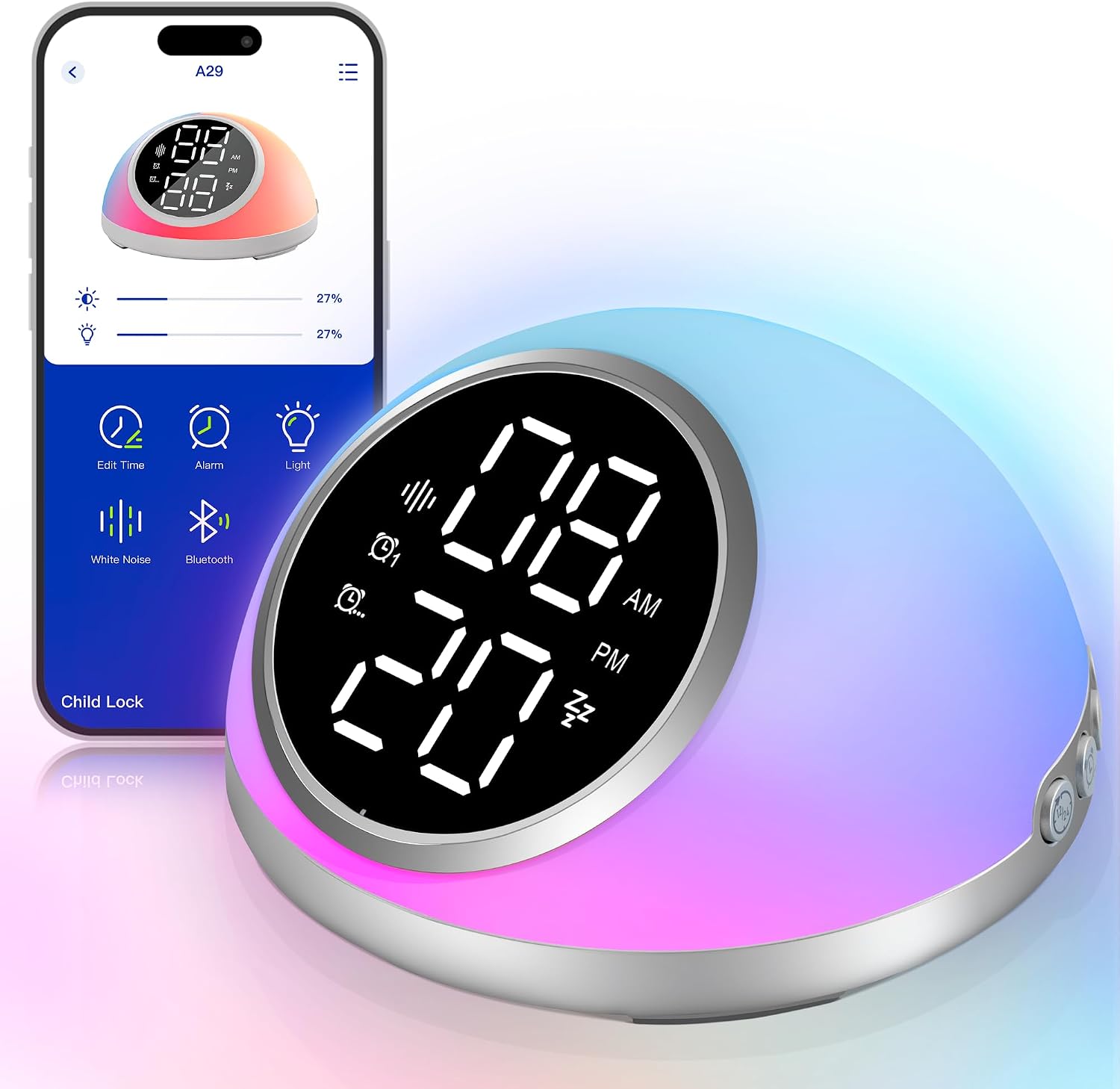
Image: The Fansbe Direct A29 Digital Alarm Clock displaying time and its corresponding mobile application interface, showing various control options.
Operating Instructions
Button Descriptions
Familiarize yourself with the buttons on your alarm clock for manual control:
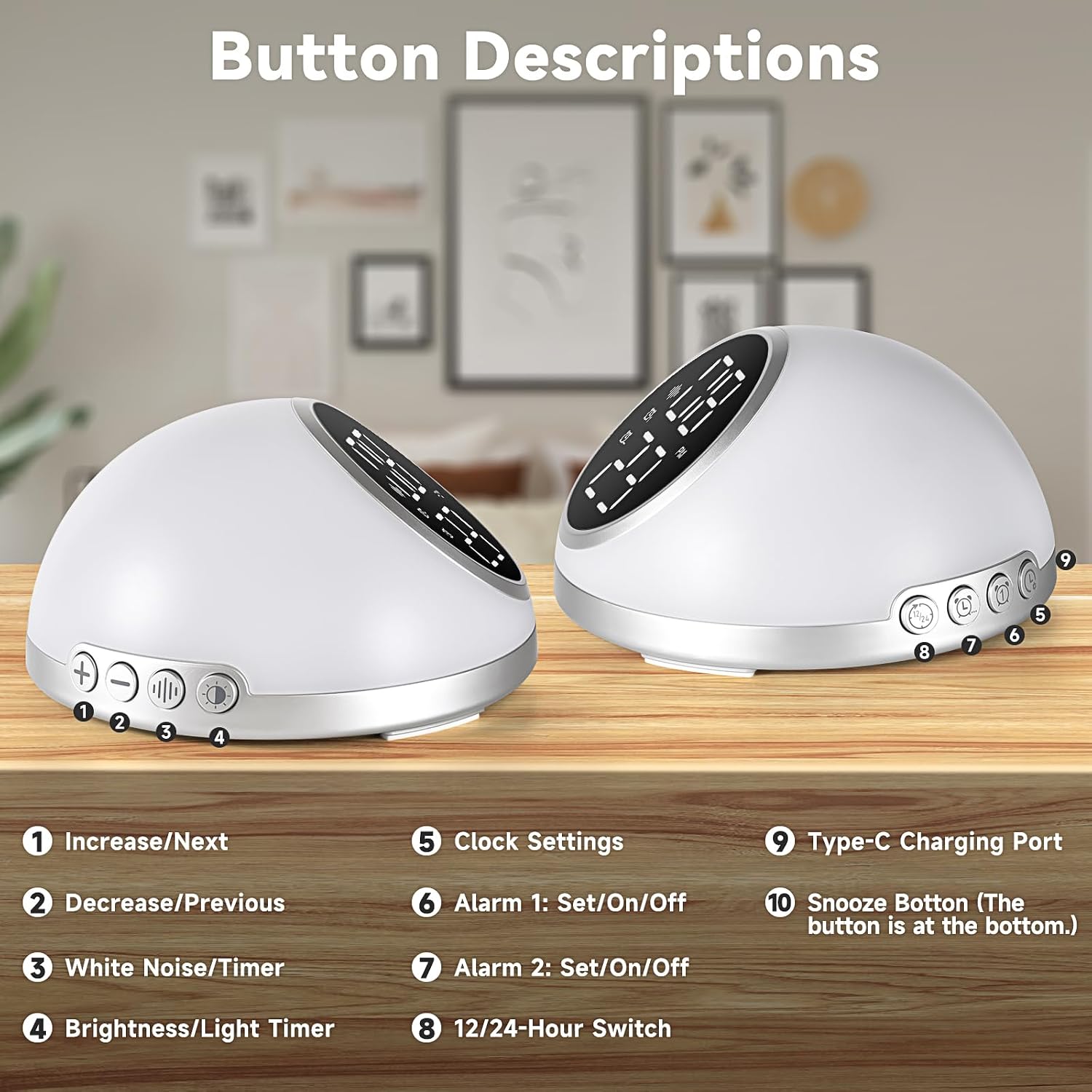
Image: Two views of the Fansbe Direct A29 Digital Alarm Clock, highlighting and numbering its various buttons and ports with corresponding descriptions.
- Increase/Next: Adjusts values up or navigates to the next option.
- Decrease/Previous: Adjusts values down or navigates to the previous option.
- White Noise/Timer: Activates white noise and sets its auto-off timer.
- Brightness/Light Timer: Adjusts display brightness and sets night light auto-off timer.
- Clock Settings: Enters time setting mode.
- Alarm 1: Set/On/Off: Sets or toggles Alarm 1.
- Alarm 2: Set/On/Off: Sets or toggles Alarm 2.
- 12/24-Hour Switch: Toggles between 12-hour and 24-hour time formats.
- Type-C Charging Port: Power input for the device.
- Snooze Button: (Located at the bottom) Activates snooze function when an alarm sounds.
Time Display and Format
The time display brightness can be adjusted to your preference, or turned off completely for a dark room environment. You can also switch between 12-hour and 24-hour formats.
- Adjust Brightness: Press the Brightness/Light Timer button to cycle through 5 brightness levels or turn off the display.
- Change Time Format: Press the 12/24-Hour Switch button to toggle between 12-hour (with AM/PM indicator) and 24-hour formats.

Image: The Fansbe Direct A29 Digital Alarm Clock demonstrating various levels of time display brightness, from 100% to off, and indicating 12/24-hour format switch and app sync.
Alarm Settings
The alarm clock supports two built-in alarms via buttons and up to 10 alarms via the FANSBE app.
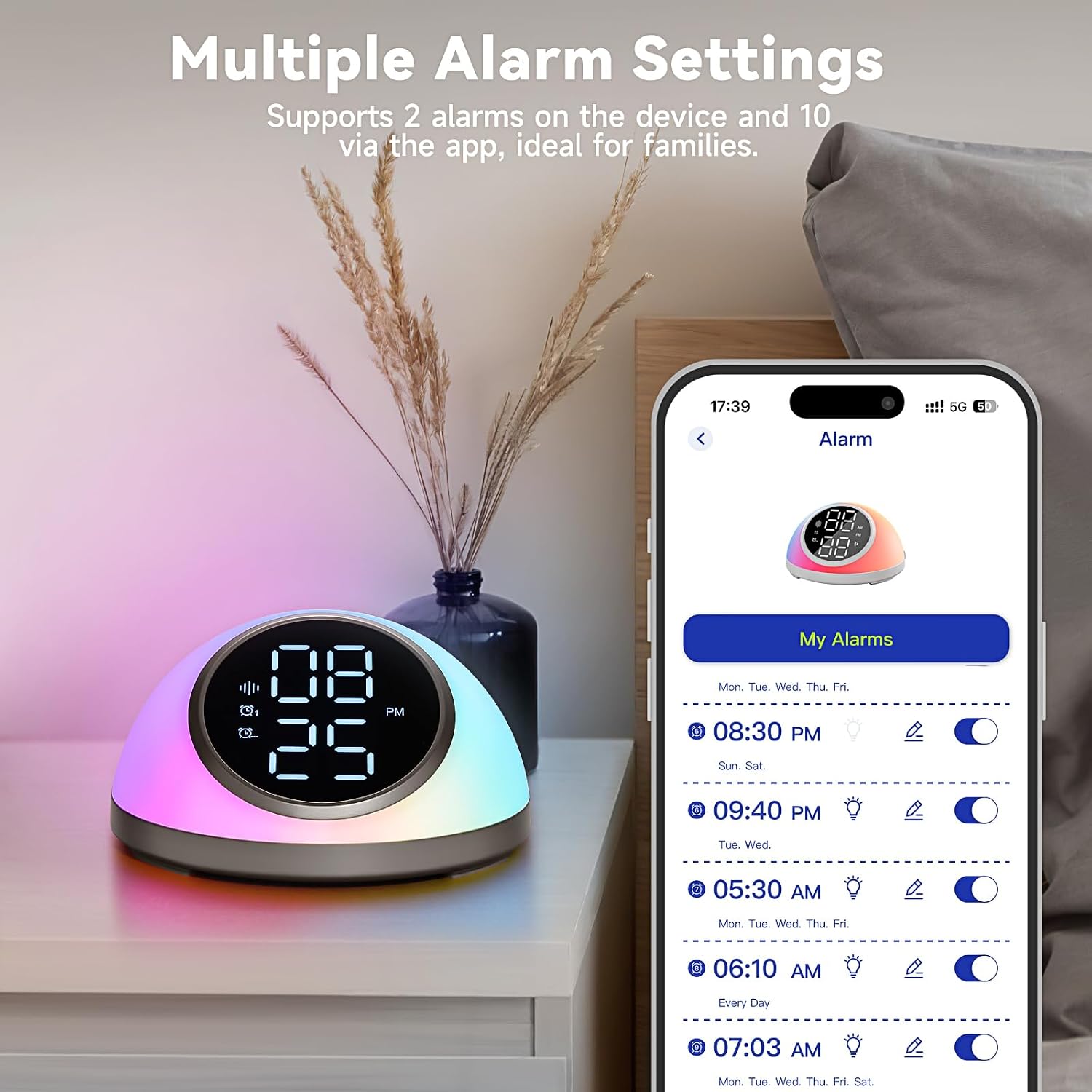
Image: The Fansbe Direct A29 Digital Alarm Clock displaying time, alongside a smartphone screen showing the 'My Alarms' section of the app with multiple alarms configured.
Setting Alarms via Buttons:
- Press and hold Alarm 1 Set/On/Off or Alarm 2 Set/On/Off to enter alarm setting mode.
- Use the Increase/Next and Decrease/Previous buttons to adjust the hour, then press the alarm button again to confirm and move to minutes.
- Adjust minutes, then press the alarm button again to confirm.
- Continue to set alarm tone and volume using the Increase/Next and Decrease/Previous buttons, confirming each step with the alarm button.
- To activate/deactivate an alarm, short press the corresponding Alarm 1 Set/On/Off or Alarm 2 Set/On/Off button. An alarm icon will appear/disappear on the display.
Setting Alarms via FANSBE App:
The app allows for more advanced alarm settings, including up to 10 alarms, custom schedules, and a wider selection of tones.
- Open the FANSBE app and navigate to the "Alarm" section.
- Tap "+Add" to create a new alarm.
- Set the time, repeat days, alarm tone (9 options), and initial volume.
- Save the alarm. You can easily toggle alarms on/off within the app.
Snooze Function
When an alarm sounds, press the Snooze Button (located at the bottom of the unit) to temporarily silence the alarm for 9 minutes. The alarm will sound again after the snooze period.

Image: A hand reaching to press the snooze button on the Fansbe Direct A29 Digital Alarm Clock, illustrating the 9-minute snooze feature and adjustable alarm volume/ringtones.
White Noise & Auto-Off Timer
The alarm clock features a white noise machine with 23 soothing sounds and 16 volume levels to aid sleep.

Image: The Fansbe Direct A29 Digital Alarm Clock displaying time, surrounded by icons representing 23 soothing sounds like white noise, fan, wind, campfire, forest, rain, wave, and river sounds.
- Activate White Noise: Short press the White Noise/Timer button to cycle through the available sounds.
- Adjust Volume: Use the Increase/Next and Decrease/Previous buttons to set the desired volume level (1-16).
- Set Auto-Off Timer: While white noise is playing, press and hold the White Noise/Timer button to set the auto-off timer for 15, 30, 60, 90, or 120 minutes. The white noise will automatically turn off after the selected duration.
Night Light & Auto-Off Timer
The integrated night light offers various lighting effects and customizable colors, controllable via buttons or the app.

Image: The Fansbe Direct A29 Digital Alarm Clock on a bedside table, illuminated with a custom orange light, demonstrating its custom lighting effects and app control for colors.
- Activate Night Light: Short press the Brightness/Light Timer button to cycle through different lighting effects and colors.
- Adjust Brightness: The night light has 5 brightness levels, which can be adjusted via the app or by cycling through the light modes.
- Set Auto-Off Timer: While the night light is on, press and hold the Brightness/Light Timer button to set the auto-off timer for 15, 30, 60, 90, or 120 minutes.
- App Control: Use the FANSBE app to choose from 6 additional lighting effects and customize colors.
Maintenance
To ensure the longevity and optimal performance of your Fansbe Direct A29 Digital Alarm Clock, follow these simple maintenance guidelines:
- Cleaning: Wipe the device with a soft, dry cloth. Do not use abrasive cleaners, solvents, or harsh chemicals, as these may damage the surface.
- Avoid Water: This device is not waterproof. Keep it away from water, moisture, and high humidity environments.
- Storage: When not in use for extended periods, store the alarm clock in a cool, dry place. Remove backup batteries if storing for a very long time to prevent leakage.
- Power: Use only the provided USB Type-C cable and a compatible power adapter.
Troubleshooting
If you encounter issues with your Fansbe Direct A29 Digital Alarm Clock, please refer to the following common solutions:
- Device not powering on: Ensure the USB Type-C cable is securely connected to both the alarm clock and a working power source. Try a different USB port or power adapter.
- Alarm not sounding: Check if the alarm is activated (alarm icon visible on display). Verify the alarm volume is not set to zero. Ensure the time is set correctly.
- Difficulty with settings (buttons): Some settings require pressing and holding buttons, while others require short presses. Refer to the "Button Descriptions" and specific operating instructions. If still difficult, try using the FANSBE app for easier control.
- App not connecting: Ensure Bluetooth is enabled on your phone and the alarm clock is powered on. Close and reopen the FANSBE app. If the issue persists, restart your phone and the alarm clock.
- Time display is off: The time can be synced automatically via the FANSBE app. Ensure the app is connected and the time sync feature is enabled.
- Backup battery not working: Ensure 2 AAA batteries are installed correctly with proper polarity. Replace old batteries with new ones.
Specifications
| Feature | Detail |
|---|---|
| Brand | Fansbe Direct |
| Model Number | A29 |
| Colour | Silver |
| Product Dimensions | 11.51 x 3.81 x 4.06 cm |
| Item Weight | 249 g |
| Display Type | Digital |
| Special Features | Adjustable Brightness, Adjustable Volume, Noise Machine, Snooze, Timer, App Control |
| Power Source | Type-C Charging |
| Backup Battery | 2 x AAA (not included) |
Warranty and Support
Fansbe Direct offers a 30-day money-back guarantee for this product. For any questions, technical support, or warranty claims, please contact Fansbe Direct customer service through the retailer's platform or the contact information provided with your purchase.
Please retain your purchase receipt as proof of purchase for warranty purposes.