
Electactic NPLH5A-05C/X1E
Electactic 8000 BTU Portable Air Conditioner User Manual
Model: NPLH5A-05C/X1E
1. Introduction
This manual provides detailed instructions for the safe and efficient operation of your Electactic 8000 BTU Portable Air Conditioner. This 3-in-1 unit offers cooling, dehumidification, and fan functions, designed to provide comfort in spaces up to 350 sq.ft. Please read this manual thoroughly before use and retain it for future reference.
2. Safety Information
Always follow basic safety precautions when using electrical appliances to reduce the risk of fire, electric shock, and injury.
- Ensure the power supply matches the voltage specified on the unit's rating label (115 Volts).
- Do not operate the unit with a damaged cord or plug.
- Do not block air inlets or outlets. Maintain at least 20 inches of clearance around the unit.
- Do not insert fingers or objects into the air discharge area.
- Always unplug the unit before cleaning or servicing.
- Keep the unit on a stable, level surface.
- This appliance is not intended for use by persons (including children) with reduced physical, sensory or mental capabilities, or lack of experience and knowledge, unless they have been given supervision or instruction concerning use of the appliance by a person responsible for their safety.
3. Package Contents
Verify that all items are present in the packaging:
- Electactic Portable Air Conditioner Unit
- Remote Control
- Exhaust Hose
- Hose Connector
- Window Kit (Adjustable Window Panel, Adapter)
- Drainage Hose (4ft)
- Flat Screws (x2)
- Window Kit Screws
- User Manual (This document)
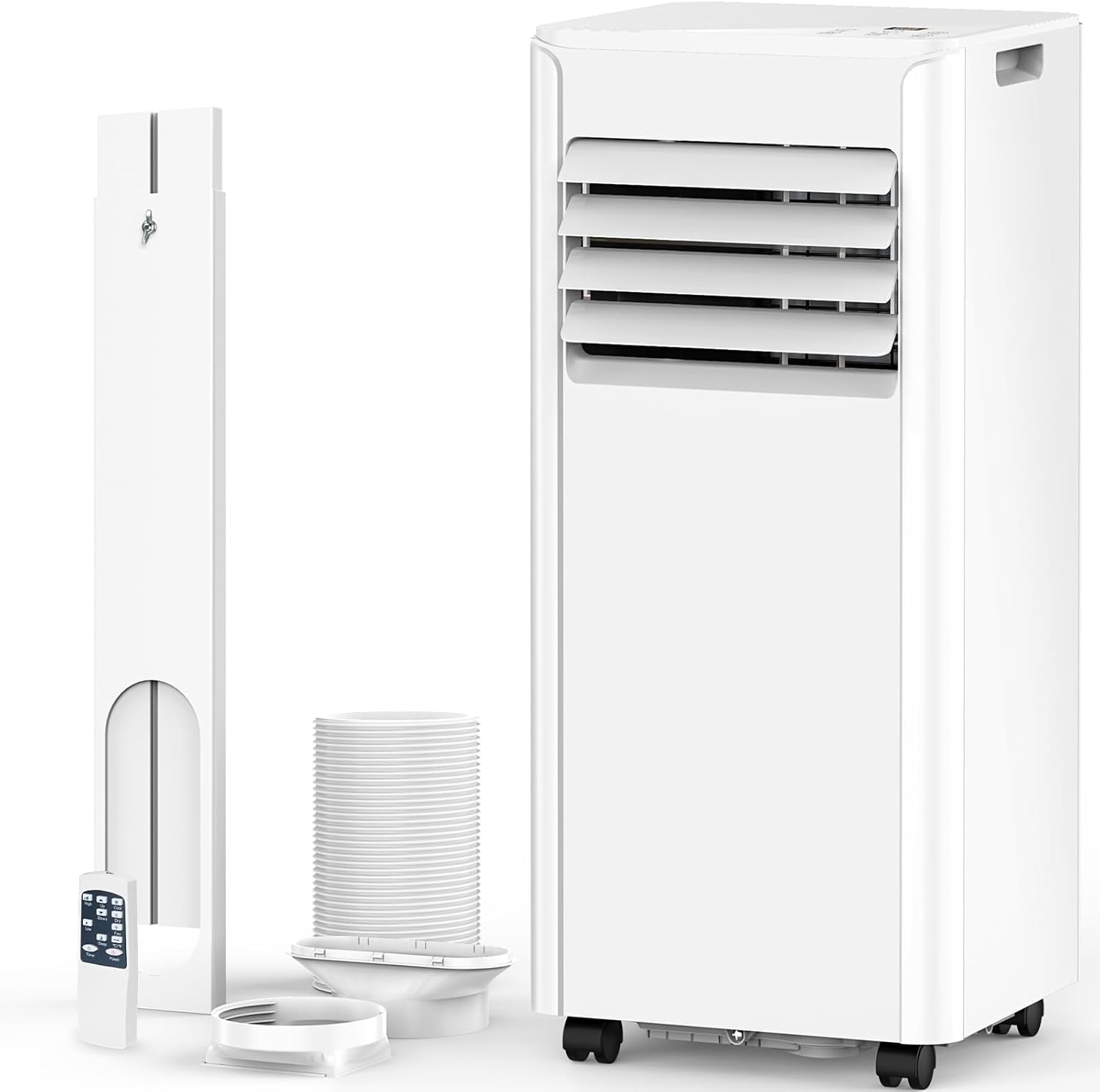
Figure 3.1: Electactic Portable Air Conditioner with all components, including the main unit, exhaust hose, window kit, and remote control.
4. Product Overview
Familiarize yourself with the main parts of your portable air conditioner:
- Control Panel: Located on the top of the unit, featuring an LED display and touch buttons for various functions.
- Air Outlet: Front-facing louvers where conditioned air is discharged.
- Air Inlet/Filter: Located on the rear, where air is drawn in for conditioning. Features a washable filter.
- Exhaust Air Outlet: Rear connection point for the exhaust hose.
- Drainage Ports: Located at the bottom rear for water drainage.
- Casters & Handles: Four 360° swivel casters and side handles for easy portability.

Figure 4.1: Side view illustrating the compact design and dimensions (11.69"D x 11.93"W x 27.28"H) for easy placement.

Figure 4.2: Detailed view of portability features including easy-grip handle and 360° caster wheels, along with the adjustable fan blade and detachable/washable filter.
5. Setup and Installation
Follow these steps to set up your portable air conditioner:
- Placement: Place the unit on a flat, stable surface. Ensure there is at least 20 inches of clear space around the unit for proper airflow.
- Attach Exhaust Hose: Screw the hose connector onto one end of the exhaust hose. Attach the other end of the hose to the exhaust air outlet on the back of the unit.
- Install Window Kit:
- Adjust the window panel to fit your window opening (suitable for 27-53 inch hanging or sliding windows).
- Secure the window panel in place using the provided screws.
- Attach the adapter end of the exhaust hose to the opening in the window panel.
- Power Connection: Plug the power cord into a grounded electrical outlet.
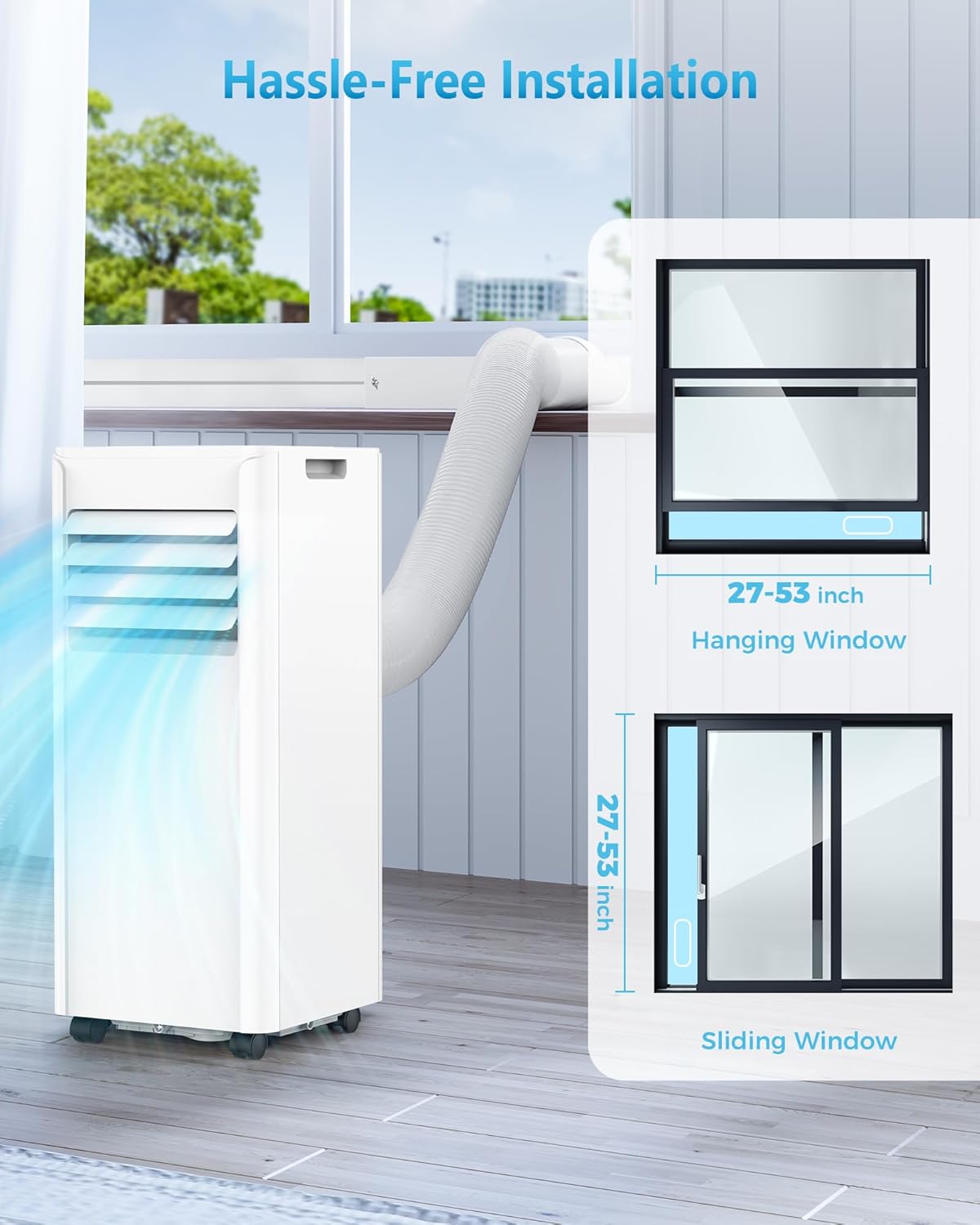
Figure 5.1: Illustration of hassle-free installation with the adjustable window mounting kit, compatible with both hanging and sliding windows (27-53 inches).
6. Operating Instructions
Your Electactic Portable Air Conditioner features a user-friendly LED control panel and a remote control for convenient operation.
Control Panel & Remote Functions:
| Button/Indicator | Function |
|---|---|
| Power Button | Turns the unit ON/OFF. |
| Mode Button | Cycles through modes: Cool, Dehumidify, Fan, Sleep. |
| Up/Down Arrows | Adjusts temperature (61°F-90°F) or timer settings. |
| Speed Button | Adjusts fan speed (High/Low). |
| Timer Button | Sets the auto ON/OFF timer (1-24 hours). |
| Sleep Mode | Activates quiet operation for comfortable sleep. |
| Water Full Indicator | Lights up when the internal water tank is full and needs draining. |

Figure 6.1: The intuitive LED control panel and remote control allow for easy adjustment of settings.
Operating Modes:
- Cool Mode: Provides powerful cooling for rooms up to 350 sq.ft. Set your desired temperature using the Up/Down arrows. The unit will cycle on/off to maintain the set temperature.
- Dehumidify Mode: Reduces humidity in the air, collecting up to 51 pints per day. This mode helps prevent dampness and mildew. The unit will automatically manage humidity levels.
- Fan Mode: Circulates air without cooling or dehumidifying. Choose between High or Low fan speeds for air circulation.
- Sleep Mode: Operates with lower noise (53 dB) and gentler airflow for a quiet and comfortable sleeping environment.

Figure 6.2: The unit provides efficient cooling with 8000 BTU capacity, covering up to 350 sq.ft, with a temperature range of 61°F-90°F.

Figure 6.3: Sleep mode ensures a quiet environment with noise levels below 53dB, comparable to a quiet refrigerator.
7. Maintenance
Regular maintenance ensures optimal performance and longevity of your unit.
Cleaning the Air Filter:
The air filter should be cleaned every two weeks or more frequently depending on usage and air quality.
- Unplug the unit from the power outlet.
- Locate the air filter on the rear of the unit.
- Remove the filter by pulling it out.
- Wash the filter with warm, soapy water. Rinse thoroughly.
- Allow the filter to air dry completely before reinserting it into the unit.
Draining Collected Water:
In Dehumidify mode, water is collected internally. The
Related documentsNPLH5A-05C/X1E


Ask a question about this manual
Ask about setup, troubleshooting, compatibility, parts, safety, or missing instructions. Manuals+ will review the question and use this page’s manual context to help answer it.