
Introduction
This user manual provides detailed instructions for the safe operation, installation, maintenance, and troubleshooting of your Electactic Portable Air Conditioner. This 10000 BTU unit is designed to efficiently cool spaces up to 450 sq.ft, offering a temperature adjustment range of 61°F-90°F. It functions as a 3-in-1 unit, providing cooling, dehumidification, and fan modes. Its portable design with 360° swivel casters and side handles allows for easy movement between rooms.
Safety Information
Please read all safety warnings and instructions carefully before using this appliance to prevent injury or damage. Keep this manual for future reference.
- Ensure the power supply matches the voltage specified on the unit's rating label.
- Do not operate the unit with a damaged cord or plug.
- Always unplug the unit before cleaning or servicing.
- Do not block air inlets or outlets. Maintain adequate clearance around the unit for proper airflow.
- Do not insert objects into the air vents.
- Keep the unit away from heat sources and direct sunlight.
- Do not use the unit in wet or damp environments, such as bathrooms.
- Supervise children and ensure they do not play with the appliance.
- If the unit is damaged, do not attempt to repair it yourself. Contact qualified service personnel.
Product Overview
Components
Your Electactic Portable Air Conditioner package includes the following main components:
- Portable Air Conditioner Unit
- Exhaust Hose
- Window Sealing Kit (adjustable window mounting kit)
- Remote Control
- Drainage Hose (4ft)
- User Manual
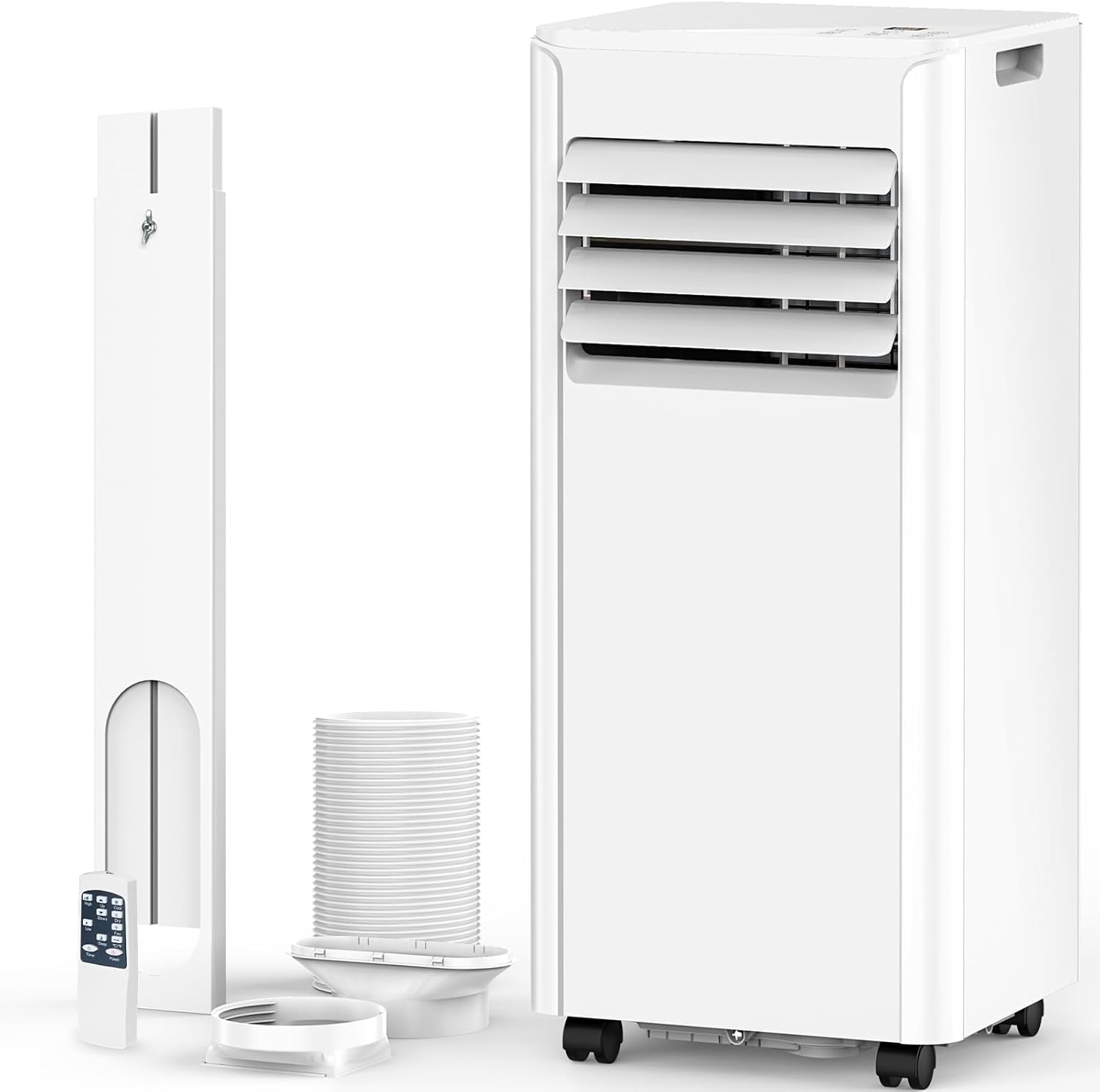
Image: Main components of the Electactic Portable Air Conditioner, including the unit, exhaust hose, window kit, and remote control.

Image: A visual representation of all accessories included with the portable air conditioner, such as the window kit components, remote, and hoses.
Key Features
- Powerful Cooling: 10000 BTU cooling capacity, suitable for rooms up to 450 sq.ft.
- Wide Temperature Range: Adjustable from 61°F to 90°F.
- 4-in-1 Multifunction: Operates as an Air Conditioner, Dehumidifier (63 Pints/day capacity), Fan (2 speeds), and Sleep Mode.
- Dual Control: Equipped with both a remote control and an intuitive LED control panel for convenient operation.
- 24-Hour Timer: Program automatic turn-on or turn-off times for energy savings.
- Quiet Operation: Sleep mode operates with lower noise levels (53 dB) for a comfortable environment.
- Enhanced Portability: Features four 360° swivel casters and ergonomically designed side handles for easy movement.
- Self-Evaporation System: Utilizes collected water from dehumidification to cool the condenser, improving efficiency.
- Washable Filter: Easy to remove and clean for consistent performance.

Image: Visual representation of the unit's cooling efficiency, including BTU, area coverage, and temperature range.

Image: Details on the compact design and portability features, including dimensions, handle, wheels, and washable filter.
Setup
Follow these steps to set up your portable air conditioner for optimal performance.
1. Prepare the Window Kit
- Assemble the adjustable window sealing kit according to your window type (hanging or sliding). The kit is designed to fit window openings between 27 and 53 inches.
- Secure the exhaust hose adapter to the window kit opening.
2. Connect the Exhaust Hose
- Attach one end of the exhaust hose to the adapter on the window kit by twisting it securely.
- Connect the other end of the exhaust hose to the exhaust port on the back of the portable air conditioner unit. Ensure it slides and locks into place.
- Position the unit near the window, ensuring the exhaust hose is extended but not excessively bent or kinked, to allow for efficient airflow.

Image: Side view of the portable AC unit with the exhaust hose properly connected.

Image: Illustration of the hassle-free installation process, showing the unit connected to a window with the exhaust hose.
Operating Instructions
Your portable air conditioner can be controlled using either the LED control panel on top of the unit or the included remote control.
LED Control Panel

Image: Detailed view of the LED control panel on the unit's top.
- Power Button: Press to turn the unit ON or OFF.
- Mode Button: Cycle through Cooling, Dehumidifier, and Fan modes.
- Speed Button: Adjust fan speed (Low/High).
- Up/Down Buttons: Adjust the desired temperature or set the timer duration.
- Timer Button: Set the 1-24 hour timer for automatic operation.
Remote Control

Image: The remote control and its various functions for convenient operation.
The remote control offers all the functionalities of the LED control panel, allowing you to adjust settings from a distance.
- Cool Mode: Provides powerful cooling. Set your desired temperature using the Up/Down arrows.
- Dry Mode (Dehumidifier): Reduces humidity in the room. The unit will automatically select the fan speed.
- Fan Mode: Circulates air without cooling. Choose between Low or High fan speed.
- Sleep Mode: Operates quietly with gentler airflow for undisturbed rest.
- Timer Function: Press the Timer button to set the desired operating duration (1-24 hours).
Maintenance
Regular maintenance ensures the longevity and efficiency of your portable air conditioner.
Filter Cleaning
The air filter should be cleaned every two weeks or more frequently depending on usage and air quality.
- Unplug the unit from the power outlet.
- Locate the air filter panel on the back of the unit and remove it.
- Wash the filter with warm, soapy water. Rinse thoroughly.
- Allow the filter to air dry completely before reinserting it into the unit. Do not use a dryer or direct sunlight.
Water Drainage
The unit has a self-evaporation system, but in high humidity conditions, excess water may accumulate and require drainage.
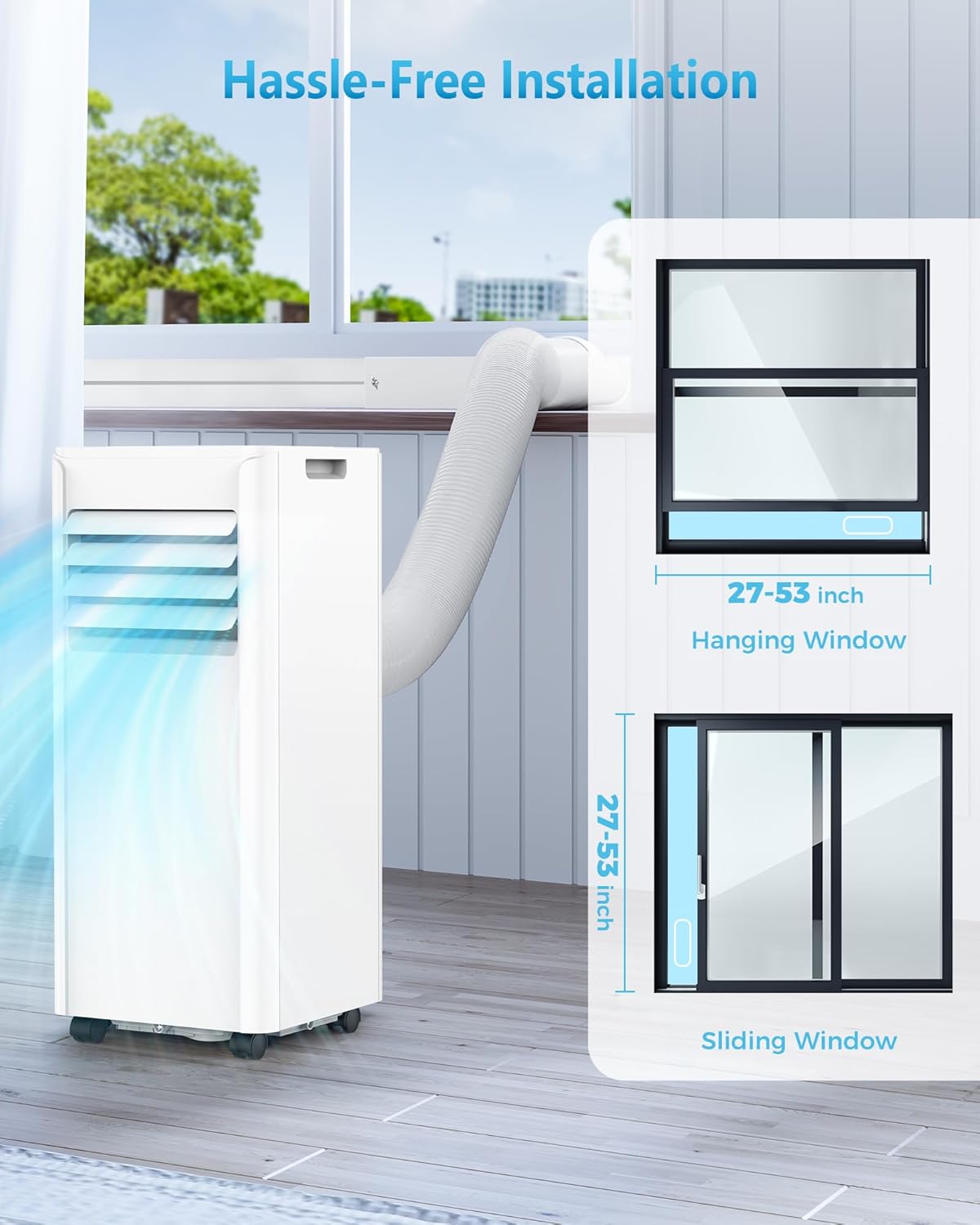
Image: Illustration of the unit's self-evaporation and drainage options.
- Manual Drain: When the internal water tank is full, the unit will stop operating and display a "Water-full Alarm". Place a shallow pan or tray under the lower drain port and remove the drain plug to empty the water. Reinsert the plug firmly after draining.
- Continuous Drain: For continuous operation in high humidity, attach the provided drainage hose to the continuous drain port. Ensure the hose is directed to a suitable drain or container and is not kinked or elevated above the drain port.
Storage
If storing the unit for an extended period:
- Drain all accumulated water from the unit.
- Clean the air filter and allow it to dry completely.
- Unplug the power cord and coil it neatly.
- Store the unit in a cool, dry place, away from direct sunlight and extreme temperatures.
Troubleshooting
Before contacting customer support, please refer to the following common issues and their solutions:
| Problem | Possible Cause | Solution |
|---|---|---|
| Unit does not turn on. | No power, power cord unplugged, circuit breaker tripped. | Check power connection, ensure outlet is functional, reset circuit breaker. |
| Unit does not cool. | Air filter dirty, exhaust hose not properly installed, room too large, doors/windows open. | Clean air filter, ensure exhaust hose is sealed, close doors/windows, check room size. |
| Unit is noisy. | Unit not on a flat surface, air filter dirty, internal components vibrating. | Place on a flat, stable surface. Clean air filter. If noise persists, contact support. |
| Water leakage. | Drain plug loose, drainage hose kinked or blocked, water tank full. | Ensure drain plug is secure. Straighten drainage hose. Empty water tank if full. |
| Remote control not working. | Batteries dead or incorrectly inserted, remote out of range. | Replace batteries. Ensure line of sight to the unit's receiver. |
Specifications
- Model Number: NPLH5A-06C/X1E
- Cooling Capacity: 10000 BTUs
- Coverage Area: Up to 450 sq.ft
- Temperature Range: 61°F - 90°F
- Dehumidification Capacity: 63 Pints/day
- Voltage: 115 Volts
- Noise Level: 53 dB (in Sleep Mode)
- Product Dimensions (D x W x H): 11.69 x 11.93 x 27.28 inches
- Item Weight: 46.2 pounds
- Manufacturer: Electactic
Warranty and Support
Your Electactic Portable Air Conditioner comes with a 1-Year Warranty from the date of purchase.
For warranty claims, technical assistance, or any questions regarding your product, please contact Electactic customer support. Refer to the contact information provided on the product packaging or the official Electactic website.
Important: Do not attempt to repair the unit yourself. Unauthorized repairs may void your warranty.


