
1. Introduction
This manual provides essential instructions for the safe and efficient use of your isinwheel M10 Battery. Please read this manual thoroughly before using the product and retain it for future reference. Proper use and maintenance will ensure optimal performance and longevity of your battery.
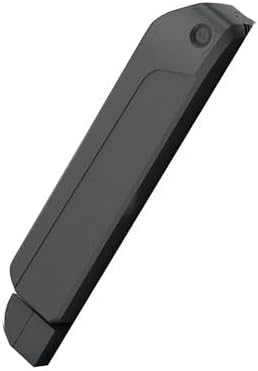
Image 1.1: The isinwheel M10 Battery. This image displays the sleek, dark gray casing of the rechargeable battery, designed for the M10 scooter.
2. Safety Information
Your safety is paramount. Observe the following precautions to prevent injury or damage to the battery and connected devices:
- Charging: Use only the charger specifically designed for the isinwheel M10 Battery. Do not use unauthorized chargers. Charge in a well-ventilated area, away from flammable materials.
- Handling: Do not puncture, drop, disassemble, or modify the battery. Avoid exposing the battery to extreme temperatures, direct sunlight, or fire.
- Water Exposure: Keep the battery dry. Do not immerse it in water or expose it to rain.
- Storage: Store the battery in a cool, dry place, away from children and pets.
- Disposal: Dispose of the battery according to local regulations. Do not dispose of it with household waste.
- Damage: If the battery appears damaged, swollen, or leaks, discontinue use immediately and contact customer support.
3. Package Contents
Please check the package contents upon receipt. If any items are missing or damaged, contact isinwheel customer support.
- 1 x isinwheel M10 Battery
- 1 x User Manual (this document)
- (Charger sold separately or included with M10 scooter)
4. Setup
4.1 Initial Charging
Before first use, fully charge the battery. This helps to calibrate the battery management system and ensures optimal performance.
- Connect the charger to a standard wall outlet.
- Connect the charger's output plug to the charging port on the isinwheel M10 Battery.
- The charging indicator on the charger (or battery, if applicable) will show the charging status. Refer to your charger's manual for specific indicator meanings.
- Once fully charged, disconnect the charger from the battery, then from the wall outlet.
4.2 Installation (for M10 Scooter)
Refer to your isinwheel M10 Scooter's user manual for detailed battery installation instructions. Ensure the battery is securely seated and locked into place before operating the scooter.
5. Operating Instructions
5.1 Battery Usage
- Ensure the battery is fully charged before long rides to maximize range.
- Monitor the battery level indicator on your M10 scooter's display during operation.
- Avoid completely draining the battery regularly, as this can reduce its lifespan.
5.2 Recharging the Battery
Recharge the battery when the power level is low. Follow the same steps as initial charging (Section 4.1).
- Always use the original or an approved replacement charger.
- Do not leave the battery charging unattended for extended periods, especially overnight.
- Charging time may vary depending on the remaining battery level and charger specifications.
6. Maintenance
6.1 Cleaning
Wipe the battery casing with a soft, dry cloth. Do not use harsh chemicals, abrasive cleaners, or immerse the battery in water.
6.2 Storage
If storing the battery for an extended period (more than one month), ensure it is charged to approximately 50-70% capacity. Store it in a cool, dry place between 0°C and 25°C (32°F and 77°F). Recharge the battery every 2-3 months to prevent deep discharge, which can cause irreversible damage.
6.3 Battery Care
- Avoid frequent full discharges.
- Do not expose the battery to extreme heat or cold.
- Regularly inspect the battery for any signs of damage or wear.
7. Troubleshooting
| Problem | Possible Cause | Solution |
|---|---|---|
| Battery not charging | Charger not connected properly; Faulty charger or outlet; Battery damage. | Ensure connections are secure. Try a different outlet. Test charger if possible. If issues persist, contact support. |
| Shortened battery life/range | Aging battery; Improper charging/storage; Extreme operating conditions. | Review maintenance guidelines. Ensure proper charging habits. Battery capacity naturally degrades over time. |
| Battery indicator inaccurate | Battery management system (BMS) calibration needed. | Fully charge and then fully discharge the battery once to recalibrate the BMS. |
For problems not listed here or if solutions do not resolve the issue, please contact isinwheel customer support.
8. Specifications
- Brand: isinwheel
- Model: M10 Battery
- Reusability: Rechargeable
- Recommended Uses For Product: Bicycle (Note: This battery is designed for the isinwheel M10 scooter, as per product description.)
- Manufacturer: Shenzhen Xincheng Times Technology Co.,Ltd
- Date First Available: February 13, 2025
9. Warranty and Support
9.1 Warranty Information
isinwheel products are covered by a limited warranty. Please refer to the official isinwheel website or your purchase documentation for specific warranty terms and conditions. The warranty typically covers manufacturing defects under normal use.
9.2 Customer Support
For technical assistance, warranty claims, or any other inquiries, please contact isinwheel customer support:
- Call Center: 1(888) 293-5788
- Live Chat/Email Support: support@isinwheel.com
- Online Resources: Visit the official isinwheel website for FAQs and additional support materials.


