
Hasuit Farmhouse Bed Frame Twin XL Size
Hasuit Farmhouse Twin XL Bed Frame User Manual
Model: Farmhouse Bed Frame Twin XL Size
Introduction
Thank you for choosing the Hasuit Farmhouse Twin XL Bed Frame. This bed frame features a rustic design with a bookcase headboard, sliding barn doors, integrated LED lighting, a charging station, and two under-bed storage drawers. This manual provides essential information for assembly, operation, maintenance, and troubleshooting to ensure safe and proper use of your new bed frame.
Safety Information
Please read and understand all instructions before beginning assembly. Keep this manual for future reference. Failure to follow these instructions may result in injury or damage to the product.
- Ensure all parts are present and undamaged before assembly. Do not use if any parts are missing or broken.
- Assemble the bed frame on a soft, clean surface to prevent scratches.
- It is recommended to have at least two people for assembly.
- Do not overtighten screws during assembly.
- Keep small parts away from children during assembly.
- Periodically check all connections and tighten as necessary.
- Do not exceed the maximum weight capacity of 900 lbs (408 kg).
- Only use the bed frame with a compatible Twin XL size mattress. No box spring is required.
Package Contents
Verify that all components listed in the included installation manual are present. The package typically includes:
- Headboard components (with LED lights and charging station)
- Bed frame side rails and footboard
- Slats and support legs
- Two under-bed storage drawers
- Hardware kit (screws, bolts, tools)
- Installation Manual
Setup and Assembly
Assembly of the Hasuit Farmhouse Twin XL Bed Frame requires careful attention to the provided detailed instructions. While straightforward, assembly can be time-consuming, typically taking several hours. Follow the numbered accessories and steps in the included installation manual.

Figure 1: Product Dimensions. This diagram illustrates the overall dimensions of the assembled bed frame, including the headboard, footboard, and under-bed drawers, providing a visual guide for space planning.
Key Assembly Steps:
- Headboard Assembly: Begin by assembling the headboard components, including the sliding barn doors and internal storage shelves. Ensure the LED light strips and charging station are correctly integrated as per the manual.
- Frame Construction: Connect the side rails to the headboard and footboard. Secure all connections firmly but avoid overtightening.
- Slat Installation: Install the bed slats evenly across the frame to provide proper mattress support.
- Drawer Assembly: Assemble the two under-bed storage drawers. Note that the drawers can be installed on either side of the bed, allowing for flexible room layout.

Figure 2: Under-Bed Drawer Assembly Options. This image demonstrates various ways the two under-bed storage drawers can be positioned, either together on one side or separately on opposing sides, to suit your room's layout.
Operating Instructions
LED Lighting System
The headboard features integrated LED lights with multiple modes and color options. These lights are controlled via a dedicated app or a physical key control.
- App Control: Download the specified mobile application (details in the installation manual) to access a wide range of colors, dynamic light patterns, music synchronization, voice control, and timing functions.
- Key Control: Use the physical key control (if provided) to cycle through basic colors and modes.

Figure 3: Smart RGB LED Lights. This image highlights the LED lighting system within the headboard, showcasing its customizable colors and control features, including app and key control, music, voice, and timing modes.
Built-in Charging Station
The headboard includes a convenient charging station for your electronic devices.
- AC Outlets: Two 125V/12A AC outlets are available for powering larger devices.
- USB Ports: Two 5V/2A USB ports are provided for charging smartphones, tablets, and other USB-powered devices.
- Power Cord: The charging station is equipped with a 4.92-foot power cord for connection to a wall outlet.

Figure 4: Built-in Charging Station. A detailed view of the charging station integrated into the headboard, featuring two AC outlets and two USB ports, along with its power specifications.
Headboard Storage with Sliding Barn Doors
The headboard offers versatile storage options, including a spacious top surface, two compartments hidden behind sliding barn doors, a central shelf, and a storage box with a door.
- Sliding Barn Doors: Gently slide the barn doors to access the hidden compartments.
- Top Surface: Utilize the 6.7-inch spacious top for decorative items or frequently used essentials.
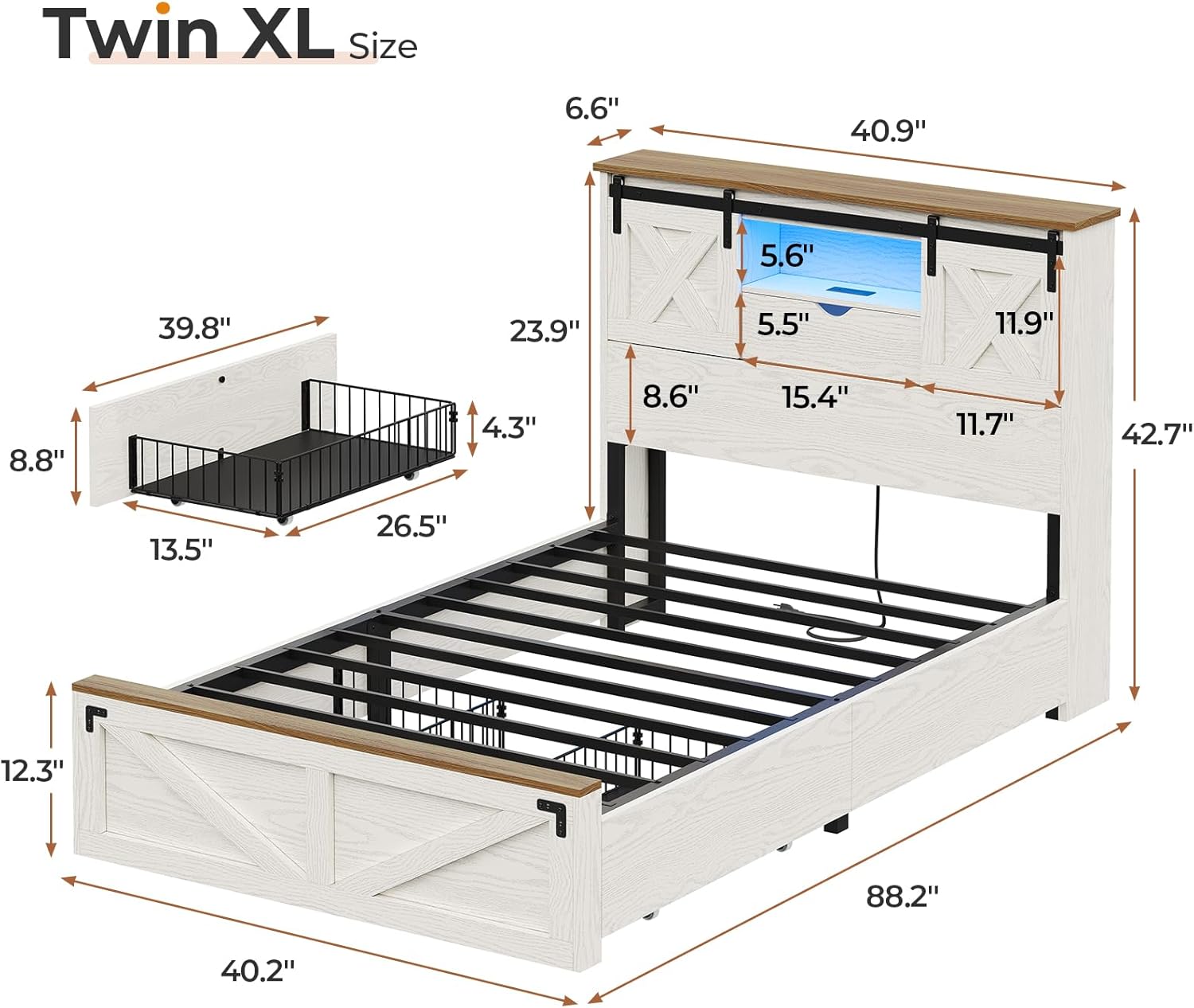
Figure 5: Farmhouse Storage Headboard. This image provides a clear view of the headboard's storage capabilities, including the sliding barn doors, rustic accent decor, and a storage cubby with a door, highlighting its functional design.
Under-Bed Storage Drawers
The two under-bed drawers provide additional storage space. Each drawer is equipped with four smooth wheels for easy movement and a closing buckle to keep them securely shut.
- Access: Pull the drawers out from under the bed using the integrated handles.
- Security: Engage the closing buckle to prevent accidental opening.
Maintenance
Proper care and maintenance will extend the life of your Hasuit bed frame.
- Cleaning: Wipe surfaces with a soft, damp cloth. Avoid harsh chemicals or abrasive cleaners that may damage the finish.
- Dusting: Regularly dust the bed frame to prevent buildup.
- Hardware Check: Periodically inspect all screws and bolts to ensure they are tight. Retighten as needed to maintain stability.
- LED Lights: If LED lights malfunction, refer to the troubleshooting section or contact customer support. Do not attempt to repair electrical components yourself.
Troubleshooting
If you encounter issues with your bed frame, refer to the following common problems and solutions:
| Problem | Possible Cause | Solution |
|---|---|---|
| Bed frame feels unstable or wobbly. | Loose hardware. | Check and tighten all screws and bolts. Ensure all connections are secure. |
| LED lights are not working. | Power connection issue, app not connected, or light strip malfunction. | Ensure the power cord for the headboard is securely plugged in. Check the app connection. If issues persist, contact customer service. |
| Charging station is not providing power. | Power cord not plugged in, or circuit issue. | Verify the headboard's power cord is fully inserted into a working wall outlet. Test with another device. If still not working, contact customer service. |
| Drawers are difficult to open/close or do not stay shut. | Obstruction, misaligned wheels, or buckle not engaged. | Clear any obstructions. Check if wheels are properly aligned and clean. Ensure the closing buckle is engaged. |
Specifications
| Feature | Detail |
|---|---|
| Brand | Hasuit |
| Model Number | Farmhouse Bed Frame Twin XL Size |
| Color | White |
| Product Dimensions (L x W x H) | 224.03 x 102.11 x 108.46 cm (88.2 x 40.2 x 42.7 inches) |
| Item Weight | 39.5 kg (87.08 lbs) |
| Material | Engineered Wood, Metal |
| Special Features | Charging Station, Farmhouse Decor, LED Lighting, Storage Headboard with Sliding Barn Door |
| Compatible Mattress Size | Twin XL Size |
| Weight Capacity | Up to 900 lbs (408 kg) |
| Included Components | Charging Station, Installation Manual, LED Lights, Platform Bed, Storage Headboard |
Warranty and Support
Hasuit is committed to providing quality products and customer satisfaction. If your bed frame arrives damaged, scratched, or with missing parts, or if you encounter any other issues during assembly or use, please contact our customer service team.
Our after-sales service team aims to respond to inquiries within 24 hours to assist with troubleshooting, part replacement, or any other support you may require.
Please refer to the contact information provided in your installation manual or on the official Hasuit website for the most current support details.
Ask a question about this manual
Ask about setup, troubleshooting, compatibility, parts, safety, or missing instructions. Manuals+ will review the question and use this page’s manual context to help answer it.