
Introduction
This manual provides detailed instructions for the installation, operation, and maintenance of your DD Audio SS5.500 5-Channel Amplifier. The SS5.500 is designed to deliver high-fidelity audio performance with its Class AB 4-channel section for mid/high frequencies and an efficient Class D mono channel for subwoofers. Please read this manual thoroughly before attempting installation or operation to ensure proper use and to prevent damage.
Safety Warning: Always disconnect the vehicle's battery before performing any electrical work. Improper installation can lead to serious injury or damage to your vehicle's electrical system. If you are unsure about any part of the installation process, consult a professional audio installer.
Product Features
- 5-Channel Amplifier: 4 channels (Class AB) + 1 channel (Class D)
- 980W RMS Total Output
- 12dB/Octave High Pass/Low Pass Crossovers
- Dual Toroidal Power Supply
- Heavyweight DD Aluminum Chassis for efficient heat dissipation
- Set Screw Power and Speaker Terminals
- Remote Gain Control included
- 4 AWG Power Terminals
- Elna capacitors, precision resistors, and high specification transistors for Class AB section
- International Rectifier components for Class D section
Setup and Installation
1. Mounting the Amplifier
Choose a secure, dry location for mounting the amplifier, away from direct sunlight and heat sources. Ensure adequate airflow around the amplifier for proper cooling. The amplifier should be mounted firmly to prevent movement during vehicle operation.

Figure 1: Side view of the DD Audio SS5.500 amplifier, highlighting the robust aluminum chassis and heatsink fins designed for efficient heat dissipation.
2. Power Connections
- Power (+12V): Connect a 4 AWG power cable directly from the positive terminal of the vehicle's battery to the +12V terminal on the amplifier. Install an appropriate fuse (not supplied) within 18 inches (45 cm) of the battery.
- Ground (GND): Connect a 4 AWG ground cable from the GND terminal on the amplifier to a clean, unpainted metal surface of the vehicle's chassis. Ensure a solid, low-resistance connection.
- Remote (REM): Connect a remote turn-on wire from your head unit's remote output to the REM terminal on the amplifier. This wire signals the amplifier to turn on and off with your head unit.
3. Speaker Output Connections
Connect your speakers to the designated speaker output terminals. The SS5.500 features dedicated outputs for Channels 1-4 and a separate output for Channel 5 (subwoofer). Ensure correct polarity (+ to + and - to -) for all speaker connections. Refer to your speaker's impedance ratings to ensure compatibility with the amplifier's output capabilities.
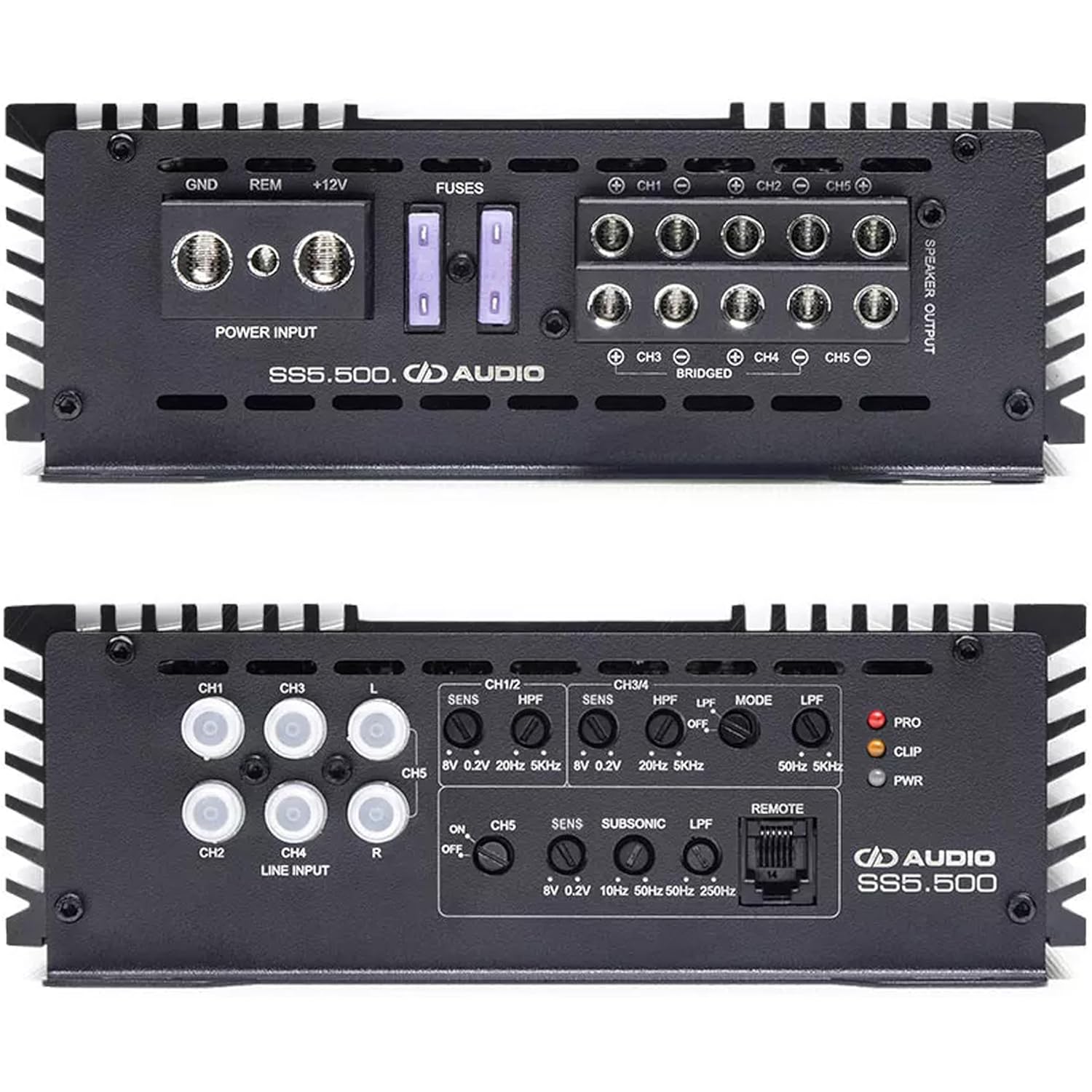
Figure 2: Top view of the DD Audio SS5.500 amplifier, illustrating the power input terminals (GND, REM, +12V), fuse slots, and speaker output terminals for channels 1-5.
4. Input Connections
The amplifier supports both RCA (low-level) and high-level inputs. Connect the RCA cables from your head unit's pre-amp outputs to the corresponding RCA input jacks on the amplifier (CH1/2, CH3/4, CH5). If your head unit does not have RCA outputs, use the high-level input feature (refer to specific wiring instructions for high-level input if applicable, not detailed here).
Operating Instructions
The SS5.500 amplifier features various controls to fine-tune your audio system. Adjustments should be made carefully to achieve optimal sound quality and prevent speaker damage.
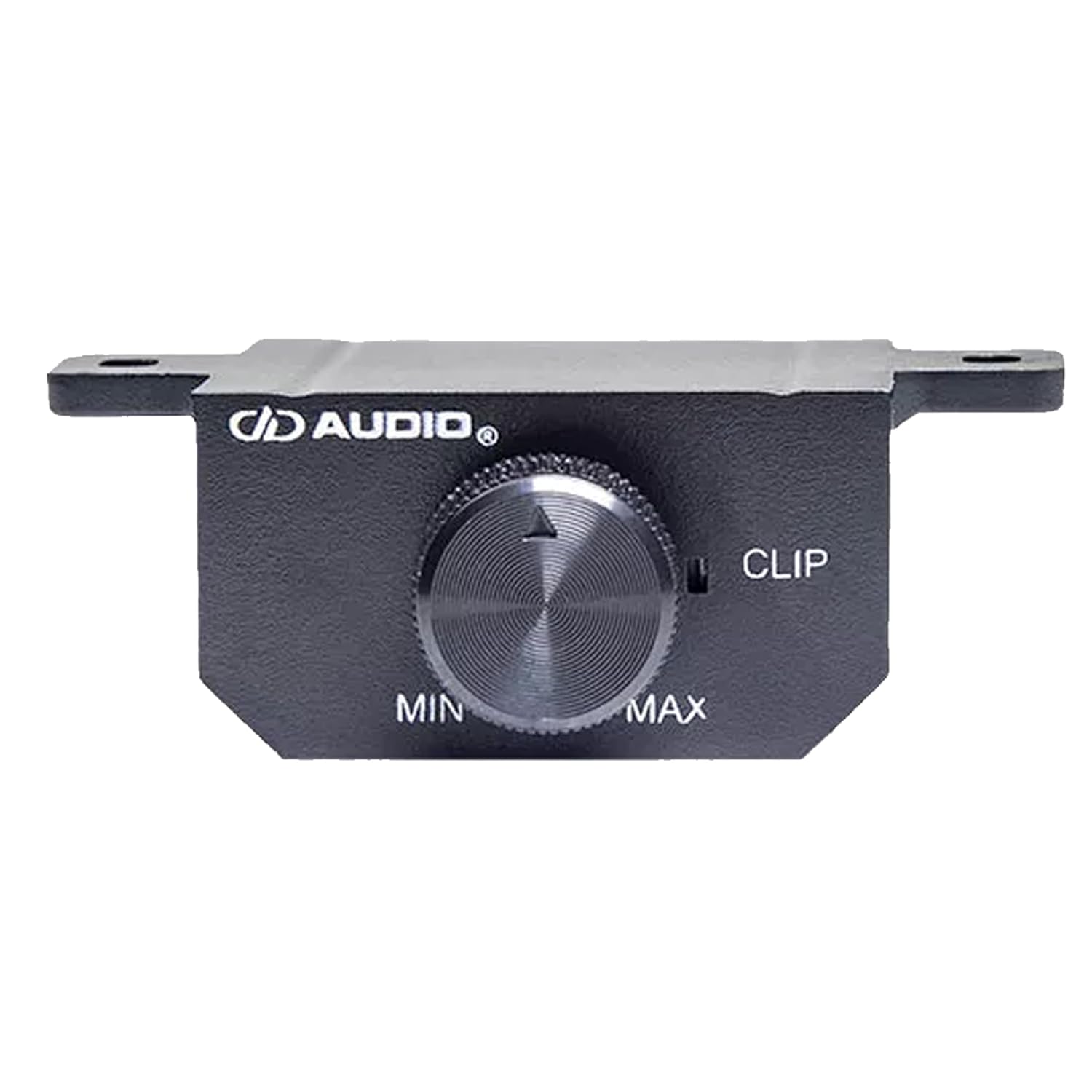
Figure 3: Control panel of the DD Audio SS5.500 amplifier, detailing input channels, gain controls (SENS), high-pass filters (HPF), low-pass filters (LPF), sub-sonic filter, and mode switches.
1. Gain (SENS) Adjustment
The gain control (SENS) matches the amplifier's input sensitivity to the output voltage of your head unit. Start with the gain set to minimum. Play a familiar track at about 75% of your head unit's maximum volume. Slowly increase the amplifier's gain until you hear distortion, then back off slightly. This ensures maximum clean output.
- RCA Input Sensitivity: 0.25V - 6V
- High-Level Input Sensitivity: 1.1V - 20V
2. Crossover Settings
The SS5.500 features independent crossover controls for channels 1/2, 3/4, and 5.
- High Pass Filter (HPF): (Channels 1/2, 3/4) Allows frequencies above the set point to pass through. Use this for full-range speakers to prevent low frequencies from causing distortion. Adjustable from 20Hz - 5kHz.
- Low Pass Filter (LPF): (Channels 1/2, 3/4, 5) Allows frequencies below the set point to pass through. Use this for subwoofers or mid-bass speakers. Adjustable from 50Hz - 5kHz (Channels 1/2, 3/4) and 50Hz - 250Hz (Channel 5).
- Sub-Sonic Filter: (Channel 5) A specialized high-pass filter for subwoofers, preventing extremely low, inaudible frequencies from being played, which can waste amplifier power and damage subwoofers. Adjustable from 10Hz - 50Hz.
3. Bass Boost
The amplifier includes a bass boost feature (up to 12dB). Use this sparingly and with caution, as excessive bass boost can lead to distortion and potential speaker damage. Adjust gradually to enhance low-frequency response.
4. Remote Gain Control
The included remote gain control allows for convenient adjustment of the subwoofer channel (Channel 5) output level from the driver's seat. Connect the remote control to the "REMOTE" port on the amplifier.

Figure 4: The remote gain control unit for the DD Audio SS5.500 amplifier, providing convenient adjustment of subwoofer output.
Maintenance
- Cleaning: Periodically wipe the amplifier's exterior with a soft, dry cloth. Do not use harsh chemicals or abrasive cleaners.
- Inspection: Regularly check all power, ground, and speaker connections to ensure they are secure and free from corrosion. Inspect wiring for any signs of wear or damage.
- Ventilation: Ensure that the amplifier's heatsink fins are free from obstructions to maintain proper cooling.
Troubleshooting
| Problem | Possible Cause | Solution |
|---|---|---|
| No Power / Amplifier Not Turning On | Blown fuse, loose power/ground/remote wire, faulty remote turn-on signal. | Check amplifier fuses and external fuse near battery. Verify all power, ground, and remote connections are secure. Test remote wire for +12V when head unit is on. |
| No Sound Output | Loose RCA/speaker connections, incorrect gain settings, amplifier in protect mode. | Check all input and output connections. Adjust gain settings. If protect light is on, check speaker wiring for shorts or impedance issues. |
| Distorted Sound | Gain set too high, incorrect crossover settings, poor ground connection, damaged speakers. | Reduce gain. Adjust HPF/LPF settings. Ensure a solid ground connection. Inspect speakers for damage. |
| Amplifier Overheating | Insufficient ventilation, impedance too low, prolonged high output. | Ensure proper airflow around the amplifier. Verify speaker impedance is within specifications. Reduce volume or output level. |
Specifications (SS5.500)
- Operating Voltage: 9 - 16 Volts (DC)
- Test Voltage: 14.4 Volts
- Input Channels: 6
- Output Channels: 5
- Continuous Wattage @4ohm (CH1-4): 80W x 4
- Continuous Wattage @2ohm (CH1-4): 120W x 4
- Continuous Wattage @1ohm (CH5): 500W x 1
- Max Current Draw: 100 Amps
- RCA Input Voltage Sensitivity: 0.25V - 6V
- High-Level Input Voltage Sensitivity: 1.1V - 20V
- RCA Input S/N: > 95 dB
- Damping Factor: > 100
- THD: < 1.0%
- Bass Boost: 12 dB
- Frequency Response: 20Hz - 20kHz
- High Pass Filter (HPF): 20Hz - 5kHz
- Sub-Sonic Filter (CH5): 10Hz - 50Hz
- Low-Pass Filter (CH1-4): 50Hz - 5kHz
- Low-Pass Filter (CH5): 50Hz - 250Hz
- Power Wire Gauge: 4 AWG
- Speaker Wire Gauge: 12 AWG
- Dimensions (L x W x H): 13.5 x 7.3 x 2.4 inches (340 x 185 x 60 mm)
- Item Weight: 5 pounds
- Material: Aluminum, Iron (for Toroidal Power Supply)
Warranty and Support
For warranty information and technical support, please refer to the official DD Audio website or contact your authorized DD Audio dealer. Keep your purchase receipt as proof of purchase for any warranty claims.
DD Audio Official Website: ddaudio.com

