
1. Introduction
Thank you for choosing the ecoCalm 20-inch Solar Ceiling Fan Light. This product is designed to provide efficient cooling and lighting for various outdoor and off-grid spaces using solar power. Please read this manual thoroughly before installation and operation to ensure proper use and longevity of your device.

Figure 1: Complete ecoCalm Solar Ceiling Fan Light system.
2. Safety Information
- Ensure all connections are secure before operation.
- Do not attempt to disassemble or modify the product. This may void the warranty and pose safety risks.
- Keep the solar panels clean and free from obstructions to maximize charging efficiency.
- Install the fan and solar panels in locations where they are not exposed to extreme weather conditions beyond their IP rating.
- Keep out of reach of children.
3. Package Contents
Verify that all items listed below are included in your package:
- Solar Panel x2 (15W Bifacial)
- 20-inch Ceiling Fan with Light
- Solar Power Bank / Control Unit
- Connection Cables
- Mounting Screw Set
- User Manual (this document)

Figure 2: Included Accessories.
4. Setup and Installation
Follow these steps for proper assembly and installation:
- Assemble the Fan Blades: Carefully insert each fan blade into its designated slot on the fan motor housing. Ensure they are securely fastened.
- Mount the Fan: Use the provided hook and mounting hardware to securely hang the fan from a suitable overhead structure (e.g., gazebo ceiling, RV interior).
- Install Solar Panels: Mount the two bifacial solar panels in a location that receives maximum direct sunlight throughout the day. Ensure they are angled appropriately for optimal sun exposure.
- Mount the Control Unit: Secure the ecoCalm control unit to a wall or stable surface using the provided hardware.
- Connect Wiring:
- Connect the cables from the solar panels to the designated inputs on the control unit.
- Connect the fan's power cable to the output on the control unit.
Video 1: Demonstrates how to connect the cords for the solar ceiling fan light kit.
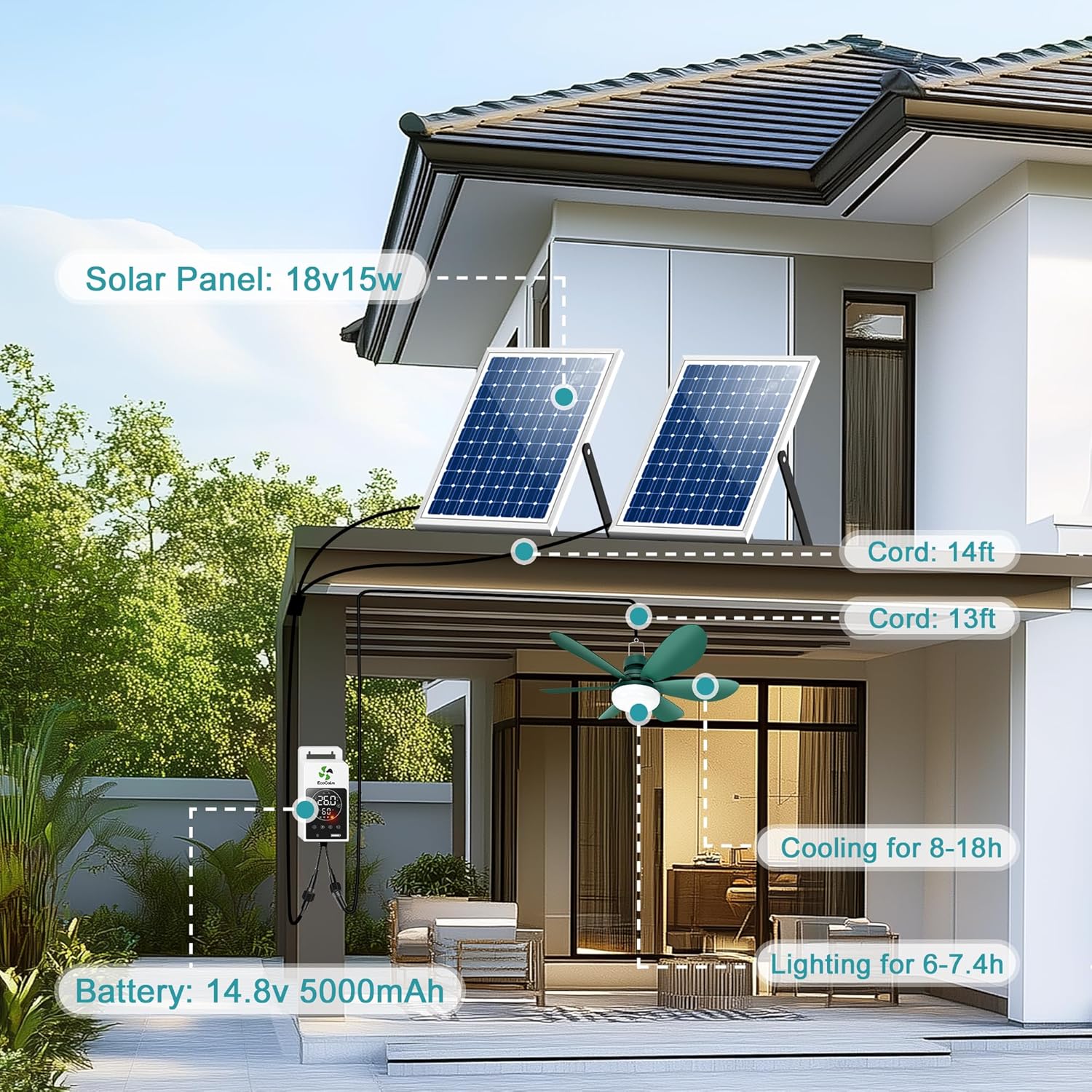
Figure 3: Fan blade assembly.

Figure 4: Fan mounted in an outdoor setting.

Figure 5: Solar panel installation for efficient charging.

Figure 6: Control unit mounted.
5. Operating Instructions
The ecoCalm control unit allows for easy management of your fan and light. Refer to the diagram below for button functions:

Figure 7: Premier Smart Controller Interface.
- Power On/Off: Long press the power button (⏻) for 3 seconds to turn the system on or off.
- Fan Speed: Press the fan button (⌂) to cycle through 3 wind speeds.
- Light Control: Press the light button (💡) to adjust the LED light through 3 brightness levels (4000K natural white).
- Temperature Unit: Press the °C/°F button to switch between Celsius and Fahrenheit display.
- ECO Mode: Long press the fan button to enter ECO mode. In this mode, the fan automatically turns on at 26°C (79°F) and off at 20°C (68°F) by default. You can adjust these auto-on/off temperature thresholds by long-pressing the '+' or '-' buttons respectively, then using '+' or '-' to set the desired temperature. Settings auto-save after 5 seconds of inactivity.
- Battery Indicator: The battery icon displays the current charge level of the built-in battery. A blinking sun icon indicates active solar charging.
Video 2: Overview of the ecoCalm Solar Ceiling Fan Light with Battery features and controls.
6. Maintenance
- Cleaning the Fan: Periodically wipe the fan blades and light cover with a soft, damp cloth to remove dust and debris. Ensure the fan is off before cleaning.
- Solar Panel Care: Regularly clean the surface of the solar panels with a soft cloth and water to remove dirt, dust, or leaves that may reduce charging efficiency. Avoid abrasive cleaners.
- Battery Longevity: For optimal battery life, avoid fully discharging the battery frequently. The MPPT technology helps manage charging for extended battery health.
7. Troubleshooting
| Issue | Possible Cause | Solution |
|---|---|---|
| Fan/Light not turning on | Low battery charge; Loose connection; System off. | Check battery level and ensure solar panels are charging; Verify all cables are securely connected; Long press power button to turn on. |
| Poor fan performance | Low battery; Obstruction to blades; Incorrect speed setting. | Ensure battery is charged; Clear any obstructions around blades; Adjust fan speed setting. |
| Solar panels not charging | Insufficient sunlight; Dirty panels; Loose connection. | Relocate panels to direct sunlight; Clean panel surfaces; Check cable connections. |
| ECO mode not activating | Temperature not reaching set threshold; ECO mode not enabled. | Verify ECO mode is enabled (long press fan button); Check set temperature thresholds. |
8. Specifications
| Feature | Specification |
|---|---|
| Model Number | KP-SCFL20 |
| Product Dimensions | 20.47 x 20.47 x 6.3 inches |
| Item Weight | 8.91 pounds |
| Solar Panel Power | 2 x 15W Bifacial (Total 30W Max) |
| Battery Capacity | Rechargeable battery with MPPT technology |
| Fan Airflow | Up to 1910 CFM (3 speeds) |
| Light Output | 4000K Natural White, 4648 Lumens (3 levels) |
| Special Features | Adjustable Thermostat, ECO Mode, Solar Powered |
| Material | Monocrystalline Silicon (panels) |
9. Warranty and Support
For warranty information and customer support, please refer to the contact details provided with your purchase or visit the official ecoCalm website. Keep your purchase receipt as proof of purchase.

