
Introduction
This manual provides essential instructions for the assembly, operation, and maintenance of your IRONCK Entertainment Center. Please read this manual thoroughly before assembly and use to ensure safe and proper functionality.

Image: Overall view of the IRONCK Entertainment Center with LED lighting.
Safety Information
Adherence to the following safety guidelines is crucial for preventing injury and damage to the product.
- Always ensure the TV stand is stable and level before placing a TV on it.
- Do not place heavy objects on the glass shelves.
- Keep the charging station dry and free from debris.
- Unplug the charging station when not in use or during lightning storms.
- Keep the TV stand away from heat sources and flammable materials.
- Always follow the assembly instructions carefully to avoid injury.
Package Contents
Verify that all components are present before beginning assembly. If any parts are missing or damaged, contact customer support.
- Main structural panels (carbon fiber board)
- 3 height-adjustable glass shelves
- LED light strips
- Remote control for LED lights
- Built-in charging station (2 AC outlets, 1 USB port, 1 Type-C port)
- Assembly hardware (screws, connectors, etc.)
- Instruction manual
Assembly Instructions
The IRONCK Entertainment Center is designed for straightforward assembly. All parts are numbered, and detailed instructions are included in the package. Please follow these steps carefully:
- Unpack Components: Carefully remove all parts from the packaging and lay them out on a clean, soft surface to prevent scratches.
- Identify Parts: Match each part to its corresponding number in the provided assembly diagram.
- Assemble Frame: Follow the step-by-step diagrams to connect the main structural panels using the provided hardware. Ensure all connections are secure.
- Install Shelves: Insert the glass shelves into the designated slots. The height of the glass shelves is adjustable.
- Install LED Lights: Attach the LED light strips to the designated areas. Ensure the wiring is routed through the cable holes for a tidy appearance.
- Connect Charging Station: Secure the built-in charging station into its designated slot on the top surface. Plug the power cord into a wall outlet.
- Final Check: Verify that all screws are tightened and the stand is stable before placing any items on it.
For visual guidance, refer to the assembly diagrams provided in your physical instruction booklet.
Setup and Operation
1. Dimensions and Placement
The overall dimensions of the entertainment center are 13.6 inches (D) x 55.1 inches (W) x 24.6 inches (H). Ensure the stand is placed on a stable, level surface.

Image: Detailed dimensions of the IRONCK Entertainment Center.
2. TV Compatibility
This entertainment center is suitable for flat-screen TVs ranging from 50 to 75 inches. Ensure your TV's base fits within the top surface dimensions.

Image: TV size compatibility demonstration on the IRONCK Entertainment Center.
3. LED Lighting System
The integrated LED light strips provide customizable ambient lighting. Use the included remote control to adjust colors and modes.
- Power On/Off: Press the power button on the remote.
- Color Selection: Choose from 7 main colors or various RGB combinations using the color buttons.
- Mode Selection: Cycle through different dynamic lighting modes (e.g., flashing, fading) using the 'MODE' button.
- Brightness/Speed Adjustment: Use the 'BRIGHT' and 'SPEED' buttons to fine-tune the lighting effects.

Image: Multifunctional dynamic RGB LED lights with remote control.
4. Built-in Charging Station
The top surface features a convenient charging station with 2 standard AC outlets, 1 USB port, and 1 Type-C port. This allows for easy power access for your TV, gaming consoles, and other electronic devices.
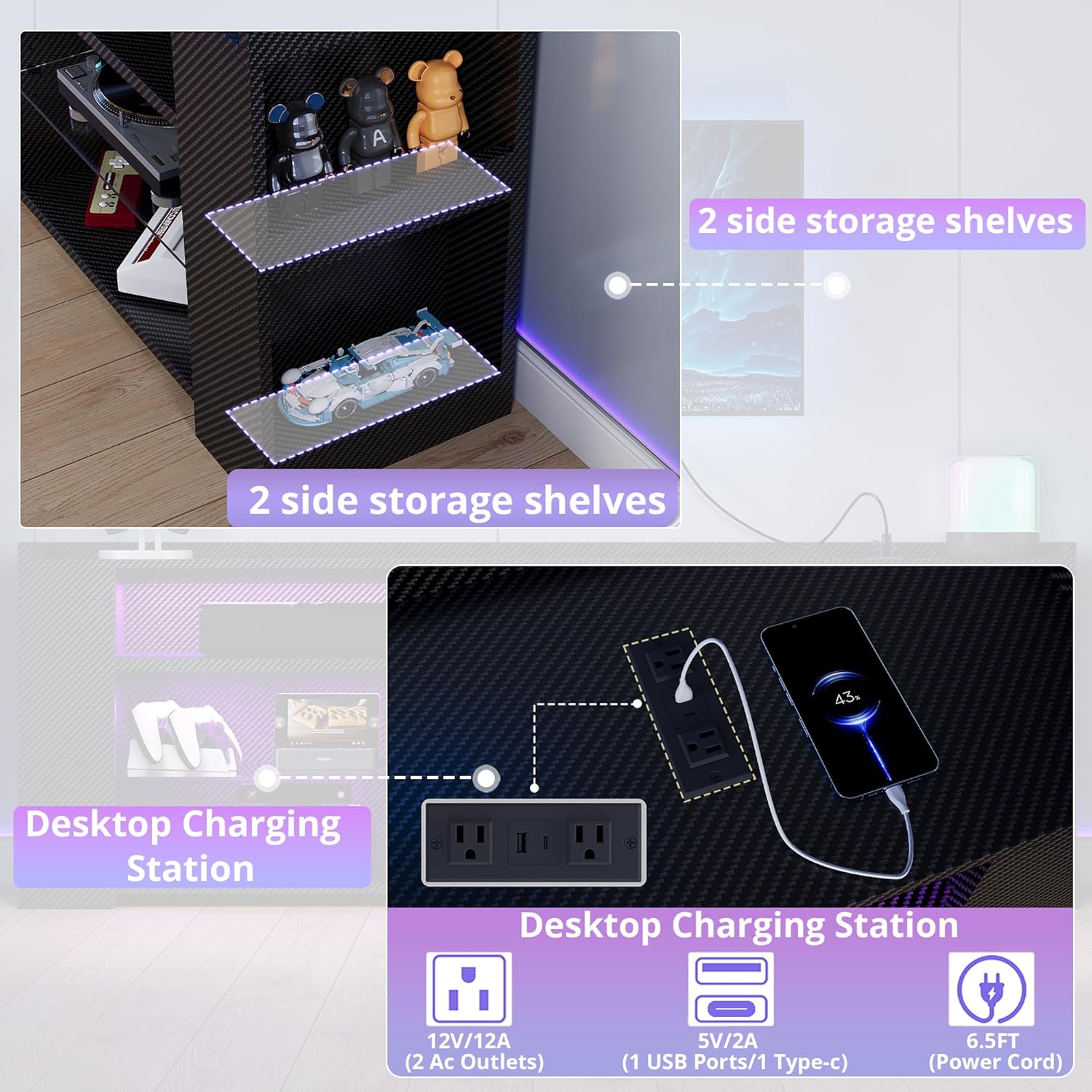
Image: Desktop Charging Station with AC, USB, and Type-C ports.
5. Storage and Cable Management
The entertainment center offers 11 compartments, including 3 height-adjustable glass shelves and open-shelved designs for long items. Cable holes are strategically placed at the back to help organize and conceal wires, maintaining a clean aesthetic.

Image: Features including adjustable shelves, open design, glass shelves, and wiring holes.

Image: Carbon fiber panel detail with wiring holes and baffle.
Maintenance
To ensure the longevity and appearance of your IRONCK Entertainment Center, follow these maintenance guidelines:
- Cleaning: The waterproof surface can be easily wiped clean with a damp cloth. Avoid abrasive cleaners or harsh chemicals that may damage the finish.
- Dusting: Regularly dust all surfaces with a soft, dry cloth.
- Glass Shelves: Clean glass shelves with a glass cleaner and a soft cloth to prevent streaks.
- Electrical Components: Ensure the charging station and LED lights are unplugged before cleaning. Do not use liquid cleaners directly on electrical components.
Troubleshooting
| Problem | Possible Cause | Solution |
|---|---|---|
| LED lights not working | Power connection loose; remote battery dead; LED strip damaged. | Check power connections. Replace remote battery. Contact customer support if LED strip is damaged. |
| Charging station not providing power | Power cord unplugged; device not properly connected; power surge. | Ensure the main power cord is securely plugged into a wall outlet. Verify devices are correctly plugged into the charging station. Check household circuit breaker. |
| Stand feels unstable | Uneven floor; loose assembly hardware. | Adjust the stand's position on a level surface. Re-tighten all assembly screws. |
Specifications
| Feature | Detail |
|---|---|
| Brand | IRONCK |
| Model Name | HK-TS-TV02 |
| Product Dimensions | 13.6"D x 55.1"W x 24.6"H |
| Item Weight | 71.4 pounds |
| Material | Carbon Fiber Laminate/Veneer, Carbon Steel Frame |
| Color | Black Carbon Fiber |
| Recommended TV Size | 50 - 75 inches |
| Number of Compartments | 11 |
| Number of Shelves | 3 (glass, height-adjustable) |
| Special Feature | Built-In Charging Station (2 AC, 1 USB, 1 Type-C) |
| Lighting | Multifunctional Dynamic RGB LED Lights with Remote Control |
| Assembly Required | Yes |
Official Product Videos
IRONCK Entertainment Center 1400mm Overview
Video: A brief overview of the IRONCK Entertainment Center, showcasing its features and design.
Warranty and Support
For warranty information or technical support, please refer to the contact details provided in your product packaging or visit the official IRONCK website. Keep your purchase receipt for warranty claims.