
LiTHELi U20HW11-0A110
Litheli Paddle Board Pump User Manual
Model: U20HW11-0A110
Introduction
Thank you for choosing the Litheli Paddle Board Pump. This electric air pump is designed for efficient inflation and deflation of various inflatables, including paddle boards, kayaks, mattresses, and tents. Featuring high-pressure capabilities, intelligent modes, and a portable design, it provides a convenient solution for your outdoor inflation needs. Please read this manual thoroughly before operation to ensure safe and optimal performance.
Safety Information
To prevent injury or damage, always adhere to the following safety precautions:
- Do not operate the pump in wet conditions or immerse it in water.
- Keep the pump away from children and pets.
- Ensure the inflation hose is securely connected to both the pump and the inflatable valve before starting operation.
- Do not exceed the recommended pressure for your inflatable item. The pump features an automatic stop function, but always verify the pressure setting.
- Avoid blocking the air intake or exhaust ports during operation.
- Disconnect the power source when the pump is not in use or before performing any maintenance.
- Use only the provided accessories and power cables.
- Do not attempt to disassemble or repair the pump yourself. Contact qualified service personnel for assistance.
Package Contents
Verify that all items are present in your package:
- Litheli Electric SUP Pump (Model U20HW11-0A110)
- Air Hose with 6 Interchangeable Nozzles
- U20 IPS Super Battery
- Battery Charging Cable
- 12V Car Power Cable
- Operating Manual (this document)
- Storage Bag

Image: The Litheli Paddle Board Pump shown with its included accessories, including the pump unit, hose, nozzles, battery, and cables.

Image: A close-up view of the six interchangeable nozzles provided with the pump, designed to fit various inflatable valves.
Product Overview
Key Components
- Pump Unit: The main body housing the motor, control panel, and display.
- U20 IPS Super Battery: Detachable 12500mAh battery pack, also functions as a power bank.
- Inflation/Deflation Ports: Located on top of the pump for connecting the air hose.
- Digital Display: Shows real-time pressure, battery level, and unit settings.
- Control Panel: Buttons for power, mode selection, pressure adjustment, and unit switching.
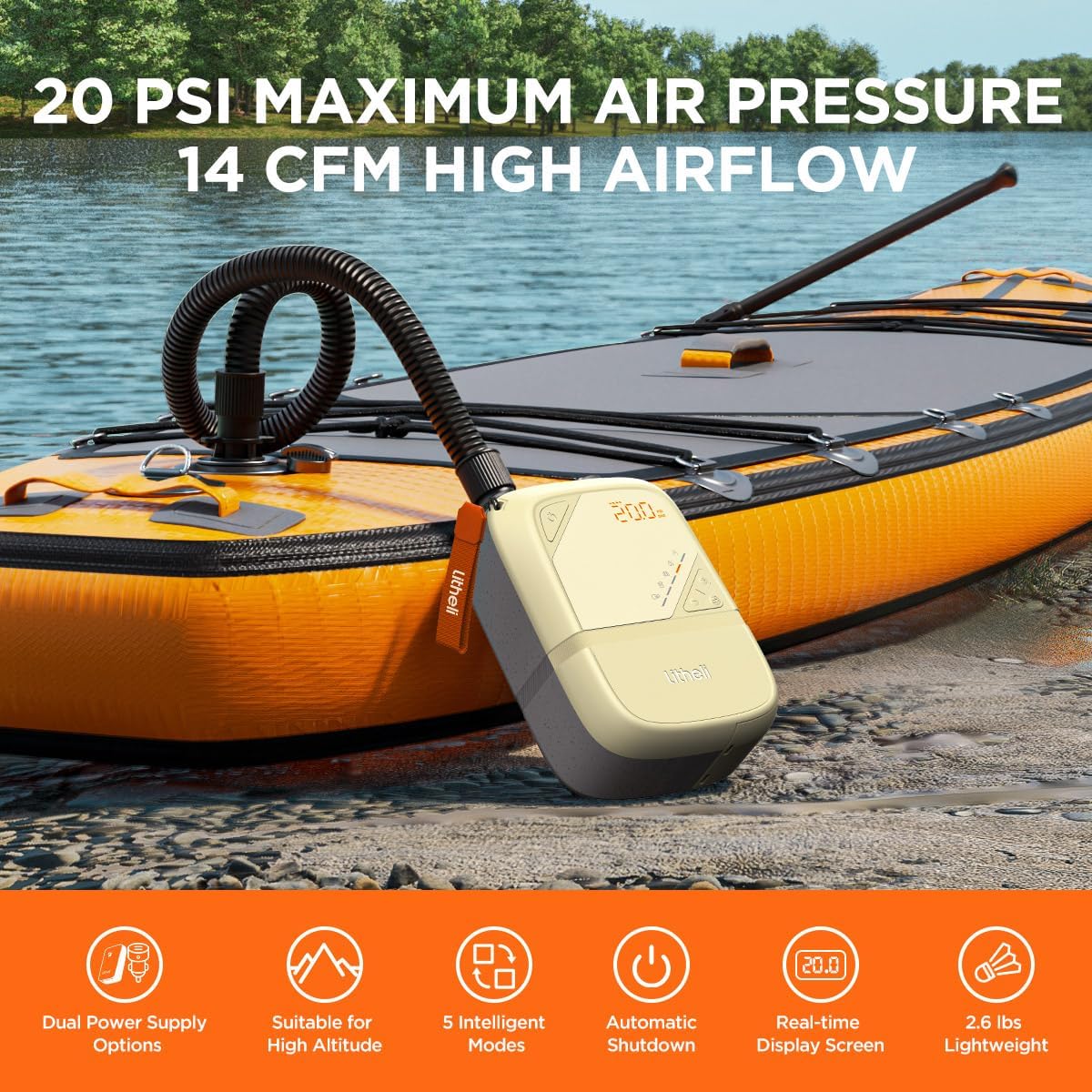
Image: The Litheli pump in use, connected to an inflatable paddle board on a beach, demonstrating its compact size and portability.
Features
- High-Pressure Inflation and Deflation: Capable of reaching up to 20 PSI (1.4 Bar) with a maximum flow rate of 400 liters/minute.
- Precise Pressure Control: Adjustable to 0.1 PSI increments, with automatic shut-off at preset pressure.
- Dual Power Supply Options: Operates with the included 12500mAh battery or via a 12V car cigarette lighter adapter.
- Portable and Lightweight: Weighs only 2.65 pounds with compact dimensions (9.13" × 6.18" × 3.62").
- 5 Intelligent Modes: Pre-programmed settings for various inflatables, including Personalized, Paddle Board, Inflatable Tent, Inflatable Bed, and Deflation modes.
- Real-time Display: Clear digital screen showing current pressure, battery level, and selected unit (PSI/Bar).
- Durable Construction: Sand-colored ABS shell designed to be UV, stain, and scratch-resistant.

Image: An internal diagram illustrating the dual pump system, designed for faster and more efficient inflation, even in high-altitude environments.
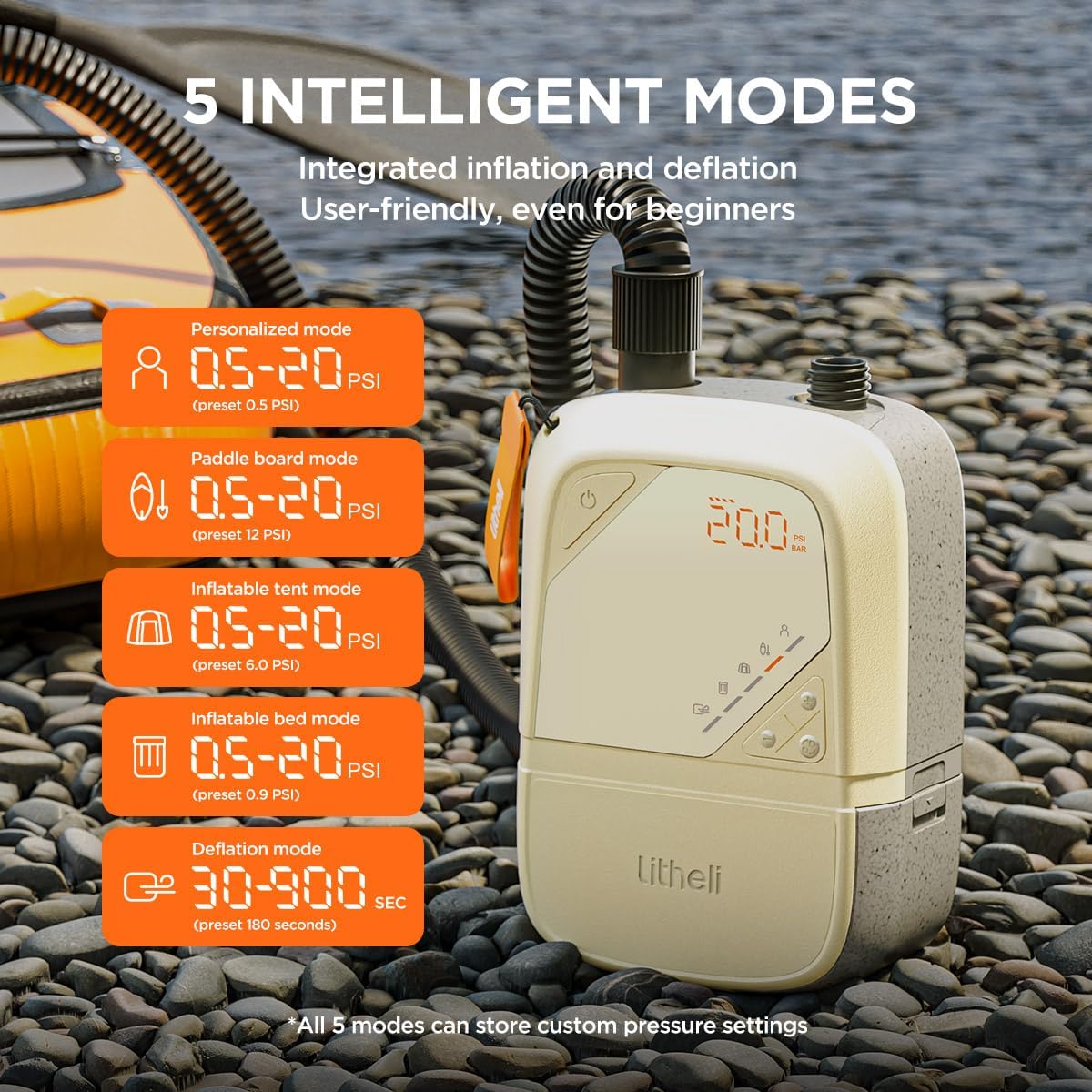
Image: The pump's display showing the five intelligent modes, each with a preset pressure range, simplifying operation for different inflatable types.

Image: A detailed view of the pump's digital display, showing real-time pressure readings, and an illustration of the high-precision pressure sensor.
Setup
1. Charging the Battery
Before first use, fully charge the U20 IPS Super Battery. The battery can be charged independently or while attached to the pump.
- Connect the Battery Charging Cable to the battery's charging port.
- Connect the other end of the cable to a suitable USB power adapter (not included) or a 45W Type-C bidirectional fast charging source.
- The battery indicator on the pump's display or the battery itself will show charging status. Charge until full.

Image: A person connecting a charging cable to the removable U20 IPS Super Battery, highlighting its function as a power bank.
2. Attaching the Air Hose and Nozzle
- Identify the correct nozzle for your inflatable's valve.
- Attach the chosen nozzle firmly to the end of the air hose.
- Connect the other end of the air hose to the appropriate port on the pump unit. For inflation, use the port marked for inflation. For deflation, use the port marked for deflation.
- Ensure all connections are secure to prevent air leakage.
Operation
1. Powering On and Setting Pressure
- Press the Power button (⏻) to turn on the pump. The digital display will illuminate.
- Press the Mode button to cycle through the 5 intelligent modes (Personalized, Paddle Board, Inflatable Tent, Inflatable Bed, Deflation). Each mode has a default preset pressure.
- Alternatively, use the '+' and '-' buttons to manually adjust the target pressure. The pressure can be set in 0.1 PSI increments.
- Press the Unit button to switch between PSI and Bar display units.
2. Inflation
- Connect the air hose with the appropriate nozzle to the inflation port on the pump.
- Insert the nozzle firmly into the valve of the inflatable item.
- Ensure the pump is powered on and the desired pressure is set.
- Press the Start/Stop button to begin inflation. The pump will automatically stop once the preset pressure is reached.
- Disconnect the nozzle from the inflatable and the hose from the pump.
3. Deflation
The pump also supports deflation for quick packing and storage.
- Connect the air hose with the appropriate nozzle to the deflation port on the pump.
- Insert the nozzle firmly into the valve of the inflatable item.
- Select the "Deflation mode" using the Mode button.
- Press the Start/Stop button to begin deflation. The pump will run for the preset duration (e.g., 180 seconds) or until manually stopped.
- Disconnect the nozzle from the inflatable and the hose from the pump.
Maintenance
- Cleaning: Wipe the pump's exterior with a soft, damp cloth. Do not use harsh chemicals or abrasive cleaners. Ensure the pump is dry before storage.
- Storage: Store the pump and its accessories in the provided storage bag in a cool, dry place, away from direct sunlight and extreme temperatures.
- Battery Care: For long-term storage, charge the battery to approximately 50-70% capacity. Recharge every 3-6 months to maintain battery health.
- Hose and Nozzles: Inspect the hose and nozzles regularly for any signs of wear, cracks, or damage. Replace if necessary to ensure optimal performance.
Troubleshooting
| Problem | Possible Cause | Solution |
|---|---|---|
| Pump does not turn on. | Battery is depleted or not properly inserted. | Charge the battery or ensure it is securely connected. |
| Pump runs but does not inflate. | Hose or nozzle not properly connected; valve on inflatable is closed or faulty. | Check all connections for leaks. Ensure the inflatable's valve is open and functioning correctly. |
| Pump stops prematurely. | Preset pressure reached; pump overheating. | Check the preset pressure. Allow the pump to cool down if it feels hot. |
| Inaccurate pressure reading. | Sensor obstruction or calibration issue. | Ensure no debris is blocking the sensor. If issues persist, contact customer support. |
| Battery drains quickly. | Old battery; frequent high-pressure use. | Consider replacing the battery if it's old. High-pressure inflation consumes more power. |
Specifications
| Attribute | Detail |
|---|---|
| Brand | LiTHELi |
| Model Number | U20HW11-0A110 |
| Maximum Pressure | 20 PSI (1.4 Bar) |
| Air Flow Capacity | 400 LPM (Liters Per Minute) |
| Power Source | Battery Powered (12500mAh) / 12V DC Adapter |
| Item Weight | 2.65 pounds (42.33 Ounces) |
| Dimensions (L x W x H) | 9.13 x 6.18 x 3.62 inches |
| Material | ABS Plastic, Metal Components |
| Color | Sand Color |
Warranty and Support
The Litheli Paddle Board Pump (Model U20HW11-0A110) comes with a 1-Year Limited Manufacturer's Warranty from the date of purchase. This warranty covers defects in materials and workmanship under normal use.
For warranty claims, technical support, or any questions regarding your product, please contact Litheli customer service. Refer to the contact information provided on the Litheli official website or the packaging for the most up-to-date support channels.
Please retain your proof of purchase for warranty validation.
Related documentsU20HW11-0A110

Ask a question about this manual
Ask about setup, troubleshooting, compatibility, parts, safety, or missing instructions. Manuals+ will review the question and use this page’s manual context to help answer it.