
Pinmoco L104660A-BLKM
Pinmoco 63-Inch LED TV Stand Instruction Manual
Model: L104660A-BLKM
1. Important Safety Information
Please read all instructions carefully before assembly and use. Keep this manual for future reference.
- Always secure the TV stand to the wall using the included anti-tip kit to prevent tipping. This is crucial for safety, especially in households with children.
- Distribute weight evenly. Keep heavy items away from the edges to maintain stability.
- Do not place the TV stand in high-traffic areas where it could be easily bumped or cause obstruction.
- Ensure the TV stand is placed on a flat, stable surface.
- Do not exceed the maximum weight limit of 200 pounds for the top surface.
2. Product Overview
The Pinmoco 63-Inch LED TV Stand is designed to accommodate TVs up to 70 inches, providing a modern entertainment solution with integrated LED lighting and ample storage. It features a durable P2 particle board construction with tempered glass elements.
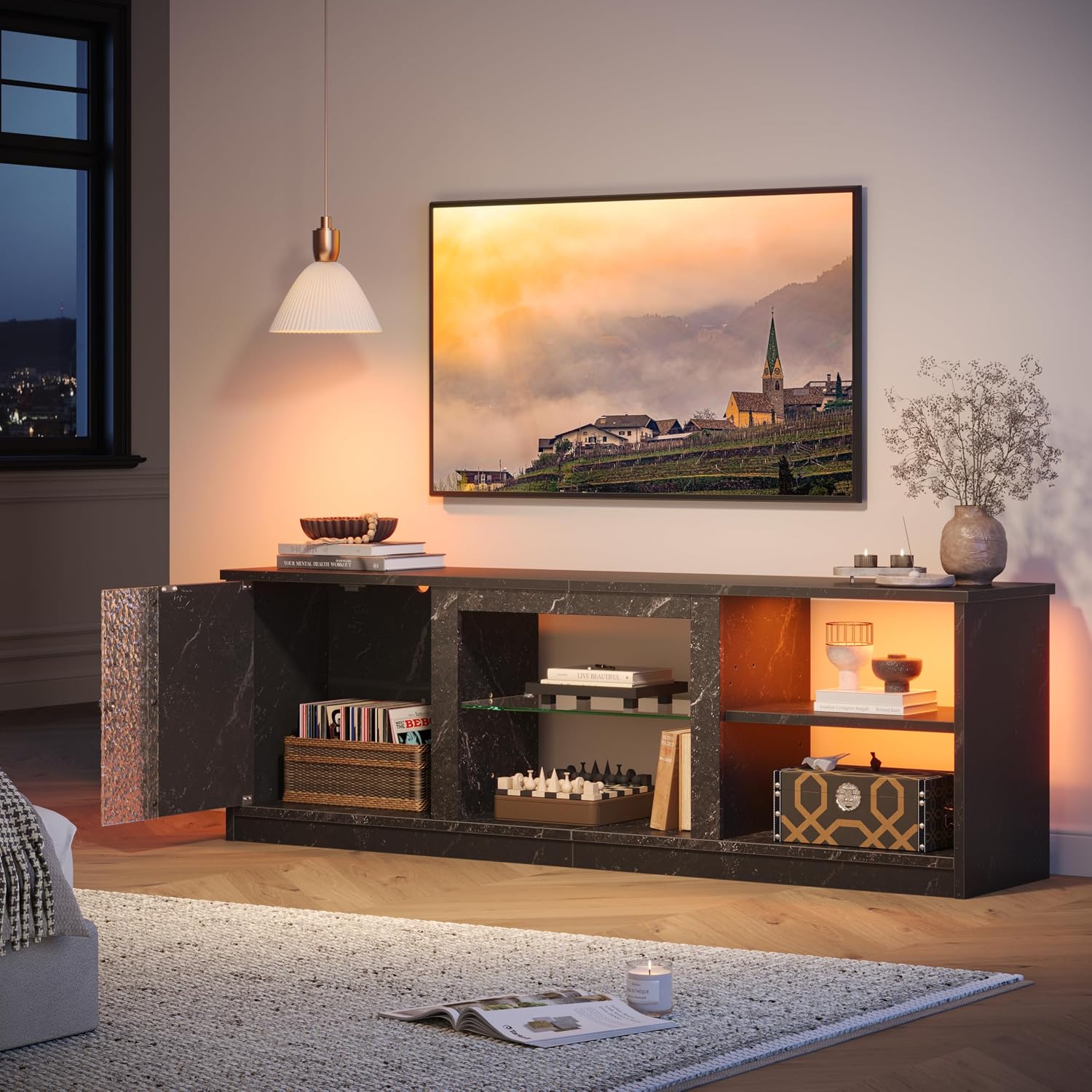
Image 2.1: The Pinmoco 63-Inch LED TV Stand, showcasing its design and functionality in a living room environment.
3. Setup and Assembly
Assembly is required for this TV stand. It is recommended to have two people for assembly to ensure ease and safety. All necessary components and instructions are included in the packaging.
3.1 Unpacking and Component Check
- Carefully unpack all components and hardware from the box.
- Verify that all parts listed in the assembly guide are present and undamaged. If any parts are missing or damaged, please contact Pinmoco customer support for assistance.
3.2 Assembly Steps
Follow the detailed step-by-step instructions provided in the separate assembly manual included with your product. Ensure all screws and fasteners are tightened securely, but do not overtighten.

Image 3.1: Product dimensions and weight capacity. The stand measures 63 inches in length, 13.8 inches in depth, and 20.7 inches in height, supporting up to 200 lbs on the top surface.
3.3 Anti-Tip Kit Installation
After assembly, it is mandatory to install the anti-tip kit to secure the TV stand to a wall. Refer to the anti-tip kit instructions for proper installation to prevent accidental tipping.
4. Operating Instructions
4.1 LED Lighting System
The TV stand features integrated LED lights to enhance your entertainment experience. The LED system offers 7 main colors and 20 dynamic modes, controllable via a remote control.
- Power On/Off: Use the power button on the remote control to turn the LED lights on or off.
- Color Selection: Press the color buttons on the remote to select one of the 7 static colors.
- Dynamic Modes: Use the mode buttons to cycle through the 20 dynamic lighting effects.
- Brightness/Speed Adjustment: Adjust the brightness of static colors or the speed of dynamic modes using the designated buttons on the remote.

Image 4.1: The LED lighting system, illustrating the available colors, dynamic modes, and the remote control for operation.

Image 4.2: The TV stand illuminated with blue LED lights, demonstrating its use with gaming equipment and other media devices.
4.2 Adjustable Tempered Glass Shelves
The entertainment center includes two tempered glass shelves with three adjustable height levels. This allows for flexible storage and display of various items, such as media players, gaming consoles, or decorative objects.
- To adjust a shelf, carefully remove any items from the shelf.
- Lift the shelf slightly and reposition the shelf supports to the desired height level.
- Ensure the shelf is securely seated on all four supports before placing items back.

Image 4.3: The storage cabinet and adjustable glass shelves, highlighting the flexibility for organizing various items and maintaining a tidy appearance.
5. Maintenance
Regular maintenance will help preserve the appearance and longevity of your Pinmoco TV stand.
- Cleaning: Wipe surfaces with a soft, damp cloth. Avoid abrasive cleaners or harsh chemicals that may damage the finish.
- Dusting: Dust regularly with a dry, soft cloth to prevent buildup.
- Spills: Clean spills immediately with a dry cloth to prevent staining or damage to the material.
- Hardware Check: Periodically check all screws and fasteners to ensure they remain tight. Retighten if necessary.
6. Troubleshooting
This section addresses common issues you might encounter.
- LED Lights Not Working:
- Check if the power adapter is securely plugged into both the LED strip and a working power outlet.
- Ensure the remote control has working batteries and is pointed directly at the LED receiver.
- If the issue persists, contact customer support for assistance.
- Stand Instability:
- Verify that all assembly screws are tightened.
- Ensure the anti-tip kit is correctly installed and secured to the wall.
- Confirm the stand is on a level surface.
- Missing Parts or Damaged Components:
- If you encounter missing parts or a bent bar during assembly, please contact Pinmoco customer support immediately for parts replacement or upgrade service.
7. Specifications
| Feature | Detail |
|---|---|
| Brand | Pinmoco |
| Model Name | L104660A-BLKM |
| Color | Black |
| Product Dimensions | 63"D x 13.8"W x 20.7"H |
| Item Weight | 52.9 Pounds |
| Weight Limit (Top Surface) | 200 Pounds |
| Material | Engineered Wood, Tempered Glass |
| Number of Shelves | 3 (2 adjustable glass shelves) |
| Number of Compartments | 5 |
| Special Feature | Adjustable Shelf, LED Lights (7 colors, 20 dynamic modes) |
| Mounting Type | Floor Mount (with anti-tip kit for wall securing) |
| Assembly Required | Yes |
8. Warranty and Support
8.1 Returns Policy
This product is eligible for a 30-day easy returns policy. Please refer to the retailer's return policy for specific details and procedures.
8.2 Customer Support
For any questions, concerns, or assistance with missing parts or damaged components, please contact Pinmoco Direct customer support. Contact information can typically be found on your purchase receipt or the retailer's website.
Pinmoco is committed to providing quality products and support. We offer parts replacement or upgrade service for eligible issues.
Ask a question about this manual
Ask about setup, troubleshooting, compatibility, parts, safety, or missing instructions. Manuals+ will review the question and use this page’s manual context to help answer it.