
Culligan ZEROP10
Culligan with ZeroWater Technology 10-Cup Water Filter Pitcher User Manual
Model: ZEROP10 | Brand: Culligan
Introduction
The Culligan with ZeroWater Technology 10-Cup Water Filter Pitcher provides advanced 5-stage water filtration, guaranteed to remove 99.9% of dissolved solids – guaranteed. This pitcher is IAPMO certified to reduce lead, Total PFAS (forever chemicals), mercury, fluoride, and chlorine, ensuring cleaner, better-tasting water for your household. Its space-saving design fits easily into most refrigerators, and the integrated TDS meter helps you monitor water quality and filter life.

Figure 1: The Culligan with ZeroWater Technology 10-Cup Water Filter Pitcher.
What's in the Box
Your Culligan with ZeroWater Technology 10-Cup Water Filter Pitcher package includes the following components:
- 10-Cup Water Filter Pitcher
- 5-Stage Advanced Water Filter
- TDS Water Tester
- User Manual
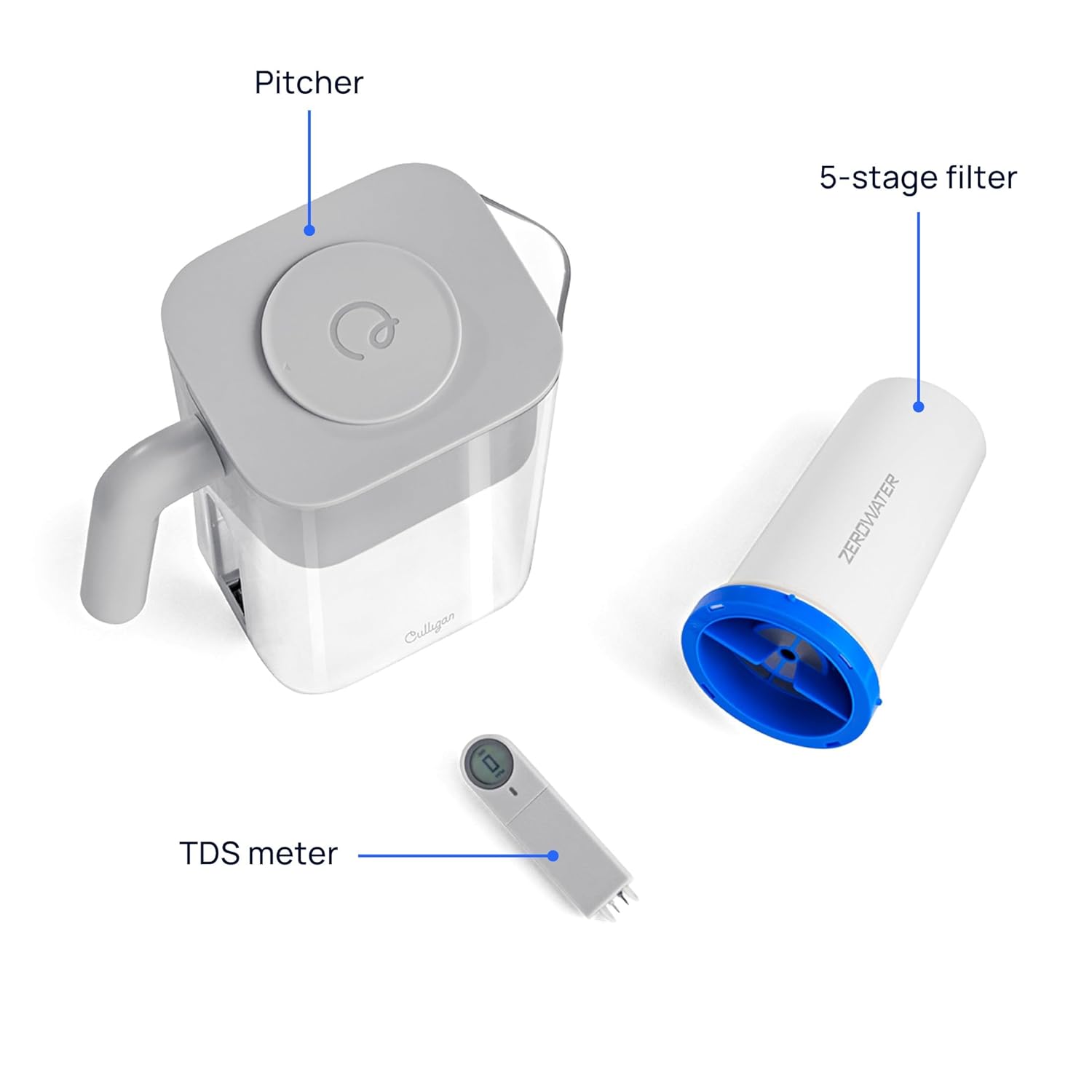
Figure 2: All components included in the package: the pitcher, the 5-stage filter, and the TDS meter.
Setup Instructions
- Unpack Components: Carefully remove all parts from the packaging.
- Wash Components: Wash the pitcher, lid, and reservoir with warm water and mild soap. Rinse thoroughly. Do not wash the filter or TDS meter with soap.
- Install Filter: Insert the 5-stage advanced water filter into the designated slot in the reservoir. Ensure it is securely seated.
- Assemble Pitcher: Place the reservoir with the installed filter into the pitcher body.
- Attach Lid: Secure the lid onto the pitcher.
- Initial Fill: Fill the top reservoir with tap water. Allow the water to filter through completely. Discard the first two full pitchers of filtered water to prime the filter.

Figure 3: The pitcher and its packaging, illustrating the product as it appears out of the box.
Operating Instructions
Filling the Pitcher
- Open Lid: Slide open the easy-slide lid on top of the pitcher.
- Pour Water: Pour tap water into the top reservoir. The water will slowly filter through the 5-stage filter into the main pitcher body.
- Wait for Filtration: Allow the water to fully filter before pouring. The Ready-Pour® design allows dispensing while filtering.
Dispensing Water
- Pouring: Use the ergonomic handle for an easy and convenient pour. The smooth spout is designed for no-drip pouring.
- Refrigerator Dispensing (for dispenser models): If using a dispenser model, pull the spigot lever to dispense water directly into your glass or bottle.

Figure 4: Demonstrates the ergonomic handle and smooth spout for easy, no-drip pouring.
Using the TDS Meter
The built-in TDS (Total Dissolved Solids) meter measures the level of dissolved solids in your water. A reading of "0" indicates that the filter is removing virtually all TDS from your water, providing optimal purity.
- Check Reading: The digital display on the TDS meter will show the PPM (parts per million) of dissolved solids.
- Filter Replacement Indicator: The meter alerts you when it's time to change your filter. When the reading is no longer 0, or reaches a higher number (e.g., 006), it's time to replace the filter.

Figure 5: A close-up view of the integrated TDS meter, displaying a reading of 0 PPM, indicating highly filtered water.
Maintenance
Filter Replacement
Replace your filter when the TDS meter indicates a reading above 0, or when the water flow significantly slows down. Filter life varies based on water quality and usage.
- Remove Old Filter: Lift the reservoir out of the pitcher and carefully remove the old filter by twisting and pulling it out.
- Insert New Filter: Align the new Culligan with ZeroWater Technology filter with the opening in the reservoir and push it firmly into place until it clicks.
- Prime New Filter: After installing a new filter, fill the top reservoir and discard the first two full pitchers of filtered water to ensure optimal performance.
Note: This pitcher is compatible only with new Culligan with ZeroWater Technology filters. It is NOT compatible with legacy ZeroWater filters.

Figure 6: Compatibility chart for Culligan with ZeroWater Technology filters.
Cleaning the Pitcher
Regularly clean the pitcher body, lid, and reservoir with warm water and mild dish soap. Rinse all parts thoroughly before reassembly. Do not put the filter or TDS meter in a dishwasher.
Troubleshooting
| Problem | Possible Cause | Solution |
|---|---|---|
| Water filters slowly. | Filter is nearing end of life or is clogged. | Replace the filter. Ensure proper filter installation. |
| TDS meter reading is not 0. | Filter needs replacement. | Replace the 5-stage filter. Ensure the TDS meter is properly inserted. |
| Water tastes unusual. | Filter needs replacement or initial priming was insufficient. | Replace the filter. Discard the first two full pitchers of water after new filter installation. |
| Pitcher leaks. | Components not assembled correctly. | Disassemble and reassemble all parts, ensuring they are securely fitted. Check for cracks. |
Specifications
- Model Name: 10 Cup Pitcher
- Model Number: ZEROP10
- Product Dimensions: 9.5"L x 5"W x 10.5"H
- Item Weight: 1.74 Kilograms (3.84 Pounds)
- Capacity: 10-Cup
- Filter Type: 5-Stage Advanced Water Filtration
- Certifications: IAPMO Certified to Reduce Lead, Total PFAS, Mercury, Fluoride, and Chlorine
- Special Features: Built-In TDS Meter, Change Filter Indicator, Ergonomic Handle, Lightweight, Reduce TDS
- Material: BPA-free plastic
- Power Source: Manual (TDS meter uses small batteries, typically button cells)
- UPC: 810136500349

Figure 7: Product dimensions for the 10-Cup Pitcher.
Warranty and Support
For warranty information and customer support, please refer to the contact details provided on the product packaging or visit the official Culligan website. Keep your purchase receipt for warranty claims.
You can visit the Culligan Store on Amazon for more information and to purchase replacement filters.
Ask a question about this manual
Ask about setup, troubleshooting, compatibility, parts, safety, or missing instructions. Manuals+ will review the question and use this page’s manual context to help answer it.