
1. Introduction
Thank you for choosing the Chuboor PJ01 Air Purifier. This device is designed to improve your indoor air quality by effectively capturing airborne pollutants. Please read this manual thoroughly before operation to ensure safe and efficient use.

Figure 1: Chuboor PJ01 Air Purifier in a home setting.
2. Important Safety Information
To reduce the risk of fire, electric shock, or injury, please observe the following safety precautions:
- Always unplug the air purifier before moving it, opening the grille, changing filters, or performing any maintenance.
- Do not use the appliance if the power cord or plug is damaged.
- Keep the air purifier away from water or other liquids.
- Do not block air inlets or outlets.
- This appliance is not intended for use by persons (including children) with reduced physical, sensory or mental capabilities, or lack of experience and knowledge, unless they have been given supervision or instruction concerning use of the appliance by a person responsible for their safety.
- The Child Lock feature can be activated to prevent accidental operation by children. Press and hold the Child Lock button for 3 seconds to activate/deactivate.
- The Chuboor PJ01 Air Purifier is fully certified by FCC, CARB, CE, PSE, and UKCA for safe and reliable performance.
3. Product Overview
The Chuboor PJ01 Air Purifier is designed for large rooms, covering up to 1,200 ft² and refreshing the air in a 120ft² bedroom every 7 minutes. It features a 3-stage high-efficiency filtration system and 360° air intake.
3.1. Key Features:
- High-Efficiency Filtration: Equipped with a True H13 HEPA filter, pre-filter, and activated carbon filter, capturing 99.97% of airborne particles as small as 0.3 microns.
- Wide Coverage: Suitable for bedrooms, living rooms, offices, kitchens, RVs, and basements.
- Multiple Modes: Includes 5 purification modes (I, II, III, IV, Auto Mode, Sleep Mode) and an air quality light indicator.
- Quiet Operation: Operates as quietly as 25dB in Sleep Mode.
- Smart Features: Customizable timer options (2H, 4H, 8H) and a Child Lock feature.

Figure 2: The 3-Stage Filtration System.
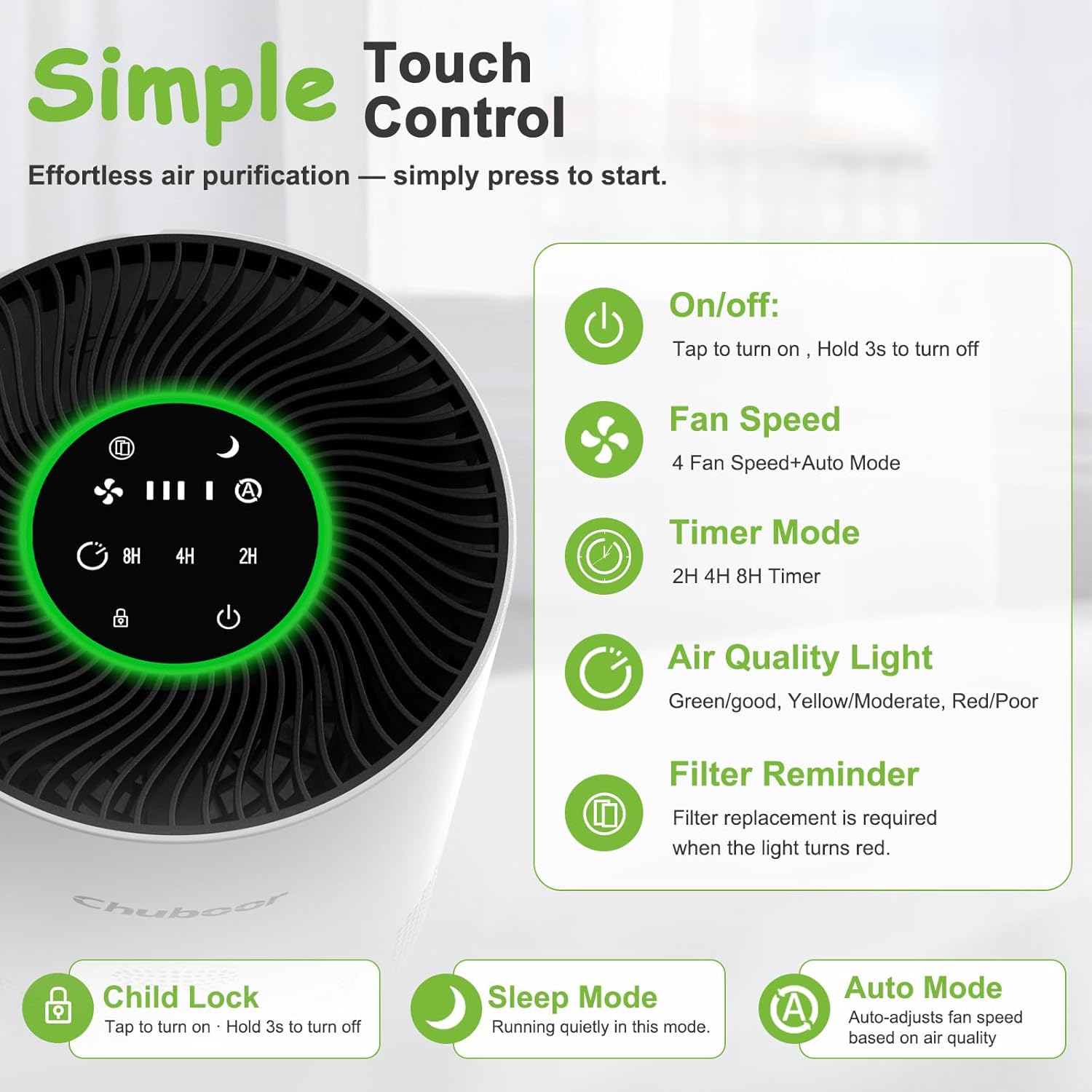
Figure 3: Simple Touch Control Panel.
Video 1: Product Showcase Video. This video provides a visual overview of the Chuboor PJ01 Air Purifier's design and functionality.
Video 2: Air Purifier Appearance Display. This video offers a detailed look at the physical design of the air purifier.
Video 3: Chuboor Air Purifiers for Home. This video provides a general overview of the Chuboor air purifier line for home use.
4. Setup Instructions
Before first use, the HEPA filter must be installed correctly. Follow these steps:
- Turn the unit upside down.
- Rotate the base cover counter-clockwise to open it.
- Remove the plastic bag from the new HEPA filter.
- Insert the filter into the unit.
- Twist the base cover clockwise to lock it in place.
- Connect the power adapter to the air purifier and then plug it into a power outlet.

Figure 4: 4 Steps to Change Filter. This diagram visually guides you through the filter installation process.
Video 4: How to install a HEPA filter when the product is used for the first time. This video provides a step-by-step guide for initial filter installation.
5. Operating Instructions
The Chuboor PJ01 Air Purifier features an intuitive touch control panel. Here’s how to operate it:
- Power On/Off: Tap the power button to turn on. Hold for 3 seconds to turn off.
- Fan Speed: Cycle through 4 fan speeds (I, II, III, IV) or select Auto Mode.
- Auto Mode: The purifier intelligently detects air quality and automatically adjusts fan speed for efficient cleaning.
- Sleep Mode: Activates quiet operation (as low as 25dB) for undisturbed sleep.
- Timer Mode: Set the purifier to operate for 2H, 4H, or 8H before automatically shutting off.
- Air Quality Light: The indicator light changes color to reflect current air quality (Green/Good, Yellow/Moderate, Red/Poor).
- Child Lock: Press and hold the Child Lock button for 3 seconds to lock the control panel, preventing accidental changes. Repeat to unlock.

Figure 5: Air Quality Light and Fan Speed Indicators.

Figure 6: Kid-Friendly Design with Child Lock and Timer.

Figure 7: Detailed view of the PJ01 Air Purifier's control panel and air quality indicators.

Figure 8: Overview of purification modes and fan speed options.
6. Maintenance
Regular maintenance ensures optimal performance and extends the lifespan of your air purifier.
6.1. Filter Replacement
The Chuboor PJ01 is equipped with a filter replacement indicator. A red light signals that filter replacement is required. For optimal purification, it is recommended to replace the filter every 3 to 4 months, depending on usage and environment.
- Unplug the air purifier.
- Turn the unit upside down and rotate the base cover counter-clockwise to open.
- Remove the old HEPA filter.
- Insert a new genuine Chuboor replacement filter (search on Amazon: B0F82VHQPS).
- Twist the base cover clockwise to lock it in place.
- Press and hold the "Filter" icon on the control panel for 5 seconds to reset the filter life indicator.

Figure 9: Filter Life Indicator and Replacement Steps.
6.2. Cleaning
Regularly dust the exterior of the air purifier with a soft, dry cloth. Do not use water or any liquid cleaners on the unit.
7. Troubleshooting
If you encounter any issues with your Chuboor PJ01 Air Purifier, please refer to the following common solutions:
- Unit not turning on: Ensure the power cord is securely plugged into both the unit and a working electrical outlet.
- Poor air purification: Check if the filter needs replacement (red indicator light). Ensure air inlets and outlets are not blocked.
- Unusual noise: Verify that the unit is placed on a stable, flat surface. Check if the filter is installed correctly and securely.
- Control panel unresponsive: Check if the Child Lock feature is activated. Deactivate it by pressing and holding the Child Lock button for 3 seconds.
For further assistance, please contact Chuboor customer support.
8. Specifications
| Feature | Detail |
|---|---|
| Model Number | PJ01 |
| Product Dimensions | 8.18"D x 8.18"W x 11.39"H |
| Item Weight | 5.2 Pounds |
| Power Source | AC/DC |
| Filtration System | 3-Stage (Pre-filter, H13 True HEPA, Activated Carbon) |
| Coverage Area | Up to 1,200 ft² |
| Noise Level (Sleep Mode) | As low as 25dB |
9. Warranty and Support
Chuboor is committed to providing high-quality products and customer satisfaction. While specific warranty details are not provided in this manual, for any questions, concerns, or support needs regarding your PJ01 Air Purifier, please contact Chuboor-US customer service. We are ready to assist you.
For optimal purification performance, we strongly recommend using genuine Chuboor replacement filters. Search on Amazon for: B0F82VHQPS to buy Original Filter.


