
Introduction
The Ozeri LS2 Multifunction Propane Tank Scale and BBQ Gas Gauge is designed to provide accurate measurements for propane tanks and can also function as a general-purpose scale for items such as fish, luggage, or groceries. It features an illuminated LCD display, unit conversion, tare function, a built-in digital thermometer, and a retractable tape measure.
What's in the Box
- Ozeri LS2 Multifunction Propane Tank Scale
- User Manual
- AAA Battery (2)
Key Features
- Propane Tank Mode: Calibrated for common 20 lb exchangeable propane tanks, providing immediate gas level insight.
- Intuitive LCD Display: Illuminates in 3 colors (red, orange, green) to indicate approximate gas level (Empty, ¼, ½, ¾, Full).
- Regular Scale Mode: Easily switches for weighing fish, small game, groceries, luggage, or postage.
- Unit Conversion: Conveniently switch between pounds (lbs) and kilograms (kg) with a maximum capacity of 110 lbs / 50 kg.
- Tare Function: Allows for additive weighing by zeroing out the weight of a container or previous item.
- Built-in Digital Thermometer: Displays temperature in Celsius (°C) or Fahrenheit (°F).
- Retractable 3ft Tape Measure: Integrated for additional utility.
Setup and Battery Installation
- Locate the battery compartment on the back of the scale.
- Open the battery compartment cover.
- Insert 2 AAA batteries, ensuring correct polarity (+/-).
- Close the battery compartment cover securely.
- Press the ON/OFF button to turn on the scale.

Image: Rear view of the Ozeri LS2 scale, highlighting the battery compartment for installation.
Operating Instructions
Using Propane Tank Mode
- Turn on the scale by pressing the ON/OFF button.
- Press the MODE button to select "Lbs Tank" mode.
- Hook the scale onto the handle of your 20 lb propane tank.
- Lift the tank using the scale's ergonomic grip.
- The LCD screen will display the total weight and illuminate in one of three colors to indicate the approximate gas level:
- Red: Empty or very low gas.
- Orange: Quarter to half full.
- Green: Half to full.
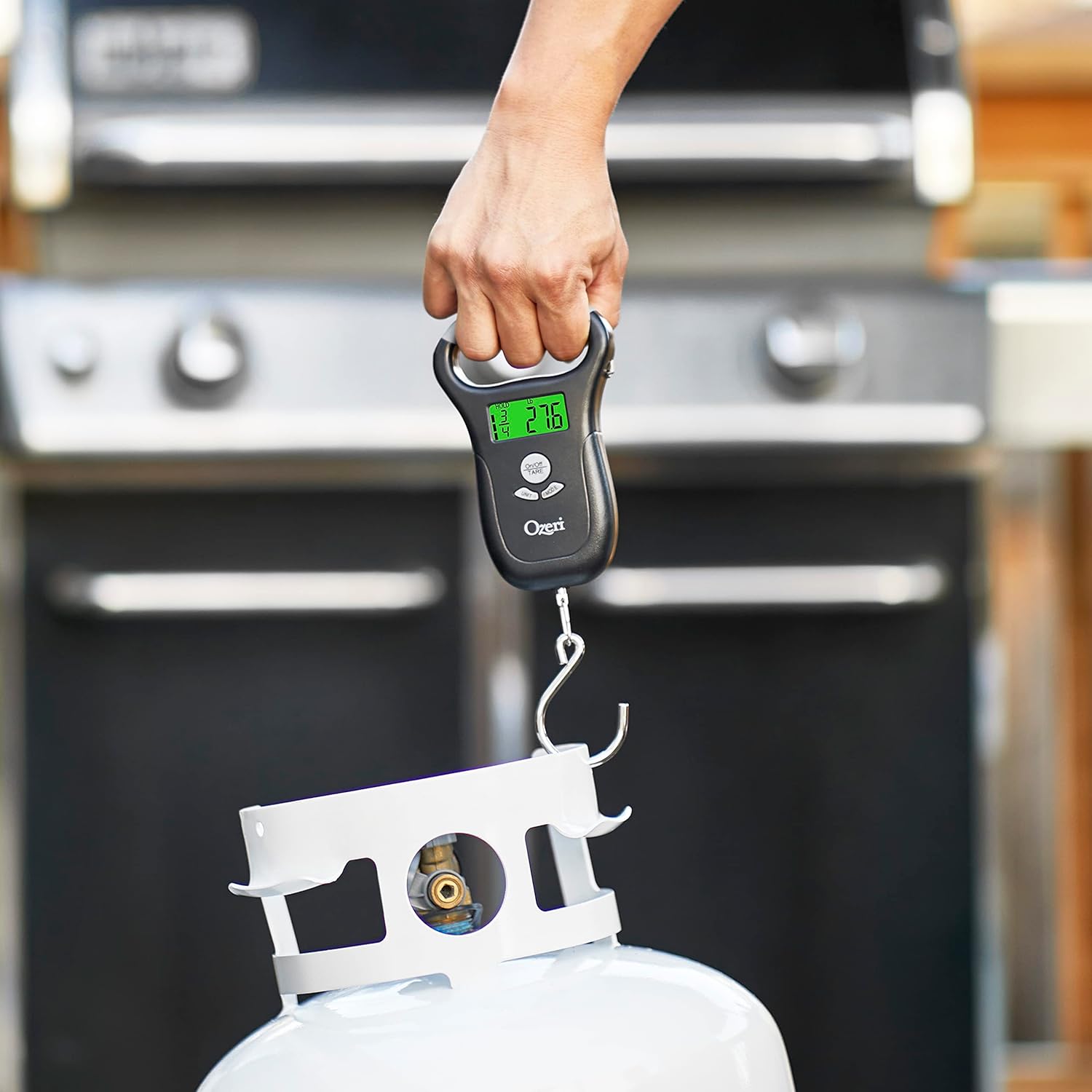
Image: The Ozeri LS2 scale displaying a green screen, indicating a full propane tank.

Image: The Ozeri LS2 scale displaying an orange screen, indicating a half-full propane tank.

Image: The Ozeri LS2 scale displaying a red screen, indicating an empty propane tank.
Using Regular Scale Mode
- Turn on the scale by pressing the ON/OFF button.
- Press the MODE button until the display shows a standard weight unit (e.g., "Lbs" or "Kg") without "Tank".
- Attach the item to be weighed to the hook.
- Lift the scale to read the weight on the LCD display.

Image: The Ozeri LS2 scale shown alongside icons representing its multi-functional use for propane, fish, and luggage.
Changing Units (Lbs/Kg)
- With the scale on, press the UNIT button to toggle between pounds (lbs) and kilograms (kg).
Using the Tare Function
- To weigh items additively, first place the container or initial item on the hook and allow the weight to stabilize.
- Press the TARE button. The display will reset to zero.
- Add the next item to the container or hook, and the display will show only the weight of the added item.
Digital Thermometer
- The built-in digital thermometer displays the ambient temperature. Press the appropriate button (refer to the scale's interface, usually the UNIT button or a dedicated temperature button) to switch between Celsius (°C) and Fahrenheit (°F).
Retractable Tape Measure
- Pull out the retractable tape measure from the side of the scale to measure lengths up to 3 feet.
Official Product Video: How to Use the Scale
Video: A demonstration of how to use the Ozeri LS2 propane tank scale, including turning it on, selecting tank size, and weighing.
Maintenance
- Cleaning: Wipe the scale with a soft, damp cloth. Do not use abrasive cleaners or immerse the scale in water.
- Storage: Store the scale in a cool, dry place when not in use. Remove batteries if storing for extended periods to prevent leakage.
- Battery Replacement: Replace batteries when the low battery indicator appears on the display.
Troubleshooting
- No Display/Low Battery: Ensure batteries are correctly installed and replace them if the display is dim or non-existent.
- Inaccurate Readings: Ensure the scale is held steady and the item is properly hooked. Avoid weighing in windy conditions. Calibrate if necessary (refer to specific calibration instructions if provided in a full manual, not detailed here).
- "Olb" Error: Indicates overload. Remove the item immediately to prevent damage to the scale.
Specifications
| Brand: | Ozeri |
| Model: | LS2-B |
| Weight Capacity: | Max 110 lbs / 50 kg |
| Display Type: | LCD |
| Material: | Alloy Steel, Polycarbonate |
| Item Weight: | 8.78 Ounces |
| Special Features: | Built-in digital thermometer, Retractable 3ft tape measure |
Warranty and Support
The Ozeri LS2 Multifunction Propane Tank Scale is backed by Ozeri's No-Hassle Warranty, which typically covers the product for 1 year from the date of purchase. For warranty claims, technical support, or further assistance, please refer to the contact information provided in the product packaging or visit the official Ozeri website.
Manufacturer: Ozeri

