1. Introduction
The Alcatel XL685 Voice is a DECT cordless phone designed for ease of use, particularly for seniors. It features a large, backlit display, big buttons, audio amplification, and a hands-free function. This manual provides detailed instructions for setting up, operating, and maintaining your phone, ensuring you can utilize all its features effectively.
Please read this manual carefully before using your phone and keep it for future reference.
2. What's in the Box
Verify that all items are present in the package:
- Alcatel XL685 Handset
- Base Unit with integrated answering machine
- Power Adapter
- Telephone Line Cord
- 2 AAA NiMH Rechargeable Batteries
- User Manual
3. Product Overview
Familiarize yourself with the main components and controls of your Alcatel XL685 Voice phone.

Image 3.1: The Alcatel XL685 Voice cordless phone, showing the handset docked in its base unit. The handset features a large display, clearly visible numeric keypad, and function buttons. The base unit includes controls for the answering machine.
3.1 Handset Features
- XL Graphic Display: White backlit screen with large characters for optimal readability.
- Large, Contrasted Buttons: Easy to see and press for dialing and navigation.
- Audio Boost Button: Instantly doubles the earpiece volume by +10dB, up to a maximum of 25dB.
- Hands-Free Function: Allows conversations without holding the handset, with adjustable volume.
- Indicator Light: Flashes for incoming calls.
- Direct Memory Keys (M1, M2): For quick dialing of favorite contacts.
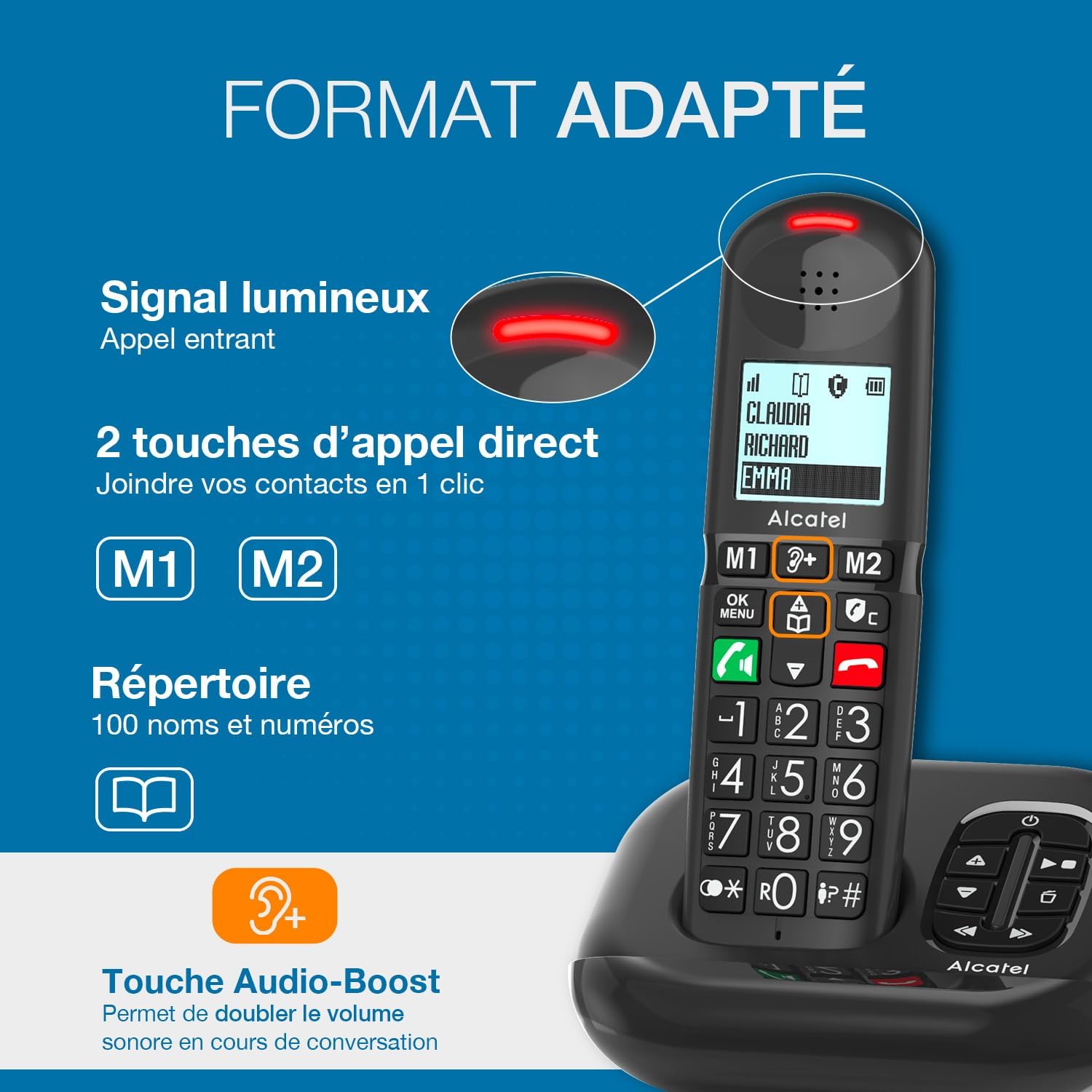
Image 3.2: A close-up of the Alcatel XL685 Voice handset, highlighting the large display, direct call keys (M1, M2), and the Audio Boost button. The image also shows the luminous signal for incoming calls and the phonebook icon, indicating its capacity for 100 contacts.
3.2 Base Unit Features
- Integrated Answering Machine: Up to 50 minutes of recording time.
- Message Counter: Digital display on the base unit shows the number of new messages.
- Answering Machine Controls: Play, stop, skip, and delete messages directly from the base.
4. Setup
Follow these steps for the initial setup of your Alcatel XL685 Voice phone.
4.1 Connecting the Base Unit
- Connect the telephone line cord to the socket on the base unit and to your telephone wall socket.
- Connect the power adapter to the base unit and plug it into a mains power outlet.
- Ensure the base unit is placed on a flat, stable surface, away from other electrical appliances to avoid interference.
4.2 Installing and Charging Batteries
- Open the battery compartment cover on the back of the handset.
- Insert the 2 AAA NiMH rechargeable batteries, observing the correct polarity (+ and -).
- Close the battery compartment cover.
- Place the handset on the base unit. The display will show a charging indicator. Allow the handset to charge for at least 15 hours before its first use to ensure optimal battery performance.
4.3 Initial Settings (Date and Time)
After the initial charge, the phone may prompt you to set the date and time. Follow the on-screen instructions or refer to the "Settings" section in this manual for detailed steps.
5. Operating Instructions
5.1 Making Calls
- Direct Dialing: Enter the phone number using the keypad, then press the Green Call button.
- From Phonebook: Press the Phonebook button, navigate to the desired contact, then press the Green Call button.
- Using Direct Memory Keys (M1/M2): Press and hold the M1 or M2 button for a few seconds to dial the stored number.
5.2 Receiving Calls
When the phone rings, press the Green Call button to answer. The indicator light on the handset will flash during an incoming call.
5.3 Hands-Free Function
During a call, press the Hands-Free button (speaker icon) to activate or deactivate the speakerphone. Adjust the volume using the navigation keys.
5.4 Audio Boost
For increased listening volume during a call, press the dedicated Audio Boost button (ear icon with '+'). This will amplify the sound by an additional 10dB, up to 25dB total. Press it again to deactivate.
5.5 Phonebook Management
Your phone can store up to 100 contacts. Each contact can have a name and number.
- Adding a Contact: Access the menu, select "Phonebook", then "Add New". Enter the name and number, then save.
- Editing a Contact: Navigate to the contact in the phonebook, select "Edit", make changes, and save.
- Deleting a Contact: Navigate to the contact, select "Delete", and confirm.
- Assigning Direct Memory Keys (M1/M2): Access the menu, select "Settings", then "Direct Memory". Choose M1 or M2 and assign a contact from your phonebook.
5.6 Answering Machine
The integrated answering machine can record up to 50 minutes of messages.
- Activating/Deactivating: Press the ON/OFF button on the base unit or through the handset menu.
- Playing Messages: Press the Play button on the base unit. Use the skip buttons to move between messages.
- Deleting Messages: During message playback, press the Delete button on the base unit.
- Recording an Announcement: Access the answering machine settings via the handset menu to record your personalized greeting.
6. Call Blocking Features
The Alcatel XL685 Voice offers advanced call blocking to protect you from unwanted calls.

Image 6.1: This image illustrates the call blocking features of the Alcatel XL685 Voice. It shows the dedicated call blocking button on the handset, explaining both manual blocking (up to 100 numbers) and automatic blocking modes, which only allow registered contacts to ring through.
6.1 Manual Call Blocking
You can block up to 100 unwanted numbers manually.
- During an Incoming Call: Press the dedicated Call Block button (shield icon) to immediately block the number.
- From Call Log: Access the call log, select the unwanted number, then press the Call Block button to add it to the block list.
6.2 Automatic Call Blocking
Activate the automatic mode to only receive calls from numbers stored in your phonebook or VIP list.
- Access the phone's menu, navigate to "Call Blocking" settings, and select "Automatic Mode".
- In this mode, all anonymous calls will be blocked automatically.
7. Maintenance
Proper care ensures the longevity of your phone.
- Cleaning: Use a soft, damp cloth to clean the handset and base unit. Do not use abrasive cleaners or solvents.
- Battery Care: Only use the supplied rechargeable NiMH batteries. If the phone will not be used for an extended period, remove the batteries.
- Environmental Conditions: Avoid exposing the phone to direct sunlight, extreme temperatures, or high humidity.
8. Troubleshooting
Here are solutions to common issues you might encounter:
| Problem | Solution |
|---|---|
| No dial tone | Check that the telephone line cord is securely connected to both the base unit and the wall socket. Ensure the power adapter is plugged in. |
| Handset not charging | Ensure the handset is correctly placed on the base unit. Check that the power adapter is connected. Verify batteries are inserted correctly. |
| Poor sound quality | Move the handset closer to the base unit. Check for interference from other electronic devices. Ensure batteries are sufficiently charged. |
| Cannot make/receive calls | Check the telephone line connection. Ensure call blocking is not preventing desired calls (check automatic mode settings). |
| Answering machine not recording | Ensure the answering machine is activated. Check if the memory is full; delete old messages if necessary. |
9. Specifications
| Brand | Alcatel |
| Model Number | ATL1428407 |
| Color | Black |
| Phone Type | Cordless (DECT) |
| Compatible Devices | Standard telephone networks (PSTN, ISDN) |
| Battery Type | NiMH (2 AAA included) |
| Answering System Type | Digital |
| Answering Machine Recording Time | 50 minutes |
| Phonebook Capacity | 100 contacts |
| Call Log Capacity | 50 last calls |
| Call Blocking Capacity | Up to 100 numbers |
| Dimensions (L x W x H) | 14 x 6.5 x 11.2 cm |
| Item Weight | 266 Grams |
| Material | Plastic |
10. Warranty and Support
Your Alcatel XL685 Voice phone comes with a manufacturer's warranty.
- Manufacturer's Warranty: 2 years.
- For technical support or warranty claims, please refer to the contact information provided with your purchase or visit the official Alcatel support website.


