
1. Introduction
The BAOFENG UV-K61 is a multi-functional two-way radio designed for reliable and versatile communication. This device features 999 channels, a dual display, USB-C charging, VOX hands-free operation, and NOAA weather alerts. This manual provides essential instructions for setting up, operating, and maintaining your UV-K61 radio.
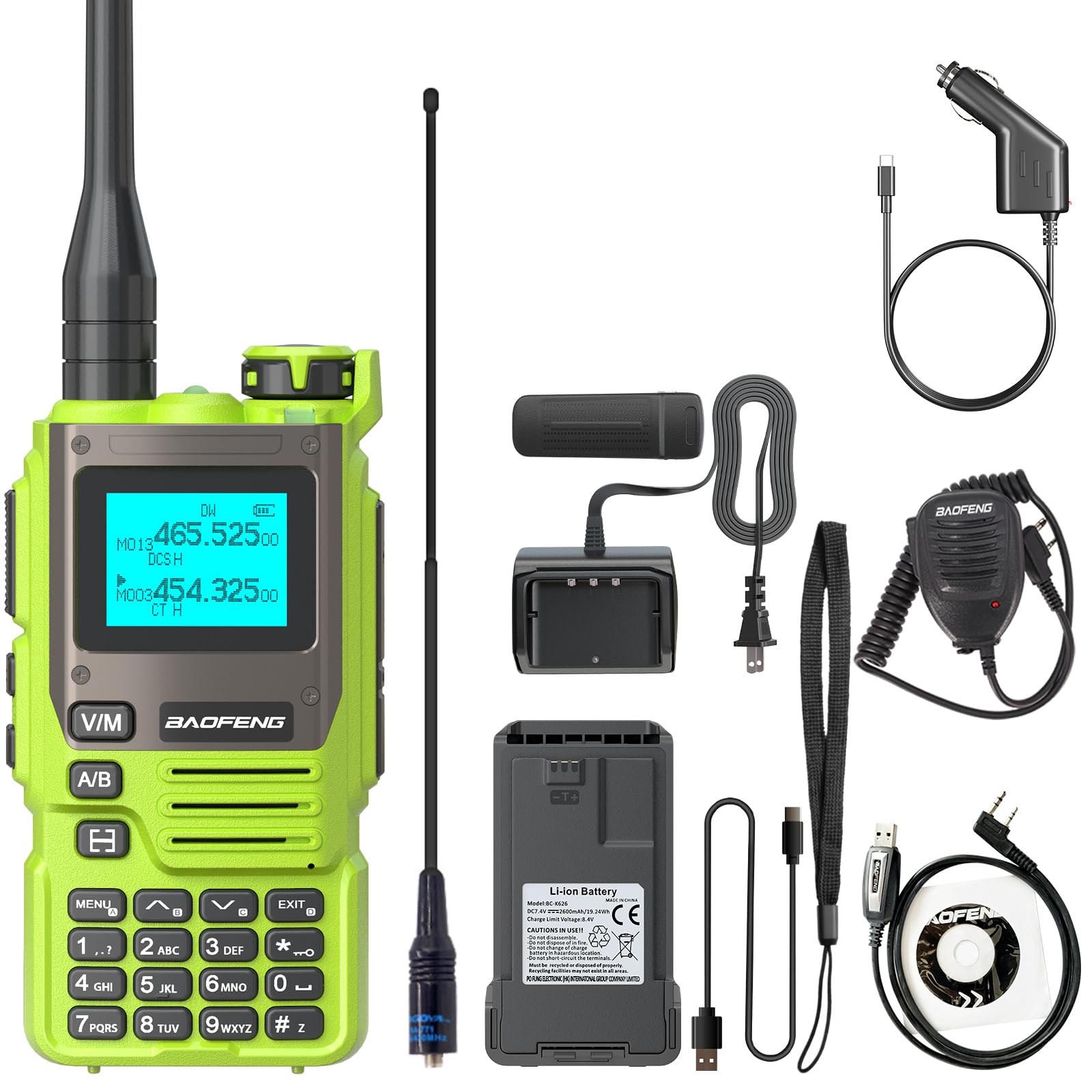
Image 1.1: BAOFENG UV-K61 Two Way Radio, front view.
2. Product Overview and Kit Contents
Your BAOFENG UV-K61 radio comes with a comprehensive kit to ensure you have everything needed for immediate use.
2.1. Kit Contents
- 1x BAOFENG UV-K61 Radio
- 1x 2600mAh High Capacity Battery
- 1x High Gain Antenna
- 1x USB-C Charger Cable
- 1x Charger Dock (US base charger)
- 1x Belt Clip
- 1x Hand Strap
- 1x User Manual (this document)
- 1x 771 Antenna
- 1x Programming Cable
- 1x Shoulder Speaker Microphone
- 1x USB-C Car Charger Cable

Image 2.1: Contents of the standard product kit.
2.2. Product Layout and Controls
Familiarize yourself with the radio's physical components and controls for optimal use.

Image 2.2: Detailed view of the radio's buttons, screen, and dimensions.
- Antenna: For signal transmission and reception.
- Volume & Power Knob: Rotate to adjust volume, press to power on/off.
- PTT Key (Push-to-Talk): Press and hold to transmit, release to receive.
- Flashlight/Alarm Switch: Activates the built-in flashlight or alarm function.
- Radio/Monitor Key: Toggles between radio mode and monitor function.
- Sweep Key: Initiates frequency scanning.
- Menu Key: Accesses the radio's menu settings.
- V/M-VFO/MR Key: Switches between VFO (Frequency Mode) and MR (Channel Mode).
- A/B Select Key: Selects the upper or lower display frequency/channel.
- Keypad: For direct frequency input and menu navigation.
- 1.44" LCD Screen: Displays frequency, channel, and status information.
- Speaker: For audio output.
- 2-pin K Port: For connecting accessories like the shoulder speaker microphone or programming cable.
3. Setup
3.1. Battery Installation and Charging
The UV-K61 is powered by a 2600mAh Lithium Ion battery. Ensure the battery is fully charged before first use.
- Align the battery with the grooves on the back of the radio and slide it into place until it clicks securely.
- To charge, connect the USB-C cable directly to the radio or place the radio in the provided charger dock.
- The LED indicator on the radio or charger dock will show Red during charging and turn Green when fully charged.
- The radio can be charged via a power bank, car charger, laptop, or any standard USB power source using the USB-C cable.

Image 3.1: Various methods for charging the UV-K61 radio.
3.2. Antenna Attachment
Screw the antenna clockwise onto the connector on top of the radio until it is finger-tight. Do not overtighten.
3.3. Belt Clip and Hand Strap
Attach the belt clip to the back of the radio using the provided screws. The hand strap can be threaded through the loop on the top side of the radio for secure carrying.
4. Operating Instructions
4.1. Power On/Off and Volume
To power on the radio, rotate the Volume & Power knob clockwise until you hear a click. Continue rotating to adjust the volume. To power off, rotate the knob counter-clockwise until it clicks off.
4.2. Channel and Frequency Selection
The UV-K61 supports 999 channels and operates in both VFO (Frequency Mode) and MR (Channel Mode).
- Press the V/M-VFO/MR key to switch between VFO and MR modes.
- In VFO mode, use the keypad to directly input frequencies or the up/down arrow keys to scan.
- In MR mode, use the up/down arrow keys to select a stored channel.
- The A/B Select key switches between the upper and lower display lines, allowing you to monitor two frequencies/channels simultaneously.

Image 4.1: The radio displaying NOAA weather alert information.
4.3. One Key Match Frequency (Wireless Frequency Copying)
This feature allows for quick and easy frequency programming by copying from another radio.
- Step 1: Turn on the radio. Press and hold the EXIT key. The screen will display "SEARCH".
- Step 2: Press and hold the transmit button on the other radio you wish to copy from. The UV-K61 will search for and display the frequency and decode information.
- Step 3: Once the search is complete, press the MENU key for confirmation. Switch to channel mode to select the channel. The screen will show the frequency of the other radio, allowing communication.

Image 4.2: Visual guide for the One Key Match Frequency function.
4.4. VOX Hands-Free Operation
The Voice Operated Exchange (VOX) function allows you to transmit without pressing the PTT key. When VOX is enabled, the radio will automatically transmit when it detects your voice.
- To enable/disable VOX, navigate to the VOX setting in the menu.
- Adjust the VOX sensitivity level (usually 1-10) to suit your environment. A higher number requires a louder voice to activate transmission.
4.5. NOAA Weather Channels
The UV-K61 includes a built-in NOAA receiver with 10 channels to provide real-time weather alerts.
- Access the NOAA weather channels through the radio's menu or a dedicated function key (if assigned).
- The radio will scan these channels and alert you to severe weather conditions, ensuring safety during outdoor activities.
4.6. Flashlight and AM/FM Radio
- Flashlight: Press the dedicated Flashlight/Alarm switch to turn the flashlight on or off.
- AM/FM Radio: The UV-K61 supports AM/FM radio reception. Use the Radio/Monitor key to switch to radio mode and scan for stations.
5. Maintenance
5.1. Battery Care
- Avoid fully discharging the battery frequently to prolong its lifespan.
- Charge the battery in a cool, dry environment.
- If storing the radio for an extended period, charge the battery to about 50% and remove it from the radio.
5.2. Cleaning
Clean the radio's exterior with a soft, damp cloth. Do not use harsh chemicals or abrasive cleaners. Ensure the radio is dry before use.
5.3. Water Resistance
Note: The BAOFENG UV-K61 is NOT water resistant. Avoid exposing the radio to rain, splashes, or immersion in water to prevent damage.
5.4. Storage
Store the radio in a cool, dry place away from direct sunlight and extreme temperatures. Keep it away from dust and moisture.
6. Troubleshooting
If you encounter issues with your BAOFENG UV-K61, refer to the following common problems and solutions:
| Problem | Possible Cause | Solution |
|---|---|---|
| Radio does not power on | Low or dead battery; improperly installed battery | Charge the battery; ensure battery is correctly installed. |
| Cannot transmit or receive | Incorrect frequency/channel; antenna not attached; low battery | Verify frequency/channel settings; ensure antenna is securely attached; charge battery. |
| Poor audio quality or static | Weak signal; interference; antenna issue | Move to an open area; check antenna connection; adjust squelch level. |
| Keypad unresponsive | Keypad lock enabled | Disable keypad lock (refer to menu settings). |
7. Specifications
Detailed technical specifications for the BAOFENG UV-K61 Two Way Radio:
| Feature | Specification |
|---|---|
| Model Number | UV-K61 |
| Number of Channels | 999 |
| Battery Type | 1 Lithium Ion battery (included) |
| Battery Capacity | 2600mAh |
| Product Dimensions | 1.37"D x 2.16"W x 4.72"H (3.48 x 5.49 x 11.99 cm) |
| Item Weight | 1.7 pounds (approx. 27.16 ounces / 770 grams) |
| Voltage | 7.4 Volts (DC) |
| Talking Range Maximum | 5 Kilometer (approx. 3.1 miles) |
| Water Resistance Level | Not Water Resistant |
| Special Features | 10 NOAA Weather Alarm, 2600mAh High Capacity Battery, Multi-Band (AM/FM), One Key Match Frequency, USB-C Charging |
8. Warranty and Support
8.1. Warranty Information
A 1-year warranty is provided exclusively through "Shiqun Electronics Co., Ltd". Please retain your proof of purchase for warranty claims.
8.2. Customer Support
For technical assistance, troubleshooting beyond this manual, or warranty inquiries, please contact the seller or authorized service center. Refer to your purchase documentation for specific contact details.


