Product Overview
The eufy Robot Vacuum Omni S1 Pro, combined with its Automatic Water Refill and Drainage System, offers an advanced solution for automated home cleaning. This integrated system provides comprehensive vacuuming and mopping capabilities, designed for hands-free operation and efficient maintenance.
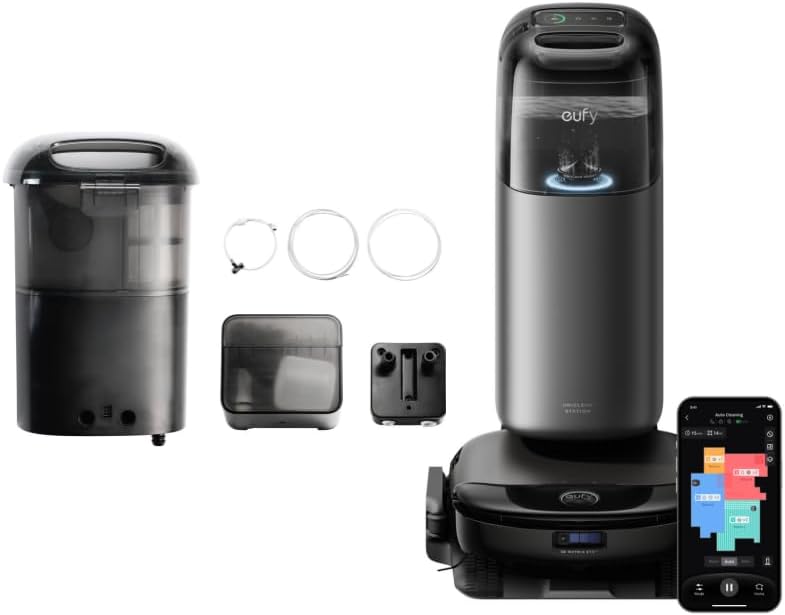
The eufy Robot Vacuum Omni S1 Pro and its Automatic Water Refill and Drainage System components, including the main station, robot, and external water tanks.
Key Features:
- Groundbreaking HydroJet System: Features an Always Clean Mop Combo and dual water reservoir with ozonated water. The 11.4-inch mop refreshes in real-time at 170 RPM, applying 1 kg of downward pressure for effective stain removal.
- 10-in-1 UniClean Station: Provides auto emptying, auto washing, auto refilling, auto heated air drying, Eco-Clean Ozone, auto waste water collection, auto detergent dispensing, LCD touch control, sealed dust bag, and 20% faster charging.
- Hands-Free Convenience: Automatic water refill and drainage system eliminates manual water tank management.
- Leak-Proof Protection: Multiple layers of overflow protection ensure controlled water levels and prevent spills.
- 3D MatrixEye Obstacle Avoidance: Advanced navigation system for precise obstacle detection and avoidance.
- Sleek Square Design: Optimized shape for effective corner-to-edge cleaning.
What's In The Box
The package includes the following components:
- Robot Vacuum Omni S1 Pro (x1)
- UniClean Station (x1)
- Automatic Water Refill and Drainage System (includes external clean/dirty water tanks, connection hoses, adapters, and fittings) (x1)
- Power Cable (x1)
- Cleaning Brush (x1)
- Extra Side Brush (x1)
- Extra Dust Bag (x1)
- User Manual and Quick Start Guide (x1)
Note: Specific quantities of small parts like screws, clamps, and additional filters may vary. Refer to the packaging for exact contents.
Setup Guide
Follow these steps to set up your eufy Robot Vacuum Omni S1 Pro and its Automatic Water Refill and Drainage System.

Visual installation guide for the eufy Robot Vacuum Omni S1 Pro's base station and water system, detailing steps for piping, tank installation, and drain line connection.
- Select the Location for the Base Station: Choose a suitable location for the UniClean Station, ensuring it has access to a power outlet and is near a water supply and drain for the automatic system.
- Install Water Piping: Connect the provided water supply line to your home's water source. Ensure all connections are secure to prevent leaks.
- Install the Front Water Tank: Position and connect the front water tank (clean water reservoir) to the system as per the diagram.
- Install the Water Refill and Drainage Module: Integrate the main module responsible for managing water flow between the system and your home's plumbing.
- Install the Connector Assembly: Securely attach any necessary connector assemblies to ensure proper water circulation.
- Install the Drain Line: Connect the drainage hose to a suitable drain point, ensuring it is properly secured and allows for efficient wastewater disposal.
- Power On: Plug the UniClean Station into a power outlet.
- Download the eufy Clean App: Search for "eufy Clean" in your app store, download, and install it. Follow the in-app instructions to connect your robot vacuum to your Wi-Fi network.
- Initial Charge: Place the robot vacuum on the UniClean Station to charge fully before its first use.

The S1 Pro Auto Refill and Drainage System, showing the main station connected to external units for automatic water refilling, draining, and leak-proof protection.

Diagram illustrating the automatic water flow for the S1 Pro's refill and drainage system: water supply connection, clean water auto-refill, and used water auto-drainage.
Operating Instructions
The eufy Robot Vacuum Omni S1 Pro can be operated via the eufy Clean app or directly from the UniClean Station.
Using the eufy Clean App:
- Start/Stop Cleaning: Tap the 'Start' or 'Pause' button in the app to begin or halt a cleaning cycle.
- Cleaning Modes: Select from various cleaning modes such as Auto, Spot, Zone, or Custom cleaning.
- Suction Power & Water Level: Adjust suction power and water flow for mopping based on floor type and cleaning needs.
- Scheduling: Set cleaning schedules for automated cleaning at preferred times.
- Mapping & No-Go Zones: View the real-time cleaning map, set virtual walls, and define no-go zones or no-mop zones.
- Voice Control: Integrate with smart home assistants like Amazon Alexa or Google Assistant for voice commands.
UniClean Station Functions:

Detailed view of the 10-in-1 UniClean Station, highlighting its automatic emptying, washing, refilling, heated air drying, Eco-Clean Ozone, waste water collection, detergent dispensing, LCD touch control, anti-bacterial dust bag, and 20% faster charging capabilities.
- Auto Emptying: The station automatically empties the robot's dustbin into a sealed dust bag.
- Auto Washing: The mop pads are automatically washed and cleaned at the station.
- Auto Refilling: The robot's clean water tank is automatically refilled from the station's reservoir.
- Auto Heated Air Drying: Mop pads are dried with heated air to prevent odors and mildew.
- Eco-Clean Ozone: Utilizes ozone for enhanced cleaning and sanitization.
- Auto Waste Water Collection: Dirty water from mop washing is collected in the station's dirty water tank.
- Auto Detergent Dispensing: Automatically dispenses cleaning solution for mopping.
- LCD Touch Control: Use the integrated LCD screen for basic controls and status updates.
HydroJet Mopping System:

Diagram illustrating the eufy HydroJet System with its 170 RPM real-time self-cleaning mop, 1 kg downward pressure, 11.4-inch mop, and dual water reservoir for thorough cleaning.
The HydroJet system ensures deep cleaning with its rotating mop pads and consistent downward pressure. The mop pads are continuously refreshed with clean, ozonated water during the cleaning cycle.
Navigation and Obstacle Avoidance:

Illustration of the 3D MatrixEye Obstacle Avoidance system, demonstrating its ability to detect and navigate around objects with 300K voxels and 750x more precise navigation, even in low light conditions.
Equipped with 3D MatrixEye technology, the robot precisely maps your home and avoids obstacles, even in low-light conditions, ensuring a smooth and efficient cleaning path.

The eufy Robot Vacuum Omni S1 Pro's sleek square design, enabling effective corner-to-edge cleaning.
The robot's square design allows it to reach deep into corners and along edges, maximizing cleaning coverage.
Maintenance
Regular maintenance ensures optimal performance and extends the lifespan of your eufy Robot Vacuum Omni S1 Pro.
Robot Vacuum Maintenance:
- Main Brush: Clean the main brush weekly by removing hair and debris. Use the provided cleaning tool.
- Side Brushes: Check side brushes monthly for wear and tear. Replace if damaged. Remove tangled hair.
- Mop Pads: The UniClean Station automatically washes the mop pads. Periodically inspect them for excessive wear and replace as needed.
- Sensors: Wipe all sensors (cliff sensors, wall sensor, charging contacts) with a clean, dry cloth monthly to ensure proper navigation and charging.
- Wheels: Clean any debris or hair from the wheels to maintain smooth movement.
UniClean Station Maintenance:
- Dust Bag: The station uses a sealed dust bag. Replace the dust bag when the app or station indicates it is full.
- Clean Water Tank: The automatic system refills this. Ensure the external clean water tank is connected and has sufficient water.
- Dirty Water Tank: The automatic system drains this. Periodically check the external dirty water tank and ensure the drain line is clear.
- Mop Washing Tray: Clean the mop washing tray inside the station regularly to prevent residue buildup.
- Detergent Dispenser: Refill the detergent reservoir as needed.
- Air Drying Vent: Ensure the air drying vent is clear of obstructions.
Troubleshooting
If you encounter issues with your eufy Robot Vacuum Omni S1 Pro, refer to the following common problems and solutions:
| Problem | Possible Cause | Solution |
|---|---|---|
| Robot does not start or respond. | Low battery; Power switch off; Robot stuck. | Charge the robot; Turn on the power switch; Clear any obstructions. |
| Poor cleaning performance. | Full dustbin; Clogged filter; Worn brushes; Mop pads dirty. | Replace dust bag; Clean/replace filter; Clean/replace brushes; Ensure mop pads are clean and wet. |
| Robot gets stuck frequently. | Obstacles; Dirty sensors; Dark surfaces. | Clear cables/small objects; Clean cliff sensors; Use virtual walls/no-go zones. |
| Water refill/drainage not working. | Water supply off; Clogged hoses; Tank not properly connected. | Check water supply; Inspect hoses for kinks/blockages; Reconnect tanks securely. |
| Mop pads not drying properly. | Air vent blocked; Drying cycle interrupted. | Clear vent; Ensure robot is properly docked and drying cycle completes. |
For more detailed troubleshooting or persistent issues, please refer to the eufy Clean app or contact customer support.
Specifications
| Feature | Detail |
|---|---|
| Brand | eufy |
| Model Name | RM |
| Surface Recommendation | Carpet, Hardwood |
| Special Features | Obstacle Avoidance, Smart Mapping, Wet/Dry, Self-Emptying, Auto Mop Washing, Auto Refill, Auto Drainage, Heated Air Drying, Eco-Clean Ozone |
| Color | Black |
| Filter Type | Cloth |
| ASIN | B0DWRTSWCV |
| Mop Rotation Speed | 170 RPM |
| Mop Downward Pressure | 1 kg |
| Mop Size | 11.4 inches |
Warranty and Support
eufy products are designed with quality and performance in mind. For warranty information, please refer to the warranty card included with your product or visit the official eufy website.
For technical support, troubleshooting assistance, or to purchase replacement parts, please contact eufy customer service:
- Online Support: Visit the official eufy support page for FAQs, video tutorials, and contact options.
- eufy Store: Visit the eufy Store on Amazon
- Customer Service: Refer to your product packaging or the eufy website for the most current contact information (phone, email, live chat).
Please have your product model number (RM) and ASIN (B0DWRTSWCV) ready when contacting support.