Introduction
This manual provides detailed instructions for replacing the LED module in your TCL 52" Ceiling Fan with Lights (Model HFSB-60000AD). Please read all instructions carefully before beginning the replacement process to ensure safe and proper installation.
Safety Information
- WARNING: Always disconnect power to the ceiling fan at the circuit breaker before attempting any installation, maintenance, or replacement.
- Ensure the replacement LED module is compatible with your fan model.
- If you are unsure about any part of the installation, consult a qualified electrician.
- Handle the LED module carefully to avoid damage to the electronic components.
Package Contents
Verify that all components are present before proceeding:
- 1 x Replacement LED Module (HFSB-60000AD compatible)

Image: The replacement LED module, a circular board with multiple small LED lights and central mounting holes.
Setup and Installation
- Step 1: Disconnect Power. Before starting, ensure the power supply to the ceiling fan is completely turned off at the main circuit breaker.
- Step 2: Access the Light Kit. Carefully remove the light cover or diffuser from your TCL 52" ceiling fan. This usually involves twisting or unscrewing the cover.
- Step 3: Disconnect Old LED Module. Locate the existing LED module. It will typically be secured with screws or clips and connected by electrical wires. Disconnect the wiring harness from the old module.
- Step 4: Remove Old LED Module. Unscrew or unclip the old LED module from its mounting position within the fan's light kit.
- Step 5: Install New LED Module. Position the new replacement LED module in the same location. Ensure it aligns correctly with the mounting holes.
- Step 6: Connect Wiring. Connect the wiring harness from the fan to the new LED module. Ensure connections are secure and correctly polarized if applicable.
- Step 7: Reattach Light Cover. Once the new LED module is securely installed and wired, reattach the light cover or diffuser to the fan.
- Step 8: Restore Power. Turn the power back on at the circuit breaker. Test the new LED module to ensure it functions correctly.
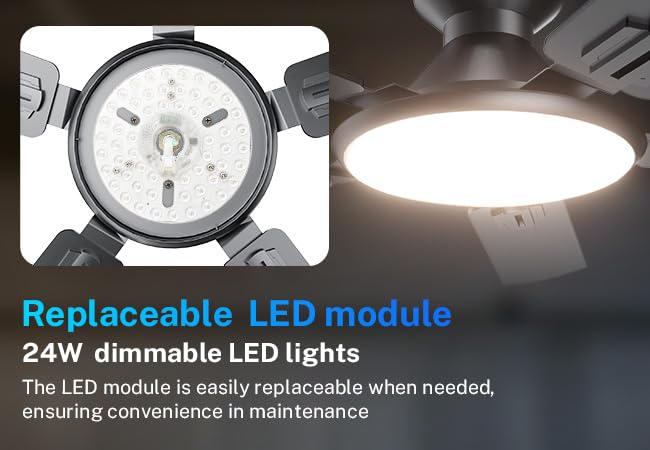
Image: A close-up view showing the LED module installed within the ceiling fan's light housing, highlighting its replaceable nature.
Operating Instructions
The replacement LED module is designed to integrate seamlessly with your TCL 52" Ceiling Fan's existing light controls. This module supports stepless dimming and tri-color temperature adjustments (3000K, 4000K, 6500K) if your fan model originally featured these capabilities.
- Dimming: Use your fan's remote control or wall switch (if applicable) to adjust the brightness of the LED light.
- Color Temperature: Cycle through the available color temperatures (Warm White, Neutral White, Cool White) using your fan's remote control or designated switch.

Image: A visual representation of a ceiling fan demonstrating stepless dimming from 10% to 100% and three color temperature options: 3000K (warm), 4000K (neutral), and 6500K (cool).
Maintenance
- Cleaning: Ensure power is off before cleaning. Use a soft, dry cloth to gently wipe the LED module and light cover. Do not use abrasive cleaners or solvents.
- Longevity: LED modules are designed for long life. Avoid frequent power cycling to maximize lifespan.
Troubleshooting
| Problem | Possible Cause | Solution |
|---|---|---|
| LED module does not light up. | No power; Loose wiring; Faulty module. | Check circuit breaker. Ensure all wires are securely connected. If problem persists, the module may be faulty. |
| Light flickers or dims unexpectedly. | Incompatible dimmer; Loose connection. | Ensure your fan's dimmer is compatible with LED lights. Check wiring connections. |
| Incorrect color temperature or dimming not working. | Fan control issue; Module not fully compatible. | Refer to your ceiling fan's original manual for control troubleshooting. Verify module compatibility. |
| Module appears damaged. | Physical damage during handling or shipping. | Do not install a damaged module. Contact customer support for a replacement. |
Specifications
- Brand: TCL
- Model: HFSB-60000AD (Replacement LED Module)
- ASIN: B0DWRTBGRX
- UPC: 846042019590
- Package Dimensions: 4 x 4 x 1 inches; 8 ounces
- Manufacturer: TCL
- First Available: February 11, 2025
Warranty and Support
For warranty information or technical support regarding your replacement LED module, please contact TCL customer service. Refer to your original ceiling fan documentation or visit the official TCL website for contact details.
You can also visit the TCL Store on Amazon for more product information.


