
Introduction
This manual provides instructions for the installation, operation, and maintenance of your LEDVANCE 6-inch Night Ring Recessed LED Downlight. This product features an integrated Night Light mode and 5 CCT (Correlated Color Temperature) selectability, offering versatile lighting options for various indoor environments.
The downlight is designed for ease of installation and provides high efficacy and quality light, meeting ENERGY STAR and Title 24 standards. Its damp rating allows for use in multiple applications, including residential and commercial settings.
- Integrated Night Light mode, activated via a standard wall switch.
- 5 CCT color temperature selection (2700K/3000K/3500K/4000K/5000K) for customizable ambiance.
- Energy-efficient 12W LED, producing 1000 lumens.
- Dimmable functionality.
- Long lifespan of approximately 50,000 hours.

Figure 1: LEDVANCE downlights providing illumination in a living room setting.
Safety Information
Before installation, read and understand all instructions. Ensure power is disconnected at the circuit breaker before beginning any electrical work. If you are unsure about installation procedures, consult a qualified electrician.
- Suitable for damp locations.
- Operating voltage: 120 Volts.
- Do not attempt to modify the fixture.
- Ensure proper grounding to prevent electrical shock.
Setup and Installation
The LEDVANCE Night Ring Downlight is designed for easy flush mount installation. It includes an E26 base adapter for compatibility with existing recessed cans.
Package Contents:
- 1 x LEDVANCE 6-inch Night Ring Microdisk Downlight
- 1 x E26 Base Adapter
Dimensions:

Figure 2: Product dimensions. The downlight has a diameter of 6.89 inches and a height of 1.1 inches.
Installation Steps:
- Turn off power: Locate the circuit breaker controlling the light fixture and switch it off.
- Remove existing trim (if applicable): Carefully remove any existing recessed light trim and bulb.
- Connect E26 adapter: Screw the E26 base adapter into the existing socket of the recessed can.
- Connect downlight: Plug the downlight's connector into the E26 adapter's connector.
- Select CCT (before final installation): On the back of the downlight fixture, locate the CCT selection switch. Choose your desired color temperature (2700K, 3000K, 3500K, 4000K, or 5000K).
- Insert into can: Gently push the downlight into the recessed can until the spring clips secure it flush with the ceiling.
- Restore power: Turn the power back on at the circuit breaker.
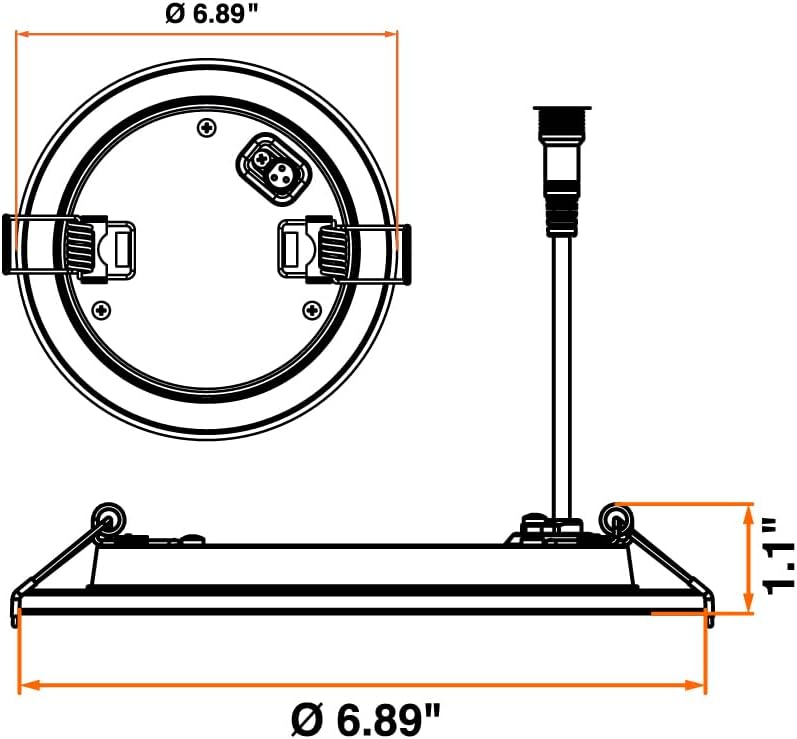
Figure 3: Rear view of the downlight, highlighting the CCT selection switch and electrical connections.
Operating Instructions
CCT Selection:
The downlight features 5 CCT options. The desired color temperature must be selected using the switch on the back of the fixture prior to final installation. The available options are:
- 2700K: Soft White
- 3000K: Warm White
- 3500K: Neutral White
- 4000K: Cool White
- 5000K: Daylight
Video 1: This video demonstrates the different color temperature options (CCT) available for LEDVANCE lighting products, showing how each setting changes the ambiance of a room.
Night Light Mode:
The integrated Night Light mode is activated through a standard wall switch. Toggle the wall switch to cycle between the main light and the night light mode. This feature provides a calming ambient glow, ideal for creating a comfortable atmosphere.
Dimming:
This downlight is dimmable. Ensure you use a compatible LED dimmer switch for optimal performance and to avoid flickering or damage to the fixture.

Figure 4: Hallway installation demonstrating the versatility of 5 CCT color temperature selection.
Maintenance
LEDVANCE LED downlights are designed for long-term, maintenance-free operation. No user-serviceable parts are inside.
- Cleaning: To clean the fixture, ensure power is off. Use a soft, dry, or slightly damp cloth. Avoid abrasive cleaners, solvents, or harsh chemicals, as these can damage the finish or electrical components.
- Bulb Replacement: The LED light source is integrated and not designed for user replacement. The fixture has a long lifespan, reducing the need for frequent replacements.
Troubleshooting
If you experience issues with your LEDVANCE downlight, refer to the following common troubleshooting steps:
| Problem | Possible Cause | Solution |
|---|---|---|
| Light does not turn on | No power to the fixture; Loose connection; Faulty switch | Check circuit breaker; Verify all connections are secure; Test wall switch. |
| Light flickers or dims improperly | Incompatible dimmer switch; Loose wiring; Overloaded circuit | Ensure dimmer is LED compatible; Check wiring connections; Reduce load on circuit. |
| Incorrect CCT (color temperature) | CCT switch set incorrectly | Turn off power, remove fixture, and adjust the CCT selection switch on the back. |
| Night Light mode not working | Wall switch not toggled correctly | Ensure the wall switch is toggled to activate the night light mode. |
If these steps do not resolve the issue, please contact customer support.
Specifications
| Feature | Detail |
|---|---|
| Brand | LEDVANCE |
| Model Name | Night Ring Microdisk |
| Item Model Number | 65793 |
| Size | 6 Inch - 1 Pack |
| Product Dimensions | 6.8"L x 6.8"W x 1.1"H |
| Wattage | 12 watts |
| Brightness | 1000 Lumens |
| Color Temperature | 5CCT (2700K/3000K/3500K/4000K/5000K) |
| CRI | 90 |
| Voltage | 120 Volts |
| Light Source Type | LED |
| Bulb Base | E26 |
| Installation Type | Flush Mount |
| Indoor/Outdoor Usage | Indoor |
| Special Features | Adjustable Color Temperature, Anti-Rust, Energy Efficient, Lightweight, Shock Resistant |
| Specification Met | FCC, RoHS, cETL, ENERGY STAR, Title 24 |
| Lifespan | 50,000 hours |
Warranty
This LEDVANCE product is backed by a 5-year manufacturer's limited warranty. For detailed warranty terms and conditions, please refer to the official LEDVANCE website or contact customer support.
Support
For further assistance, technical support, or to inquire about replacement parts, please visit the official LEDVANCE website or contact their customer service department.
You can find more information and products from LEDVANCE at their Amazon store: LEDVANCE Amazon Store


