
Bushnell A1-Slope (Model 202510S)
Contents
Bushnell Golf A1-Slope Laser Rangefinder User Manual
Model: A1-Slope (202510S)

The Bushnell Golf A1-Slope Laser Rangefinder, showcasing its compact design and primary features.
1. Introduction
The Bushnell Golf A1-Slope is the smallest laser rangefinder ever developed by Bushnell Golf, designed for precision and ease of use on the golf course. It incorporates advanced technology to provide accurate distance measurements, including slope compensation, to enhance your game.
Key Features:
- Slope Compensation: Patented, Tour-validated Slope Technology provides precise compensated distances.
- Slope On/Off: Easily toggle slope compensation via the mode button for tournament play.
- Pinseeker with JOLT Technology: Provides vibrating pulses to confirm flag lock, ensuring you've targeted the flag, not background objects.
- Extended Range: Capable of ranging 350+ yards to a flag and up to 1,300 yards for larger targets.
- Rechargeable Battery: Integrated USB-C rechargeable battery offers 3,000+ target acquisitions per charge, equivalent to approximately 40 rounds of golf.
- BITE Magnetic Skin: Features Bushnell Golf's exclusive BITE magnetic cart mount for convenient attachment to golf carts.
- Weather Resistant: IPX6 rating ensures durability in various weather conditions.
2. Setup
2.1 Unboxing and Initial Inspection
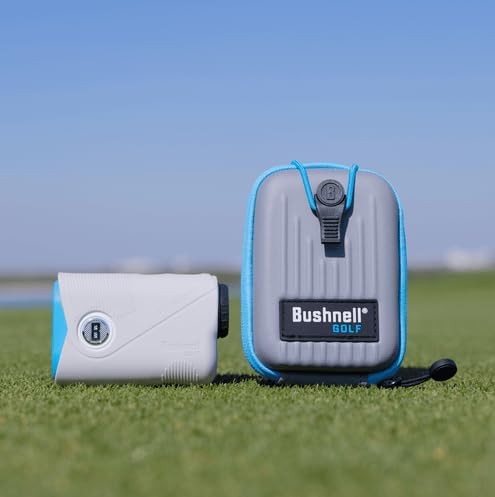
Upon opening the package, ensure all components are present and in good condition. The package should include the A1-Slope Rangefinder, BITE Magnetic Skin, Premium Carry Case, USB-C Charging Cord, and this User Manual.

The Bushnell Golf A1-Slope package contents, including the rangefinder and accessories.
2.2 Charging the Device
Before first use, fully charge your A1-Slope rangefinder. Connect the included USB-C charging cord to the device's charging port and plug the other end into a compatible USB power source. A full charge provides power for approximately 3,000+ target acquisitions or 40 rounds of golf.

The USB-C charging port on the Bushnell Golf A1-Slope rangefinder.

Official product video demonstrating the Bushnell Golf A1-Slope's features, including its compact size and charging capabilities.
3. Operating Instructions
3.1 Basic Ranging
To obtain a distance measurement, look through the eyepiece and press the power/fire button once. Aim the reticle at your desired target. The distance will be displayed in yards (Y) or meters (M) depending on your selected unit. The A1-Slope offers 6x magnification for clear viewing of targets up to 1,300 yards.
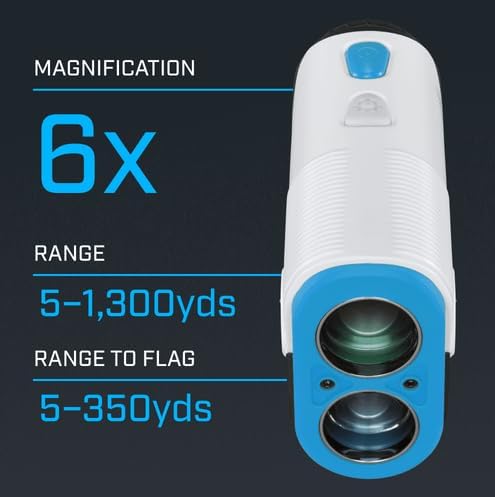
Visual representation of the 6x magnification and ranging capabilities of the A1-Slope.
3.2 Pinseeker with JOLT Technology
For precise flag targeting, utilize Pinseeker with JOLT. When multiple objects are in the field of view, Pinseeker prioritizes the closest object (the flag). Once the flag is acquired, the device will provide short vibrating pulses (JOLT) to confirm that you have locked onto the flag, giving you confidence in your measurement.
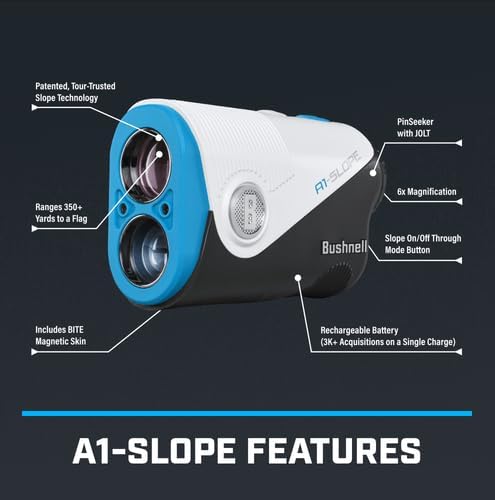
Diagram illustrating the Pinseeker with JOLT technology for accurate flag targeting.
3.3 Slope Technology
The A1-Slope features patented Slope Technology, which calculates and displays the compensated distance based on the incline or decline to the target. This provides a more accurate 'plays like' distance for uphill and downhill shots. To toggle the Slope feature on or off, press and hold the Mode button until the display changes.

An example of slope compensation, showing how uphill/downhill affects the 'plays like' distance.
3.4 BITE Magnetic Mount
The A1-Slope is equipped with the BITE Magnetic Mount, allowing you to securely attach the rangefinder directly to a golf cart bar or other metal surfaces. This provides quick and easy access to your device during play.
The Bushnell Golf A1-Slope attached to a golf cart using its BITE Magnetic Mount.
4. Maintenance
4.1 Cleaning
To ensure optimal performance and longevity, keep your rangefinder clean. Gently wipe the exterior with a soft, clean cloth. For the lenses, use a lens cleaning cloth and solution specifically designed for optics. Avoid abrasive materials or harsh chemicals.
4.2 Storage
Store the A1-Slope in its premium carry case when not in use. Keep it in a cool, dry place, away from direct sunlight and extreme temperatures. Ensure the device is fully charged before long-term storage to maintain battery health.
4.3 Weather Resistance
The A1-Slope is weather resistant with an IPX6 rating, meaning it is protected against powerful water jets. While it can withstand rain and splashes, it is not designed for submersion in water. Always ensure the USB-C port cover is securely closed to maintain water resistance.
5. Troubleshooting
- No Display: Check if the battery is charged. Connect the USB-C cable to charge the device.
- Inaccurate Readings: Ensure a clear line of sight to the target. Hold the device steady during measurement. Environmental factors like fog or heavy rain can affect accuracy.
- Difficulty Locking On: Use the Pinseeker with JOLT technology by sweeping across the target. Ensure the flagstick is clearly visible and not obscured by other objects.
- Device Not Responding: Try restarting the device by holding down the power button. If the issue persists, ensure the battery is not completely depleted.
6. Specifications
| Feature | Specification |
|---|---|
| Brand | Bushnell |
| Model Name | A1-Slope |
| Model Number | 202510S |
| Measuring Range | 5-1,300 yards |
| Range to Flag | 350+ yards |
| Magnification | 6x |
| Battery Type | Rechargeable Lithium-Ion |
| Battery Life (Acquisitions) | 3,000+ per charge |
| Battery Life (Rounds) | Approx. 40 rounds |
| Charging Port | USB-C |
| Weather Resistance | IPX6 |
| Item Weight | 5.1 Ounces |
| Material | Plastic |
| Color | White/Blue |
| UPC | 029757025517 |
7. Warranty and Support
The Bushnell Golf A1-Slope Laser Rangefinder comes with a 2-Year Manufacturer Warranty. This warranty covers defects in materials and workmanship under normal use.
For warranty claims, technical support, or any questions regarding your product, please visit the official Bushnell Golf website or contact their customer service department. Keep your proof of purchase for all warranty-related inquiries.
Documents and downloads
Ask a question about this manual
Ask about setup, troubleshooting, compatibility, parts, safety, or missing instructions. Manuals+ will review the question and use this page’s manual context to help answer it.