
1. Introduction
This manual provides instructions for the Beyution AKB73755415 Replacement Remote Control. This infrared remote is designed to operate various LG LED TV models without requiring any programming or setup. Simply insert batteries, and it is ready for use.
Compatible LG TV Models include:
- 55LY750H-ZA, 32LY751H-ZA, 39LN549C-ZA, 37LP361H-ZA, 42LN549E-ZA, 39LN549E-ZA, 47LY960H-ZA, 47LY960H-ZB, 42LN548C-ZA, 42LN549C-ZA
- 55LY960H-ZA, 55LY960H-ZB, 60LY960H-ZA, 60LY960H-ZB, 22LX752V-ZA, 28LX752V-ZA, 28LY750H-ZD, 37LP869H-ZA, 55LA625C-ZA
- 39LW750H-ZB, 42LW750H-ZA, 42LP860H-ZA, 47LP860H-ZA, 55LP860H-ZA, 55LY760H-ZD, 32LY761H-ZA, 37LP630H-ZA, 37LP631H-ZA, 37LP632H-ZA
- 39LP630H-ZA, 39LP631H-ZA, 39LP632H-ZA, 42LP630H-ZA, 42LP631H-ZA, 39LP360H-ZA, 42LP361H-ZA, 32LP630H-ZA, 32LP631H-ZA
- 22LW750H-ZA, 28LW750H-ZA, 32LW750H-ZA, 47LW750H-ZB, 32LW760H-ZA, 39LY750H-ZA, 42LY750H-ZA, 47LY750H-ZA
- 39LY751H-ZA, 42LY751H-ZA, 32LY760H-ZA, 32LY760H-ZD, 39LY760H-ZD, 39LY760H-ZA, 42LW760H-ZA, 32LY750H-ZA, 42LY760H-ZA
- 42LY760H-ZD, 47LY760H-ZA, 47LY760H-ZD, 39LP361H-ZA, 42LP360H-ZA, 55LY760H-ZA, 39LY761H-ZA, 42LY761H-ZA, 47LY761H-ZA
- 47LY751H-ZA, 55LY751H-ZA, 55LY761H-ZA, 42LY960H-ZA, 42LY960H-ZB, 32LP632H-ZA, 60LN549E-ZE, 32LP360H-ZA, 32LP361H-ZA
- 37LP360H-ZA, 47LN548C-ZA, 47LN549C-ZA, 47LN549E-ZA, 55LN549E-ZE, 37LN548C-ZA, 37LN549C-ZA, 32LN548C-ZA, 32LN549C-ZA
- 32LN549E-ZA, 37LN549E-ZA, 39LN548C-ZA
Note: If your specific TV model is not listed, please contact customer support for compatibility verification.
2. Setup
2.1 Battery Installation
The remote control requires two (2) AAA alkaline batteries (not included) for operation. Follow these steps to install the batteries:
- Locate the battery compartment on the back of the remote control.
- Press down on the latch and slide the battery cover downwards to open it.
- Insert two AAA batteries, ensuring the positive (+) and negative (-) terminals align correctly with the markings inside the compartment.
- Slide the battery cover back into place until it clicks securely.

Image: Back of the remote control with the battery cover removed, showing the battery insertion process.
2.2 Initial Use
This Beyution AKB73755415 remote control is a replacement infrared remote and does not require any programming or pairing. Once new alkaline batteries are correctly installed, the remote control is ready to operate your compatible LG LED TV.
3. Operating Instructions
Point the remote control directly at your LG LED TV. The remote offers a stable performance and a responsive connection for controlling your television functions.

Image: Remote control in use, pointing towards a television screen.
3.1 Basic Functions
- Power Button: Turns the TV on or off.
- Number Buttons (0-9): Directly select channels.
- Volume Up/Down (+/-): Adjusts the sound volume.
- Channel Up/Down (P+/P-): Changes channels sequentially.
- Mute Button: Silences or restores the TV sound.
- Navigation Pad (Up, Down, Left, Right, OK): Navigates through menus and confirms selections.
3.2 Special Features
- Input/Source: Selects different input sources (HDMI, AV, etc.).
- Guide/Info: Displays program guide or information.
- Settings: Accesses the TV's main settings menu.
- Exit: Exits the current menu or function.
- Quick View (Q.VIEW): Switches between previously viewed channels.
- Ratio: Adjusts the screen aspect ratio.
4. Maintenance
4.1 Battery Replacement
When the remote control's performance degrades or it stops responding, it is likely time to replace the batteries. Follow the battery installation steps in Section 2.1 to replace the old batteries with new AAA alkaline batteries.
4.2 Cleaning
To clean the remote control, use a soft, dry cloth. Do not use liquid cleaners, sprays, or abrasive materials, as these can damage the remote's surface or internal components.
4.3 Storage
Store the remote control in a dry place, away from direct sunlight and extreme temperatures. If the remote will not be used for an extended period, it is recommended to remove the batteries to prevent leakage.
5. Troubleshooting
| Problem | Possible Cause | Solution |
|---|---|---|
| Remote not responding | Dead or incorrectly installed batteries. Obstruction between remote and TV. | Replace batteries with new alkaline ones, ensuring correct polarity. Remove any objects blocking the remote's signal path to the TV's IR receiver. |
| Short operating distance | Weak batteries. Interference. | Replace batteries. Ensure no strong light sources (like direct sunlight) are interfering with the IR signal. |
| Certain buttons not working | Compatibility issue with specific TV model. | Verify your TV model is listed as compatible. Contact customer support if issues persist. |
6. Specifications
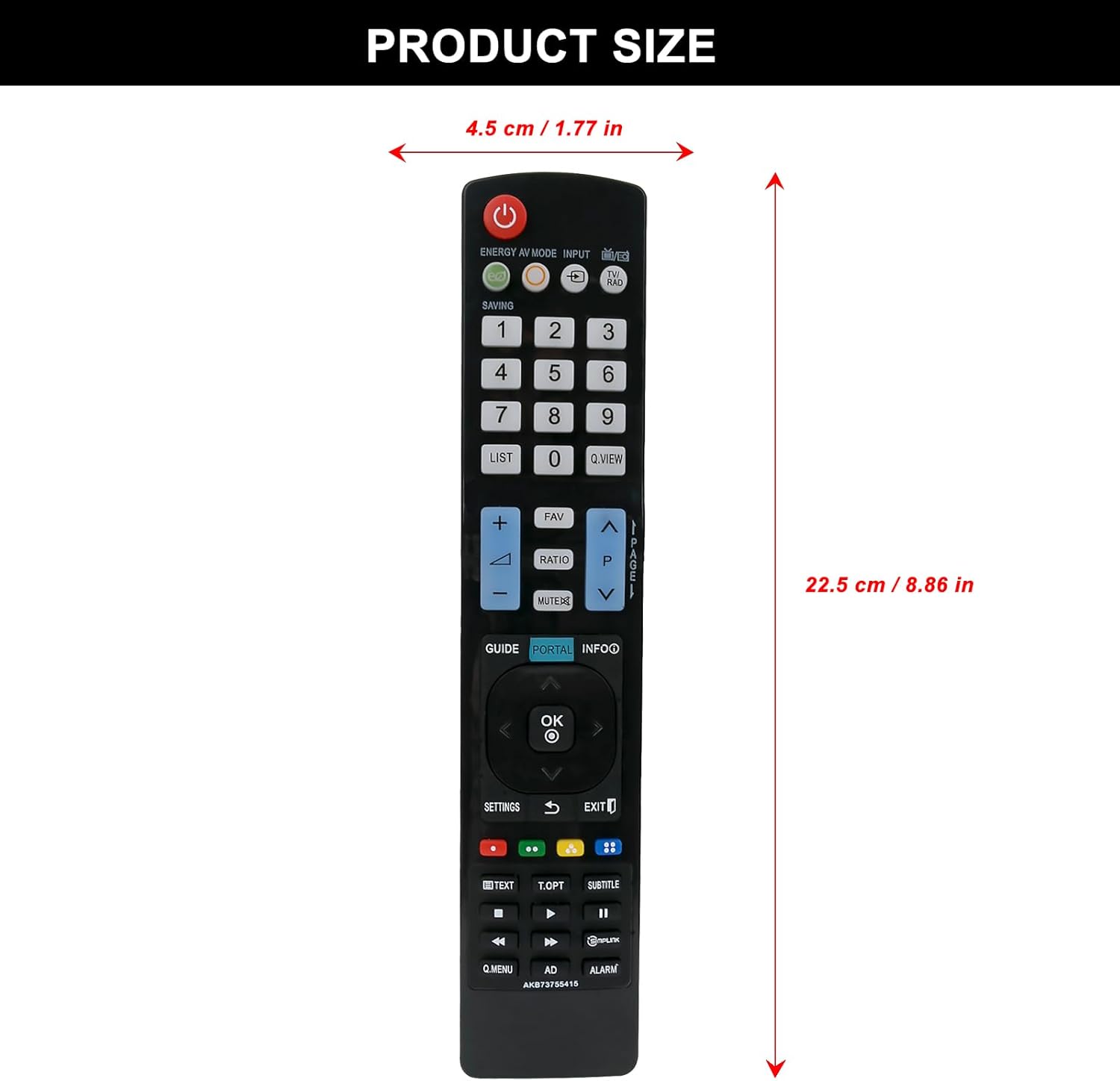
Image: Remote control with product dimensions.
- Product Model Number: AKB73755415
- Connectivity Technology: Infrared (IR)
- Power Source: 2 x AAA batteries (not included)
- Product Dimensions: 5 x 1 x 0.6 inches (approximately 12.7 x 2.54 x 1.52 cm)
- Item Weight: 1 ounce (approximately 28 grams)
- Color: Black
- Special Feature: Ergonomic design
- Max Number of Supported Devices: 5 (refers to the remote's capability, not simultaneous control)
- Compatible Devices: Television (specifically LG LED TVs as listed)
- Remote Distance: Effective up to 8 meters, available up to 10 meters.
7. Warranty and Support
7.1 Warranty Information
This Beyution remote control comes with a 1-year return policy, ensuring quality and customer satisfaction. If you encounter any issues within this period, you may be eligible for a return or replacement.
7.2 Customer Support
For any questions regarding compatibility, troubleshooting, or warranty claims, please contact Beyution customer support. Provide your product model number (AKB73755415) and a detailed description of your issue for prompt assistance.