
1. Introduction and Overview
The E-FENCE GPS Wireless Dog Collar Fence System provides a reliable and flexible solution for containing your dog within a defined outdoor area. Utilizing advanced GPS positioning technology, this system creates a wireless boundary without the need for physical wires or a separate transmitter. It features adjustable warning modes, health monitoring capabilities, and a durable, waterproof design for various outdoor conditions.

Image 1: The E-FENCE GPS Wireless Dog Collar Fence System in use, showing two collars and a dog within a virtual boundary.

Image 2: Illustration of the E-FENCE system's key benefits: no app, no subscription, no transmitter, and no digging required.
2. Setup Instructions
2.1 Charging the Device
Before initial use, fully charge the collar receiver. The device uses a sustainably rechargeable 12V battery (included). A full charge ensures up to 48 hours of continuous operation.
2.2 Fitting the Collar
Ensure the collar is properly fitted to your dog. The E-FENCE collar is adjustable and suitable for most dogs weighing between 15 lbs and 120 lbs, with a neck size range of 12 to 28 inches. The collar strap can be trimmed if necessary for a custom fit. The contact points on the collar should touch your dog's skin for effective operation.

Image 3: Guide for adjusting the E-FENCE collar to fit various dog sizes, highlighting its croppable design.
2.3 Defining the Boundary
The system operates by establishing a central point and a circular boundary around it. Follow these steps to set up your containment area:
- Determine Center Point: Place the collar receiver at the desired center of your containment area.
- Activate GPS: Turn on the device and allow it to acquire a stable GPS signal.
- Set Boundary Radius: Adjust the boundary radius from 65 feet (20 meters) up to 3280 feet (1000 meters). The adjustment increment is 10 feet (3 meters) per step.
- Utilize 'REMEMBER' Function: For quick setup in previously used locations, activate the 'REMEMBER' function to recall the last set center point.
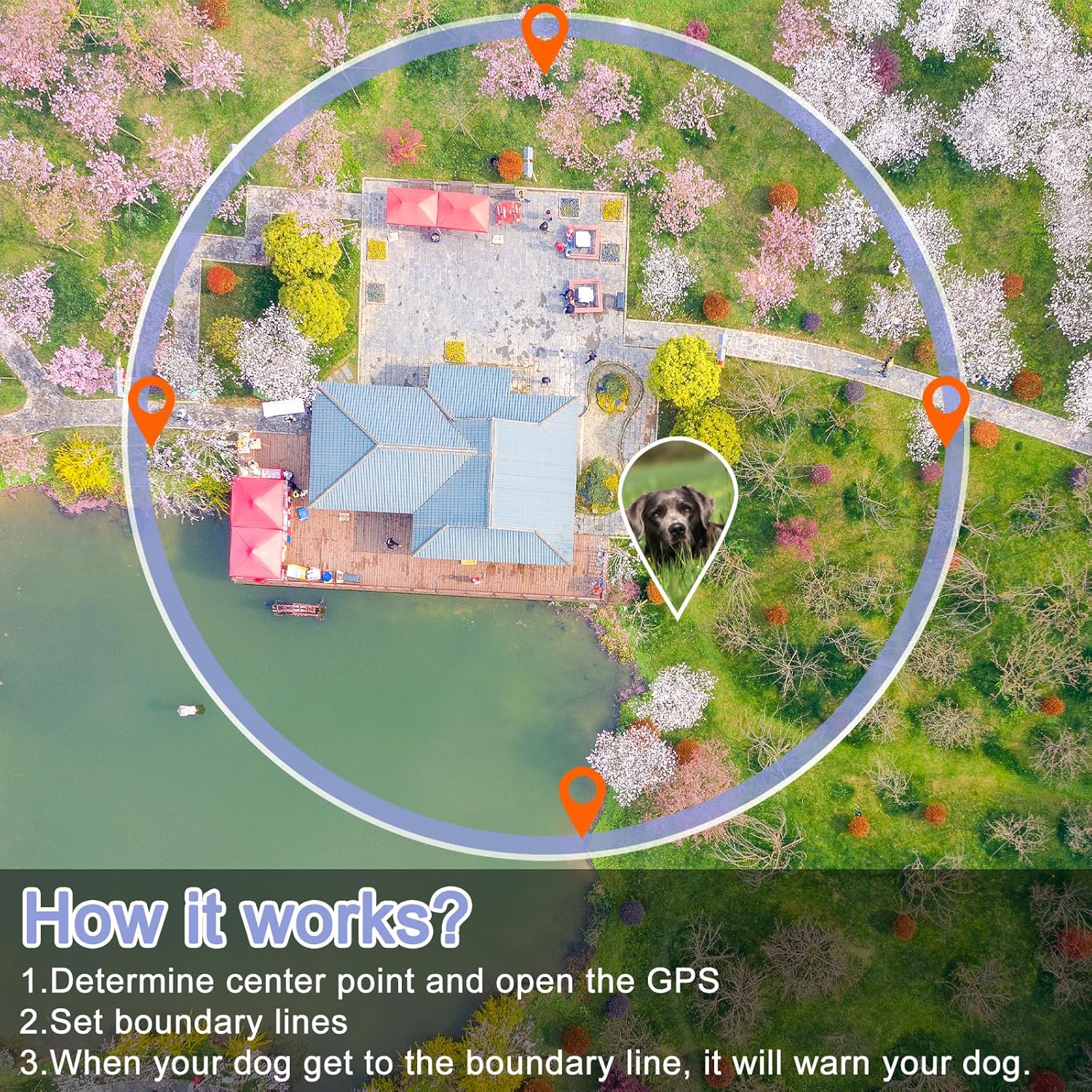
Image 4: Visual explanation of the E-FENCE system's operation, from determining the center point to setting boundary lines.
3. Operating Instructions
3.1 Warning Modes
The E-FENCE system offers three adjustable warning modes to train your dog to stay within the defined boundary:
- Beep Mode: Provides an audible warning. This mode can be toggled on or off (0-1 level).
- Vibration Mode: Delivers a gentle vibration. Intensity is adjustable from 0 to 3 levels.
- Electric Shock Mode: Provides a static correction. Intensity is adjustable from 0 to 10 levels.
These modes can be combined to create an effective training sequence tailored to your dog's temperament and size. The device uses simple physical buttons for control, eliminating the need for an app or Wi-Fi connection.

Image 5: Detailed view of the three adjustable warning modes available on the E-FENCE collar.
3.2 Health Monitoring
Beyond containment, the E-FENCE GPS wireless dog fence includes features to monitor your dog's health:
- Heart Rate Monitoring: Tracks your dog's heart rate.
- Body Temperature Monitoring: Measures your dog's body temperature.
- Step Counting: Records your dog's activity levels.
These features are designed to help ensure your dog's safe and healthy activity while using the system.

Image 6: Overview of the six functions, including health monitoring and training modes, integrated into the E-FENCE collar.
3.3 Waterproof Design
The collar receiver boasts an IP7 waterproof rating, making it suitable for dogs who enjoy water activities or for use in rainy conditions. Ensure the charging port cover is securely sealed to maintain its waterproof integrity.

Image 7: Demonstration of the E-FENCE collar's IP7 waterproof capability, suitable for various wet environments.
4. Maintenance
4.1 Cleaning
Regularly clean the collar and receiver unit with a damp cloth. Ensure the contact points are free of dirt or debris to maintain proper function. Do not use harsh chemicals or abrasive cleaners.
4.2 Battery Care
To maximize battery life, charge the device regularly, especially after extended periods of use. Avoid completely draining the battery frequently. Store the device in a cool, dry place when not in use.
4.3 Inspection
Periodically inspect the collar strap and receiver for any signs of wear or damage. Ensure the USB charging port cover is intact and properly sealed to maintain the IP7 waterproof rating.
5. Troubleshooting
- Device Not Powering On: Ensure the battery is fully charged. Connect the device to the charger and attempt to power it on after a few minutes.
- Inconsistent Boundary Warnings: Verify that the device has a clear line of sight to GPS satellites. Obstructions like dense tree cover or tall buildings can interfere with GPS signal accuracy. Re-establish the center point if necessary.
- No Response at Boundary: Check the selected warning mode settings (Beep, Vibration, Electric Shock) and their intensity levels. Ensure the collar is fitted correctly with contact points touching the dog's skin.
- Short Battery Life: Ensure the device is fully charged before each use. Battery performance can be affected by extreme temperatures.
- Water Intrusion: Always ensure the USB charging port cover is securely closed before exposing the device to water to maintain its IP7 waterproof rating.
6. Specifications
| Brand Name | E-FENCE |
| Model Number | E060 |
| Item Weight | 1.74 pounds |
| Batteries | 1 x 12V battery (included) |
| Waterproof Rating | IP7 |
| Boundary Radius | Adjustable from 65ft to 3280ft (10ft increments) |
| Collar Size | Adjustable 12-28 inches |
| Target Audience | Dogs (15lb-120lbs) |
| Certifications | UL, IP7 |
| Specific Uses | Outdoor use only |
7. Warranty and Support
7.1 Warranty Information
The E-FENCE GPS Wireless Dog Collar Fence System comes with a 2-year warranty. Please retain your proof of purchase for warranty claims.
7.2 Customer Support
For technical assistance, troubleshooting, or warranty inquiries, please contact E-FENCE customer support. Refer to the product packaging or the official E-FENCE website for current contact information.


