
1. Product Overview
The Uharbour 1/4 Drive Torque Wrench Set provides precise torque control for various applications, including bicycles, motorcycles, cars, and machine maintenance. This set features a dual-direction adjustable ratchet with 72 teeth, ensuring accurate and efficient operation.
Key Features:
- Precise Torque Control: Adjustable 20-200 in-lb torque range with ±3% accuracy, ensuring safe and accurate tightening for bicycles, motorcycles, and cars.
- Dual-Direction Ratchet: Features a 72-tooth ratchet head, allowing for smooth and efficient operation in both clockwise and counterclockwise directions.
- Comprehensive Accessories: Includes Hex bits (H2, H2.5, H3, H4, H5, H6, H8, H10), Torx bits (T10, T25, T30), a 10cm extension rod, and a 1/4" adapter for enhanced versatility.
- Certified Accuracy: Each torque wrench is pre-calibrated and comes with a calibration certificate with a unique serial number for guaranteed precision.
- Durable and Ergonomic Design: Made from high-quality materials, featuring a comfortable grip and clear torque scale for easy adjustments and long-lasting performance.

Figure 1: Uharbour 1/4 Drive Torque Wrench Set, including the wrench, extension rod, adapter, and various bits, all neatly organized in a protective case.
2. Setup and Torque Adjustment
Properly setting the torque value is crucial for accurate and safe operation. Follow these steps to adjust your Uharbour torque wrench:
- Unlock the Handle: Locate the locking mechanism at the base of the handle. Slide it down to unlock the adjustment mechanism.
- Adjust Torque Value: Rotate the handle to set the desired torque value. The main scale indicates major increments (e.g., 20, 40, 60 in-lb), while the micro-scale on the handle provides finer adjustments (e.g., 0, 2, 4, 6, 8 in-lb). Add the value from the main scale to the value aligned on the micro-scale to get your total torque setting. For example, if the main scale shows 40 in-lb and the micro-scale shows 6 in-lb, the total setting is 46 in-lb.
- Lock the Handle: Once the desired torque is set, slide the locking mechanism back up to secure the handle. This prevents accidental changes during use.

Figure 2: Detailed view of the dual scale on the Uharbour torque wrench, displaying both in-lb and N.m measurements for precise adjustments. The laser-engraved scale ensures clear readability and durability.
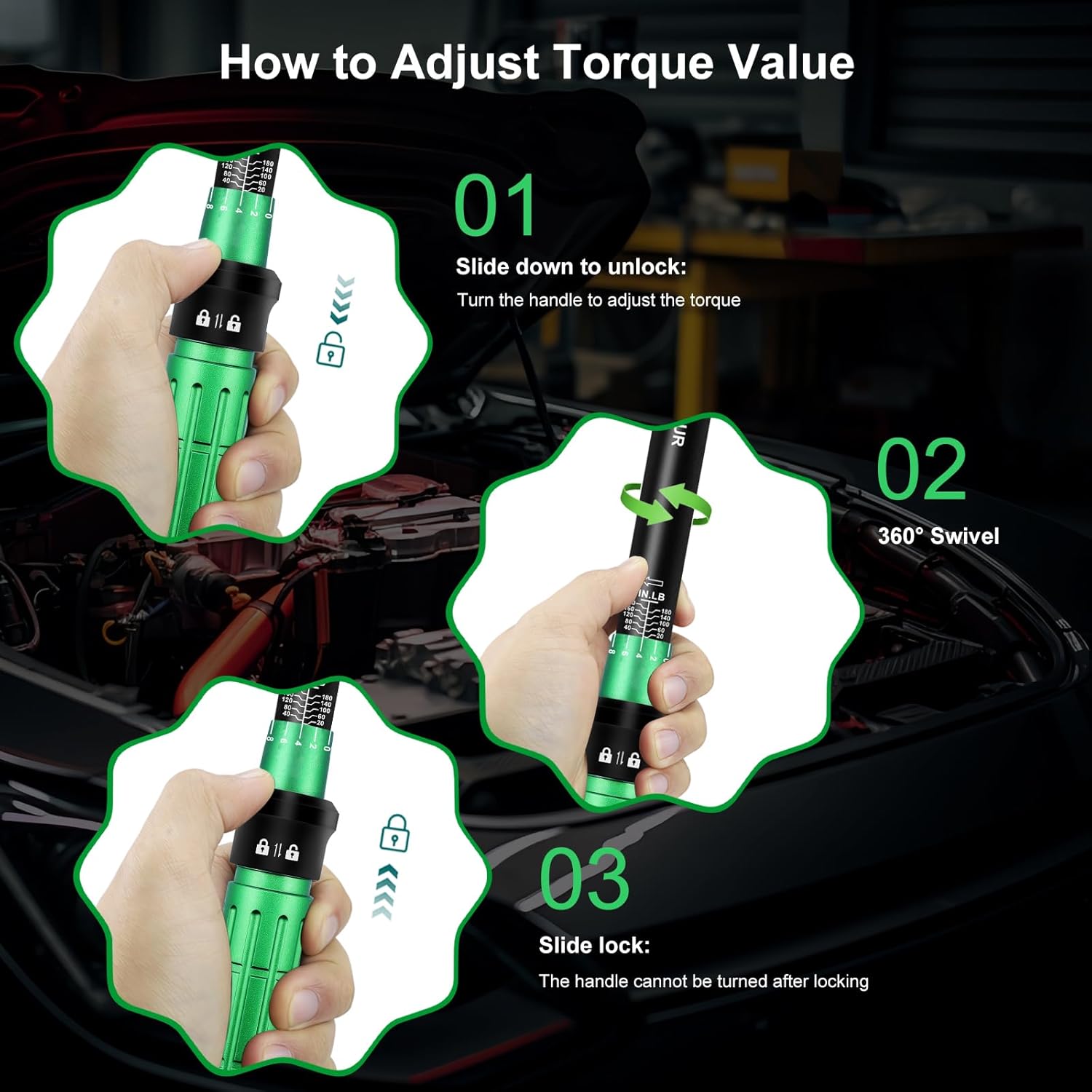
Figure 3: Step-by-step visual guide demonstrating how to unlock, adjust, and lock the torque value on the wrench handle.
Video 1: Demonstration of the proper use of click-type torque wrenches, illustrating the adjustment and application process.
3. Operating Instructions
Using the torque wrench correctly ensures fasteners are tightened to the manufacturer's specifications, preventing damage from over-tightening or loosening from under-tightening.
- Select the Correct Bit/Socket: Choose the appropriate Hex or Torx bit, or use the 1/4" adapter with a suitable socket, for your fastener. The set includes Hex bits (H2, H2.5, H3, H4, H5, H6, H8, H10) and Torx bits (T10, T25, T30).
- Attach Bit/Socket: Press the quick-release button on the ratchet head to attach the selected bit or adapter. Ensure it is securely seated.
- Set Torque Value: Follow the "Setup and Torque Adjustment" section to set the required torque value.
- Apply Torque: Place the wrench onto the fastener. Apply steady, increasing pressure to the handle in the tightening direction (clockwise for most fasteners). Continue applying pressure until you hear and feel a distinct "click." This click indicates that the preset torque value has been reached.
- Do Not Over-Tighten: Once the click is heard, stop applying force immediately. Continuing to tighten after the click can lead to over-torquing and damage to the fastener or component.
- Dual-Direction Use: The 72-tooth ratchet head allows for both clockwise and counterclockwise operation. Use the switch on the ratchet head to change direction as needed for loosening or tightening.
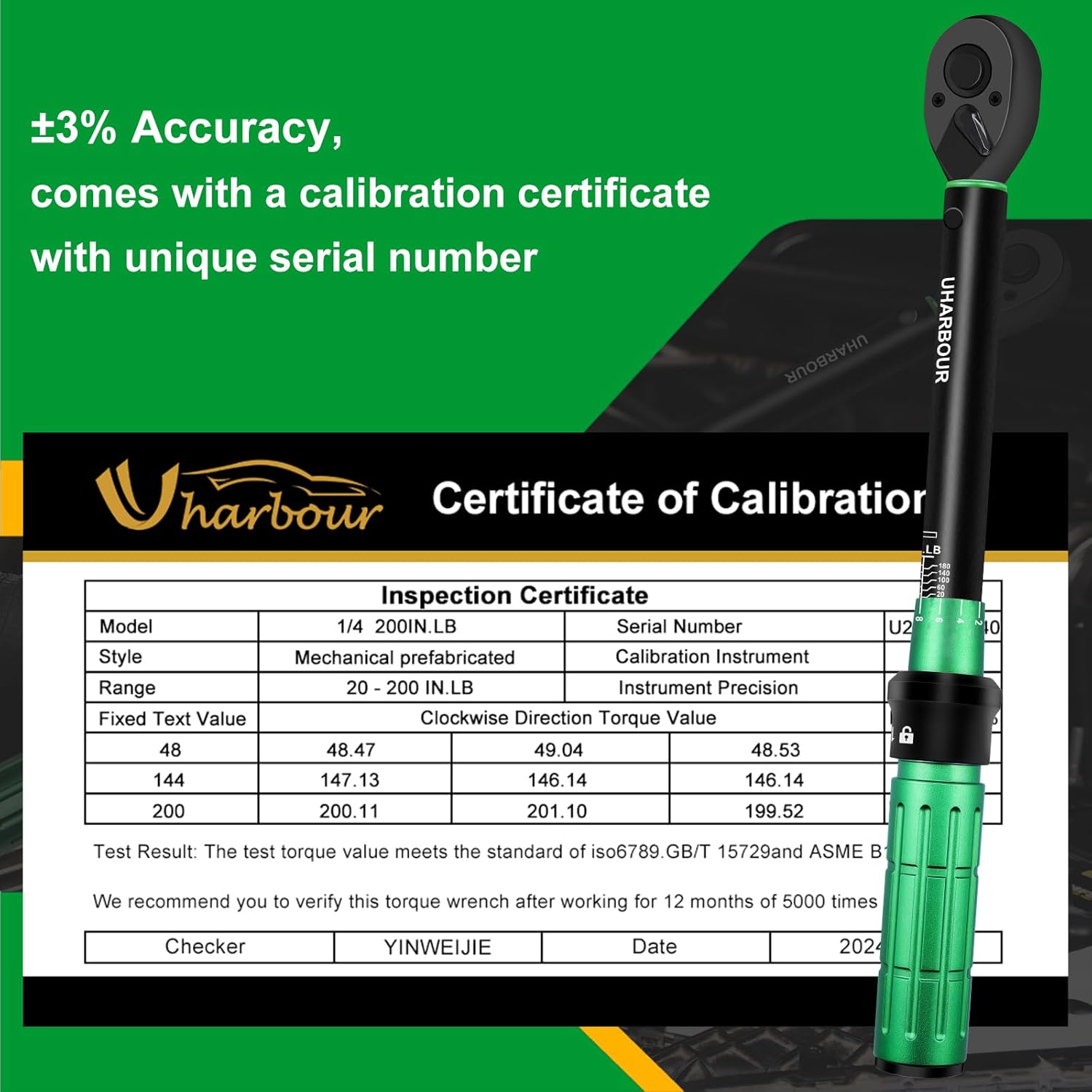
Figure 4: A user applying the Uharbour torque wrench to tighten a component within a car engine bay, demonstrating its versatility for automotive maintenance.
Video 2: A seller's demonstration of the ANPUDS 1/4 Inch Drive Click Torque Wrench, showcasing its features and operation, which is similar to the Uharbour model.
4. Maintenance and Storage
Proper maintenance and storage are essential to preserve the accuracy and lifespan of your torque wrench.
- Clean After Use: Wipe the wrench clean with a dry, soft cloth after each use. Avoid using solvents or harsh chemicals that could damage the finish or internal components.
- Reset to Lowest Setting: Before storing, always reset the torque wrench to its lowest torque setting (20 in-lb or 2.3 N.m). This relieves tension on the internal spring mechanism, preventing fatigue and maintaining calibration accuracy over time. Do not set it below the lowest specified value.
- Store in Protective Case: Store the torque wrench and its accessories in the provided protective case. This protects it from dust, moisture, and physical damage.
- Avoid Dropping: Torque wrenches are precision instruments. Dropping the wrench can severely affect its calibration and accuracy.
- Recalibration: It is recommended to verify the torque wrench's calibration after 12 months or 5000 uses, whichever comes first. Refer to a professional calibration service for this.
5. Troubleshooting
If you encounter issues with your torque wrench, consider the following:
- No Audible Click: Ensure the torque value is set correctly and the locking mechanism is engaged. Apply steady, increasing pressure. If still no click, the wrench may require recalibration or inspection.
- Over-tightening/Stripping: This can occur if the torque value is set too high, if pressure is continued after the click, or if the wrench is out of calibration. Double-check the required torque specifications for your fastener and ensure the wrench is properly calibrated.
- Inaccurate Readings: Inaccurate readings can result from improper storage (not resetting to lowest setting), dropping the tool, or prolonged use without recalibration. If accuracy is critical, professional recalibration is advised.
6. Specifications
| Feature | Specification |
|---|---|
| Brand | Uharbour |
| Model Number | UHXM009-2 |
| Drive Size | 1/4 inch |
| Torque Range | 20-200 in-lb (2.3-22.6 N.m) |
| Accuracy | ±3% |
| Ratchet Teeth | 72 teeth |
| Material | Alloy Aluminum, Chrome Vanadium Steel |
| Included Components | 1/4 Torque wrench, Hex bits (H2, H2.5, H3, H4, H5, H6, H8, H10), Torx bits (T10, T25, T30), 10cm extension rod, 1/4" adapter |
| Item Weight | 490 g |
| Country of Origin | China |
7. Warranty and Support
The Uharbour Torque Wrench Set comes with a 2-year warranty. For any support inquiries, technical assistance, or warranty claims, please contact Uharbour customer service:
- Email: support@uharbour.net
Please have your product model number (UHXM009-2) and the unique serial number from your calibration certificate ready when contacting support.
8. Package Contents Overview
Video 3: An unboxing video from a seller, demonstrating the contents of a similar torque wrench set, including the wrench, bits, and case.
Video 4: A seller's overview of a 1/4" torque wrench and other related tools, providing a general idea of the product's capabilities and accessories.