
Satco 62-1860
Satco 62-1860 11" LED Cloud Fixture User Manual
Model: 62-1860
Introduction
Thank you for choosing the Satco 62-1860 11" LED Cloud Fixture. This manual provides essential information for the safe installation, operation, and maintenance of your new LED fixture. Please read this manual thoroughly before installation and retain it for future reference.
This fixture is designed for residential and commercial lighting applications, offering versatile CCT (Correlated Color Temperature) selectable options and dimmable functionality. Its durable construction and energy-efficient LED technology ensure long-lasting performance and reduced energy consumption.
Safety Information
WARNING: Risk of electric shock. Disconnect power at the fuse or circuit breaker before installing or servicing. All electrical connections must be in accordance with local and National Electrical Code (NEC) standards.
CAUTION:
- This product must be installed in accordance with the applicable installation code by a person familiar with the construction and operation of the product and the hazards involved.
- To prevent wiring damage or abrasion, do not expose wiring to edges of sheet metal or other sharp objects.
- Do not make or alter any open holes in an enclosure of wiring or electrical components during kit installation.
- Suitable for damp locations.
- California Proposition 65 Warning: This product may contain chemicals known to the State of California to cause cancer, birth defects, or other reproductive harm.
Product Overview
The Satco 62-1860 LED Cloud Fixture is an 11-inch round, flush-mount ceiling light featuring CCT selectable technology and 0-10V dimming. It is designed for easy installation and provides high-quality illumination.
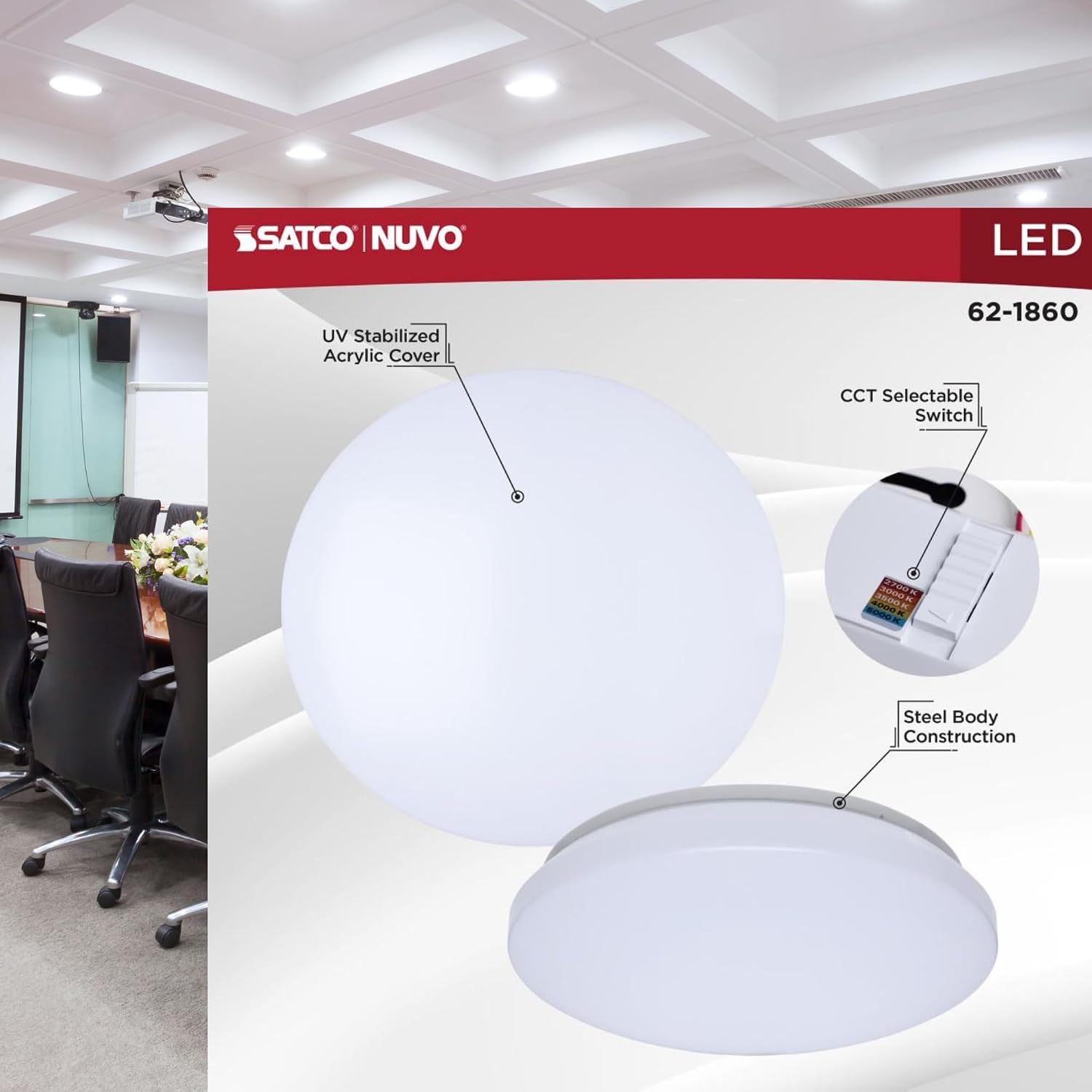
Figure 1: Key components of the Satco 62-1860 LED Cloud Fixture, highlighting the UV stabilized acrylic cover, the CCT selectable switch, and the durable steel body construction.

Figure 2: The Satco 62-1860 LED Cloud Fixture as packaged, displaying key features such as 14W power, 90 CRI, CCT selectable range, and 50,000-hour life.
Key Features:
- CCT Selectable Technology: Adjust between 2700K (Warm White) to 5000K (Natural Light) for a customizable lighting experience.
- Energy-Efficient LED: 14W power consumption with an impressive 1150-1250 lumens output, offering bright, consistent illumination.
- Versatile Voltage & Dimming: Operates at 120V-277V with 0-10V dimmable capability for precise lighting control.
- Damp Rated & NEC Compliant: Safe for damp locations and closet installations, meeting NEC 410.16 regulations.
- Long-Lasting Performance: With a 50,000-hour lifespan, this fixture minimizes maintenance and energy costs.
Setup and Installation
Before beginning installation, ensure all necessary tools and components are available. It is recommended to have a qualified electrician perform the installation.
Tools Required:
- Screwdriver (Phillips and Flathead)
- Wire Strippers
- Electrical Tape
- Safety Glasses
- Ladder (if installing on ceiling)
Package Contents:
- Satco 62-1860 LED Cloud Fixture (Light kit included)
- Installation Hardware (screws, wire nuts)
Installation Steps:
- Turn Off Power: Locate the circuit breaker or fuse box and turn off the power supply to the light fixture location. Verify power is off using a voltage tester.
- Prepare Mounting Surface: Ensure the mounting surface is clean, dry, and structurally sound to support the fixture.
- Attach Mounting Bracket: Secure the mounting bracket (if separate) to the junction box using the provided screws.
- Make Electrical Connections:
- Connect the fixture's black wire to the supply's black (hot) wire.
- Connect the fixture's white wire to the supply's white (neutral) wire.
- Connect the fixture's green or bare copper ground wire to the supply's ground wire.
- For 0-10V dimming, connect the purple wire to the dimmer's purple (data +) wire and the pink/grey wire to the dimmer's pink/grey (data -) wire. If not using dimming, cap these wires.
- Secure all connections with wire nuts and electrical tape.
- Mount the Fixture: Carefully align the fixture with the mounting bracket and secure it in place using the provided screws. Ensure no wires are pinched.
- Restore Power: Once the fixture is securely mounted and all connections are checked, restore power at the circuit breaker.
Operating Instructions
Turning On/Off:
The fixture operates like a standard light fixture. Use the wall switch connected to the fixture to turn it on or off.
CCT (Color Temperature) Selection:
The Satco 62-1860 features a selectable CCT switch located on the fixture itself. This switch allows you to choose between five color temperature options: 2700K (Warm White), 3000K (Soft White), 3500K (Neutral White), 4000K (Cool White), and 5000K (Natural Light).
- Disconnect Power: Before adjusting the CCT switch, ensure the power to the fixture is turned off at the wall switch or circuit breaker for safety.
- Locate Switch: The CCT selection switch is typically found on the back or side of the fixture's main body.
- Select CCT: Use a small tool or your finger to slide the switch to your desired color temperature setting.
- Restore Power: Turn the power back on to see the selected color temperature.

Figure 3: Detail of the CCT selection switch, allowing users to choose from various color temperatures.
Dimming Functionality (0-10V):
This fixture is compatible with 0-10V dimmers. To utilize the dimming feature, ensure you have a compatible 0-10V dimmer switch installed and wired correctly to the fixture's purple and pink/grey dimming wires.
- Adjust the dimmer switch to achieve the desired brightness level.
- Ensure the dimmer is rated for LED fixtures and 0-10V control.
Maintenance
The Satco 62-1860 LED Cloud Fixture requires minimal maintenance. Regular cleaning will help maintain its appearance and light output.
Cleaning:
- Disconnect Power: Always turn off the power to the fixture before cleaning.
- Wipe Down: Use a soft, dry, or slightly damp cloth to wipe the exterior surface of the fixture.
- Avoid Harsh Chemicals: Do not use abrasive cleaners, solvents, or polishes, as these can damage the finish or acrylic cover.
- Allow to Dry: Ensure the fixture is completely dry before restoring power.
Lamp Replacement:
This fixture uses integrated LED technology, meaning the LED light source is not user-replaceable. The fixture has a long rated life of 50,000 hours, significantly reducing the need for lamp replacement.
Troubleshooting
| Problem | Possible Cause | Solution |
|---|---|---|
| Fixture does not light up. |
|
|
| Light flickers or dims unexpectedly. |
|
|
| Incorrect color temperature. |
|
|
Specifications
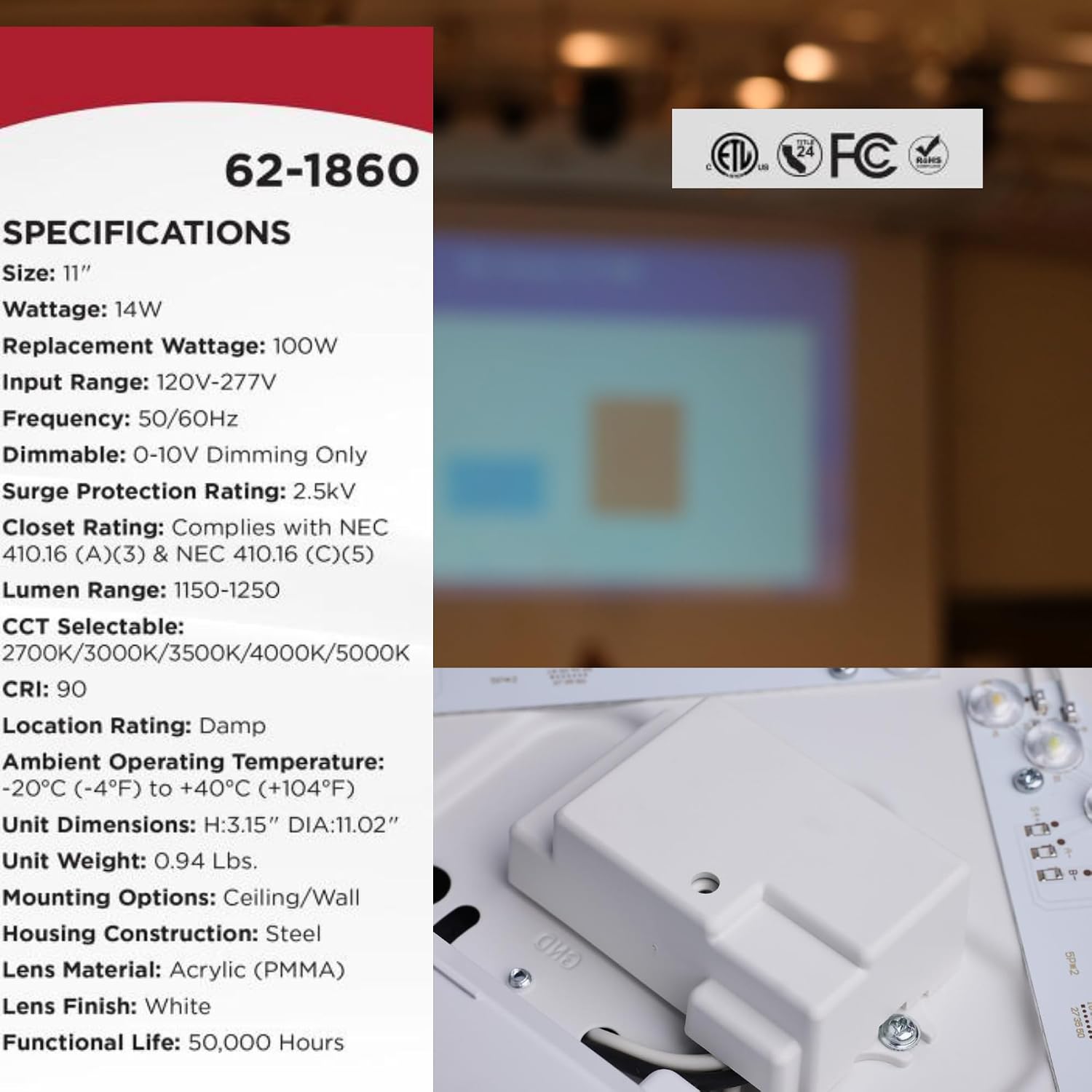
Figure 4: A visual representation of the technical specifications for the Satco 62-1860 fixture.

Figure 5: Dimensional drawing of the fixture, indicating its 11.02-inch diameter and 3.11-inch height.
| Attribute | Value |
|---|---|
| Model Number | 62-1860 |
| Brand | Satco |
| Size | 11 inches |
| Wattage | 14W |
| Replacement Wattage | 100W Equivalent |
| Input Voltage Range | 120V-277V |
| Frequency | 50/60Hz |
| Dimmable | 0-10V Dimming Only |
| Surge Protection Rating | 2.5kV |
| Closet Rating | Complies with NEC 410.16 (A)(3) & NEC 410.16 (C)(5) |
| Lumen Range | 1150-1250 Lumens |
| CCT Selectable | 2700K/3000K/3500K/4000K/5000K |
| CRI (Color Rendering Index) | 90 |
| Location Rating | Damp |
| Ambient Operating Temperature | -20°C (-4°F) to +40°C (+104°F) |
| Unit Dimensions | H: 3.15" (78.99mm) DIA: 11.02" (279.91mm) |
| Unit Weight | 0.94 lbs (per fixture) |
| Mounting Options | Ceiling/Wall |
| Housing Construction | Steel |
| Lens Material | Acrylic (PMMA) |
| Lens Finish | White |
| Functional Life | 50,000 Hours |
| Certifications | cETLus, RoHS, FCC, California T24 Listed |
Warranty and Support
Satco products are manufactured to the highest quality standards. For detailed warranty information and support, please refer to the official Satco website or contact their customer service.
You can often find warranty details and support resources by visiting the manufacturer's website or scanning the QR code provided on the product packaging or related documentation.

Figure 6: Product packaging highlighting application areas and a QR code for warranty information. Scan the QR code or visit qrco.de/beBfRa for complete warranty details.
For technical assistance or questions regarding your Satco 62-1860 LED Cloud Fixture, please contact Satco customer support:
- Website: www.satco.com
- Contact Information: Refer to the "Contact Us" section on the Satco website for phone numbers and email support.
Related documents62-1860


Ask a question about this manual
Ask about setup, troubleshooting, compatibility, parts, safety, or missing instructions. Manuals+ will review the question and use this page’s manual context to help answer it.