
Introduction
Thank you for purchasing the REMAX SPK RB-M82 Portable Bluetooth Speaker. This manual provides important information regarding the setup, operation, maintenance, and troubleshooting of your device. Please read this manual thoroughly before using the product to ensure proper function and to extend its lifespan.

Image: The REMAX SPK RB-M82 speaker alongside its retail packaging, showcasing its design and the product box.

Image: The REMAX RB-M82 speaker illuminated with its vibrant RGB lights, set against a dark, atmospheric background, highlighting its aesthetic appeal.
Package Contents
Please check the package for the following items:
- REMAX SPK RB-M82 Portable Bluetooth Speaker
- USB Charging Cable
- User Manual (this document)
Product Features
- Wireless Connectivity: Bluetooth technology for seamless audio streaming.
- True Wireless Stereo (TWS) Support: Pair two RB-M82 speakers for enhanced stereo sound.
- Portable Design: Compact and lightweight for easy transport, featuring an integrated lanyard.
- Extended Playback: Up to 4-5 hours of continuous music playback on a single charge.
- Versatile Audio Sources: Supports Bluetooth streaming and TF card (micro SD) playback.
- Dynamic RGB Lighting: Integrated LED lights provide various light modes to enhance the listening experience.

Image: An infographic highlighting key features of the RB-M82 speaker, including Bluetooth 5.4, TWS interconnection for surround sound, and a durable weaving lanyard for portability.

Image: The REMAX RB-M82 speaker showcasing its illuminated top ring, demonstrating the integrated RGB lighting feature.
Controls and Indicators
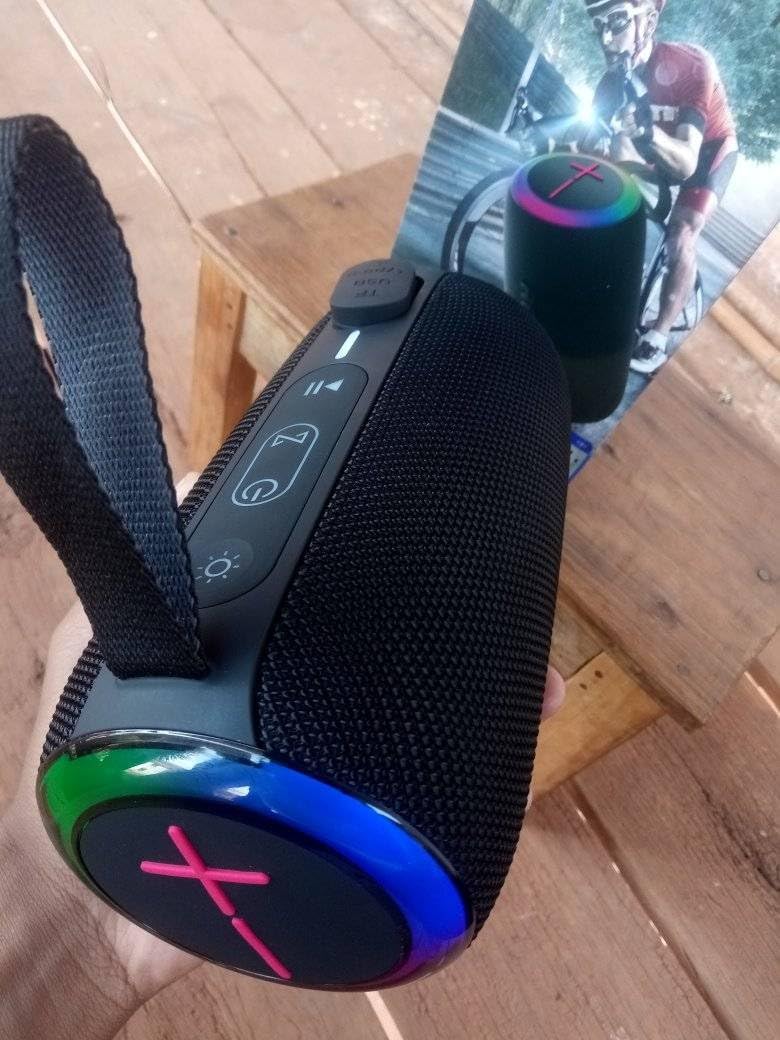
Image: A close-up view of the top panel of the RB-M82 speaker, displaying the control buttons and LED indicators for power, playback, volume, and light modes.
Familiarize yourself with the speaker's controls:
- Power Button (⏻): Press and hold to power on/off.
- Play/Pause Button (⏸): Press to play or pause audio.
- Volume Down / Previous Track Button (⏮): Press to decrease volume. Press and hold for previous track.
- Volume Up / Next Track Button (⏭): Press to increase volume. Press and hold for next track.
- Light Mode Button (☀): Press to cycle through different RGB light modes.
- Mode Button (M): Press to switch between Bluetooth and TF Card modes.
Setup
Charging the Speaker
Before first use, fully charge the speaker. Connect the provided USB charging cable to the Type-C port on the speaker and the other end to a USB power adapter (not included) or a computer's USB port.

Image: A detailed view of the speaker's side panel, revealing the USB Type-C charging port and the TF (micro SD) card slot, protected by a rubber cover.
- The charging indicator light will illuminate during charging.
- The light will turn off or change color once charging is complete.
Operating Instructions
Bluetooth Pairing
- Power On: Press and hold the Power button to turn on the speaker. It will enter Bluetooth pairing mode automatically, indicated by a flashing LED light.
- Activate Bluetooth: On your mobile device (smartphone, tablet, computer), enable Bluetooth.
- Search for Device: In your device's Bluetooth settings, search for available devices.
- Connect: Select "REMAX RB-M82" from the list. Once connected, the speaker will emit a confirmation tone, and the LED light will stop flashing and remain solid.
- Play Audio: You can now play audio from your device through the speaker.
True Wireless Stereo (TWS) Function
To pair two RB-M82 speakers for TWS stereo sound:
- Ensure both RB-M82 speakers are powered on and not connected to any Bluetooth device.
- On one of the speakers (this will be the primary speaker), double-press the Power button or a dedicated TWS button (if available, otherwise refer to specific product instructions for TWS pairing initiation). The speaker will enter TWS pairing mode.
- The two speakers will automatically search for and connect to each other. A confirmation tone will sound once connected.
- Once TWS paired, connect your mobile device to the primary speaker via Bluetooth as described in the "Bluetooth Pairing" section.
- Audio will now play in stereo through both speakers.
TF Card Playback
- Insert a TF (micro SD) card with MP3 audio files into the TF card slot on the speaker.
- The speaker will automatically switch to TF card mode, or you may need to press the "Mode" button to select TF card mode.
- Playback will begin automatically. Use the Play/Pause, Volume Up/Down, and Next/Previous Track buttons to control playback.
Maintenance
- Cleaning: Use a soft, dry cloth to clean the speaker's surface. Do not use abrasive cleaners, alcohol, or chemical solvents.
- Storage: Store the speaker in a cool, dry place away from direct sunlight and extreme temperatures.
- Battery Care: To prolong battery life, charge the speaker regularly, even if not in use for extended periods (e.g., once every 3 months).
- Water Resistance: While portable, avoid exposing the speaker to excessive moisture or submerging it in water unless explicitly stated as waterproof in product specifications.
Troubleshooting
| Problem | Possible Cause | Solution |
|---|---|---|
| Speaker does not power on. | Low battery. | Charge the speaker fully. |
| Cannot pair via Bluetooth. | Speaker is not in pairing mode; device Bluetooth is off; speaker is already connected to another device. | Ensure speaker is in pairing mode (flashing LED). Turn on Bluetooth on your device. Disconnect from other devices. Restart both speaker and device. |
| No sound. | Volume too low; incorrect source selected; speaker not connected. | Increase volume on both speaker and device. Ensure correct mode (Bluetooth/TF Card) is selected. Re-establish Bluetooth connection. |
| TWS pairing fails. | Speakers are too far apart; one speaker is already connected to a device. | Place speakers closer together. Ensure both speakers are disconnected from other Bluetooth devices before initiating TWS pairing. |
Specifications
| Model Number | RB-M82 |
| Brand | Remax |
| Connectivity Technology | Bluetooth, USB (for charging) |
| Audio Output Mode | Stereo |
| Speaker Maximum Output Power | 12 Watts |
| Frequency Response | 20 KHz |
| Playback Time | 4-5 hours (approx.) |
| Supported Media | Bluetooth, TF Card (Micro SD) |
| Product Dimensions | 12.7 x 40.6 x 20.3 cm |
| Weight | 790 g |
Safety Information
- Do not expose the speaker to extreme temperatures, humidity, or direct sunlight.
- Do not disassemble, repair, or modify the speaker yourself. This will void the warranty.
- Keep the speaker away from strong magnetic fields.
- Avoid dropping or subjecting the speaker to strong impacts.
- Dispose of the product and its battery responsibly according to local regulations.
Warranty and Support
For warranty information and customer support, please refer to the warranty card included with your purchase or contact your local Remax distributor. Keep your purchase receipt as proof of purchase.
For further assistance, you may visit the official Remax website or contact their customer service department.