
Introduction
This manual provides essential information for the safe and efficient operation, installation, and maintenance of your Panasonic EU 7-in-1 Convertible 1.5 Ton 3 Star Inverter Split Smart AC. This advanced air conditioning unit features a 7-in-1 convertible mode, smart connectivity with Wi-Fi and voice assistant support, and robust construction for enhanced durability and air purification.
Setup and Installation
Included Components
- 1 Indoor Unit
- 1 Outdoor Unit
- 1 Remote Control
- 1 User Manual
Installation Guidelines
Installation of this split air conditioning system requires specialized knowledge and tools. It is strongly recommended that installation be performed by a qualified and certified technician to ensure proper functioning, safety, and warranty validity. Incorrect installation can lead to water leakage, refrigerant leakage, electric shock, or fire.
Ensure the indoor unit is placed in a location that allows for optimal airflow and even distribution of cool air. The outdoor unit should be placed in a well-ventilated area, away from direct sunlight and obstructions, to ensure efficient heat dissipation.

Image: Panasonic EU Indoor Unit, front view. This unit is designed for quiet and efficient operation within your living space.
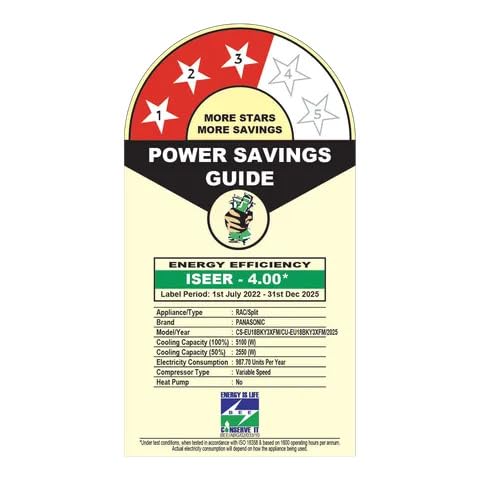
Image: Panasonic EU Outdoor Unit. This unit houses the compressor and condenser, responsible for heat exchange.
Operating Instructions
Remote Control Functions
The remote control allows you to manage all functions of your AC unit. Ensure the remote is pointed towards the indoor unit when transmitting commands.
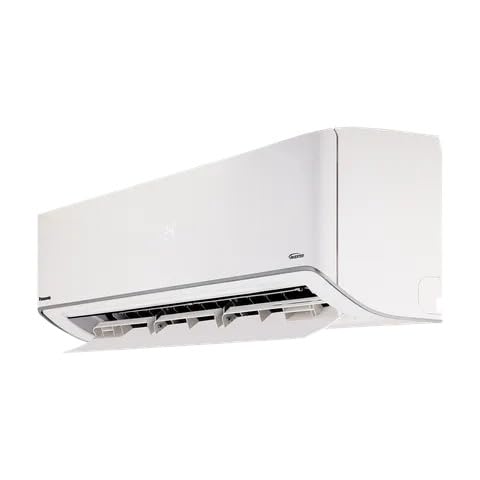
Image: Panasonic AC Remote Control. This remote features buttons for power, mode selection, temperature adjustment, fan speed, and swing control.
- ON/OFF Button: Powers the unit on or off.
- MODE Button: Cycles through operating modes (Cool, Dry, Fan, Auto).
- TEMP Buttons (▲/▼): Adjusts the desired temperature.
- FAN SPEED Button: Selects fan speed (Low, Medium, High, Auto).
- SWING Button: Activates or deactivates the horizontal and vertical airflow swing.
- 7-in-1 Convertible Button: Accesses various convertible modes for optimized cooling and energy saving.
- POWERFUL Button: Engages maximum cooling capacity for rapid temperature reduction.
- TIMER Button: Sets the on/off timer for scheduled operation.
- CLEAN Button: Activates the Crystal Clean function for internal unit cleaning.
7-in-1 Convertible Modes
Your AC offers versatile 7-in-1 convertible modes, allowing you to adjust cooling capacity based on your needs and save energy. Refer to the detailed instructions in the full manual for specific mode selections and their benefits.
Smart Connectivity and Voice Control
The Panasonic EU AC is equipped with Smart Wi-Fi, enabling seamless control via your smartphone from anywhere. Download the Panasonic MirAIe app to connect your AC. Additionally, it supports Voice Assist functionality through Amazon Alexa and Google Assistant, allowing for hands-free operation.

Image: Panasonic AC Smart Features. This image illustrates voice command control, smartphone app control, and custom sleep profiles, highlighting the integrated smart home capabilities.
Enhanced Airflow
The unit features a Four-Way Swing and higher airflow design to ensure uniform distribution of cool air throughout the room, eliminating hot spots and maintaining consistent comfort.
Maintenance
Regular maintenance ensures optimal performance and longevity of your air conditioner.
Crystal Clean Function
Activate the Crystal Clean function periodically to automatically clean the indoor unit's evaporator coil, preventing mold and bacteria growth and ensuring fresh, clean air output. Refer to the remote control section for how to activate this feature.
Filter Cleaning
Your AC is equipped with PM0.1 and Ag Clean+ filters for enhanced air purification. These filters capture fine particles, bacteria, and allergens. Clean the filters regularly (e.g., every two weeks or as needed) by removing them from the indoor unit and washing them with water. Allow them to dry completely before reinserting.
General Care
- Wipe the exterior of the indoor and outdoor units with a soft, damp cloth. Do not use harsh chemicals or abrasive cleaners.
- Ensure the outdoor unit's coils are free from debris, leaves, and other obstructions to maintain efficient heat exchange.
- Schedule professional servicing annually to check refrigerant levels, electrical connections, and overall system health.

Image: Panasonic AC Durability and Airflow Features. This graphic highlights the AC's ability to cool at 55°C, higher airflow design, anti-corrosive blue coating on copper U-bend, and stabilizer-free operation within 145-285V.
Troubleshooting
Before contacting customer support, please refer to the following common issues and solutions:
| Problem | Possible Cause | Solution |
|---|---|---|
| AC does not turn on | No power, circuit breaker tripped, remote control batteries low. | Check power supply, reset circuit breaker, replace remote control batteries. |
| Insufficient cooling | Dirty air filters, blocked outdoor unit, wrong mode selected, room too large. | Clean air filters, clear obstructions from outdoor unit, select appropriate mode (e.g., Cool or Powerful), ensure room size matches AC capacity. |
| Unusual noises | Loose parts, foreign objects, normal operating sounds (e.g., refrigerant flow). | Check for loose panels or objects. If noise persists or is abnormal, contact service. |
| Water leakage from indoor unit | Blocked drain pipe, improper installation. | Check and clear the drain pipe. If the issue persists, contact a qualified technician. |
For issues not listed here or if troubleshooting steps do not resolve the problem, please contact Panasonic customer support.
Technical Specifications
| Feature | Specification |
|---|---|
| Brand | Panasonic |
| Model Name | CS/CU-EU18BKY3XFM |
| Capacity | 1.5 tons |
| Cooling Power | 5100 Kilowatts |
| Product Dimensions (D x W x H) | 24.4D x 104W x 29.6H Centimeters |
| Noise Level | 47 Decibels |
| Refrigerant | R-32 |
| Inverter Type | Has Inverter |
| Installation Type | Split System |
| Voltage | 230 Volts |
| Wattage | 1660 Watts |
| Item Weight | 28 Kilograms |
| Control Method | App, Remote, Voice |
| BEE Star Rating | 3 Star |
| Annual Energy Consumption | 987.7 Kilowatt Hours Per Year |
| Seasonal Energy Efficiency Ratio (SEER) | 13 |
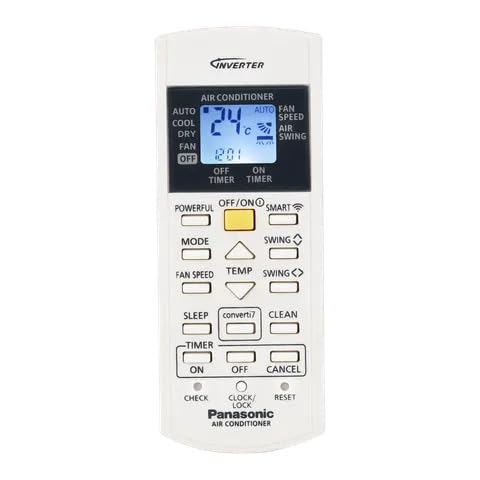
Image: Panasonic AC Energy Label. This label displays the energy efficiency rating (ISEER 4.00*), cooling capacity, and annual electricity consumption for the model.
Warranty Information
Your Panasonic EU Inverter Split Smart AC comes with the following warranty coverage:
- 1 Year Comprehensive Warranty: Covers the entire unit from the date of purchase.
- 5 Years PCB Warranty: Covers the Printed Circuit Board.
- 5 Years ODU Casing Warranty: Covers the Outdoor Unit Casing.
- 10 Years Compressor Warranty: Covers the compressor, a critical component of the AC system.
Please retain your purchase receipt for warranty claims. The warranty is subject to terms and conditions outlined by Panasonic. For detailed warranty terms, refer to the official Panasonic warranty document included with your product or visit the Panasonic India website.
Customer Support
For any inquiries, technical assistance, or service requests, please contact Panasonic customer support:
Manufacturer: Panasonic Life Solutions India Private Limited
Address: 12th Floor, Ambience Tower I, Ambience Island NH-8, Gurgaon, Haryana-122002, India
Telephone: +91-0124-487-1300
You can also visit the official Panasonic India website for product registration, FAQs, and service center locations.


